Labor Reconciliation Report Template

Start with a free 30-day trial. No credit card required.
Looking for a ready-to-use Labor Reconciliation Report that still fits how your team works? This template comes pre-built with all the audit fields needed to fully account for labor expense in a given payroll period, along with a 4-way report reconciliation that gives you more complete and accurate labor cost data. Variances and totals are calculated automatically, so there's no slow manual math to work through. You can edit any part of it to match your company's payroll and reporting processes, and the report will still hold up against the audits you'd be assessed on.
This Labor Reconciliation Report is an easy-to-use form that your workers can use to reconcile labor costs across reports, check variances and totals without manual calculation, and produce accurate, audit-ready records of labor expense for each payroll period, keeping your reporting process fast and consistent.
 100% fully editable Labor Reconciliation Report
Export your Labor Reconciliation Report to PDF or CSV
Access your Labor Reconciliation Report on mobile, tablet or computer


Trusted by companies, projects and teams of all sizes















What is Labor Reconciliation Report?
A Labor Reconciliation Report is a detailed and comprehensive financial document that tracks labor costs. It's a document that ensures that labor expenses are recorded internally and align with labor and contractual obligations.
Reconciliation reporting is the process of reviewing and comparing financial transactions to ensure that they are consistent and accurate across multiple sets of data. This approach is critical for detecting inconsistencies, rectifying errors, and ensuring the accuracy of financial accounts. Businesses use reconciliation reports to compare internal data with external documents like bank statements, invoices, and receipts to ensure that all transactions are properly documented.
Compare this Labor Reconciliation Report to forms created from Word, Excel, or PDF
Curious how this Labor Reconciliation Report works? Check out the example below to see exactly what a completed report looks like, from the audit fields through to the auto-calculated variances and totals. You can generate your own version in a few clicks, export it as a custom form with your company details, and fill in the relevant information to have a ready-to-use Labor Reconciliation Report in a matter of minutes.
Use this Labor Reconciliation Report template for free

Generate this template automatically with Storm
You don't have to build the Labor Reconciliation Report field by field. Let Storm, the AI Data Capture Agent inside Dashpivot, build the template for you in seconds.
Describe what you need
Tell Storm the form you want in plain language and it builds a structured digital template from scratch, with fields, tables, and signatures in place.
Upload what you already use
Drop in your existing PDF, Word, Excel, or even a photo of a paper form. Storm rebuilds it as a smart digital template with the structure intact.
 Storm
Storm
Generate a Labor Reconciliation Report form template that I can use for my business
Applicable Standards and Policies for Labor Reconciliation Report
Creating a Labor Reconciliation Report is vital for companies to comply with federal, state, or contractual regulations in the United States, which are
- The Fair Labor Standards Act (FLSA), which clearly states that companies must maintain records of hours worked, wages paid, and deductions made. There should be accurate Labor Reconciliation Report under these standards because, firstly, it ensures that employees are being fairly compensated, and secondly, it helps companies and businesses avoid labor-related penalties.
- The Generally Accepted Accounting Principles (GAAP) are to ensure that labor costs are properly recorded, accrued in the correct period, and matched with the correct job order. A GL Reconciliation template, or simply a general ledger, is a commonly used document to sort and verify the entries. It makes sure that the general ledger and the balances align with payroll and labor cost documentation. Oftentimes, businesses use a GL Reconciliation template in Excel to reduce manual errors.
- The Davis-Bacon Act, which requires certified payroll reporting for federally funded construction projects. Contractors are required to submit the complete records for compliance. Fulfilling the Labor Reconciliation Report is an essential step to make sure that the wage rates mandated by law are being paid fairly to the employees.
- State-Specific Labor Laws, like the NY Labor Relations Regulations, have the power to impose additional requirements even beyond the federal standards, especially when businesses are managing multi-state workforces because both federal and state labor laws must be followed.
Staff Members and Parties that use Labor Reconciliation Report
The Labor Reconciliation Report is a tool used to record and ensure that the total labor costs, including hours, taxes, and payments, match actual payments, bank statements, and tax filings. It’s key for any members and parties involved in accounting and managing the workforce to understand what a reconciliation report is, which is why project managers and accounting staff often make use of this tool. They use these reports to verify accurate employee payments, reconcile data with the general ledger, and meticulously record payroll expenses.
Usually, at the end of the day, teams prepare a job labor report to compare the budgeted versus the actual labor costs. Some labor report revisions and even labor report corrections are necessary, especially when discrepancies are found; that’s why creating a routine report reconciliation is a non-negotiable step.
From the standpoint of HR labor relations, a thorough labor record is a legal requirement. Departments that oversee NY labor relations and those operating under the NY State Labor Relations Board or the NYS Labor Relations Board must strictly follow the specific documentation and reporting standards. Similarly, those that are subject to the Kansas labor relations or the Virginia labor relations board are also expected to maintain complete labor records that follow their respective state laws.
For businesses that work with a union workforce, labor union reports and union labor reports are also required to be filed regularly. The requirements differ in every jurisdiction, but the general mandate is simply to keep detailed payroll and labor records.
Business Risks Reduced by Labor Reconciliation Report
The Labor Reconciliation Report template is a critical report that must be integrated into the accounting process and internal audit procedures of the company to avoid the following:
Payroll errors
The Labor Reconciliation Report accurately records labor hours that directly match with timesheets, job records, and labor systems. This process ensures that there are no discrepancies and errors in the record, which prevents underpayments, overpayments, and disputes with employees or subcontractors.
Budget inaccuracy
The project manager can promptly correct discrepancies detected by the report. The early action can help realign the budget to what was forecasted and planned.
Disputes with clients and employees
An employee’s compensation is a critical need for them. Failing to provide the exact pay can significantly damage employee morale, negatively impacting their work ethic and relationship with the company. On the other hand, investors and clients would rather not invest their time and money in projects that are poorly managed financially.
Business Opportunities Created by Labor Reconciliation Report
The Labor Reconciliation Report does not stop in the reconciliation and accounting processes. It can provide so much more for companies and businesses. The following are the business opportunities that the Labor Reconciliation Report can provide:
Fraud Prevention
The Labor Reconciliation Report serves as a control mechanism against irregular costs. The process behind the form helps detect fraudulent activities—including ghost employees and unaccounted adjustments to payment.
Cash flow visibility
Doing the reconciliation process can thoroughly track expenses, ensuring costs are accurate and profits are correctly stated.
Better Forecasting and Process
By maintaining consistent data in the Labor Reconciliation form, businesses gain solid access to historical data, which provides reliable information for improving processes, procedures, budget allocation, work planning, and forecasting.
What should a Labor Reconciliation Report Template include?
A proper payroll reconciliation report should include the following information:
- Company Name & Project Details
- Contractor/Subcontractor Details
- Employee Information/Classification
- Detail of Actual vs. Reported Labor Hours
- Analysis of Variance (between actual and reported labor hours)
- Sections for supporting documents
What is a Labor Reconciliation Report in construction?
Money flows like a river in a construction project. Every movement and activity needed to complete a project requires a substantial amount of spending. This statement is especially true when talking about labor. Labor is the act of producing or completing something through physical and mental exertion. As an exchange for doing labor, establishments compensate the laborers with money, which we commonly call a salary. In the construction industry, the bigger the project, the more laborers are required to finish it, especially when there is an established deadline to complete it. This means that the amount needed to spend on labor is directly proportional to the size of the project and how fast it needs to be completed.
Knowing these facts, establishments need to take measures to ensure that labor costs are accurate. The best way to do that is to make a Labor Reconciliation Report. Employing a Labor Reconciliation Report in construction can accurately provide a summary of all the labor costs in a specific activity or procedure in the project. Establishments can actively monitor discrepancies and prevent any cost overruns and payroll errors, which helps keep the project going and maintain a good relationship with the workforce. Actively practicing this process increases the efficiency of spending on a construction project, which helps with the overall completion.
How to create a Labor Reconciliation Report?
A Labor Reconciliation Report provides data on how labor costs are managed throughout an activity in a project. Establishments can use this report to correct any cost inconsistencies, therefore mitigating any discrepancies. However, the Labor Reconciliation Report must be completely designed to efficiently manage labor costs. Here is a comprehensive guide to making an effective Labor Reconciliation Report.
Prerequisites in making a Labor Reconcilition Report
Before making the job labor report, the following things must be established first.
- A defined project and cost code structure
- Standard labor classification and pay rates
- Approved timekeeping or timesheet system
- Defined and written procedures on payroll
- Defined roles and responsibilities
- Compliance requirements for labor laws, contracts, and internal controls
-
Creating the main sections of the Labor Reconcilition Report
To create the Labor Reconciliation Report, the following sections must be present in the report:
- General information of the project
- Summary of monthly payroll
- Payroll and bank reconciliation for net pay
- Payroll register and general ledger reconciliation
- Payroll liabilities and tax reconciliation
- 4-way labor reconciliation
- Direct versus indirect labor reconciliation
- Job cost labor reconciliation
- Certified payroll tie-out
- Work in progress (WIP) tie-out
- Corrective Actions
- Signatories
-
Best Practices in making the Labor Reconciliation Report
- Establish standards in labor classification
- Data should be presented side-by-side
- The form should be designed to follow the flow of labor data from site to payment
- Make sure to incorporate instructions to guide users in completing the form
- Provide fields that allow users to place comments on variances and discrepancies
- Make sure to highlight variances in the form to easily trace discrepancies
- Make sure to have a reviewing and approval process
-
Labor Reconciliation Report user guide
The Labor Reconciliation Report would not be an effective form if not used the right way. This is a guide for users on how to complete the form effectively:
- Define the schedule of conducting the report
- Define who uses and edits the report
- The person who completes, reviews, and approves the report should understand the scope and purpose of the report
- It is practical to compare approved data and not drafted data
- Provide comments on fields with variances
- Review provided data on completed form
- Review the calculations
- Compile completed reports
Frequently asked questions
How to create your Labor Reconciliation Report in an App or Software System
A solid Labor Reconciliation Report covers all the bases: the work hours per employee, a labor summary, timesheet data, payroll figures, and how costs are allocated across jobs.
45 minutes
Medium difficulty
-
How to create a Labor Reconciliation Report in an app or software?
Using an app that uses digital forms rather than paper-based forms improves accuracy and control by:
- Providing a single approved format across projects
- Streamlining calculations through automation
- Reducing manual data input
- Providing a single storage for compiling records
- Establishing a more efficient workflow and process
-
Creating the General Information Section
This section provides an overview of what period the report is for. To guide users with that, here are the fields that you must provide in this section:
- A date field for when the report was prepared
- A field for providing the business or establishment name
- A selection field for the month the report is trying to account
- Integrate colors to each selection item to enhance aesthetics
- A date range field to specifically pinpoint which payroll date is accounted
-
Creating the Reconciliation Sections
This section is the core part of the report. This section records all labor costs incurred during the payroll period specified in the general information section. The reconciliation section includes the following:
- Summary of monthly payroll
- Payroll and bank reconciliation for net pay
- Payroll register and general ledger reconciliation
- Payroll liabilities and tax reconciliation
- 4-way labor reconciliation
- Direct versus indirect labor reconciliation
- Job cost labor reconciliation
For each of these sections, a default table must be provided to allow users to input multiple entries. To create a complete table for each section, the following columns must be provided:
- Label or Title. The data set could include different categories, employee names, or job activities.
- Actual data source. This column represents the original record in the field.
- Reference data source. This column affirms the completeness and correctness of the actual data source
- Variance column integrated with a formula (Variance = Reference data source – actual data source)
- Explanation column. This allows users to explain discrepancies or input findings
After making the table for the individual entries, make a summary table that includes the following:
- Actual data source total (∑ actual data source)
- Reference data source total (∑ Reference data source)
- Variance total (∑ Variance)
-
Creating the 4-way labor reconciliation section
This section double-checks if all the other sections are consistent. This section is crucial because it verifies that no discrepancies or errors are found when filling out the reconciliation sections. To create an effective 4-way labor reconciliation section, follow these steps:
Add a table for reconciliation hours with the following columns:- Employee name
- Timesheet hours
- Labor distribution report
- Payroll
- General ledger
- Variance (Variance = Timesheet hours – Labor Distribution Hours)
- Explanation
Create a table for the labor reconciliation summary, which has the following rows:
- Timesheets or job costs
- Labor distribution report
- Payroll
- General ledger
- Variance (Variance = Timesheet hours – Labor Distribution Hours)
-
Creating the direct vs indirect labor reconciliation section
This section is to ensure that labor classification is consistent. To help achieve that, the following procedures must be followed:
- Create a prefilled table
- The first column should present the direct and indirect categories
- Add a timesheet column
- Add a labor distribution report column
- Add a payroll column
- Add a general ledger column
- Add a variance column where a formula is integrated (Variance = Timesheet hours – Labor Distribution Hours)
- Add a summary table that calculates the total labor. (Total labor = Direct labor + Indirect labor)
-
Creating the Job Cost Labor Section
The purpose of this section in the form is to validate that labor is correctly assigned to projects or activities. To efficiently create this section, here is what you must do:
- Add a default table to allow multiple entries for projects or activities
- Provide the following manual entry columns: job, payroll labor, job cost report, and general ledger job cost.
- Add a variance column that auto-calculates. (Variance = Max – Min)
- Provide an explanation column to allow users to provide comments
-
Creating the work in progress (WIP) labor tie-out section
This section provides a summary of the cost incurred for incomplete projects or activities. Here are the steps to make the WIP labor tie-out a complete section:
- Add a prefilled table with the following categories: labor per job cost ledger, labor used in WIP schedule, and Variance
- Automate the calculation of the variance by integrating a formula (Variance = job cost ledger – WIP schedule)
-
Creating the corrective actions section
This is the part where users can suggest corrective actions for found discrepancies to help mitigate imbalances in the planned and actual labor costs. Making this section requires the following steps:
- Add a default table to allow multiple entries of found issues
- Add the following columns: issue, severity, corrective action, and deadline
- The severity column can be a selection list with colors. selection could include low, medium, and high.
- The deadline column should be a date field
-
Creating the signatories section
This section verifies the validity of the report. To ensure that, the following signature fields must be added:
- Signature of the user who prepares the form
- Signature of the user who reviews the form
- Signature of the user who approves the form
About the author

Felmar Mantalaba
Content Engineer
 LinkedIn
Education
Cebu Institute of Technology - University - Mechanical Engineering with Mechatronics
Bio
Felmar is a mechanical engineer, whose four years of experience in the mining industry inspired him to write and share stories to progress the revolution of new technologies and create smarter, smoother ways of living.
Past Projects
Safety, Health, and Environment Management System (SHEMS) CoordinationSHEMS Coordinator at Atlas Consolidated Mining, ensuring organizational compliance with ISO 14001 and ISO 45001 standards, performing risk assessments, developing policies, and conducting audits and inspections to maintain a safe and environmentally responsible workplace.
Maintenance Management and OptimizationSenior Maintenance Manager (OIC) leading equipment maintenance and operational efficiency initiatives, reducing downtime by 10%, improving Mean Time Between Failure (MTBF) and Mean Time To Repair (MTTR) for major equipment, and managing maintenance schedules, manpower, and materials, while overseeing capital project optimization.
Inspection Engineering and Equipment ReliabilityInspection Engineer responsible for technical blueprint interpretation, vendor collaboration, preventive maintenance scheduling, and data collection for vibration and temperature readings, delivering actionable recommendations and comprehensive reports to improve equipment reliability and operational performance.
End-to-End Operational Oversight in Mining EngineeringContributed to multiple facets of operational management, including SHEMS compliance, maintenance optimization, inspections, and capital project evaluation, integrating safety, reliability, and efficiency improvements across all stages of copper production operations.
Version History:
Related apps and templates
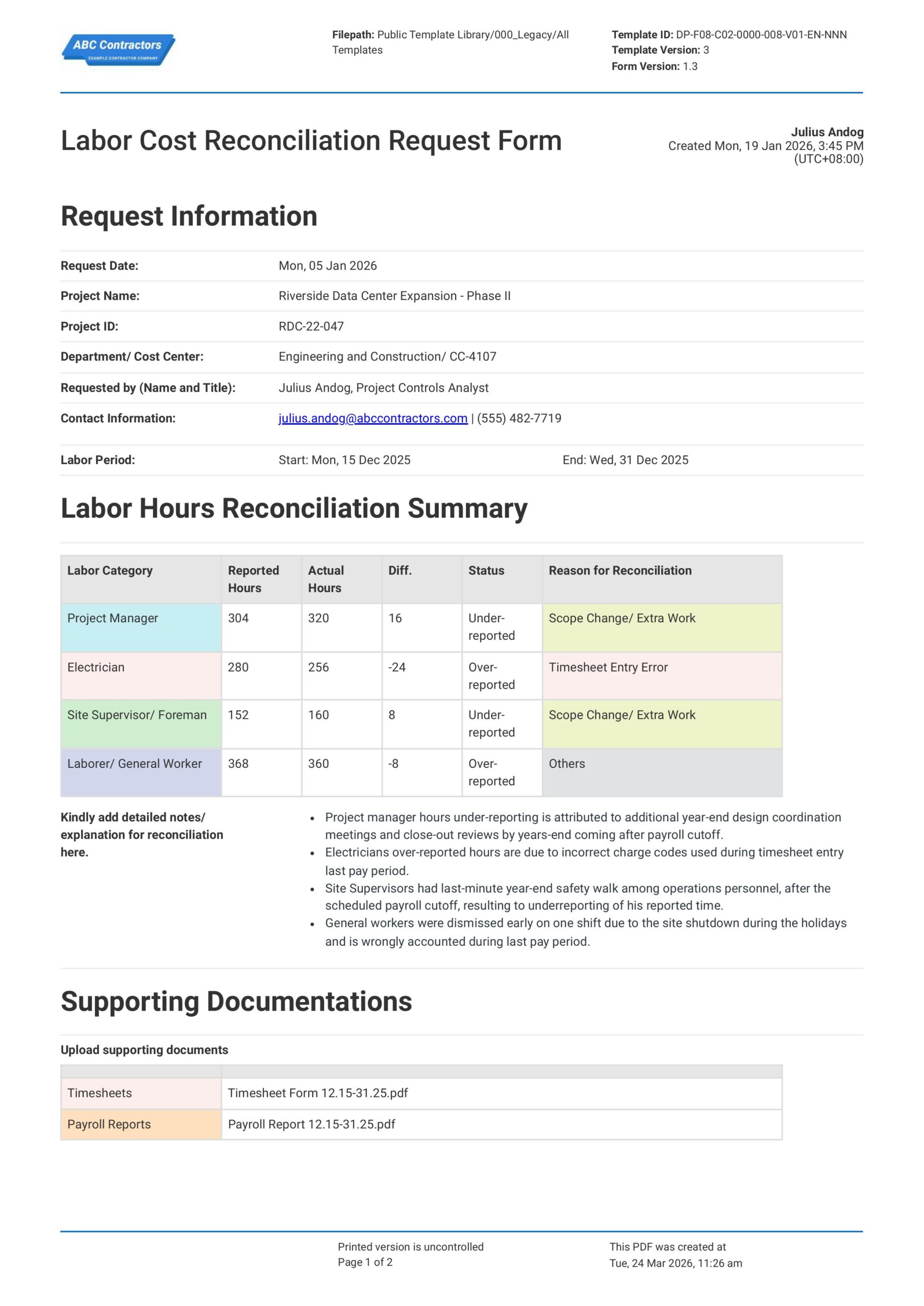
Labor Cost Reconciliation Request Form
This Labor Cost Reconciliation Request Form is a tool used to review and reconcile any labor cost discrepancies that arise during the contractual reporting or billing period. Additionally, tracking these discrepancies
View template
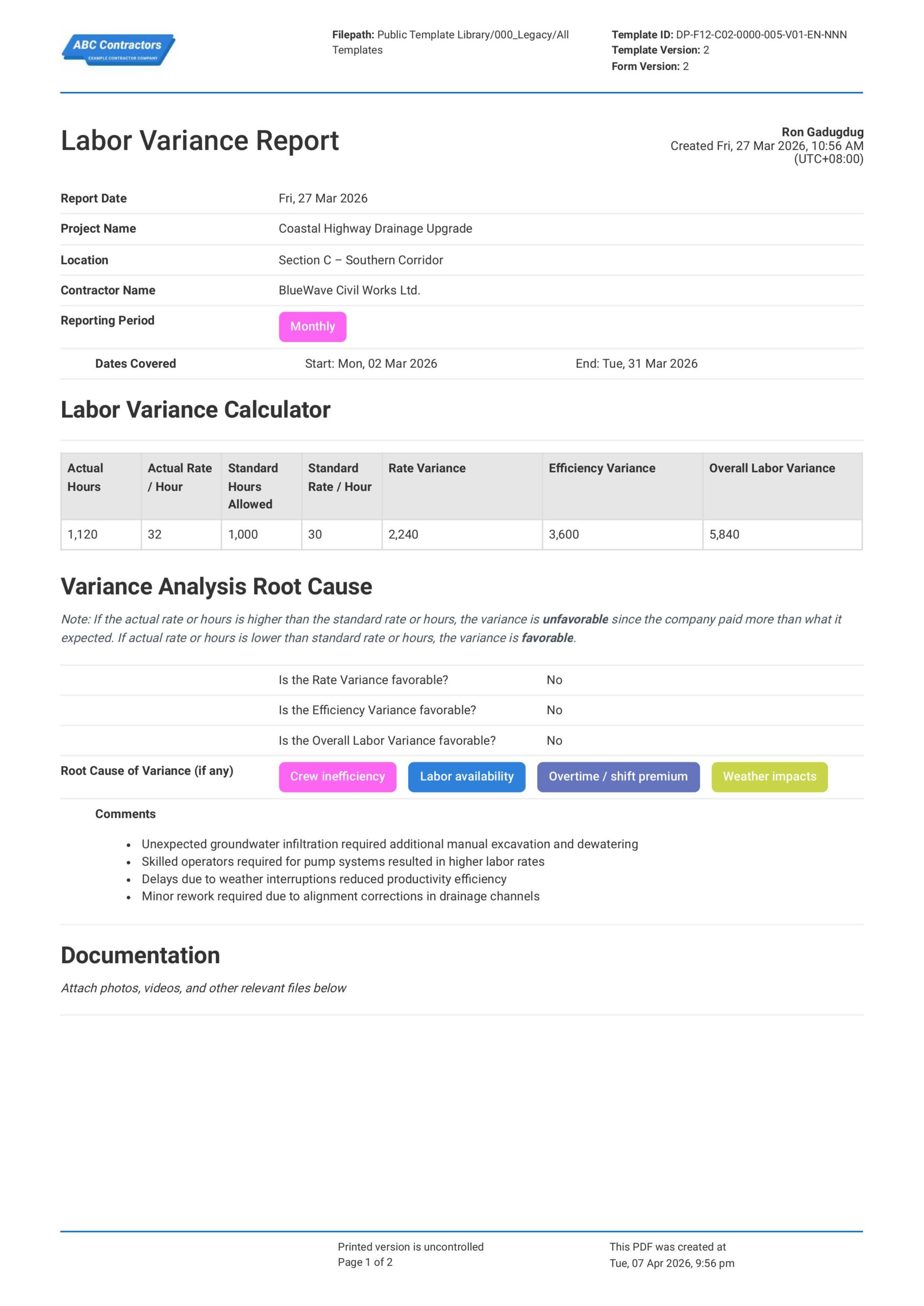
Labor Variance Report
This Labor Variance Report is a document that your team can use to compare planned labor hours and hourly rates against the actual hours and rates for a project. Record important details for labor variance analysis,
View template
Labor Productivity Report
This free Labor Productivity Report example is readily available to immediately provide total employee productivity. The downloadable template already integrates the standard formulas to obtain the metrics related to
View templateThis report was generated with Dashpivot software
- Access, edit and complete your Labor Reconciliation Report from any device - mobile, tablet or computer.
- Print, download or send your Labor Reconciliation Report as perfectly formatted PDF documents with your company logo.
- Store your Labor Reconciliation Report securely online, where they can be searched and found in seconds
- Invite internal and external parties to see, edit and sign off on Labor Reconciliation Report online.
