Procore alternative for Toolbox Talks
Procore is an enterprise construction platform built around drawings, financials, and project controls, and Toolbox Talks live inside it as one small piece of a much larger system. If you're already running Procore and wondering whether there's a better alternative for the talk itself, that's the question this page answers.

Trusted by companies, projects and teams of all sizes















The short answer
The Procore alternative for Toolbox Talks is Dashpivot by Sitemate. If your crew isn't filling in forms on site, or the mobile experience is pushing people back to paper, it's worth a look. If Procore's running your whole project and field adoption isn't the problem, switching probably isn't.
What Procore Is Built For
Procore is an enterprise project management platform built to run the full lifecycle of a construction project. It connects the office and the site across drawings, documents, financials, and project controls, and it's the system head contractors and general contractors reach for when they need everything in one place.
- Managing drawings, RFIs, and submittals across a project
- Running project financials, budgets, and change orders
- Document control and compliance at the head contractor level
- Connecting subcontractors and site teams to a single project record
Why Teams Look for an Alternative
Procore wasn't designed around the moment a supervisor gathers the crew for a five-minute talk before work starts. The platform is thorough, but that thoroughness creates friction at the point where Toolbox Talks actually happen.
- Fillable PDFs on mobile are clunky, so the form gets skipped or typed up after the fact rather than at the talk
- The platform is heavy enough that field crews don't adopt it, which means sign-off records are incomplete or missing
- Enterprise pricing means teams often pay for a full platform but use only part of it, with Toolbox Talks buried inside a system sized for much more
- Failed rollouts leave crews defaulting to paper, which defeats the point of having a digital record at all
In our sales calls, teams describe Procore as powerful for the project but heavy for field forms, with pre-starts and toolbox talks handled as fillable PDFs that are difficult to complete on a phone.
What Dashpivot by Sitemate Is Built For
Dashpivot is the system of record for the work in the field. Forms your crews fill in on site, signed and filed against the job, covering safety, quality, field reporting and plant. It sits below project management, as the layer where the Toolbox Talk actually gets done and captured.
- Forms built from your own documents, using the template library, or AI Templates, where Storm builds the template from a document you upload or a description you type
- Filled on the phone in the field, online or off, by the crew doing the work
- Signed on the device, with digital signatures, QR check-in and a full audit trail
- Your account, your records, whoever runs the project you're on

Run Toolbox Talks in Dashpivot
It's a Dashpivot form, filled on the Sitemate Mobile App in the field. Speak the talk, sign it on site, and keep the record on your own account, whoever runs the project.
Toolbox Talk App
Run the Toolbox Talk the way you always have. The crew checks in digitally, Storm turns the spoken briefing into written discussion points, and the signed record is filed before anyone starts work.

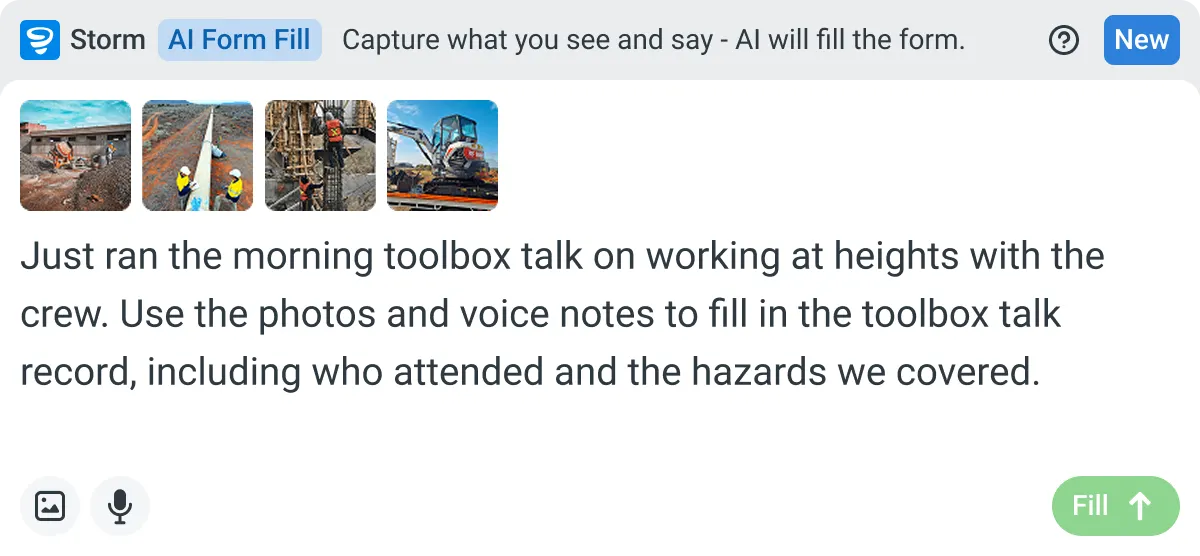
AI Form Fill
Capture what you see and say, and Storm fills the form for you. The details land in the right fields automatically, so a complete record exists the moment the work is done.
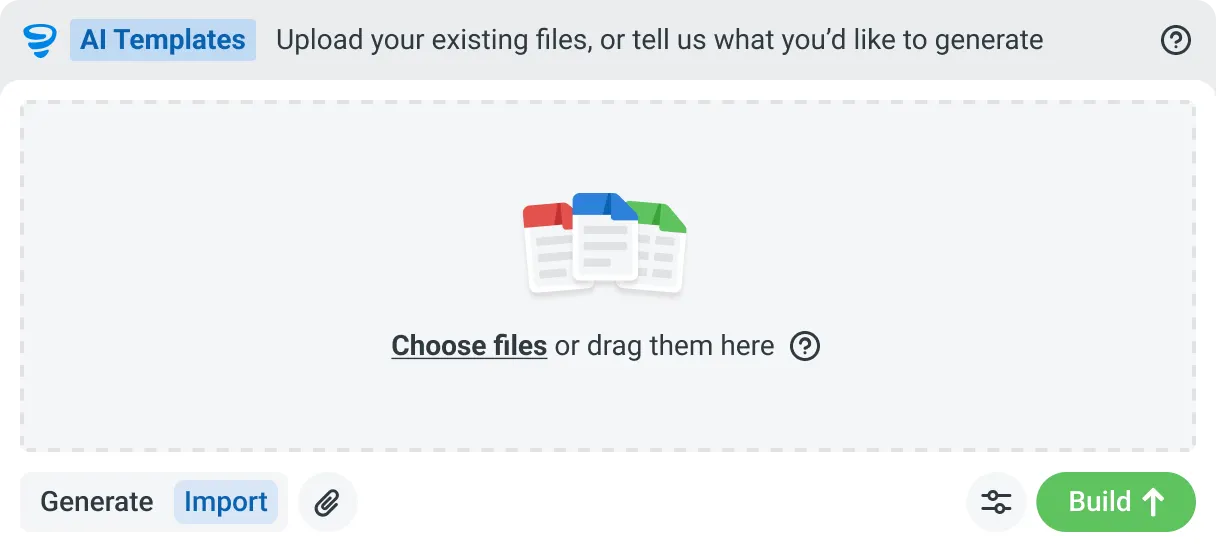
AI Form Generation
Describe the form you need in plain language, or upload an existing PDF, Word or Excel document. Storm builds it as a structured digital template with the right fields, sections and workflow attached, and you edit it before you publish.
How You Run a Toolbox Talk in Dashpivot
Three steps. You set the template up in Dashpivot, run the talk on the Sitemate Mobile App, and the signed record files itself back into Dashpivot. The talk itself doesn't change. What changes is where it gets filled in and how little gets typed afterwards.
-
Step 1
Get the Template
Four ways in, and none of them is starting from a blank page. The template is the Dashpivot form your crew fills in, so this is the part you set up once.
- Pick one from the template library, if a standard Toolbox Talk suits you
- Import the one you already run, so the wording your crews know stays the same
- Describe what you need and let Storm build it, section structure, fields and sign-off points included
- Build it yourself in the Dashpivot drag-and-drop editor, with photo, signature, location and weather fields
-
Step 2
Run the Talk and Capture It
The supervisor runs the talk as normal, with the form open on the Sitemate Mobile App. The record gets made while it happens rather than afterwards, and how much of it gets typed is up to you.
- The crew checks in by QR scan or by picking their name, with location and time stamps behind it
- Key points get logged as you go, typed on the device or spoken as a voice note
- Weather is captured automatically, so nobody writes down the conditions
- Storm is optional. Speak the talk and it drafts the discussion points into the fields for you
- You approve it. The supervisor checks attendance, edits the points and signs before the crew starts work
-
Step 3
Keep the Record
Signed, timestamped and stored in your own Dashpivot account, whoever owns the project.
- Every talk carries its own history, who filled it, who edited what, and who signed off
- Talks link to worker profiles, so attendance builds up per person across sites and meetings
- Export it or hand it to an auditor without asking anyone for access to their platform
What Dashpivot Can Replace
A good part of what Procore does isn't what we do.
What it can do today
These points are focused on the Toolbox Talk itself, which is the job this page is about.
- Run the Toolbox Talk on a form your crew actually fills in the field, online or off
- Sign off on the device, at the talk, rather than typing it up later
- Draft from what you say, if you use Storm, with you checking it before it's signed
- Cover quality, field reporting and plant in the same system, not safety alone
- Give you a record that's yours, independent of the project platform
What it cannot do
The rest of what Procore is built to run across a whole project, which is where it's genuinely the better tool.
- Manage drawings, RFIs and submittals the way a project platform does
- Run project financials, budgets and change orders
- Replace Procore for the head contractor's commercial and document control
Procore and Dashpivot by Sitemate for Toolbox Talks
Where each one lands on the parts of this job that actually differ. The rows where Procore wins are there because they're true.
| Procore | Dashpivot | |
|---|---|---|
| Capturing the talk | Typed into a form, often after the talk | Filled on the device at the talk, or spoken with Storm |
| Field adoption | Heavy to use on a phone, so forms get skipped | Mobile-first form the crew actually fills on site |
| Proving attendance | Sign-on inside the platform | Digital signatures on the form, plus QR check-in with Sitemate ID |
| What it's built for | Enterprise project management: drawings, financials, controls | Field records: safety, quality, field reporting and plant |
| Cost and fit | Enterprise pricing, often only part of it used | Lighter footprint, you pay for the field team that fills the forms |
| Who holds the record | The project platform for the head contractor | Your own account, whoever owns the site |
| Rolling it out | A platform-wide implementation | One crew, one week, alongside what you use now |
| Best fit | Head contractors running a whole project | Subcontractors, SMEs and head contractors alike |
Where the Two Actually Differ
For Toolbox Talks specifically, the two tools differ on where the form gets filled in, who actually fills it, and who holds the record when the project is done.
- Procore captures the talk in a form that's often completed after the fact. Dashpivot by Sitemate is filled on the device at the talk, online or offline, by the person running it
- Procore's mobile experience relies on fillable PDFs that crews find hard to use on site. Dashpivot's forms are built mobile-first so the crew can actually fill them in the field
- The record in Procore lives inside the head contractor's project platform. In Dashpivot, the record belongs to your account, whoever owns the site
- Rolling out Procore is a platform-wide implementation. Dashpivot can start with one crew in a week, alongside whatever else you're using
Where Procore Is the Better Choice
If you're a head contractor running the full project, Procore is genuinely the better tool. It's entrenched at the enterprise and GC level for a reason, and nothing on this page changes that for what it's actually built to do.
- You're a head contractor or GC who needs drawings, financials, document control, and project management in one platform
- Your company has already implemented Procore across the project and field adoption isn't the problem you're trying to solve
- The Toolbox Talk record needs to sit inside the same system as your RFIs, submittals, and commercial documents for contractual or audit reasons
How Teams Move From Procore
It's rarely the right call to switch everything all at once. The primary focus is usually to substitute the field capture layer Procore doesn't do well. A move usually starts with the documents that hurt most: Toolbox Talks, inductions and pre-starts.
-
Step 1
Decide
Talk to us about the job rather than the platform. If what you need is drawings, RFIs and project financials, Procore is the better tool and we'll say so. If it's about making Toolbox Talks easy enough that your crews start asking to move the rest of their site documentation across, that's where Sitemate comes in.
-
Step 2
Convert
Your current Toolbox Talk, as a PDF, Word doc, Excel sheet or a photo of the paper form, rebuilt by Storm - Sitemate's AI Agent - as a smart digital template with the wording your crews already understand.
-
Step 3
Pilot
One crew, one week, running alongside Procore and whatever else you use. Nothing switched off, and nothing needing a long migration. Hint: the crew that complains most about paperwork is probably the right one to start with.
-
Step 4
Roll Out
Held as an account template so the talk is identical in every workspace and edited centrally. Inductions and pre-starts follow once the Toolbox Talk has settled, and the record is yours from the first one.
Frequently Asked Questions
Is Dashpivot a replacement for Procore?

Not across the board. Procore runs drawings, RFIs, budgets and project controls, and we don’t do any of that. For running the Toolbox Talk, getting the crew to fill it in the field, and holding the signed record, teams do move across.
Can we use both?
Yes, and plenty do. The project stays in Procore and the field records live in Dashpivot, where the crew actually fills them. That’s the usual setup for a team that finds Procore too heavy on the tools.
Does Procore do Toolbox Talks?
Yes, as forms inside its safety and quality tools. Teams describe the gap as weight rather than absence: the field forms are heavy to fill on a phone, so the talk gets typed up later or skipped.
Do we have to use Storm to run a Toolbox Talk?
No. The talk is a form, and filling it in on a phone works like any other Dashpivot form. Storm is there if you’d rather speak it than type it, and Storm can build the talk template for you with AI Templates if you want a starting point.
How does attendance get recorded?
Digital signatures are fields on the Toolbox Talk form, so the crew signs on the device at the talk. Workers can also check in by QR with their Sitemate ID.
What happens to the record if we stop using Procore?
Your Dashpivot records stay on your own account. They were never inside Procore, so leaving the platform doesn’t take the talk history with it.
 English (United States)
  English (Australia)
  English (UK)
  English (New Zealand)
  English (South Africa)
  German