Otter.ai Alternative for Construction
Lots of construction teams use Otter.ai to keep track of what's said in meetings, and it's tempting to use it for the site diary too. But a voice memo recorded on the drive home still needs someone to type it into the diary at the end of a long day. Dashpivot by Sitemate turns what the crew records on site, including entries, photos and voice notes, into the diary itself, ready for the supervisor to check and sign.

Trusted by companies, projects and teams of all sizes


The short answer
Keep Otter.ai if you need meetings written down. Switch to Dashpivot by Sitemate if you want a site diary that comes back from site complete. The crew talks through the day on their phone, and Storm drafts the diary for the supervisor to check and sign.
What Otter.ai Is Built For
Otter.ai is an AI meeting assistant that transcribes live and recorded meetings, interviews and voice memos. OtterPilot can join your Zoom, Google Meet and Microsoft Teams calls to capture audio and shared slides, then sends a summary and action items afterwards. You can also ask its AI chat about what was said. For a project manager stuck in back-to-back calls, it means no more taking minutes.
Why Teams Look for an Otter.ai Alternative
Otter.ai gives you a transcript and a summary, but the office needs plant, hours, weather and delays in the diary's own fields, filed against the right job. So someone still has to read the transcript and type it into the diary, which is exactly the double handling the recording was supposed to fix. And when a variation claim lands months later, a meeting summary isn't the record you want to rely on.
What Dashpivot by Sitemate Does for the Site Diary
Dashpivot by Sitemate is a field reporting platform built for construction teams and the supervisors who sign off their work. It covers the site diary and the other forms a job runs on. The crew fills them in on the Sitemate Mobile App, on site, while the work is happening. They can talk through the day and take photos, and Storm completes the form from that with AI Form Fill. The supervisor reviews every report and signs it before it goes to management or the client, so nothing is filed without a look. The app keeps working with no signal, in a trench or out of range, and syncs once the phone's back in coverage. Each finished report lands in Dashpivot against the job it belongs to, with the photos, the weather and the sign-off attached. That's the record you'll want when a variation claim comes in or the client asks for proof of progress.
- Site diary: filled in on the phone, on site
- Offline: syncs back in range

Fill In and Sign the Site Diary in Dashpivot
In Dashpivot, the site diary is a template your team sets up once and then fills in on the Sitemate Mobile App on site, by typing or by talking the day through. The supervisor reviews and signs it, and it files under the right job as your company's record.

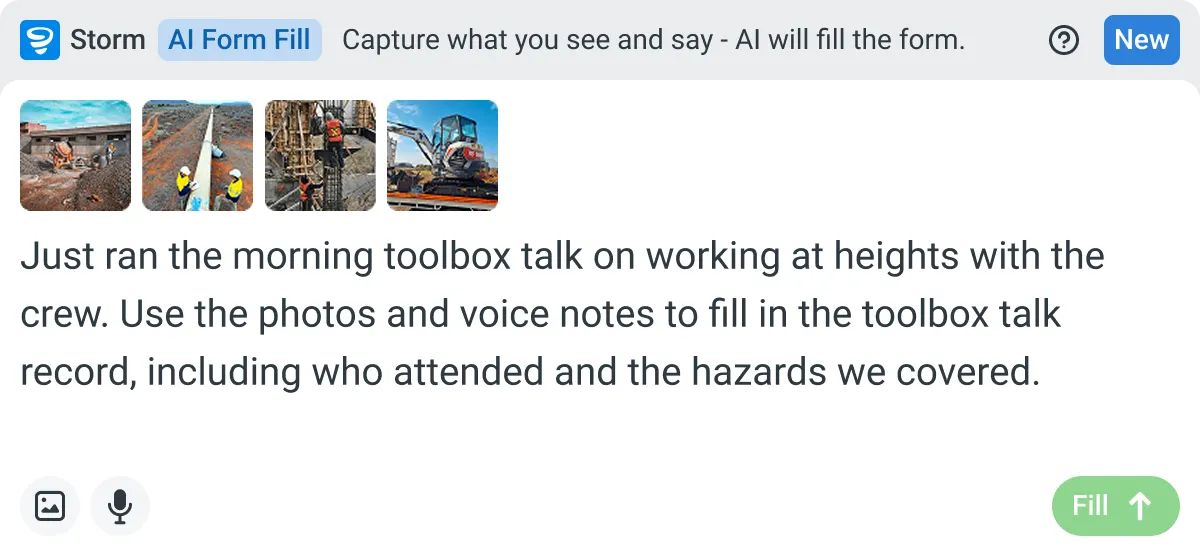
AI Form Fill
Capture what you see and say, and Storm drafts the form for you. The details land in the right fields, so there is a record to check the moment the work is done, and you review and submit it yourself.


Listens to the work
Captures voice cleanly through machinery, wind, and movement. Accents and trade language understood. No headset needed.

Sees the site
Photos read as primary data, not attachments. Equipment, defects, PPE, and conditions are all interpreted directly from what's in frame.

Knows the context
Location, time, crew, plant, and materials pulled automatically. Critical for inspections, incidents, and time entries.
How a Site Diary Runs in Dashpivot
The template is set up once in Dashpivot. From then on the crew fills in the daily report on the Sitemate Mobile App on site, and once the supervisor signs it, the record files itself back into Dashpivot.
-
Step 1
Set up the site diary once
Every crew on the job fills in the same site diary, so it's set up once in Dashpivot with the fields your office actually needs, like plant, hours, weather and delays. You can adjust it later without starting again.
- Template library: start from a ready-made site diary
- AI Templates: Storm builds it from your current diary or a short description
-
Step 2
Record the day on site
On site, the crew records the day on the Sitemate Mobile App as it happens, either by filling in the fields or by talking it through. It works with no signal and syncs later. The supervisor reviews the report and signs it off before it goes anywhere.
- Photos and notes from the work
- Storm with AI Form Fill, completing it from a voice note
-
Step 3
A signed record you own
Once the supervisor signs it, the report sits in Dashpivot under the job it belongs to, and it's your company's record. When a variation claim comes in months later, you pull up that day's diary instead of hunting through voice memos.
- Each day's diary, by job
- The supervisor's sign-off
What Dashpivot does not replace
Dashpivot won't join your Monday coordination call. It doesn't sit in on Zoom, Google Meet or Microsoft Teams, and it won't send minutes to attendees. If meetings are where your team loses track of decisions, Otter.ai is the right tool for that, and there's no reason to move it. Dashpivot covers what happened on site: the signed diary with the plant, hours, weather and delays your office needs, plus the day's photos. Many teams use both, with Otter.ai on the office calls and the site diary in Dashpivot. The real question is where the day's work gets recorded, because that's what you'll be asked for when a client wants proof of progress or a claim needs backing up.
What Dashpivot Does for the Site Diary Today
Dashpivot handles the daily record from the crew's phone to the supervisor's signature, and keeps working without signal.
- Site diary on the phone, even offline
- Storm drafts it from a voice note
- Photos attached to each day
- Signed diaries filed by job
Where Dashpivot Stops and Otter.ai Fits Better
Dashpivot isn't a meeting tool. For office calls or recorded interviews that just need transcribing, Otter.ai is the better fit with less setup.
- Joining your Zoom, Google Meet or Microsoft Teams calls
- Sending meeting summaries and action items
Here's how Otter.ai and Dashpivot by Sitemate compare on the things construction teams care about when deciding where the day gets recorded. Otter.ai leads on meetings, joining video calls and capturing shared slides, which Dashpivot doesn't do. The rest is about the site record: the fields your office needs, who signs it, and where it lives afterwards.
- Capability | Otter.ai | Dashpivot by Sitemate
- Built for | Meetings, interviews and voice memos | The site diary and the other forms a job runs on
- Video calls | OtterPilot joins scheduled Zoom, Google Meet and Microsoft Teams calls | Doesn't join video calls
- Voice input | Transcribes live and recorded audio | Storm fills the diary from a voice note with AI Form Fill
- What you get afterwards | A meeting summary and action items | A site diary with your office's fields
- Visuals | Captures slides shared in meetings | Photos from site attached to each day
- Sign-off | Not built for construction field reporting | The supervisor reviews and signs every diary
- Finding it later | AI chat across meeting content | Diaries filed by job
Where Otter.ai and Dashpivot Differ for Construction
Both turn speech into text and save someone from writing up the day from memory. What you get at the end is different. Otter.ai gives you a meeting transcript and summary. Dashpivot gives you a completed site diary, filled in on site and signed by the supervisor.
- Meetings are Otter.ai's strength. It joins your video calls automatically and sends the summary afterwards.
- The output is a site diary. Storm fills your template from a voice note with AI Form Fill, and the supervisor checks it before signing.
- It works out of range. The crew fills in the diary without signal and it syncs later.
Where each of these is the better choice
If the work you need captured happens in meetings, Otter.ai is the better choice. It joins your Zoom, Google Meet and Microsoft Teams calls, records the audio and slides, and sends a summary when the call ends. For client calls and project meetings, it's exactly what you need.
- You need project meetings written down with minimal setup
- You only need interviews or voice memos transcribed
- Your site diary already comes back on time and complete
How teams move across
Most teams don't switch everything at once, and some don't need to switch at all. A move starts with one question: is the site diary the problem you're trying to fix, or the meetings? Answer that before anyone builds a template.
-
Step 1
Decide
If the thing you need to capture is meetings, stay on Otter.ai. It joins your Zoom, Google Meet and Microsoft Teams calls and sends the summary and action items afterwards, which is the job it's built for. Dashpivot is worth a look when the record you need is the site diary, filled in on site and signed.
-
Step 2
Convert
Most teams already have a site diary as a PDF, a Word file or an Excel sheet. Upload it and Storm builds the Dashpivot template from it with AI Templates. Check the fields against what your office needs before anyone uses it on site.
-
Step 3
Pilot
Run it on one site with one crew for a few weeks. Keep Otter.ai on for your meetings, and keep the old diary going alongside if the office wants a fallback, until the supervisor's happy with what comes back.
-
Step 4
Roll out
Once the pilot site is running well, bring the next sites across one at a time. Each supervisor still reviews and signs the daily report, and the office has every diary in Dashpivot without having to chase the crew for it.
Frequently Asked Questions
Can Otter.ai do a site diary?

Not on its own. It transcribes conversations and sends a summary, but it isn’t a forms tool, so the diary fields still need filling in somewhere else. In Dashpivot, the crew fills them in on site.
Can the crew fill in the site diary with no signal?
Yes. The Sitemate Mobile App works offline, so the crew can complete the diary in a trench or out of range and it syncs later.
Can we keep using Otter.ai for meetings?
Yes, and most teams should. Otter.ai stays on your Zoom, Google Meet and Microsoft Teams calls, and the site diary moves to Dashpivot. They don’t overlap much.
Can we use the site diary format we already have?
Yes. Upload your current diary as a PDF, Word or Excel file and Storm builds a Dashpivot template from it with AI Templates. Check the fields before the crew starts using it.
Does Storm sign off the diary?
No. Storm drafts it from what the crew records, and the supervisor reviews and signs it. Once signed, it’s filed under the job, ready for the next variation claim or client update.