Construction AI Voice to Form App
On most jobs, the real record of the day is already sitting in someone's phone as photos and voice messages. A construction AI voice to form app turns that into your site diary. The foreman talks through the crew, plant, weather and delays, and Storm fills in your template from what they said, with photos attached. The supervisor reads it over and signs before it goes to the office or the client.

Trusted by companies, projects and teams of all sizes


The short answer
A construction AI voice to form app lets your foreman or crew talk through the day on their phone and get a completed form back. In Dashpivot, Storm uses AI Form Fill to pull the hours, plant, weather and delays from that voice note into your existing site diary template, photos included. The supervisor fixes anything that's off and signs it before it leaves site.
The Talking Is Easy, the Typing Up Is Not
A construction AI voice to form app lets someone on site describe the day out loud and get a filled-in form back. The foreman talks into their phone about who was on and what held things up, and the app turns that into the site diary or daily report your company already uses. In Dashpivot, Storm does the drafting with AI Form Fill, and the supervisor reviews and signs before the record is filed.
- Records the day by voice, on site, while it's fresh
- Add photos to the entry they belong to
- Storm fills your existing form with AI Form Fill
- Works with no signal on site and syncs later
- A supervisor checks and signs every record before it's filed
Why a Voice Memo Used to Stay a Voice Memo
Before AI, a voice memo from site stayed a voice memo. Someone still had to play it back and type it into the diary field by field, usually in the car after the shift. Dictation could turn speech into a block of text, but it couldn't tell which words were the crew's hours and which were a weather delay. Filling the right fields of a form from a spoken account of the day only became possible with AI.
Why the Site Diary Gets Written After the Fact
Ask around and you'll hear the same story. The shift runs late, the diary waits, and by the time someone writes it up, the hours and weather are a guess from two days ago. The office spends the week chasing it, deciphering handwriting, and typing the same hours into the timesheet again. Then a variation claim lands, and the one record you need is the vague one.
How an AI voice to form app works
The crew talks through the day once, on site, while it's fresh. Storm turns that into a filled form, and a supervisor reads it and signs before it goes anywhere. Nothing reaches the client or the office file without that check.
-
Step 1
Talk through the day on your phone
The foreman or a crew member talks through the day into their phone: who was on, what plant ran, the weather and any delays. They can add photos as they go. It still works with no signal in a trench, and syncs once they're back in range.
-
Step 2
It comes back as a filled-in form
Storm fills in your own site diary template from the voice note and photos, with AI Form Fill. Hours, plant, weather and delays land in their fields, and photos attach to the entry they belong to.
-
Step 3
The supervisor checks and signs it
The supervisor reads the draft, corrects anything Storm got wrong and signs it. Only then does it go to the project manager or the client. If the weather or the hours are off, it's caught here, before it ends up in a delay claim.
What crews capture this way
Mostly it's the site diary and the daily report, with dockets or daywork sheets when extra work comes up. The crew talks it through once and adds photos where they help, and the hours they record can carry across to the timesheet so nobody fills in the same thing twice.
- Site diary entries for crew hours, plant, weather and delays
- Daily reports that feed the client's progress update and monthly claim
- Hours that carry across to the timesheet
- Dockets and daywork sheets for extra work on the day
- Photos tied to the entry they belong to
- Toolbox talk and pre-start notes from the morning
What to Look For in an AI Voice to Form App
Test it on a real day, ideally a messy one with a delay or a plant breakdown. Check whether the draft lands in the right fields of your own form and whether it still works with no signal. A supervisor should have to sign before anything goes to the client. If the app can't fill your existing site diary, you'll end up keeping two.
- Fills the site diary template you already use
- Puts hours, plant and weather in the right fields
- Works with no signal on site and syncs when back in range
- Handles photos alongside the voice note
- Needs a supervisor's sign-off before anything is issued
- Lets you pull up reports by site or job
- Carries hours across to the timesheet without re-entry
What to avoid
The usual ways this goes wrong are an app that writes into its own format your office then has to re-key, and one that files the record straight to the client. Avoid both. Also watch for any app that needs signal the whole time, because a trench or a remote site often won't have it.
- Its own report format your office has to re-key
- Records that reach the client before anyone signs
- Needing signal on site to save an entry
- Hours entered twice, once in the diary and once in the timesheet
- Reports you can't pull up by site or job
- Drafts that guess at hours or weather with no one checking
Storm Only Knows What the Crew Tells It
Storm works from what the crew says and what's in the photos. If the foreman mentions the roller broke down mid-morning and you lost two hours, that goes straight into the delays field. If nobody mentions the late delivery, it won't show up in the diary. The more of the day the crew talks through, including the parts that went smoothly, the more complete the draft.
Sign-off is where a person steps in. Storm fills the form, but the supervisor decides if it's right. Nothing goes to the project manager or client until they've read it and signed. That's deliberate, because the site diary is what you'll lean on when a claim comes in, and the supervisor who was there is the best person to catch a wrong number.
What it can do today
Storm fills in the site diary or daily report you already use in Dashpivot, straight from voice and photos, using AI Form Fill. It works without signal, and once signed, every record is filed against the site so the office can find it by job.
- Fills your own site diary template from a voice note
- Attaches each photo to the right entry
- Saves entries offline and syncs when you're back in range
- Carries hours across to the timesheet
What it cannot do
Storm won't sign off a report or send anything to the client on its own. It can't check the hours or weather against what really happened, so if the voice note is wrong, the draft will be too. That's what the supervisor's review is for.
- Sign off a report for the supervisor
- Send anything to the client before it's signed
- Fill in details nobody mentioned or photographed
- Check whether the hours or weather are correct
Site paperwork comes up in thousands of our sales calls
Each bar counts the sales calls where buyers raised a document, by topic and region, from our analysis of 11,787 calls over twelve months. Daily reports and site diaries came up in more than 2,000 of them. Teams keep bringing us the paperwork around a shift, and that's the paperwork a voice to form app drafts for a supervisor to check.
How the record gets there
A voice note recorded on site ends up as a signed record in Dashpivot, once Storm has drafted it and a supervisor has checked it. From there, Sitemate MCP lets the AI assistant your office already uses read what's been filed and answer questions about it.
-
Storm
Storm takes the voice note and photos and fills in the site diary with AI Form Fill, putting hours, plant and weather into the right fields. The draft then waits for the supervisor to check before anything is filed.
-
Dashpivot
Dashpivot is where the form lives. The supervisor opens the draft, fixes anything that's wrong and signs it off, and the signed record is kept against the site so the office can pull it up by job.
-
Sitemate MCP
Sitemate MCP connects those filed records to the AI assistant your office already uses, like Claude or ChatGPT, so a project manager can ask what held up a job last week and get an answer drawn from the signed site diaries.

Turn Voice Notes Into Site Diaries With Storm in Dashpivot
The AI behind your site diary is Storm, Sitemate's data capture agent for the front line of the built world. A voice note and photos go in. A filled form comes out for the supervisor to check and sign, and it keeps working with no signal on site.

AI Form Fill
Capture what you see and say, and Storm drafts the form for you. The details land in the right fields, so there is a record to check the moment the work is done, and you review and submit it yourself.

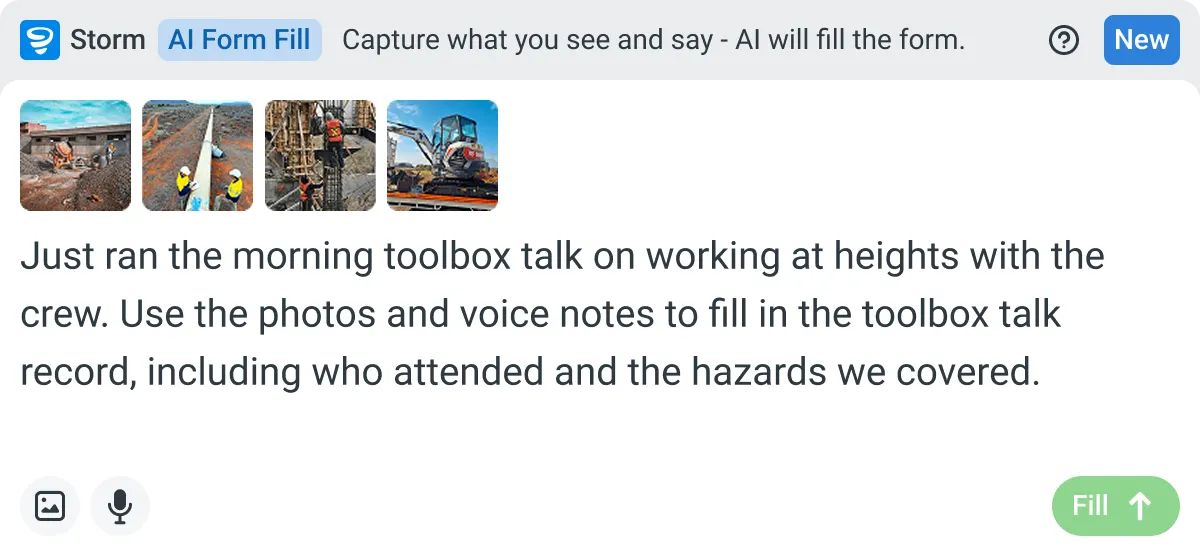

Listens to the work
Captures voice cleanly through machinery, wind, and movement. Accents and trade language understood. No headset needed.

Sees the site
Photos read as primary data, not attachments. Equipment, defects, PPE, and conditions are all interpreted directly from what's in frame.

Knows the context
Location, time, crew, plant, and materials pulled automatically. Critical for inspections, incidents, and time entries.
Frequently Asked Questions
Can the crew fill in the site diary with no signal?

Yes. The entry saves to the phone in a trench or out of range, and syncs to Dashpivot once there’s coverage. The supervisor then reviews and signs it as usual.
Do the crew have to fill in the diary and a timesheet?
No, they only record it once. Hours from the site diary can carry over to the timesheet, so nobody types them twice. The supervisor still checks them before sign-off.
Can I pull up reports by site or job?
Yes. Every signed record is stored against its site in Dashpivot, so the office can open one job and see all its diaries in one place.
Does it use our own site diary format?
Yes. Storm fills your existing template with AI Form Fill, so the fields match what your office and client expect. If your diary isn’t in Dashpivot yet, Storm can build it with AI Templates from a description or from your current PDF, Word or Excel file.
Is the filled-in form ready to send to the client?
Not until the supervisor signs it. Storm produces a draft, and the supervisor reads it and fixes anything that’s wrong first. Only the signed version goes to the project manager or client.