Mitti alternative for SWMS
Mitti, formerly SafetyCulture and iAuditor is widely used by Australian crews for inspections, and some use it for their Safe Work Method Statements (SWMS) too. If it’s an SWMS alternative you’re after, here’s where Mitti and Dashpivot by Sitemate each fit for high-risk construction work.

Trusted by companies, projects and teams of all sizes















The short answer
Dashpivot by Sitemate is a Mitti alternative built for SWMS. Make the switch if your SWMS keeps changing with the job and you need a flexible document where crews can easily sign the current versions on site.
What Mitti Is Built For
Mitti, SafetyCulture and iAuditor are all the same platform. SafetyCulture is the company, iAuditor was the original app, and the whole thing became Mitti in 2026. It's built for quick mobile inspections and checklists, with ready-made templates that need almost no setup. Some teams also use it for SWMS as a templated checklist.
- Safety and quality inspections and audits on your phone
- Ready-made checklists you fill in on your phone
- A free plan so small teams can get started quickly
- Widely used, with a strong reputation for safety inspections
Why Teams Look for a Mitti Alternative
A SWMS isn’t the same as an inspection. It breaks high-risk construction work into steps, listing the hazards, risk ratings and controls for each one, and it needs updating as the job changes. A fixed checklist shows every section no matter what the work is, and all you get at the end is a PDF.
- Every section appears on every job, because sections can't show or hide based on the work
- Crews have to manually mark sections that don't apply
- Results only come out as a PDF report
- Engineers want the data in a structured format or a spreadsheet
- Paying per user adds up as every supervisor and leading hand needs access
The method changed on Wednesday, half the crew signed Monday's SWMS, and the principal contractor's safety officer wants to know which version they're working to.
What Dashpivot by Sitemate Does for SWMS
Dashpivot by Sitemate is a field system for running SWMS. You build each SWMS once as a form and the crew doing the work signs it on site. Every version is filed against its job and stored on your own account.
- Master SWMS: one template for every job
- Conditional logic: sections show only when the job needs them
- Sign-on on site: digital signatures, plus QR check-in on the Sitemate Mobile App
- Your own account: the records are yours, whichever principal contractor runs the job

Write and Sign SWMS in Dashpivot
The crew opens the Dashpivot form on the Sitemate Mobile App on site and signs onto the version they're working to. The record stays on your own account, whichever principal contractor runs the job.
Safe Work Method Statement App
Build the SWMS once and run it on every job. Storm, Sitemate's data capture agent, can draft the first version from the work scope for a supervisor to check, the crew signs on from their phones, and every signed version is filed against the job.


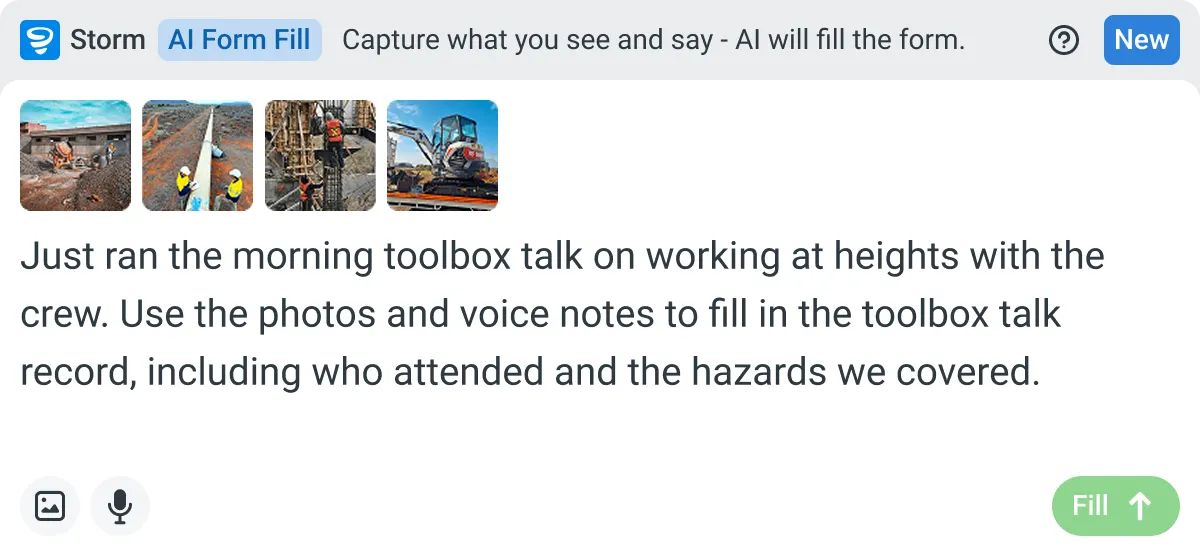
AI Form Fill
Capture what you see and say, and Storm drafts the form for you. The details land in the right fields, so there is a record to check the moment the work is done, and you review and submit it yourself.
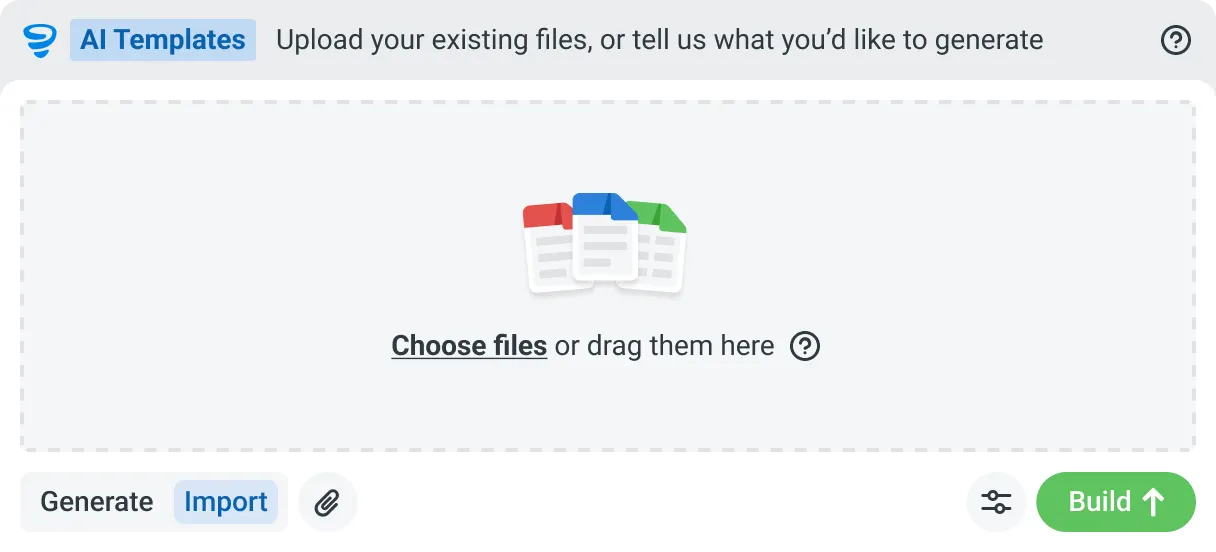
AI Templates
Describe the template you need in plain language, or upload an existing PDF, Word or Excel document. Storm builds the structure, with the right fields, sections, columns and workflow attached, and you review and refine it before you save.
How a SWMS Runs in Dashpivot
You set the SWMS up once in Dashpivot. The crew signs it on site before work starts, and the signed version is filed against the job on your own account.
-
Step 1
Set the SWMS Up Once
Start from the SWMS format you already use. It keeps the risk matrix your principal contractors accept and the job steps you've written, and becomes the form every job runs from.
- Bring your own format: upload a PDF, Word or Excel file and Storm, Sitemate's data capture agent, builds the template with AI Templates
- Describe one: type what the SWMS needs to cover and Storm builds it. Either way, you check what Storm produces before anyone uses it
- Build it yourself: Dashpivot's drag-and-drop editor, with signature, photo and location fields
-
Step 2
Run It and Sign On
The supervisor briefs the crew on site with the form open on the Sitemate Mobile App, online or offline. If the job throws up something the SWMS didn't cover, they add a site-specific control on the phone.
- Digital signature: each crew member signs on the device
- QR check-in: workers scan in with their Sitemate ID
- Photos: attach to the step they relate to
- Storm, if you want it: speak the scope and Storm drafts the job steps, hazards and controls. The supervisor reviews the draft and edits the site specifics
- Sign-off: the SWMS is signed before work starts
-
Step 3
Keep Every Version
Each SWMS is signed with a timestamp and filed against its job. Every version is kept for audit, and it stays on your Dashpivot account after the job closes.
- Version history: who changed what, and who signed which version
- One register: every SWMS across your jobs and subcontractors
- PDF export for the principal contractor
- Excel export for your own reporting
What Dashpivot Doesn't Replace
Dashpivot handles the SWMS process and stores the record, but it doesn’t assess the controls or count as regulator approval because only the person assigned to assess the SWMS reviews the hazards and signs off each job.
What Dashpivot Does for SWMS Today
Everything below is available now.
- SWMS templates with job steps, hazards, risk ratings and controls
- Storm drafts the first version from your work scope, and the supervisor checks it before release
- Crew sign-on from any device, even without signal
- One versioned, audit-ready register
- PDF or Excel exports for the principal contractor or your own records
Where Dashpivot Stops
Some limits come with the territory. On one of them, Mitti is ahead.
- It can't decide whether a control is good enough because only the safety checker decides so
- It doesn't replace the WHS regulator
- It can't approve a SWMS for anyone
- It doesn't offer a free plan like Mitti's, or have Mitti's reputation for safety inspections
Mitti vs Dashpivot by Sitemate for SWMS
Here's how the two compare on SWMS, including the areas where Mitti leads.
| Mitti | Dashpivot by Sitemate | |
|---|---|---|
| Building a SWMS | A checklist template on your phone | Your own form, or one Storm builds with AI Templates |
| Form flexibility | Fixed form, no conditional logic | Conditional logic shows only what applies |
| Output | PDF report | PDF, Excel or structured export |
| Beyond safety | Quality inspections and audits | Quality, field reporting and plant |
| Getting started | Ready-made templates and a free tier | Your own SWMS, or one Storm builds |
| Best fit | Quick, off-the-shelf inspections | A SWMS that changes with the job and needs a signed record |
Where Mitti and Dashpivot Differ for SWMS
Both put the form on a phone and both collect signatures. The difference shows up when the job changes, and in what you're left with afterwards.
- Form logic. Mitti forms are fixed. Dashpivot uses conditional logic, so the crew only sees what applies.
- Output. Mitti gives you a PDF. Dashpivot gives you a PDF plus Excel or structured data for your registers.
- Getting started. Mitti wins here, with a free tier and templates that need almost no setup. Dashpivot needs a one-time SWMS setup.
Where Mitti Is the Better Choice
Mitti's strengths are its reach and how quickly you can get going. If inspections are most of your work and the free tier covers them, Mitti is the simpler choice.
- Your SWMS rarely change and a fixed checklist does the job
- Your small team fits within the free tier
- Your company already runs inspections and audits in Mitti
- The cost of moving outweighs the gaps
How Teams Move From Mitti
Nobody moves every SWMS at once. Step one is deciding whether the move is worth it. Then one job's SWMS comes across, and you widen once a crew has signed it live.
-
Step 1
Decide
If your team mostly runs inspections and uploads the odd SWMS, Mitti may be all you need. Move when the SWMS has to change with the job, or when you need a signed record of each version.
-
Step 2
Convert
Take one job's SWMS, whether it's a Mitti PDF export, a Word file or an Excel sheet. Storm rebuilds it as a Dashpivot template with AI Templates, keeping your risk matrix and wording. You check it before use.
-
Step 3
Pilot
Go live on one job with one crew. Mitti stays on for inspections and the principal contractor still gets a PDF, so nothing you depend on switches off.
-
Step 4
Roll Out
Once one crew has signed a live SWMS end to end, hold it as an account template and add the remaining jobs and subcontractors. Every SWMS then sits in one register.
Frequently Asked Questions
Is Mitti the same as SafetyCulture and iAuditor?

Yes. SafetyCulture is the company, and Mitti has been the platform’s name since 2026. iAuditor was the original app, and plenty of crews still call it that. Everything here applies whichever name you use.
Is Dashpivot a replacement for Mitti for SWMS?
Yes, for SWMS. In Dashpivot, the SWMS is a form your crew signs on site, and each version is filed against the job. You can keep Mitti for inspections if the free tier covers you.
Can the whole crew sign onto the SWMS?
Yes. Each worker signs on the device before starting work. They can also check in by scanning a QR code with their Sitemate ID, which is their worker profile in the Sitemate Mobile App.
Do we have to use Storm to write the SWMS?
No. You can fill in the form yourself. Storm is there if you want a head start, drafting the job steps, hazards and controls from your work scope or a voice note. A supervisor or competent person reviews and signs it before it’s issued.
Can we get more than a PDF out of it?
Yes. Mitti’s output is built around the PDF report. Dashpivot gives you the PDF plus an Excel or structured export, so the data can go straight into your registers.