How to use Microsoft Copilot to draft RAMS
Every job needs a RAMS that fits the actual work, not a 70 page master copied across from the last site. The hard part was never the document, it was starting from a blank page and re-typing the same hazards and controls each time. Describe the task, the site and the crew to Microsoft Copilot and it drafts one you can work from in minutes. You read it, tighten it to the job, then get it signed and captured where it belongs.

Trusted by companies, projects and teams of all sizes















The short answer
Tell Copilot the task, the site and the crew, and it drafts a RAMS: the hazards that matter, a risk score against each, the controls, the method steps in order and a sign-on block. Get the prompt right once and you reuse it, changing only the job. You read the draft against the site, tighten it, and a competent person signs it off before anyone starts.
How to get Copilot drafting your RAMS
A RAMS worth using comes down to three things, and none of them is a long prompt. Give Copilot the specifics of the task, tell it the shape a RAMS needs, then tighten what comes back. Do it properly once and you have a pattern you reuse on the next job, where only the work changes.
-
Step 1
Give Copilot the task and the site
The draft is only as specific as what you give it. Name the task, the location, the crew and the plant involved, plus anything that makes this job different: work at height, a confined space, a live road alongside. A RAMS for cutting a chase in a load bearing wall reads nothing like a generic one, and that's the point.
- The task, and why it carries risk
- The site and the crew, so the controls fit the job
- The plant, access and permits involved
- Anything unusual about this job worth naming
-
Step 2
Tell it the shape a RAMS needs
Left open, Copilot writes prose. Tell it the sections a RAMS needs and it writes to them: the hazards for this task, a risk score against each, the controls, the method in sequence, and a sign-on line. Match it to the RAMS template your clients accept, so the draft drops straight in.
- The hazards specific to this task, not a generic list
- A risk score and residual risk against each
- The controls, tied to each hazard
- The method steps, in the order the work happens
- A sign-on block for the crew
-
Step 3
Tighten it to the site
The first draft is a starting point, not the finished RAMS. Cut anything generic, add the hazard that's real on this site today, and check the method matches how the crew will actually work. A few minutes here is what turns a passable draft into one a principal contractor accepts.
Prompt guidance for drafting RAMS with Copilot
The prompt is the thing worth building. Get it right once and it becomes your drafting prompt, where only the task and site change. One rule matters most: the more specific the work you describe, the less generic the RAMS, so name the task, the plant and the site every time.
- "Draft a RAMS for [task] at [site], for a crew using [plant]. Include the hazards, a risk score for each, the controls, and the method steps in order."
- "Add a risk score and residual risk against each hazard, using a 5 by 5 matrix."
- "Write the method as numbered steps, in the order the work happens."
- "Add a COSHH line for [substance] if it is used on this task."
- "Same shape, new job: [task] at [site]. Keep the hazards specific to that work."
Troubleshooting prompts for drafting RAMS
A weak draft is usually a thin prompt or a template that gives the RAMS nowhere to land, not a limit of the assistant. These are the fixes worth trying, in order.
- The RAMS reads generic: you named the task but not the site. Add the location, the crew and the plant, and it sharpens
- The hazards are wrong for the work: Copilot doesn't know your site, so paste the relevant part of your existing RAMS or procedure and ask it to draft from that
- There's no risk scoring: ask for a score and residual risk against each hazard, and name the matrix you use
- The method is vague: ask for numbered steps in the order the work happens, not a summary
- The fields don't match: the draft has sections your RAMS template doesn't, so ask it to write to your template's headings by name
Limitations
Copilot drafts the RAMS. It doesn't sign it off, and it doesn't know your site the way the crew does. A RAMS that reads well but misses the hazard that's actually on site is worse than a plain one that names it, so the review is the job, not an optional step.
What Copilot does well here
Given a specific brief, this is what it does well.
- Draft a full RAMS from a task description, shaped to the job
- Pull the hazards and controls that fit the work, when you give it the detail
- Score risk and suggest controls you can accept or change
- Match the RAMS to your template, so it drops straight in
- Rework length and wording in seconds
What it does not do
And here's what it doesn't do, so nobody treats the draft as the finished job.
- Know your site. It drafts from what you tell it, not from the ground
- Decide whether a control is adequate. A competent person owns that
- Sign the RAMS off or make it compliant. That's a person's call
- Guarantee it's right. You read it against the job before anyone starts
What this assumes you already do
This page assumes your team already produces RAMS and gets them signed. Copilot drafts the document, but it only helps if there's a habit of reviewing it and capturing who signed on. None of this is a setup step, it's the working practice the drafting sits on top of.
- Your team produces a RAMS for each job
- There is a RAMS template your clients accept
- A competent person reviews and signs off the method
- Crews sign onto the RAMS before work starts
Why use Copilot to draft RAMS
The RAMS itself isn't the hard part. Any competent person can describe how a task gets done safely. The hard part is starting from a 70 page master every time, re-typing the same hazards and controls for a job that changed since the last one, when the person writing it is already stretched. So the RAMS gets copied across and left generic, and a principal contractor sends it back.
A specific starting point in minutes changes that. Copilot gives you a draft that already fits the task, and you spend your time tightening it rather than re-typing. The RAMS gets done, it fits the work, and it clears the client's gate the first time.
What a good RAMS contains
A RAMS a principal contractor accepts does a few things, and a good draft should hit all of them:
- Hazards specific to this task, not a generic list
- A risk score and residual risk against each
- Controls tied to each hazard, not a separate list
- The method in the order the work actually happens
- A sign-on block, so the crew is recorded against it
It's the morning of the job, the principal contractor won't let the crew on site without a signed RAMS, and the one you have is a generic master that doesn't mention the work. Written from scratch now, it holds everyone up. Drafted in minutes and tightened, it doesn't.
What people actually run through Microsoft Copilot
Every named job customers ran through Microsoft Copilot against their own Sitemate data over six months. The profile is administrative: more than three quarters of tasks touch users, permissions or access.
Teams reach for the assistant on the documents they repeat
The jobs people run through an assistant are the ones that recur: diaries, timesheets, inspections, the structured documents produced again and again with the details changing. A RAMS is that shape of task exactly, which is why drafting one is where an assistant earns its place.
Connecting Sitemate MCP to Copilot
Three things have to be in place, and the first two are not in Copilot. An Org Controller switches MCP access on in Dashpivot by Sitemate. Then, because the Sitemate app is a Microsoft 365 agent, a Microsoft 365 admin deploys it once for everyone from the Marketplace. You will also need a Microsoft 365 Copilot subscription, the premium plan rather than the basic add-on.
-
Step 1
Turn on MCP access in Dashpivot
An Org Controller opens Settings, then Security, and sets the MCP Access toggle to anything other than None. Save changes. Until this is on, the agent won't authenticate.
-
Step 2
Deploy the Sitemate app from the Microsoft Marketplace
A Microsoft 365 admin opens the Sitemate MCP listing on the Microsoft Marketplace, selects Get it now, and signs in with a Microsoft 365 admin account. That opens the Microsoft 365 admin console. Choose who gets access, everyone or a pilot group, accept the permissions, and finish the deployment. It then appears under Settings, Integrated apps.
-
Step 3
Check the agent is there
Open Microsoft Copilot at copilot.microsoft.com or in the Microsoft 365 app, and the Sitemate agent shows up as an available tool. Allow a few minutes after deployment for it to appear. Sitemate MCP is read-only, so Copilot can read your records but can't create, edit or delete anything.
If the connector will not appear
Three things account for almost every failed connection, and the first is the most common by a distance.
- Nothing connects at all: MCP Access is still off in Dashpivot, and only an Org Controller can turn it on
- The app can't be deployed: uploading the Sitemate agent needs a Microsoft 365 Global Administrator or AI Administrator role, plus a Microsoft 365 Copilot subscription
- The agent doesn't show after install: allow a few minutes to propagate, refresh Copilot or open a new chat, then check Integrated apps in the Microsoft 365 admin console
How the record gets captured
Copilot drafts the RAMS. Getting it signed and kept is what happens in Dashpivot. Here's how the draft becomes a form your crew signs, and why the signed record matters as much as the draft.
-
Storm imports the draft, then captures it on site
Save the draft out of Copilot as a PDF, Word or Excel file, and Storm rebuilds it as a Dashpivot template with AI Templates. From there the RAMS gets run and signed on a phone or tablet while the crew is standing there, with the sign-on attached, rather than a document emailed round and chased later.
-
Dashpivot holds it as the record
Each RAMS lands against its job as a structured record, versioned and audit ready, which is what makes it something you can stand behind rather than a file in an inbox.
-
Sitemate MCP reads it back
With the RAMS captured, Copilot can read back across them the same way it helped draft this one: which jobs have a signed RAMS, which crews signed on, what's missing. Your own permissions still apply.

Storm captures the RAMS Copilot drafts
Copilot drafts the RAMS, but it still has to be run and signed. Storm captures the RAMS and its sign-on as it happens on site, so the record is there before anyone goes looking for it.

AI Form Fill
Capture what you see and say, and Storm drafts the form for you. The details land in the right fields, so there is a record to check the moment the work is done, and you review and submit it yourself.

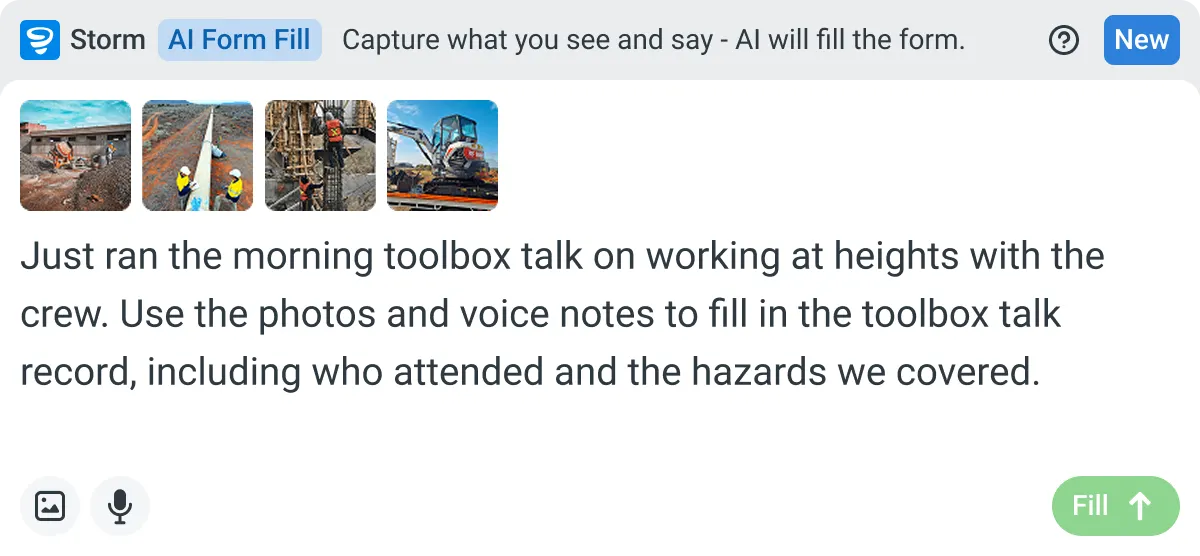

Listens to the work
Captures voice cleanly through machinery, wind, and movement. Accents and trade language understood. No headset needed.

Works on site
Built for gloves, cabs, and screen protectors. Captures inputs offline and processes in the background. No waiting on the field.

You stay in control
Storm never commits a record on its own. Every output is a draft for human review. Admins control what Storm can write to.
Frequently Asked Questions
Does Copilot know my site and my hazards?

No. It drafts from what you tell it. Name the task, the site, the plant and anything recent, and the RAMS fits the job. Leave it vague and you get a generic one, so the detail you give it is what makes the draft worth using.
Will the RAMS be specific enough for a principal contractor to accept?
With a good brief, close, but it’s a draft, not the finished RAMS. You read it against the job, cut anything generic, add the hazard that’s real on site, and a competent person signs it off. The review is quick, and it’s what gets it through the client’s gate.
Can I match the draft to our own RAMS template?
Yes. Tell Copilot the sections your RAMS uses and it writes to them, so the draft drops into the template your clients already accept, including the sign-on.
Where does the RAMS get signed and stored?
In the field. Copilot drafts it, but the RAMS is run, signed and stored in Dashpivot as the record, captured on site with Storm. The draft is the start; the signed record is the proof it ran.
Does this work with the other assistants as well?
Yes. The same approach holds whichever assistant your team uses, and the Sitemate connection supports Claude, ChatGPT and Microsoft Copilot.
Do I still need a competent person on the RAMS?
Yes. Copilot takes away the blank page, not the call. A competent person decides whether the controls are adequate and signs the method off. The draft gives them something specific to work from instead of nothing.