Toolbox Talk Conveyor Safety Template

Start with a free 30-day trial. No credit card required.
Need a Toolbox Talk Conveyor Safety your crew can pick up and use straight away? This template comes pre-written with the key content supervisors need to lead a focused safety briefing before conveyor-related work begins, covering common hazards such as entanglement, pinch points, and caught-in risks, along with the safe work practices and controls employees should follow. Every section can be edited to reflect your company's specific conveyor types, site conditions, and internal procedures, so the document remains accurate to how your operation actually runs while still holding up against the safety regulations and audit requirements you are expected to meet.
This Toolbox Talk Conveyor Safety is an easy-to-use form that your workers can use to record the details of each pre-shift safety briefing, including the hazards discussed, the controls in place, and a full attendance record so supervisors can confirm that every team member on the conveyor was present and informed before work began.
 100% fully editable Toolbox Talk Conveyor Safety
Export your Toolbox Talk Conveyor Safety to PDF or CSV
Access your Toolbox Talk Conveyor Safety on mobile, tablet or computer

Trusted by companies, projects and teams of all sizes















What is Toolbox Talk Conveyor Safety?
A Toolbox Talk Conveyor Safety template is a record of the informal safety meetings that focus on topics related to conveyor-related jobs, including hazards, risks, and safe work practices. Also called tailgate meetings or safety briefings, these short meetings happen before the start of a job or work shift.
Compare this Toolbox Talk Conveyor Safety template to paper-based forms created from Word, Excel or PDF
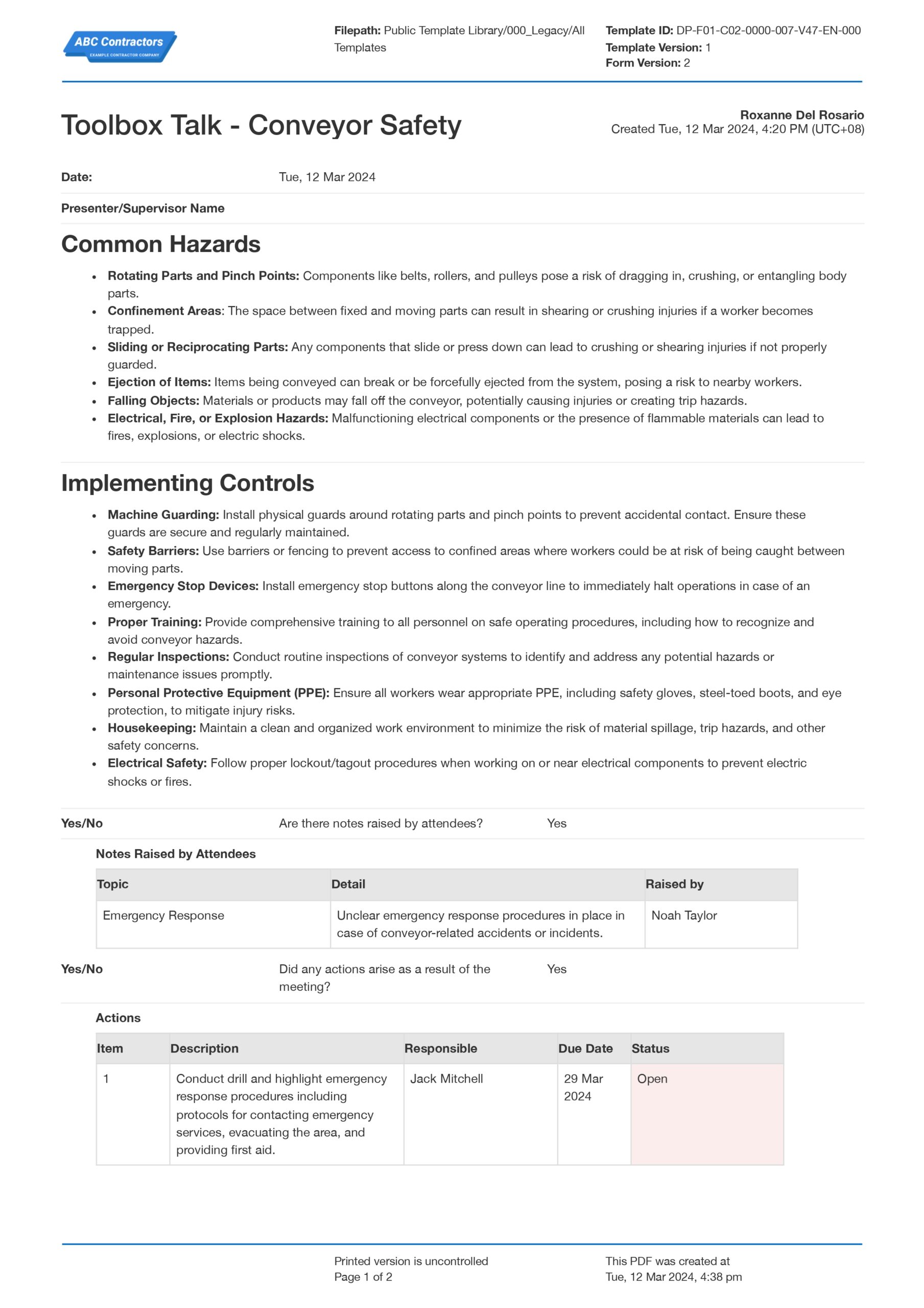
Curious how this Toolbox Talk Conveyor Safety works? Check out the example below to see what a completed form looks like and how straightforward it is to put one together. You can export it as your own custom form and fill in your site details, conveyor-specific hazards, and attendee information to have a ready-to-use document in minutes.
Use this Toolbox Talk Conveyor Safety template for free

Generate this template automatically with Storm
You don't have to build the Toolbox Talk Conveyor Safety field by field. Let Storm, the AI Data Capture Agent inside Dashpivot, build the template for you in seconds.
Describe what you need
Tell Storm the form you want in plain language and it builds a structured digital template from scratch, with fields, tables, and signatures in place.
Upload what you already use
Drop in your existing PDF, Word, Excel, or even a photo of a paper form. Storm rebuilds it as a smart digital template with the structure intact.
 Storm
Storm
Generate a Toolbox Talk Conveyor Safety form template that I can use for my business
Applicable Standards and Policies for Toolbox Talk Conveyor Safety
Conveyors are one of the common machines found in manufacturing industries. They help move heavy items from one place to another efficiently. However, these machines also have inherent hazards that workers need to watch out for. Discussing conveyor safety in one of the Toolbox talk sessions ensures that employees are reminded of the hazards and the necessary safety measures to avoid accidents. Additionally, having toolbox talks on conveyor safety ensures compliance with the following standards:
- USA: The Occupational Safety and Health Administration has mandated 29 CFR 1926.555 and 1910.212, alongside ASME/ANSI B20.1, to provide standards on conveyor safety.
- Australia: Regional frameworks, such as AS 1755, dictate the proper and safe design of conveyors and their safe operation.
- Canada: Conveyor safety in Canada is based on CSA Z432, which mandates standards on safeguarding, providing a thorough risk assessment, and establishing safety protocols.
- UK: Conveyor safety standards in the UK are governed by European Norms (EN), which includes BS EN 618 (bulk materials) and BS EN 620 (loose bulk materials).
Staff Members and Parties that use Toolbox Talk Conveyor Safety
Making the Toolbox Talk Conveyor Safety template is not a one-person job. It requires multiple inputs to ensure that all the hazards are identified and the proper measures are provided. To complete the toolbox talk form, the following personnel must contribute to it:
- Supervisors: They lead the team, which includes managing the workforce in the field. They are the personnel who verify that the workforce has completely understood the hazards involved in performing conveyor-related activities and has been provided with the proper and appropriate PPE before starting.
- Safety Officer: A safety officer’s major responsibility is to completely implement safe work practices in the workplace. They establish the criteria for what is safe and what is not. They evaluate the control systems for tasks that entail high-risk activities, such as operating conveyors.
- Operators and Maintenance staff: These employees face the dangers directly when dealing with conveyors. These people may provide various crucial inputs during the creation of a Toolbox Talk Conveyor Safety template because they are the ones who are exposed to the hazards while operating the equipment.
Business Risks Reduced by Toolbox Talk Conveyor Safety
Safety must always be the top priority, especially in industries that involve high-risk activities. Conducting a toolbox talk on conveyor safety would not only protect the employees and assets of the company but also protect against other risks that could damage the company in various ways. To put it simply, the Toolbox Talk Conveyor Safety also acts as a shield to the following business risks:
- Financial losses due to high costs related to accidents, property damage, and delays
- Legal liabilities due to non-compliance with safety regulations
- Damaged relationships due to poor reputation and trust
- High insurance costs and compensation claims
- Discontinuation or suspension of operations
- Poor employee morale
Business Opportunities Created by Toolbox Talk Conveyor Safety
Choosing to commit to providing a safe and healthy environment has its merits. It not only shields employees and company property from hazards but also provides benefits and advantages for the company. Establishing concrete safety processes, like the toolbox talk on conveyor safety, provides companies with business opportunities that help them gain more than what they have established. These are the business opportunities that can appear naturally when conducting a conveyor toolbox talk:
- Stable and solid client trust and relationship
- Greater competitive advantage on landing larger projects
- Achieving milestones on time or ahead of time
- Efficient operations
- Positive and a healthy workplace—both physical and mental
- Good reputational standing due to constant compliance with safety regulations
What to Cover in a Toolbox Talk Conveyor Safety
- Common Hazards: Identifies specific conveyor-related risks such as crushing, entanglement, and pinch points.
- Implementing Controls: Details protective measures like protective systems, conveyor inspections, and safe work practices.
- Notes Raised by Attendees: Records unique safety concerns or observations shared during the talk.
- Actions Arising from the Meeting: Lists tasks and responsibilities assigned to address identified issues.
- Attendance Record: Logs attendees to keep all relevant personnel informed and involved.
How to Use This Free Toolbox Talk Sheet on Site
This free toolbox talk conveyor-safety template is designed to be used in the field—not filled in at a desk after the fact. The workflow is straightforward: before the shift begins or before a conveyor-related task gets underway, the supervisor opens the template on their phone or tablet, reviews the pre-loaded discussion points, and adjusts any fields to reflect the specific conveyor system, location, or task for the day. This takes two to three minutes and ensures the briefing is relevant and site-specific rather than generic.
During the talk itself, the supervisor works through the checklist of hazards and controls with the crew, encouraging questions and discussion at each point. If a worker raises a safety issue — a missing guard, a faulty e-stop, or a tracking problem — the supervisor logs it directly in the action item field within the template, assigns a responsible person, and sets a due date. This means the action is captured in real time, not scrawled on a notepad and forgotten.
Once the talk is complete, the supervisor captures attendance using e-signatures directly on the device or the scan-and-sign QR code function for larger crews. The completed record is submitted and automatically stored in the project’s document register—timestamped, searchable, and accessible to the safety manager without any manual filing. For teams looking for free toolbox talks for construction that are both printable and digitally trackable, this template covers both needs: it can be printed as a PDF toolbox talk sheet for sites with limited connectivity or used fully digitally for a seamless end-to-end safety record.
How to Create a Free Toolbox Talk Conveyor Safety
Creating a thorough and compliant Toolbox Talk Conveyor Safety takes less time than you might expect when you have the right template and process in place. Follow these steps to prepare, deliver, and record your Free Toolbox Talk Conveyor Safety efficiently.
Prerequisites before making a Toolbox Talk Conveyor Safety
- Details of the specific conveyor system(s) involved in the day’s work — type, location, and any known faults or recent maintenance history
- The site’s lockout/tagout (LOTO) procedure and energy isolation register for the relevant conveyor
- The site’s emergency stop locations and emergency response plan
- A current list of crew members who will be attending the briefing
- Any recent incident reports, near-miss reports, or hazard observations related to conveyor operations on site
- PPE requirements specific to the conveyor work area
- Access to the Sitemate platform (mobile, tablet, or desktop) or a printed copy of the toolbox talk template if working offline
-
Add an information section
This section provides an overview of the details. The following fields must be present in this section:
- Toolbox title
- Date of activity
- Toolbox presenter
- Toolbox talk form number
-
Add a hazard information section
The hazard information section is part of the Toolbox Talk Conveyor Safety Template and should provide information on the hazards found when performing conveyor-related activities. It should contain the following:
- Identified hazards
- The risks involved in the hazard
- Potential effect of the hazards
-
Add a safety control information section
The safety information section is part of the Toolbox Talk Conveyor Safety template that should provide details on the necessary safety measures. It should contain the following:
- Control measures
- Description of safety measures
-
Add a raised concerns section
This section should capture the concerns raised or notes added by the workers. The fields needed in this section are:
- Topic or concern
- Detail
- Person who raised the note or concern
-
Add a needed actions section
This section presents all the actions required to address the raised note or concern. The following fields must be present in this section:
- Description of needed action
- Responsible person
- Due date
- Status of action
-
Add an attendance section
This section should allow the supervisor to record all those who attended the toolbox meeting. It should have the following fields:
- Employee name
- Employee ID number
- Employee Signature
- Signature timestamp
- Provide a signature field for the supervisor who conducted the toolbox talk
Frequently asked questions
How to create your Toolbox Talk Conveyor Safety in an App or Software System
A well-designed digital Toolbox Talk Conveyor Safety template includes a process that is both faster to execute and more reliable as a compliance record. Supervisors should spend less time on paperwork and more time on the actual safety conversation. It also helps safety managers gain visibility across all sites and crews without chasing paper or manually compiling spreadsheets. And when an audit or incident investigation requires evidence that a Toolbox Talk Conveyor Safety was delivered to a specific crew on a specific date, the record is there, complete, signed, and searchable in seconds rather than hours.
15–20 minutes
Easy difficulty
-
How to create a Toolbox Talk Conveyor Safety template in an app?
Using an app that uses digital forms instead of paper-based forms substantially improves the form by:
- Providing a single entry point for all completed toolbox talk forms
- Less manual data entry
- Simple reformatting to accommodate new protocols or updated standards
- Faster integration of relevant documents
- Creation of a more defined workflow
-
Formatting the Information section
- Add a date field to allow users to input toolbox talk date
- Provide a text field so users can input the conveyor safety toolbox presenter’s name
- Add a prefilled text field for the identified hazards information section. The purpose of this field is to ensure that all toolbox talks on conveyor safety already include the identified hazards’ information in the form. This field should provide the following information about the hazard: identified hazards, the risks involved in the hazard, and potential effects of the hazards.
- Add a prefilled text field for the safety control information. The purpose of this field is to ensure that all toolbox talks on conveyor safety already include the required safety control information in the form. This field should provide the following information about the hazard: control measures and a description of those measures.
-
Formatting the raised concerns section
- Add a field where users can select a yes or no answer from this question: Are there notes or concerns raised by attendees?
- Provide logic that when a user selects “yes,” a 3-column table appears. Format this table to enable users to freely add rows.
- Provide the following headers for each column of this table: concern/notes, detail, raised by
- Format each field in the table as text fields
-
Formatting the actions arising section
- Add a field where users can select a yes or no answer from this question: Did any actions arise as a result of the meeting?
- Provide logic that when a user selects “yes,” a 4-column table appears. Format this table to enable users to freely add rows.
- Provide the following headers for each column of this table: action description, responsible, due date, status
- Format the first 2 columns of the table as text fields to enable users to input action description and responsible person
- Format the third column as a date field
- Format the last column as a selection field for the status of the action. Each selection item can be integrated with colors to make the form more professional. Selection items: open, closed, transferred
-
Formatting the attendance section
- Add a section where employees can have their IDs scanned to automatically record their attendance.
- Add a signature field for the Toolbox Talk Conveyor Safety presenter
About the author

Felmar Mantalaba
Content Engineer
 LinkedIn
Education
Cebu Institute of Technology - University - Mechanical Engineering with Mechatronics
Bio
Felmar is a mechanical engineer, whose four years of experience in the mining industry inspired him to write and share stories to progress the revolution of new technologies and create smarter, smoother ways of living.
Past Projects
Safety, Health, and Environment Management System (SHEMS) CoordinationSHEMS Coordinator at Atlas Consolidated Mining, ensuring organizational compliance with ISO 14001 and ISO 45001 standards, performing risk assessments, developing policies, and conducting audits and inspections to maintain a safe and environmentally responsible workplace.
Maintenance Management and OptimizationSenior Maintenance Manager (OIC) leading equipment maintenance and operational efficiency initiatives, reducing downtime by 10%, improving Mean Time Between Failure (MTBF) and Mean Time To Repair (MTTR) for major equipment, and managing maintenance schedules, manpower, and materials, while overseeing capital project optimization.
Inspection Engineering and Equipment ReliabilityInspection Engineer responsible for technical blueprint interpretation, vendor collaboration, preventive maintenance scheduling, and data collection for vibration and temperature readings, delivering actionable recommendations and comprehensive reports to improve equipment reliability and operational performance.
End-to-End Operational Oversight in Mining EngineeringContributed to multiple facets of operational management, including SHEMS compliance, maintenance optimization, inspections, and capital project evaluation, integrating safety, reliability, and efficiency improvements across all stages of copper production operations.
Version History:
Related apps and templates
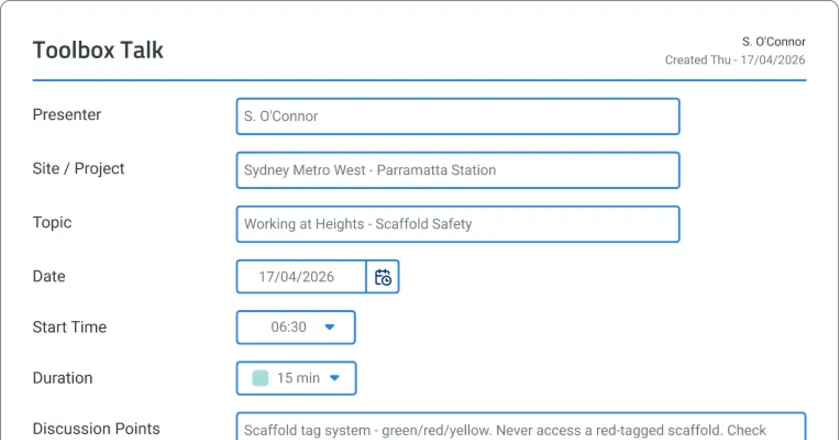
Toolbox Talk App
Toolbox Talk App by Sitemate captures digital attendance, voice-recorded safety discussions, and audit-ready records as the briefing happens. Try
View app

Toolbox Talk Excavation Safety
This Toolbox Talk Excavation Safety template is free and easily editable to adapt to your excavation safety workflow. The template already contains examples of identified excavation hazards and the necessary safety
View template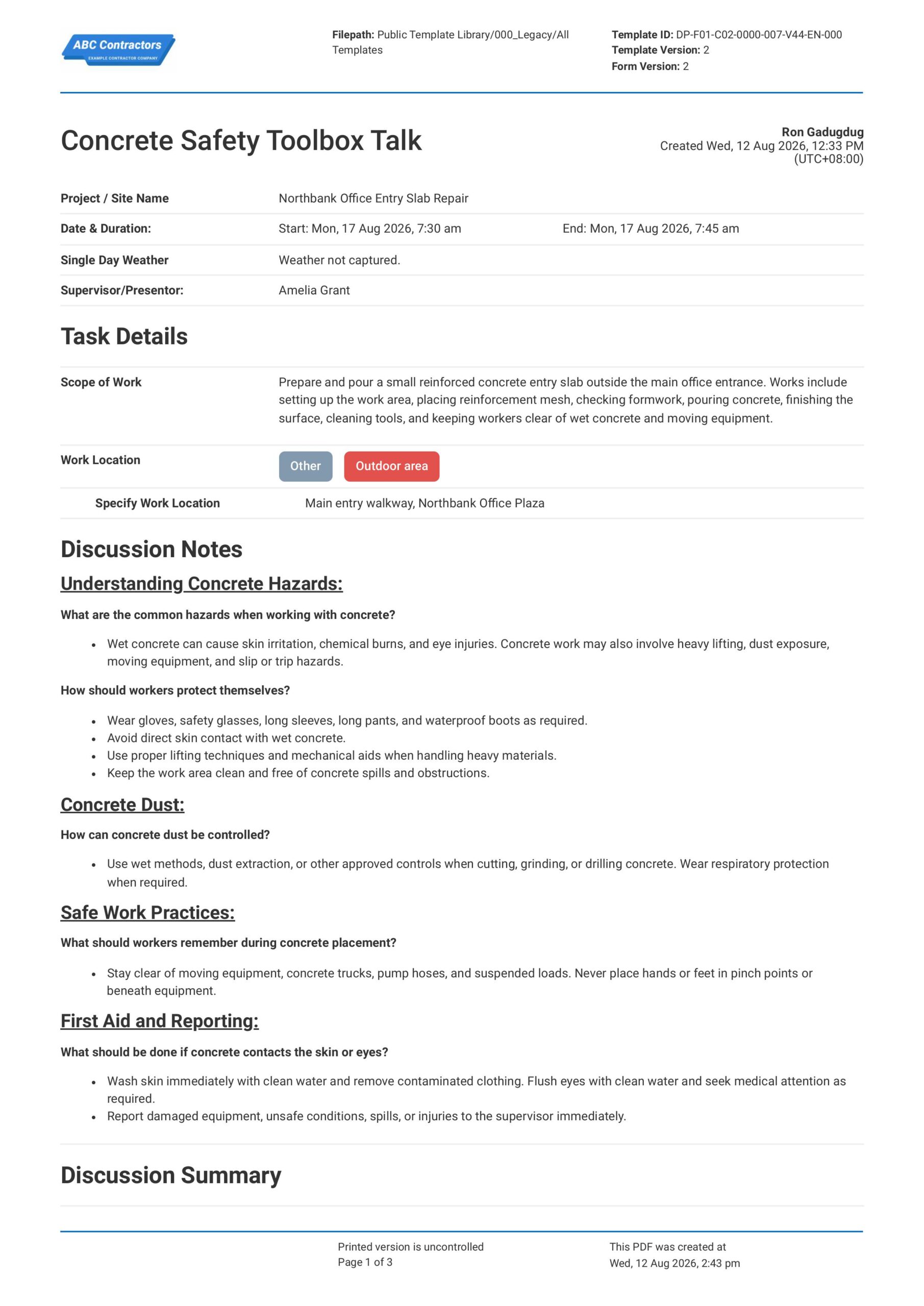
Concrete Safety Toolbox Talk
This Concrete Safety Toolbox Talk is an easy-to-use form that your workers can use to discuss concrete work hazards and safe work practices before starting concrete-related tasks. Record important toolbox talk details
View templateThis form was generated with Dashpivot software
- Access, edit and complete your Toolbox Talk Conveyor Safety from any device - mobile, tablet or computer.
- Print, download or send your Toolbox Talk Conveyor Safety as perfectly formatted PDF documents with your company logo.
- Store your Toolbox Talk Conveyor Safety securely online, where they can be searched and found in seconds
- Invite internal and external parties to see, edit and sign off on Toolbox Talk Conveyor Safety online.
