Free Field Reporting template
Construction Daily Report Template
No credit card required.
Tracking daily construction progress on your project or worksite? Looking for a construction daily report sample to help guide your own reporting process?
This Construction Daily Report is an easy-to-use form that your team can use to record and track daily work progress across construction projects. Record important details such as the reporting date, weather conditions, work completed, workforce attendance, equipment and materials used, project progress, site issues, delays, and upcoming activities, then attach supporting photos, comments, and sign-offs - all in one form. Plus, you can even export your completed reports to PDF or CSV for easy sharing with project managers, contractors, clients, and other stakeholders.
- 100% fully editable Construction Daily Report
- Export your Construction Daily Report to PDF or CSV
- Access your Construction Daily Report on mobile, tablet or computer
- Thousands of templates including other Field Reporting templates
 Click to preview
Trusted by thousands of companies, projects & teams worldwide


Compare this Construction Daily Report to reports made on other formats
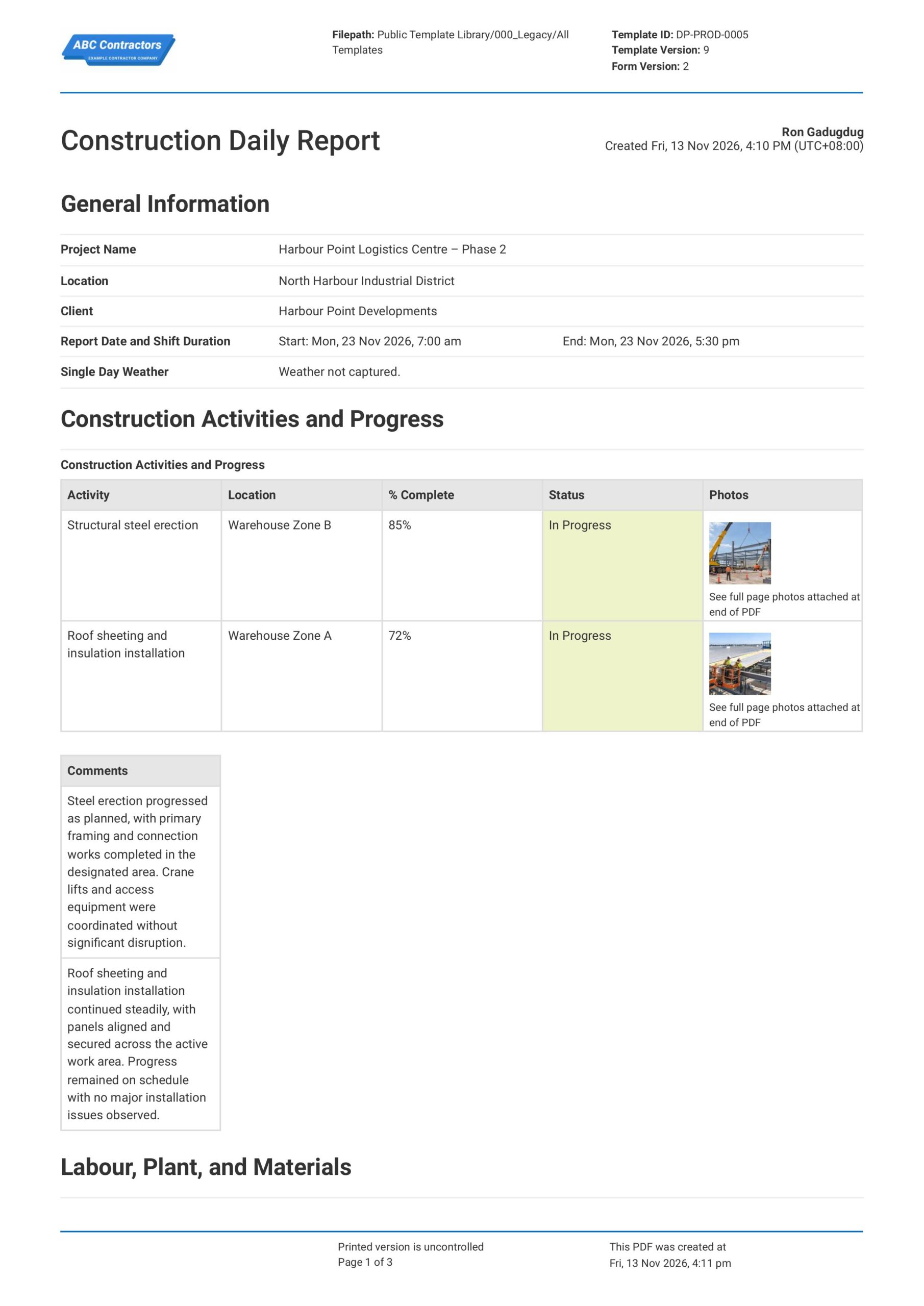
Curious how this report works? Check out the example below to see how you can generate your own version, export it as a custom form with your company details, and fill in your information to have a Construction Daily Report ready-to-use in minutes. No more starting from scratch like you would on Excel or Word-based forms.


This report was generated using Dashpivot, where you and your team can create smart documents that allow photos and video attachments, conditions, and more to tailor-fit the needs of all your work tasks.
- Access, edit and complete your Construction Daily Report from any device - mobile, tablet or computer.
- Print, download or send your Construction Daily Report as perfectly formatted PDF documents with your company logo.
- Store your Construction Daily Report securely online, where they can be searched and found in seconds
- Invite internal and external parties to see, edit and sign off on Construction Daily Report online.
Need a version for your own site?
Storm, the AI agent in Dashpivot, can build one from a short description or the form you already use.


 GLOBAL


What is a Construction Daily Report?
A Construction Daily Report is a document used by project managers, site supervisors, engineers, and contractors to record and track construction work completed over a single day. This report usually includes details on daily work activities, completed tasks, workforce and equipment, material deliveries, weather conditions, project progress, delays, and issues affecting the construction schedule.
Due to the changing site conditions, work schedules, and resource requirements that come with construction projects, daily reporting is important for identifying delays, tracking completed work, and comparing actual progress against project plans. This makes Construction Daily Reports highly relevant in residential building, commercial construction, civil works, infrastructure, utilities, and industrial projects where teams need to monitor daily productivity and keep stakeholders informed of project progress.
Applicable Standards and Policies for Construction Daily Report
There are generally no explicit universal formatting requirements for a Construction Daily Report. However, most construction contracts and project management frameworks require businesses to maintain accurate records of daily work progress, labour, equipment, materials, and site conditions. A Construction Daily Report is a good document to support these requirements. Here are examples of common standards and frameworks referenced around the world:
- ISO 21502:2020 provides guidance on project monitoring, documentation, and reporting
- PMBOK Guide covers project scheduling, progress tracking, and performance reporting
- FIDIC Conditions of Contract include reporting and recordkeeping requirements for applicable construction contracts
- NEC4 Engineering and Construction Contract includes requirements for programme management and project communication
- Local construction contracts commonly require daily progress records, work logs, and supporting documentation
Staff Members and Parties That Use the Construction Daily Report
A Construction Daily Report is primarily used by project teams that monitor daily construction progress, completed work, workforce activities, equipment use, and issues affecting project delivery. Here are examples of common parties that use a Construction Daily Progress Report:
- Site supervisors and project managers
- Foremen and site engineers
- Construction managers
- Contractors and subcontractors
- Clients and project consultants
Business Risks Reduced by the Construction Daily Report
Using a Construction Daily Report helps businesses identify issues such as incomplete work, schedule delays, low productivity, resource shortages, and unexpected site conditions before they develop into major project problems. Without accurate daily progress records and proper documentation, businesses may be exposed to risks such as:
- Project delays and missed construction milestones
- Cost overruns caused by poor productivity or resource management
- Inaccurate progress records and unsupported payment claims
- Contractual disputes over delays, work scope, or completed activities
- Poor coordination between contractors and project teams
Business Opportunities Created by the Construction Daily Report
A well-prepared Construction Daily Report helps businesses improve project visibility, daily planning, and decision-making through accurate records of completed work and project performance. Here are some ways a Construction Daily Progress Report can help businesses:
- Improve project scheduling and resource allocation
- Identify recurring delays and opportunities to improve productivity
- Improve coordination between supervisors, contractors, and project stakeholders
- Build client confidence through transparent reporting and accurate project records
What Should be Included in a Construction Daily Report?
There are no single global requirements that cover the exact format of a Construction Daily Report. Rather, reporting requirements can vary depending on the project type, contract requirements, client obligations, and company reporting procedures. However, there are some core elements that are typically included that you should know about:
- Project details such as site location, reporting date, weather conditions, and responsible persons
- Work progress details including completed activities, work quantities, locations, and percentage of completion
- Labour, subcontractor, equipment, and material usage throughout the reporting period
- Project delays, site issues, variations, safety incidents, and any disruptions affecting work progress
- Supporting photographs, upcoming activities, outstanding tasks, and supervisor sign-off
How to Create a Construction Daily Report
Building a Construction Daily Report should be based on actual site conditions and an effective reporting structure. In this section, we discuss important steps so you can create your own Construction Daily Report.
Before starting your Construction Daily Report form, the following pre-requisites should be ready.
- Project or site details are confirmed and ready.
- Daily construction activities and work progress must be ready.
- Workforce, subcontractor, and equipment details must be gathered.
- Material deliveries must be documented.
- Delays, safety incidents, and site issues must be noted.
- Supporting photos and supervisor approval details must be gathered.
Start with Project and Reporting Information
Recording general project information at the beginning of your Construction Daily Report helps establish context for the day's activities. Here are some examples of core information that you should include:
- Project name and site location
- Date and reporting period
- Contractor or subcontractor details
- Weather and site conditions
Record Daily Construction Activities and Progress
Documenting daily construction activities helps provide a clear record of the work completed and the overall progress made on site. Make sure to include details such as:
- Description of work activities performed
- Work areas or locations where activities took place
- Quantity of work completed
- Actual work progress versus projected progress
- Photos or supporting records of completed work
Document Workforce, Equipment, and Materials
Next, project teams need to track labour, equipment usage, and materials, and deliveries throughout the day. Here are some examples of information that should be recorded, noting that separate tallies should be made for different subcontractors.
- Number of workers on site
- Total labour hours worked
- Plant, machinery, and equipment used
- Materials delivered or installed
Identify Site Issues, Incidents, and Delays
It is important that any issues or delays are documented to provide a clear account of what affected construction activities during the day. Common issues that you should look out for include:
- Weather-related delays or work interruptions
- Equipment breakdowns or material shortages
- Safety incidents or unsafe site conditions
- Access restrictions or coordination issues
- Outstanding approvals
Complete Review, Follow-Up, and Sign-Off
Complete your Construction Daily Report with a section that allows users to verify that the information recorded has been acknowledged. Here are some examples of fields you can include:
- Names and roles of reviewers and approvers
- Date of review and approval
- Supervisor or site manager sign-off
Why are Construction Daily Reports Important?
Construction Daily Reports are important because construction projects involve multiple work activities, contractors, resources, and deadlines that need to be tracked throughout the project. This is especially important on civil, infrastructure, commercial, and industrial projects where delays in material deliveries, labour availability, equipment breakdowns, or site access can affect the overall construction schedule.
Essentially, a Construction Daily Progress Report helps project management teams track actual work progress against planned activities, identify delays, and keep a record of completed work. Additionally, it provides clear documentation of project progress, resource usage, and site issues, supporting communication between stakeholders, progress claims, and the review of project delays or contractual disputes.
How to Create Your Construction Daily Report in an App or Software System
A well-designed Construction Daily Reporting process helps site teams track work progress, labour, equipment, site conditions, delays, and key events, while keeping daily records structured for easy review, coordination, and sharing.
Start your Construction Daily Report with General Information
First, begin your Construction Daily Report with key project details so the document can be traced to the correct construction activity and reporting period. For ease of use, make sure to use simple text, date, and time fields for the following information.
- Text fields for Project Name, Location, and Client Name
- Date and time, or calendar fields for Report Date/s and Time of Shift start and end
- Text field to document weather conditions or Automatic Single Day Weather capture
Create a Table for Construction Activities and Progress
Next, create a section where users can record the construction activities performed during the shift, their locations, percentage of completion, and supporting progress photos. We highly recommend using a table for this section so each activity can be documented alongside its current progress and status.
- First column for Activity
- Second column for Location
- Third column for % Complete, with a percentage input field
- Fourth column for Status, with a dropdown field
- Fifth column for Photos, with photo upload or capture fields
- Additional multi-line text field for Comments
Create a Table for Labour Information
Users will next need to record the subcontractors and workers present on site during the reporting period, including their shift hours and workforce numbers. We highly recommend using a table for this section so labour attendance can be documented with the following columns:
- First column for Subcontractor
- Second column for Shift Start, with a time selector field
- Third column for Shift End, with a time selector field
- Fourth column for Hours
- Fifth column for Number of Workers
Create a Table for Plant and Equipment Information
After recording labour information, add a section where users can list the plant and equipment used during construction activities. We highly recommend using a table for this section so the equipment type, quantity, operating hours, and current condition can be recorded with the following columns:
- First column for Equipment Name
- Second column for Equipment Type
- Third column for Quantity
- Fourth column for Operating Hours
- Fifth column for Status/Remarks
Create a Table for Materials and Deliveries Information
Next, create a section where users can record materials delivered to or received on site during the shift. We highly recommend using a table for this section so each delivery can be documented alongside its supplier, quantity, and delivery status.
- First column for Supplier
- Second column for Description
- Third column for Quantity
- Fourth column for Status/Remarks
Create a Table for Safety, Quality, and Site Inspections
Next, create a section where users can record the safety and quality inspections conducted during the reporting period, including the inspection scope, location, findings, and supporting photos. We highly recommend using a table for this section, with the following formatting for the columns:
- First column for Description of Inspection Scope
- Second column for Location
- Third column for Findings / Results
- Fourth column for Comments & Remarks
- Fifth column for Photo/s, with photo upload or capture fields
- Additional multi-line text field for Additional Comments
Create a Table for Delays, Issues, and Near Misses
After the site inspection log, add a section where users can record any delays, construction issues, and near misses encountered during the shift. We highly recommend using a table for this section so each event can be documented alongside the actions taken and its current status.
- First column for Type, with a dropdown field
- Second column for Date, with a date selector field
- Third column for Location
- Fourth column for Description
- Fifth column for Action Taken
- Sixth column for Status, with a dropdown field
- Additional multi-line text field for Additional Comments
End your Construction Daily Report with Certification and Approval
Finally, complete the Construction Daily Report with a certification statement and sign-off fields for the personnel preparing and approving the report. If your app or software allows, use pre-filled certification statements and automatic e-signature fields to keep the approval process digital.
- Pre-filled text field for Report Certification Statement
- E-signature field for Report Certification
- E-signature field for Report Approval
- Automatic date and time stamp fields for each sign-off
Frequently Asked Questions
What is a Construction Daily Report used for?
A construction daily report is used to document daily work progress, site conditions, workforce activities, and equipment usage on a construction project. This is important because it gives project managers a daily record of completed work, delays, incidents, and other events that may affect project schedules and costs.
Are there any regulations or legislation on how to format a Construction Daily Report?
There is no single required format for a Construction Daily Report across all regions. However, construction contracts, government project requirements, and local regulations may specify what information must be recorded and when reports must be submitted. Because of this, teams should check project reporting requirements before preparing their reports.
What should be included in a Construction Daily Report?
A daily construction report should include the project details, reporting date, weather conditions, completed work, workforce attendance, equipment usage, material deliveries, site inspections, safety incidents, delays, and supporting photos. It should also record the responsible contractors, work locations, and any outstanding issues requiring follow-up.
How is AI helping teams create Construction Daily Reports?
AI can help teams create Construction Daily Reports by turning site notes, workforce records, photos, and progress updates into clear report drafts. When used with construction daily report software or a construction daily report app, AI can also help identify delays, flag missing information, and prepare daily progress summaries for management review.
About the Author

Ron Gadugdug
Content Engineer
 LinkedIn
Education
Cebu Institute of Technology - University - Civil Engineering
Bio
Ron is a Civil Engineer with 6 years of experience in the construction industry, primarily focused on quantity surveying, cost estimation, project management, quality control, contract administration, and property & engineering insurance. At Sitemate, he writes about practical applications of evolving technologies and digital solutions that support construction professionals in improving efficiency, compliance, and project delivery across the built world.
Past Projects
Quantity Surveying & Cost EngineeringPerformed quantity take-offs of several high-rise and horizontal structures using sheets and applications like Revit and Bluebeam Revu, and spearheaded trials with Building Information Modeling (BIM) software.
Project Management & ConsultancyCoordinated with project management teams during the construction of local projects such as a 4-tower hotel & resort, a 22 storey condominium project, and a school dormitory project.
Contract AdministrationAssisted during contract biddings and negotiations with general contractors and sub-contractors, and oversaw progress reporting, billings, and payment.
Property & Engineering InsuranceDedicated non-life claims handler, overseeing property and contractor all-risk insurance claims, risk management, and bonds.
Version history
Last edited on 13 November 2026, template version 25-11-v2