Fatigue Risk Calculator Template

Start with a free 30-day trial. No credit card required.
Need a quick way to measure fatigue risk across your team? This template comes pre-built with predefined fields, a simple scoring system, and formula fields that work out each person's fatigue level for you, so supervisors can spot high-risk individuals without manual calculations. You can edit any part of it, from the questions asked to how answers are scored, to match how your company manages fatigue, and the calculator will still hold up against the regulations you'd be audited on.
This Fatigue Risk Calculator is an easy-to-use form that your workers can use to record the factors that contribute to fatigue, generate a fatigue level result in just a few clicks, and give supervisors the information they need to make informed decisions about fatigue-related risks.
 100% fully editable Fatigue Risk Calculator
Export your Fatigue Risk Calculator to PDF or CSV
Access your Fatigue Risk Calculator on mobile, tablet or computer
Trusted by companies, projects and teams of all sizes















What is Fatigue Risk Calculator?
A Fatigue Risk Calculator is a tool for evaluating a worker’s fatigue levels and their possible impact on job performance. The fatigue calculator tool employs a scoring system that takes into account various contributing factors, resulting in an overall fatigue level score. Determining this risk is important, as workers with high fatigue levels are prone to accidents and injuries in the workplace.
With an accurate fatigue risk assessment tool to evaluate fatigue, companies can implement the correct measures to help provide safety, boost productivity, and promote employee well-being.
Compare this Fatigue Risk Calculator tool with rigid paper forms created in Word, Excel or PDF
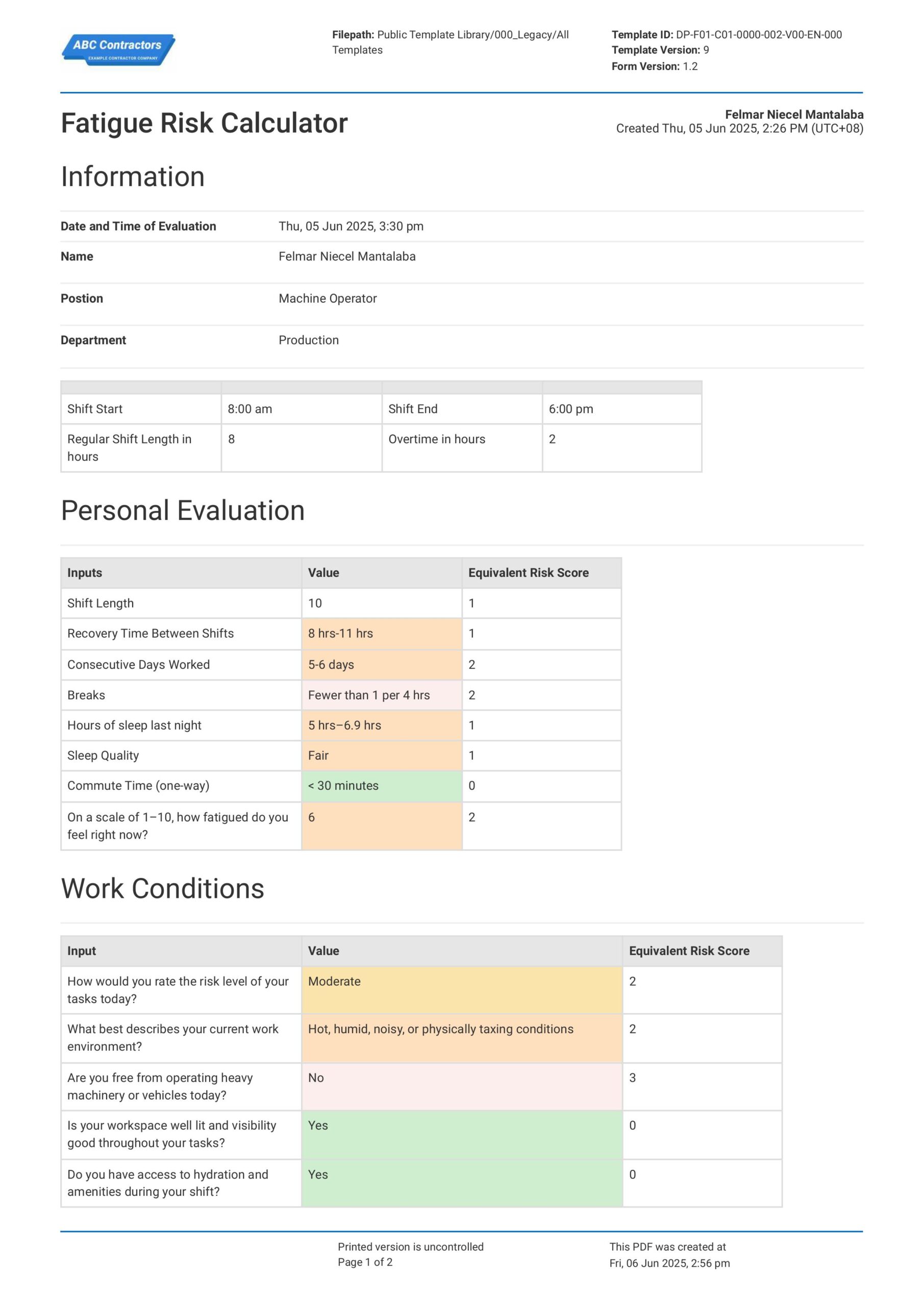
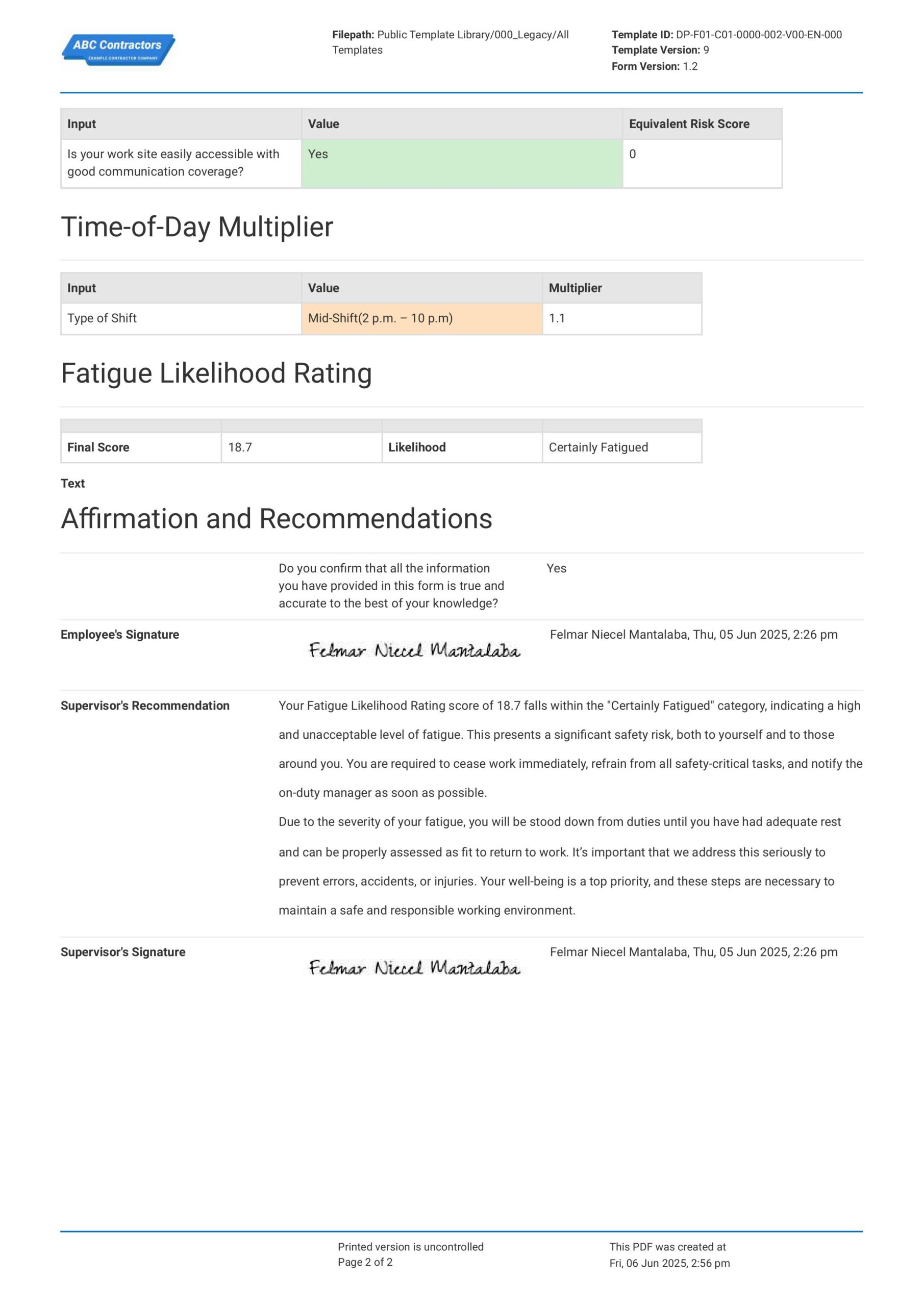
Curious how this Fatigue Risk Calculator works? Check out the fatigue calculation example below to see how the scoring system turns each answer into a clear fatigue level result. You can generate your own version, export it as a custom form with your company details, and fill in your information to have a ready-to-use Fatigue Risk Calculator in minutes.
Use this Fatigue Risk Calculator template for free

Generate this template automatically with Storm
You don't have to build the Fatigue Risk Calculator field by field. Let Storm, the AI Data Capture Agent inside Dashpivot, build the template for you in seconds.
Describe what you need
Tell Storm the form you want in plain language and it builds a structured digital template from scratch, with fields, tables, and signatures in place.
Upload what you already use
Drop in your existing PDF, Word, Excel, or even a photo of a paper form. Storm rebuilds it as a smart digital template with the structure intact.
 Storm
Storm
Generate a Fatigue Risk Calculator form template that I can use for my business
Applicable Standards and Policies for Fatigue Risk Calculator
Screening employees using the Fatigue Risk Calculator is necessary to prevent fatigue-related injuries and illnesses. The evaluation process should always be integrated into the safety management system, especially for high-risk environments, like aviation and construction, to ensure that they comply with the following regulatory standards:
- International Civil Aviation Organization (ICAO): This regulatory body mandates that aviation businesses should implement a Fatigue Risk Management Plan to prevent microsleeps, manage multi-time-zone disruptions, and support long-range operations.
- International Maritime Organization (IMO): This regulatory body requires sea-operating vessels to implement a Fatigue Risk Management Plan to manage fatigue stress from constant exposure to the high-risk hazards of seafaring.
- International Organization for Standardization (ISO): The ISO acknowledges fatigue stress as a hazard in the workplace, which requires proper safety control measures that can be established in a Fatigue Risk Management Plan.
Staff Members and Parties that use Fatigue Risk Calculator
The following are the personnel involved in conducting a fatigue evaluation using a Fatigue Risk Calculator:
- Safety manager: The person who holds this role is the core authority of managing safety in the workplace. The safety manager directs the daily implementation of safety measures for all identified hazards, which includes fatigue stress.
- Safety officer: This role ensures that safety measures are always implemented during actual work hours. Safety officers also monitor the effectiveness of the measures, ensuring that they continuously prevent the accumulation of fatigue stress.
- Medical staff: These personnel are well-versed on how fatigue stress manifests, how it affects personnel, and the needed prevention and treatment measures. Their knowledge would be beneficial in providing accurate measures for fatigue stress.
- Supervisors: They are responsible for overseeing the day-to-day activities. Being on the frontlines has given them sufficient experience to identify which activities can trigger the accumulation of fatigue stress.
Business Risks Reduced by Fatigue Risk Calculator
ISO has considered fatigue stress a workplace hazard, which means businesses should never underestimate this risk. The following business risks could arise if businesses do not properly evaluate fatigue and stress and provide the necessary measures:
- Fatigue-related incidents that cause costly operation downtime
- High healthcare costs
- Resignation waves due to burnout
- Reputational damage
- Non-compliance with regulatory standards
- Spiking of insurance premiums
Business Opportunities Created by Fatigue Risk Calculator
Conducting a fatigue evaluation using a Fatigue Risk Calculator is a proactive approach in protecting the employees and the business. Regularly conducting this process also ensures the business of the following opportunities:
- Efficient business operation
- Healthy and effective workforce
- Solid business reputation
- Deeper employee trust and relationships
- Good results from safety audits
- Higher potential for winning bids due to high workforce efficiency
Who should be evaluated using the Fatigue Risk Calculator?
- Site workers
- Operators
- Technicians
- Contractors
- Team leaders
- Night shift workers
- Supervisors
- Managers
- Admin staff
- Support staff
Interpreting fatigue risk scores
A Fatigue Risk Calculator uses a scoring system that provides a structured way of assessing fatigue levels based on measurable indicators, such as sleep quality, work schedule, and work environment. This scoring system helps supervisors make decisions and recommendations. The scores are grouped into ranges that indicate the levels of fatigue, from good (well-rested) to certainly fatigued (severe signs of fatigue).
1-3: Good
Workers who score 1-3 on the Fatigue Risk Calculator are in excellent condition. It means that these individuals are well-rested, functioning optimally, and fit for duty. This score should be the ideal target for workers to maintain, as it reduces the likelihood of fatigue-related risks and contributes to a safer and more productive work environment.
4-6: Unlikely Fatigued
This range suggests that the worker is exhibiting signs of tiredness, such as slight drowsiness or reduced focus, but the level of alertness remains at acceptable levels, and the worker is generally fit for work. However, it is still vital to monitor for any changes, especially during long shifts or physically demanding tasks. Letting the employee take breaks can mitigate the progress of fatigue.
7-9: Possibly Fatigued
A score in this range may indicate that signs of fatigue are already manifesting. The worker may begin to lose focus, have a slower reaction time, and experience a decrease in levels of alertness. While the worker may be able to do their tasks, there is an increased risk of lapses in judgment and errors. During this stage, it is important for the team lead or supervisor to provide control measures that could intervene in fatigue buildup.
10-12: Likely Fatigued
Getting these scores on the Fatigue Risk Calculator suggests that workers are experiencing significant levels of fatigue that can impair their mental and physical performance. These effects can pose a serious risk, especially in high-risk environments where alertness and precision are critical to safety. Supervisors should treat this level of fatigue as a warning sign that could end poorly if not addressed properly.
13 and above
Certainly fatigued: Scoring 13 and above indicates that the worker is experiencing severe levels of fatigue. At this stage, workers are no longer fit to work. Forcing them to work at these levels can pose an immediate threat to personal safety, coworker safety, and operational integrity. Supervisors should immediately remove any individual experiencing these levels of fatigue from duty and advise them to rest and recover. Supervisors should also take these circumstances as a sign to review and revise schedules, workloads, and fatigue management protocols.
How to Create a Fatigue Risk Calculator template
Follow these steps to build a Fatigue Risk Calculator that's ready to deploy across your sites and shifts. The process covers both the design of the assessment criteria and the configuration of scoring logic within Dashpivot.
Before creating a Fatigue Risk Calculator, gather the following
- Confirmation of the fatigue risk factors relevant to your industry and shift patterns (e.g., hours worked, sleep data, time of day, physical demand)
- A defined scoring scale — for example, a 0–10 fatigue scale for self-reported items and weighted multipliers for objective inputs
- A list of the control measures that apply at each risk level
- Clarity on who will complete the assessment (supervisor, worker, or jointly) and at what point in the shift
- Access to a Dashpivot account with template creation permissions
-
Create the information section
This section provides the general information on the person being assessed. This section should contain the following fields:
- Date and time of evaluation
- Employee Name
- Position
- Department
- Shift start and end
- Regular shift hours
- Overtime hours
-
Create the personal evaluation section
This section allows employees to evaluate themselves using the following field items:
- Shift Length
- Recovery Time Between Shifts
- Consecutive Days Worked
- Breaks
- Hours of sleep last night
- Sleep Quality
- Commute Time (one-way)
- A scale of 1–10 on how fatigued they feel
-
Create the work conditions section
This section evaluates the environment the personnel are working in. The evaluation should include the following field items:
- Risk level of tasks
- Environment description
- Involvement in operating heavy machinery
- Workplace visibility
- Access to hydration
- Proper communication
-
Computing the equivalent fatigue score
This section provides the total fatigue score based on the data provided by the employees in the field items. Here is a guide to help you configure the calculation.
- Each field item should have an equivalent fatigue score. For example, in the work conditions section, employees can choose between low, medium, and high for the risk level of tasks. Associate a score for each risk level: low – 0, medium – 3, high – 5
- Provide this time-of-day multiplier for each shift: morning shift multiplier = 1, mid-shift = 1.1, night shift = 1.5
- Create a field to place the total fatigue score. This field should compute the total fatigue score based on this formula: Total fatigue score = (∑ Fatigue score per field) x time-of-day multiplier
-
Create the sign-off section
This section validates the Fatigue Risk Calculator Form. The following fields and signatories should be present:
- Employee’s signature
- Supervisor’s signature
- Supervisor’s notes and recommendations
Frequently asked questions
How to create your Fatigue Risk Calculator in an App or Software System
A well-designed Fatigue Risk Calculator ensures that fatigue is identified early and employees are provided with proper guidance on how to recover from it. It also details the factors that contributed to the accumulation of fatigue, which helps provide accurate recovery solutions for the employee. Sitemate’s Fatigue Risk Calculator captures all these critical details in the provided template and helps users streamline the Fatigue Risk Calculator process.
10 minutes
Easy difficulty
-
How to create a Fatigue Risk Calculator in an App
The first step in creating a Fatigue Risk Calculator in an App is to create the information section. Here are the instructions to complete this section:
- Provide a date and time field for evaluation date and time
- Add text fields for the following information: employee name, position, department
- Add a predefined table with 4 columns and 2 rows.
- Format column 1, row 1, as a prefilled text containing the text “Shift start”
- Format column 2, row 1, as a time field to enable users to directly input when the time shift started
- Format column 3, row 1, as a prefilled text containing the text “Shift end”
- Format column 4, row 1, as a time field to enable users to directly input when the time shift ended
- Format column 1, row 2, as a prefilled text containing the text “Regular Shift Length in hours”
- Format column 2, row 2, as a text field to enable users to directly input their regular hours
- Format column 3, row 2, as a prefilled text containing the text “Overtime in hours”
- Format column 4, row 2, as a formula field to automatically calculate overtime hours. Use this formula to calculate the overtime hours (OT): OT = (time shift end – time shift start) – regular hours
-
Formatting the personal evaluation section
- Add a predefined table with 3 columns and 9 rows.
- Format the first row of the three columns with prefilled text to input the following headers: inputs, value, and equivalent risk score
- For the rest of the rows of the first column, format it as prefilled text fields to include the following inputs: Shift Length, Recovery Time Between Shifts, consecutive days worked, breaks, hours of sleep last night, sleep quality, commute time (one-way), and a scale of 1–10 on how fatigued they feel
- Format Column 2, Row 2, as a formula field that automatically provides total shift length. You can easily do this task by using the data provided in the table of the information section. Formula for this field: Total shift hours = time shift end – time shift start
- Row 3 in the second column should be formatted as a selection field for recovery time between shifts. Each selection item per can be integrated with colors to make the form more professional. Here are the selection items: ≥ 12 hrs, 8 hrs-11 hrs, < 8 hrs
- Row 4 in the second column should be formatted as a selection field for consecutive days worked. Each selection item can be integrated with colors to make the form more professional. Here are the selection items: 1-2 days, 3-4 days, 5-6 days, 7 days+
- Row 5 in the second column should be formatted as a selection field for break time. Each selection item can be integrated with colors to make the form more professional. Here are the selection items: ≥ 1 break every 4 hrs and Fewer than 1 per 4 hrs
- Row 6 in the second column should be formatted as a selection field for hours of sleep. Each selection item can be integrated with colors to make the form more professional. Here are the selection items: ≥ 7 hrs, 5 hrs–6.9 hrs, < 5 hrs
- Row 7 in the second column should be formatted as a selection field for sleep quality. Each selection item can be integrated with colors to make the form more professional. Here are the selection items: good, fair, bad
- Row 8 in the second column should be formatted as a selection field for commute time. Each selection item can be integrated with colors to make the form more professional. Here are the selection items: < 30 minutes, 30–60 minutes, > 60 minutes
- Row 9 in the second column should be formatted as a selection field for commute time. Each selection item can be integrated with colors to make the form more professional. Selection items must be numbers 1-10
- Format row 2, column 3 as a formula field that provides the equivalent fatigue score based on the selected shift length (SL). Here is the criterion for the formula: IF (SL>0 and SL<=8), Equivalent fatigue score = 0, IF (SL>8 and SL<=10), Equivalent fatigue score = 1, IF(SL>10 and SL<=12), Equivalent fatigue score = 2
- Format row 3, column 3 as a formula field that provides the equivalent fatigue score based on the selected recovery time between shifts (RT). Here is the criterion for the formula: IF (RT=”≥ 12 hrs”), Equivalent fatigue score = 0, IF (RT=”8 hrs-11 hrs”), Equivalent fatigue score = 1, IF (RT=”< 8 hrs"), Equivalent fatigue score = 2
- Format row 4, column 3 as a formula field that provides the equivalent fatigue score based on the selected consecutive days worked (CD). Here is the criterion for the formula: IF (CD=”1-2 days”), Equivalent fatigue score = 0, IF (CD=”3-4 days”), Equivalent fatigue score = 1, IF (CD=”5-6 days”), Equivalent fatigue score = 2,IF (CD=”7 days+”), Equivalent fatigue score = 3
- Format row 5, column 3 as a formula field that provides the equivalent fatigue score based on the selected break time (B). Here is the criterion for the formula: IF (B=”≥ 1 break every 4 hrs”), Equivalent fatigue score = 0, IF (B=”Fewer than 1 per 4 hrs”), Equivalent fatigue score = 2
- Format row 6, column 3 as a formula field that provides the equivalent fatigue score based on the selected hours of sleep (HS). Here is the criterion for the formula: IF (HS=”≥ 7 hrs”), Equivalent fatigue score = 0, IF (HS=”5 hrs–6.9 hrs”), Equivalent fatigue score = 1, IF (HS=”< 5 hrs"), Equivalent fatigue score = 2
- Format row 7, column 3 as a formula field that provides the equivalent fatigue score based on the selected sleep quality (SQ). Here is the criterion for the formula: IF (SQ=”Good”), Equivalent fatigue score = 0, IF (SQ=”Fair”), Equivalent fatigue score = 1, IF (SQ=”Bad”), Equivalent fatigue score = 2
- Format row 8, column 3 as a formula field that provides the equivalent fatigue score based on the selected commute time (CT). Here is the criterion for the formula: IF (CT=”< 30 minutes"), Equivalent fatigue score = 0, IF (CT="30–60 minutes"), Equivalent fatigue score = 1, IF (CT="> 60 minutes”), Equivalent fatigue score = 2
- Format row 9, column 3 as a formula field that provides the equivalent fatigue score based on the selected fatigue level (FL). Here is the criterion for the formula: IF (FL=1 or 2 or 3), Equivalent fatigue score = 0, IF (FL=4 or 5), Equivalent fatigue score = 1, IF (FL=6 or 7), Equivalent fatigue score = 2, IF (FL > 7), Equivalent fatigue score = 3
-
Formatting the work conditions section
This section evaluates the environment the personnel are working in. The evaluation should include the following field items:
- Add a predefined table with 3 columns and 7 rows.
- Format the first row of the three columns with prefilled text to input the following headers: inputs, value, and equivalent risk score
- For the rest of the rows of the first column, format it as prefilled text fields to include the following inputs: risk level of tasks, environment description, involvement in operating heavy machinery, workplace visibility, access to hydration, and proper communication
- Row 2 in the second column should be formatted as a selection field for the risk levels of the task. Each selection item per row can be integrated with colors to make the form more professional. Here are the selection items: low, moderate, high
- Row 3 in the second column should be formatted as a selection field for the environment description. Each selection item per row can be integrated with colors to make the form more professional. Here are the selection items: Climate-controlled or well-ventilated; quiet; Warm or moderately noisy, but manageable; Hot, humid, noisy, or physically taxing conditions; Extreme heat, cold, noise, or confined space
- Row 4 in the second column should be formatted as a selection field for involvement in operating heavy machinery. Each selection item per row can be integrated with colors to make the form more professional. Here are the selection items: Yes and No
- Row 5 in the second column should be formatted as a selection field for workplace visibility. Each selection item per row can be integrated with colors to make the form more professional. Here are the selection items: Yes and No
- Row 6 in the second column should be formatted as a selection field for access to hydration. Each selection item per row can be integrated with colors to make the form more professional. Here are the selection items: Yes and No
- Row 7 in the second column should be formatted as a selection field for proper communication. Each selection item per row can be integrated with colors to make the form more professional. Here are the selection items: Yes and No
- Format row 2, column 3 as formula fields that provide the equivalent fatigue score based on the selected risk level of tasks (RT). Here is a criterion for the formula: IF (RT=”Low”), Equivalent fatigue score = 0, IF (RT=”Moderate”), Equivalent fatigue score = 2, IF (RT=”High”), Equivalent fatigue score = 3
- Format row 3, column 3 as formula fields that provide the equivalent fatigue score based on the selected environment description (ED). Here is a criterion for the formula: IF (ED=”Climate-controlled or well-ventilated; quiet”), Equivalent fatigue score = 0, IF (ED=”Warm or moderately noisy, but manageable”), Equivalent fatigue score = 1, IF (ED=”Hot, humid, noisy, or physically taxing conditions”), Equivalent fatigue score = 2, IF (ED=”Extreme heat, cold, noise, or confined space”), Equivalent fatigue score = 3
- Format row 4, column 3 as a formula field that provides the equivalent fatigue score based on the selected involvement in operating heavy machinery (IM). Here is a criterion for the formula: IF (IM=”Yes”), Equivalent fatigue score = 3, IF (IM=”No”), Equivalent fatigue score = 0
- Format row 5, column 3 as a formula field that provides the equivalent fatigue score based on the selected workplace visibility (WV). Here is a criterion for the formula: IF (WV=”Yes”), Equivalent fatigue score = 0, IF (WV=”No”), Equivalent fatigue score = 2
- Format row 6, column 3 as a formula field that provides the equivalent fatigue score based on the selected Access to hydration (AH). Here is a criterion for the formula: IF (AH=”Yes”), Equivalent fatigue score = 0, IF (AH=”No”), Equivalent fatigue score = 2
- Format row 7, column 3 as a formula field that provides the equivalent fatigue score based on the selected Proper communication (PC). Here is a criterion for the formula: IF (PC=”Yes”), Equivalent fatigue score = 0, IF (PC=”No”), Equivalent fatigue score = 2
-
Adding the time-of-day multiplier
- Add a predefined table with 3 columns and 2 rows.
- Format the first row of the three columns with prefilled text to input the following headers: inputs, value, equivalent risk score
- Format column 1, row 2, as a prefilled text field containing the text “Type of shift”
- Format column 2, row 2, as a selection field. Selection items in this field can be integrated with colors to make the form more professional. Here are the selection items you can use: morning shift, mid-shift, and night shift
- Format column 3, row 2 as a formula field that provides the equivalent multiplier based on the selected shift (S): IF (S=”Morning shift”), Equivalent multiplier = 1, IF (S=”Mid-shift”), Equivalent multiplier = 1.1, IF (S=”Night shift”), Equivalent multiplier = 1.5
-
Adding the fatigue likelihood rating
- Add a predefined table with 4 columns. The first and third columns should be formatted as prefilled text containing the following text: column 1 = “Final Score”, Column 3 = “Likelihood”
- Format the second column as a formula field. This field should reflect the total fatigue score of the employee. Formula: Total fatigue score = (∑ fatigue score on personal evaluation section + ∑ fatigue score on work condition section) X (selected time-of-day multiplier)
- Format the fourth column as a formula field that provides the equivalent fatigue likelihood (FL) based on the total fatigue. Follow this criterion: IF (FL = 1 or 2 or 3), Likelihood = Good, IF (FL = 4 or 5 or 6), Likelihood = Unlikely Fatigued, IF (FL = 7 or 8 or 9), Likelihood = Possibly Fatigued, IF (FL = 10 or 11 or 12), Likelihood = Likely Fatigued, IF (FL > 12), Likelihood = Certainly Fatigued
-
Formatting the review and affirmation section
- Add a yes-or-no field to enable employees to affirm if all the information they have provided in the form is true and accurate to the best of their knowledge.
- Provide signature fields to the following: employee and supervisor
- Add a text field to enable supervisors to input recommendations
About the author

Felmar Mantalaba
Content Engineer
 LinkedIn
Education
Cebu Institute of Technology - University - Mechanical Engineering with Mechatronics
Bio
Felmar is a mechanical engineer, whose four years of experience in the mining industry inspired him to write and share stories to progress the revolution of new technologies and create smarter, smoother ways of living.
Past Projects
Safety, Health, and Environment Management System (SHEMS) CoordinationSHEMS Coordinator at Atlas Consolidated Mining, ensuring organizational compliance with ISO 14001 and ISO 45001 standards, performing risk assessments, developing policies, and conducting audits and inspections to maintain a safe and environmentally responsible workplace.
Maintenance Management and OptimizationSenior Maintenance Manager (OIC) leading equipment maintenance and operational efficiency initiatives, reducing downtime by 10%, improving Mean Time Between Failure (MTBF) and Mean Time To Repair (MTTR) for major equipment, and managing maintenance schedules, manpower, and materials, while overseeing capital project optimization.
Inspection Engineering and Equipment ReliabilityInspection Engineer responsible for technical blueprint interpretation, vendor collaboration, preventive maintenance scheduling, and data collection for vibration and temperature readings, delivering actionable recommendations and comprehensive reports to improve equipment reliability and operational performance.
End-to-End Operational Oversight in Mining EngineeringContributed to multiple facets of operational management, including SHEMS compliance, maintenance optimization, inspections, and capital project evaluation, integrating safety, reliability, and efficiency improvements across all stages of copper production operations.
Version History:
Related apps and templates
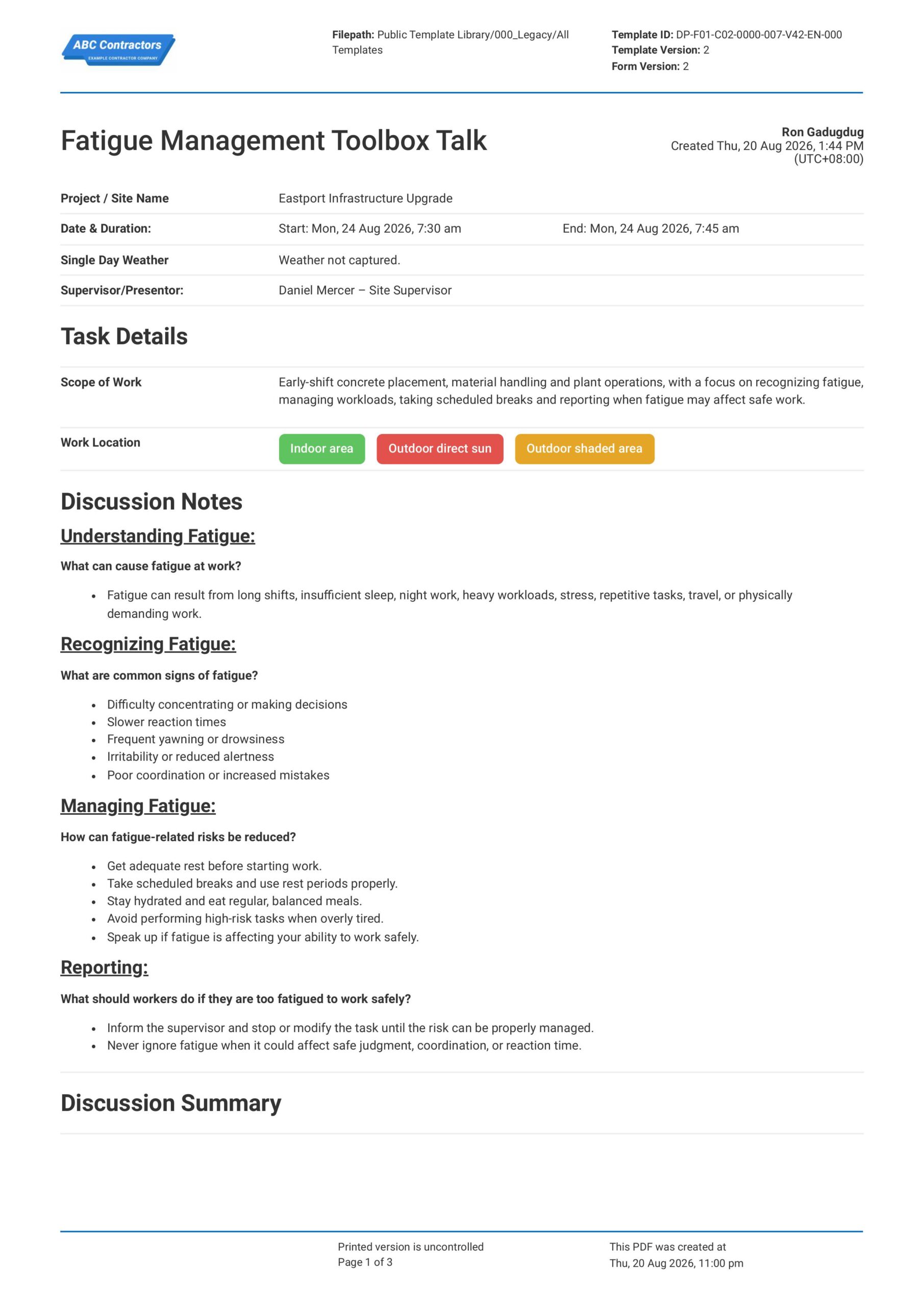
Fatigue Management Toolbox Talk
This Fatigue Management Toolbox Talk is an easy-to-use form that your workers can use to discuss fatigue risks, warning signs, and safe work practices before starting physically demanding, long-hour, shift-based, or
View template
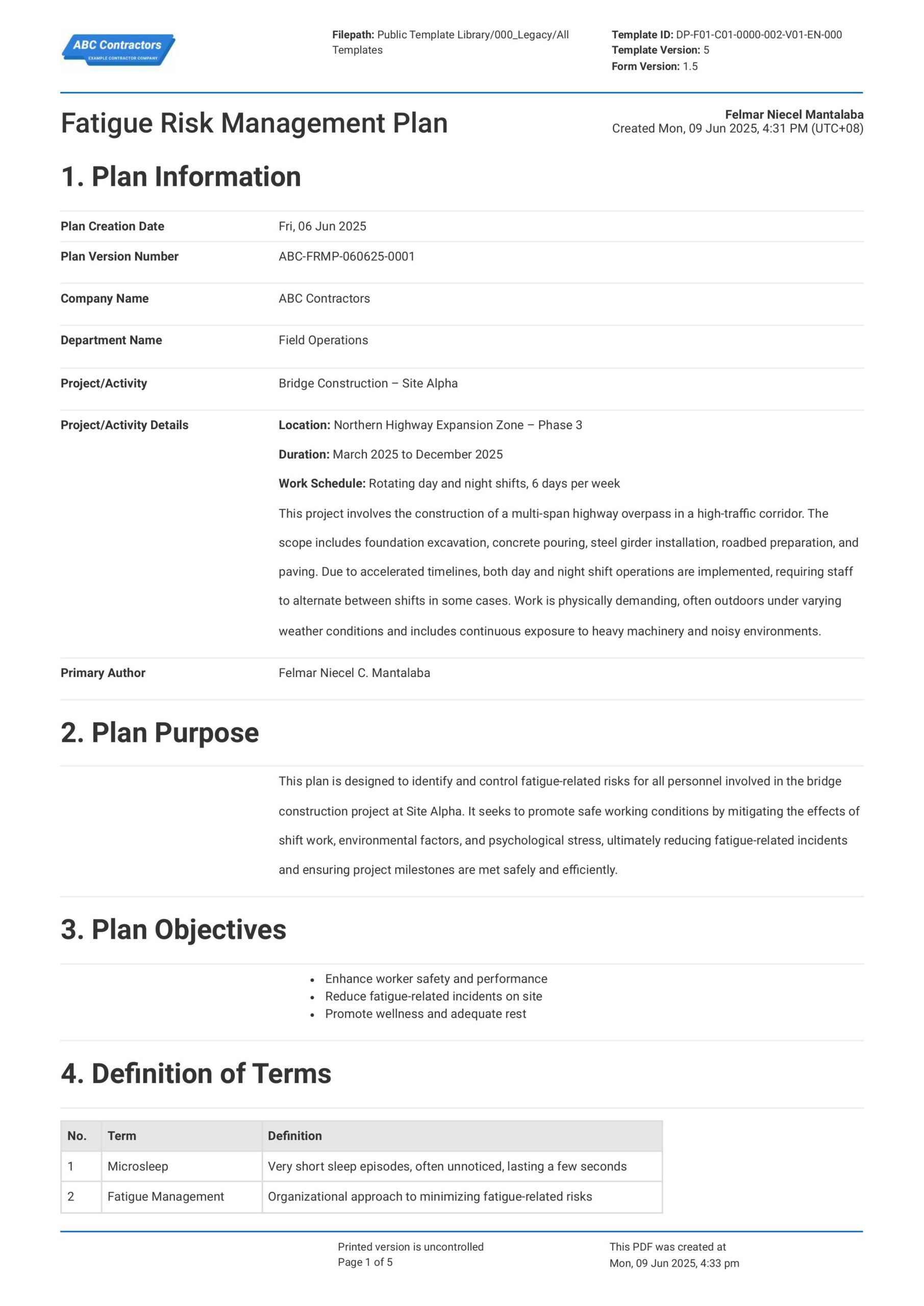
Fatigue Risk Management Plan
Sitemate's Fatigue Risk Management Plan Template is free and readily usable for businesses to help them establish a complete and compliant Fatigue Risk Management Plan. Using this template ensures proper fatigue
View template
First Aid Toolbox Talk
This First Aid Toolbox Talk template is free and readily available to guide supervisors in discussing proper first aid procedures and recording the attendance of the attendees. The template already contains the
View template