How to use Claude to write weekly construction progress reports
By Friday, everything for the weekly progress report is already on record: daily reports, inspections, photos and delays. The hard part is pulling it into something a client will actually read. Connect your project to Claude, write the prompt once, and each week you'll get a draft to check, tweak and send.

 Claude
Northgate Stage 2, week ending 15 August.
- Level 3 slab poured Tuesday, stripped Friday
- Facade install reached grid line 8, two days behind schedule
- One weather delay Wednesday, six hours lost to rain
Two items need your input before this goes to the client.
Trusted by companies, projects and teams of all sizes















The short answer
Connect your Dashpivot project to Claude and tell it which week to cover. Claude drafts the progress report from that week's daily reports, inspections and photos. Reuse the same prompt every week and just change the dates. The supervisor or project manager checks the draft and fills any gaps before it goes to the client.
How to get Claude writing your weekly reports
Getting Claude to write your weekly report takes three things. Two are about the records Claude reads, and they're the ones most often skipped. Only the last is a connection.
-
Step 1
Get the work onto digital forms
Daily reports need to go on a digital form with the same fields every time. A photo of a paper sheet is just an image, with nothing in it Claude can read as a record.
-
Step 2
Build up enough history to read back over
One daily report doesn't tell Claude much. Once there are a few weeks of them against the same project, the patterns and the gaps start to show.
-
Step 3
Connect Claude over MCP
With the records in place, your assistant needs a way to reach them. That's what MCP does: it lets an assistant query a system it doesn't own, using the permissions you already have. Depending on which system you use, the process may vary. We cover Sitemate MCP later in this article.
Prompt guidance for writing weekly progress reports with Claude
Put the effort into one prompt you can keep. A good weekly prompt names the form template and the project exactly, gives the dates, and sticks to one form template per query. Save it, and each week the only thing you change is the dates. Vague prompts, and prompts that mix templates, are where most thin answers come from.
- "List the workspaces, projects and teams I have access to."
- "List the form templates in [team name]."
- "Pull every [daily report template] form for [project] from [start date] to [end date] and show them as a table with the date, area and progress for each one."
- "Using those forms, draft a client-ready weekly progress report for [project] with these sections: [sections]."
- "Flag any day in that range with no daily report."
- "Run the same report again for [start date] to [end date]."
Troubleshooting prompts for writing weekly progress reports
A thin draft usually means a thin week, and rewording the prompt won't add what was never recorded. The fixes below are about what's on the form. Try them in this order.
- Days missing from the draft: there's no daily report for them. Fill the gap before you rerun it.
- Progress Claude can't count: it's sitting in comments. Give quantities and areas their own fields.
- Results cut short: the prompt asked for more than one form template. Ask for daily reports and variations in separate queries.
- Delays left out: they were recorded somewhere other than the report Claude read. Log them on the daily report.
- A generic-sounding draft: the form is mostly free text, so nothing's recorded the same way twice. Add fixed fields where you can.
Limitations
The biggest risk is a polished report going out unchecked, because the client will hold you to every line.
What it can do today
Claude works across your connected workspace, but only within your own access.
- Reads the projects, forms and records you have access to
- Matches names, roles and register values, so nothing is guessed
- Pulls one week on one project, not a vague summary
- Stays within your permissions without expanding anyone's access
What it cannot do
These limits are intentional. A neat report that's wrong does more harm than a thin one that's right.
- Describe work nobody recorded
- See anything outside your access
- Change records, since it only reads
- Send the report for you
What this assumes you already do
Everything here assumes the week's records already exist. Claude puts the report together from what your crews filled in each day, so patchy daily reports come back as a patchy draft. That comes down to the habit on site, and no amount of setup changes it.
- Your crews fill in a daily report most days
- Inspections, delays and photos get logged against the same project
- The reporting week is finished, or close to it
- Whoever checks the draft knows what actually happened on site
Why use Claude to write your weekly progress report
Most of what goes into the weekly report is already known by Friday. It's sitting in daily reports, inspections, dockets and site walk photos. The problem is pulling it together. Supervisors and project managers end up working from notes and memory, so things get missed and percentages get guessed. The report goes out late or light on detail, the client gets an incomplete picture, and someone loses an afternoon.
What goes into a weekly progress report
The report's read by the client and head office, and most formats cover the same ground. It shows what moved this week and flags anything that stalled or looks like becoming a problem.
- Progress this week, by area or work package
- What didn't progress, and why
- Delays, variations and problems starting to show
- Progress against the schedule, with photos to back it up
- The work planned for next week
It's four o'clock on Friday, the report is due to the client Monday, and every fact in it's already sitting in the system somewhere.
What people actually run through Claude
Every named job customers ran through Claude against their own Sitemate data. Timesheets, site diaries and plant lead, because they're the records that pile up every day.
Report writing does not show up as a job, it shows up as a habit
Across six months of real customer usage, report writing barely registers among the named jobs. It turns up in recurring runs. One customer ran a single saved weekly prompt 168 times over the period. For anyone writing the weekly report, that's the pattern worth copying: get the prompt right once and keep rerunning it.
Connecting Sitemate MCP to Claude
There are three steps, and the first happens outside Claude. An Org Controller turns on MCP access in Dashpivot, and until they do, the connector won't authenticate for anyone.
-
Step 1
Turn on MCP access in Dashpivot
An Org Controller goes to Settings > Security in Dashpivot, sets the MCP Access toggle to any option other than None, and saves the changes. From then on, the connector can authenticate.
-
Step 2
Add the Sitemate connector in Claude
In Claude, go to Settings > Connectors > Add > Browse connectors and search for Sitemate. Pick the connector with the Community tag and click Connect, then sign in with your Sitemate credentials and approve access.
-
Step 3
Pick it in a chat
Start a new chat, click the plus button, go to Connectors and pick Sitemate. Claude only sees what your Dashpivot permissions already allow, so connecting it doesn't widen anyone's access.
If the connector will not appear
Three causes account for nearly all failed connections, and the first is by far the most common.
- Nothing connects: MCP Access is still off in Dashpivot, and only an Org Controller can turn it on.
- Sitemate isn't in the connector list: search for "Sitemate" exactly and look for the Community tag.
- It doesn't show up in a chat: start a new chat, then go to the plus button > Connectors.
How the record gets captured
That leaves one question that decides the draft: how the records were captured. They pass through three products before Claude reads them.
-
Storm captures it on site
Storm fills in daily reports and inspections from the crew's voice notes and photos as the work happens, with nothing typed up later. The crew checks each one before it's submitted.
-
Dashpivot holds it as the record
Dashpivot stores every daily report and inspection against its project as a structured record, so a week can be read back without anyone digging through a folder of files.
-
Sitemate MCP reads it back
Sitemate MCP connects Claude to Dashpivot. Claude answers from your own records, and the permissions you already have still apply.

Storm fills the records Claude reads
A weekly report is only as good as the week behind it, and the gaps are almost always the days nobody wrote up. Storm captures the work on site while the crew is doing it, so the record's there before anyone goes looking.

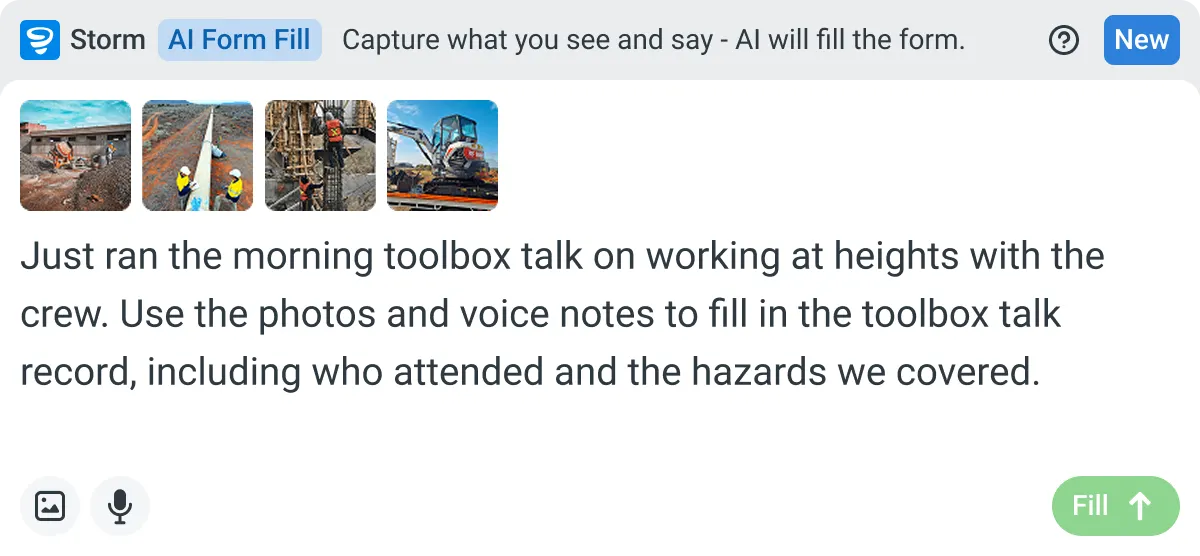
AI Form Fill
Capture what you see and say, and Storm drafts the form for you. The details land in the right fields, so there is a record to check the moment the work is done, and you review and submit it yourself.


Listens to the work
Captures voice cleanly through machinery, wind, and movement. Accents and trade language understood. No headset needed.

Works on site
Built for gloves, cabs, and screen protectors. Captures inputs offline and processes in the background. No waiting on the field.

You stay in control
Storm never commits a record on its own. Every output is a draft for human review. Admins control what Storm can write to.
Frequently Asked Questions
Can Claude actually see my project data?

Yes, once your Dashpivot workspace is connected. Claude reads your projects, folders, forms and records directly, so it isn’t relying on whatever you paste into the chat.
Do I have to paste records into the chat?
No. Pasting is where mistakes creep in, because you only paste what you remember and the report ends up reflecting memory instead of the record.
What can it see, exactly?
Your workspaces and projects, the folders and templates inside them, the forms and records they hold, and your users and register lists. It reads what’s there and won’t invent progress nobody recorded.
Does this work with ChatGPT and Microsoft Copilot as well?
Yes. The same connection works with Claude, ChatGPT and Microsoft Copilot, so the process is the same whichever one your team uses.
Can it see data it shouldn't?
No. Every request is checked against your workspace permissions, and connecting Claude doesn’t expand anyone’s access.
What if the report needs records from another project?
Keep each report to one project. Reading across projects isn’t reliable yet, and a report built from the wrong project’s records is worse than one that took a little longer.