How to Use Claude for Analysing Site Photos
Site photos pile up fast, and a month's worth is impossible to make sense of by scrolling. Claude can do the first pass for you. Connect it to your photo records over MCP and ask which areas changed between two dates, or where the crew stopped taking photos. It answers using the job, area, date and notes on each entry, and you open the photos yourself to check before anything goes into a report.

Trusted by companies, projects and teams of all sizes


The short answer
Claude can sort through your site photos as long as they're logged in a form with the job, area and date. It reads those records over MCP from a system like Dashpivot and answers questions like which areas went quiet last week or how the formwork progressed between two dates, linking back to the entries it used. The supervisor checks those entries against the photos before anything goes into a report or claim.
How to Get Claude Reading Your Site Photos
Reading back a month of site photos by hand means scrolling through every image and trying to remember which area each one came from. Claude can do the first pass if it can reach the records behind them. That needs the photos on digital forms and enough history to compare, plus a connection over MCP so Claude can read the forms. Only that last part is a setup step, and you still check what it finds.
-
Step 1
Get the work onto digital forms
Claude can only read back what was recorded in a consistent way. A photo dropped into a group chat has no job, area or date attached, and a photo of a paper diary is just a picture, with nothing in it Claude can search. Put the photos on a digital form instead, with the same fields every time: the job, the area, the date, and a short note on what the photo shows. Those fields are what Claude searches and sorts by when you ask it something.
-
Step 2
Build up enough history to read back over
One week of photos tells Claude very little. The useful questions compare: how far the formwork has moved since last month, which areas keep showing the same defect, where photos stopped coming in. Those need weeks of entries against the same project, filed the same way each time. If your crews only started recording photos on forms recently, start with narrow questions about the last few days and widen them as the history grows.
-
Step 3
Connect Claude over MCP
With the records in place, your assistant needs a way to reach them. That's what MCP does: it lets an assistant query a system it doesn't own, using the permissions you already have. Depending on which system you use, the process may vary. We cover Sitemate MCP later in this article.
-
Step 4
Ask Claude a specific question about the photo records it can now read. Name the form, the job and the date range. Ask for an answer that points back to the entries it used, so you can open the photos and check them yourself.
-
Step 5
Check the answer against the photos before anything goes into a report or a claim. Claude works from the fields and notes on each entry, so a wrong area or date on the form shows up in its answer. Correct the record, then ask again.
Prompt guidance for analysis of site photos
The prompts that work name the form, the project, the area and the dates, and say what kind of answer you want back. "What's happening on site?" gives Claude nothing to narrow on, so it answers in general terms. Ask it to point to the entries it used, so you can open the photos and check what it's telling you before you act on it.
- "List [project] photo entries for Level 2, 1 to 14 May"
- "Which areas on [project] had no photos last week?"
- "Compare [area] notes from 6 May and 20 May"
- "Show defect photo entries on [project] since 1 May"
Troubleshooting prompts for analysis of site photos
When Claude's answers come back thin, check the form the photos sit on before rewriting the prompt. Claude can only sort by the fields the form has, so a missing area field means it can't tell one level from another. Free-text notes are fine for detail, but anything you'll want to filter by, like the area, the trade or the defect type, works better as a set list.
- Answers mix up areas: no area field on the form, so add one as a set list
- Dates look wrong: photos logged days later, so record the date taken
- Defects get missed: notes are free text, so add a defect type list
- Whole weeks missing: no entries filed, so check the crew recorded that week
- Vague summaries: notes too short, so ask for one line per photo
Limitations
Claude reads what the crew recorded about each photo, so its answers are only as good as the form behind them. When every entry has a job, area, date and short note, Claude can compare one week to another and point you straight to the photos that matter. When the notes are thin, the answers are thin too, and rewording your prompt won't help.
Claude also isn't on site. A photo shows one angle at one moment, and Claude can't know what was just out of frame or what changed after the crew packed up. Where it shines is sorting through weeks of records and finding gaps. Whether a defect is fixed or whether progress is enough to claim against is still the supervisor's call. That matters most when the answer is heading into a variation claim or client update, where a wrong date or mixed-up area can cost real money.
What Claude Does Well When Analysing Site Photos
Once your photo records are connected over MCP, Claude can look across weeks of entries at once. Ask for everything logged against Level 2 in May and it lists the entries, or ask it to compare two entries for the same spot and it tells you what the notes say changed. Every answer links back to the entries it used, with a date and area you can check yourself.
- Lists photo entries for one area over a date range
- Compares two entries and sums up what the notes say changed
- Finds areas or days with no photos
- Links every answer back to its source entry
What Claude Leaves to You When Analysing Site Photos
Claude can't tell you what's in a photo unless the crew described it. Over MCP it reads the fields and notes on each entry, so a crack or missing guardrail only shows up if someone wrote it down. It can't measure progress from an image or confirm a defect was fixed unless the record says so. It also can't change anything. It reads records and drafts answers in the chat, so a wrong date or area has to be fixed on the form.
- Judging what a photo shows beyond the crew's notes
- Measuring quantities or percent complete from an image
- Confirming a defect is fixed unless it's recorded
- Creating, editing or deleting records
What This Assumes You Already Do
This page assumes photos are already part of how your crews report the day. They take them on site and note the job and area each time, often enough that a project builds up a record over weeks. It also assumes the supervisors who take the photos are the ones asking the questions, because they know what a normal photo of that area looks like and can tell when Claude's answer is off.
- Your crews already take photos on site as part of the day's record
- Each photo gets logged against a job, an area and a date
- It happens daily or weekly, often enough to build a history
- The supervisors taking the photos are the ones who'll read the answers back
Why Use Claude for Analysing Site Photos
Without it, someone has to scroll through hundreds of photos trying to remember which level each one came from. When a delay claim or client question comes up weeks later, that search can take hours, and the one photo that proves the point often can't be found.
What a Good Answer About Site Photos Contains
A good answer names the entries it's drawn from, by date and area, so you can open the photos and check. It keeps to what the records say: the area, the date, the note the crew wrote, the weather logged that day. If something looks like a change between two weeks, it says which two entries it compared. A generic answer reads like a summary of construction in general, with no dates or areas you could trace back to a photo.
- Each point tied to an entry by date and area
- Only details the crew actually recorded
- Changes between weeks named with both entries
- Gaps called out where photos weren't taken
- Nothing presented as certain that needs a check on site
Connecting Sitemate MCP
Sitemate MCP connects Claude to your Dashpivot forms through the Sitemate Connector for Claude. It's read-only. Claude can read your forms, lists, users and workspace structure, but it can't create, modify or delete anything in Dashpivot. Before anyone can connect, MCP Access has to be turned on for your company, and only an Org Controller can turn it on. The steps below follow the Sitemate helpdesk.
-
Step 1
Turn on MCP Access in Dashpivot
An Org Controller turns on MCP Access for your Dashpivot account. Until they do, nobody in the team can connect Claude, whatever their other permissions are.
-
Step 2
Add the Sitemate Connector in Claude
In Claude, add the Sitemate Connector for Claude from the connectors list, then sign in with your Sitemate account so Claude can read your forms.
-
Step 3
Ask Claude about one form first
Test it with a narrow question about a single form, like last week's photo entries on one job. If Claude lists them back, it's reading your records.
If the connector will not appear
Most failed connections come down to a few things. MCP Access hasn't been turned on by an Org Controller, or the connector was searched under a different name in Claude's list. Signing in with an account that can't see the workspace also leaves Claude with nothing to read.
- Nothing connects: MCP Access is still off
- Connector not in the list: search its exact name
- Claude finds no forms: wrong account signed in
How the record gets captured
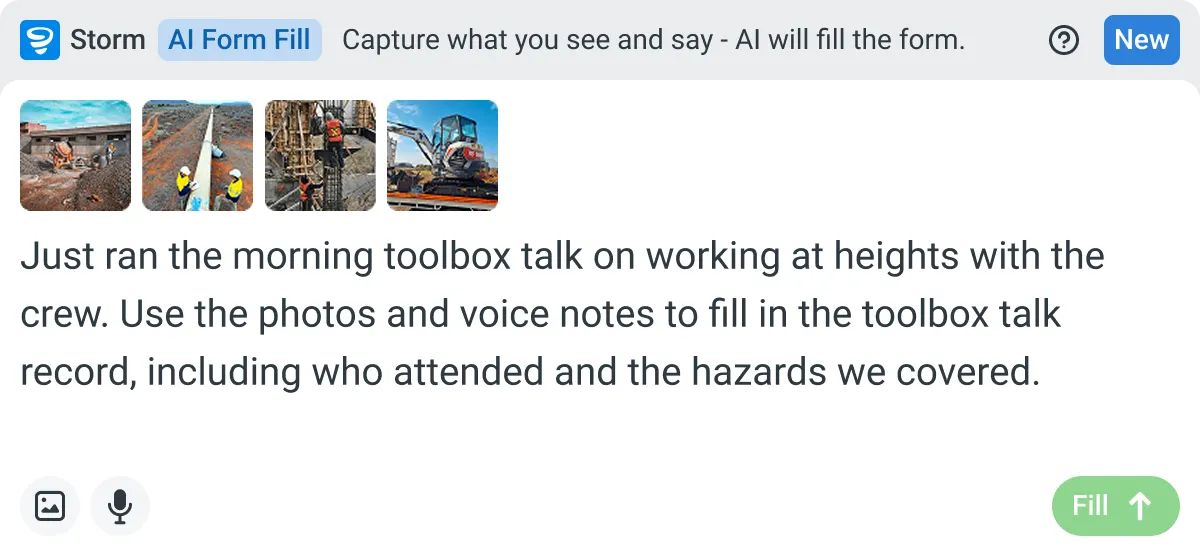
Site photos only help Claude if they land in a record it can read. Storm captures them into a form while the crew's on site, and Dashpivot holds each entry against the job and date. Sitemate MCP is how Claude reads those records back afterwards.
-
Storm Completes the Photo Form on Site
On site, the crew takes the photos and adds a quick voice note, and Storm completes the form from them with AI Form Fill. The supervisor checks what Storm filled in and signs off before the entry is submitted.
-
Dashpivot Keeps Each Entry as a Record
Dashpivot keeps each completed form as a record, with the photos attached and the job, area, date and weather stored alongside them. Over weeks that becomes a history for the project you can filter by site or date.
-
Sitemate MCP Reads It Back
Sitemate MCP gives Claude read-only access to those records, so you can ask about a job's photo history in plain language. Claude can't create, edit or delete anything in Dashpivot, and you still check its answer against the photos.

Storm Captures the Site Photos Claude Reads
The crew takes the photos and adds a quick voice note on site, and Storm fills in the form from them. The supervisor checks it and signs off, so every entry lands against the right job and date.

AI Form Fill
Capture what you see and say, and Storm drafts the form for you. The details land in the right fields, so there is a record to check the moment the work is done, and you review and submit it yourself.


Listens to the work
Captures voice cleanly through machinery, wind, and movement. Accents and trade language understood. No headset needed.

Sees the site
Photos read as primary data, not attachments. Equipment, defects, PPE, and conditions are all interpreted directly from what's in frame.

Knows the context
Location, time, crew, plant, and materials pulled automatically. Critical for inspections, incidents, and time entries.
Frequently Asked Questions
Can Claude read the photos the crew sends to our group chat?

Not in a useful way. Photos in a group chat have no job, area or date attached, so Claude has nothing to sort them by. They need to be logged in a form that records those details.
Can the crew take photos on site with no signal?
Yes. Dashpivot works offline, so the crew can fill in the form and attach photos in a trench or out of range. It syncs when they’re back in coverage, and Claude can read it from there.
Is Claude's answer good enough to back a variation claim?
It’s a good starting point. Claude finds the entries and sums up what the notes say, but the supervisor still opens the photos and checks the dates and areas before anything goes into the claim.
Can Claude fix a record if it spots a mistake?
No. Sitemate MCP is read-only, so Claude can’t create, edit or delete anything in Dashpivot. If it spots a wrong date or area, someone needs to fix it on the form.
Who has to set up the connection?
An Org Controller turns on MCP Access for your Dashpivot account. Then each person adds the Sitemate Connector for Claude and signs in with their own Sitemate account.