
The Incident Reporting App Built for Construction Teams
When incidents happen, the priority is response and safety, not paperwork. Sitemate captures incident details automatically from photos, voice recordings, and witness statements collected at the scene, so safety officers can submit complete reports while details are still fresh.

Trusted by companies, projects and teams of all sizes















Why Incident Reporting management Is Harder than It Should Be

Writing reports from memory hours later
Site supervisors spend hours after an incident trying to recall exact details from memory, often at the end of a long day when accuracy matters most.

Missing witness statements and evidence
By the time paperwork starts, witnesses have left site and critical evidence like exact weather conditions or equipment positions is lost.

Rushing to meet regulatory deadlines
Safety officers are under pressure to complete detailed incident reports within tight regulatory timeframes while managing ongoing safety responses.

Incomplete or inaccurate documentation
Manual reporting leads to missing details, incorrect timestamps, and documentation that doesn’t meet WorkSafe or HSE requirements.
A Smarter Way to Manage Incident Reporting

Automatic scene documentation from photos
Photos of the incident scene automatically populate location details, equipment involved, and environmental conditions into the incident report.

Voice recordings become structured reports
Supervisors describe what happened in their own words, and AI converts voice recordings into properly formatted incident descriptions.

Digital witness statements on-site
Collect witness statements digitally while people are still on site, with signatures and timestamps that can’t be lost or disputed.

Incomplete or inaccurate documentation
All required fields are populated automatically with GPS coordinates, weather data, and timestamps, ready for WorkSafe or HSE submission.


Understanding Incident Reporting Software
What is incident reporting in construction?
Incident reporting in construction and civil projects involves documenting workplace accidents, near misses, property damage, and safety events that occur on site. These reports are required by WorkSafe, HSE, and other regulatory bodies, typically within 24-48 hours of the incident occurring. Effective incident reporting captures not just what happened, but the environmental conditions, equipment involved, witness accounts, and immediate response actions taken. This information is critical for regulatory compliance, insurance claims, and preventing similar incidents in the future.
Key elements of effective incident reporting:
- Accurate timestamp and GPS location data
- Detailed incident description with cause analysis
- Complete witness statements and signatures
- Photo documentation of the scene and conditions
- Weather and environmental condition records
- Immediate actions taken and personnel involved
Regulatory compliance and documentation requirements
Construction incident reports must meet specific regulatory standards including mandatory reporting timeframes, required data fields, and proper documentation of corrective actions. Digital incident reporting ensures consistent compliance across all projects while maintaining complete audit trails for regulatory inspections and insurance purposes.
How To Set Up a Digital Incident Reporting Using Sitemate
Step 1:
Step 2:
Enable AI form filling features. Activate voice transcription, photo analysis, and automatic GPS/weather capture for field teams. Configure language settings for multilingual sites and witness statement formatting.
Step 3:
Set up notification workflows. Configure automatic alerts to safety managers, project managers, and regulatory contacts when incidents are reported. Set up escalation rules based on incident severity levels.
Step 4:
Train field teams on mobile capture. Train supervisors and safety officers on using mobile forms to capture incident scenes with photos and voice recordings. Practice collecting digital witness statements and reviewing AI-generated reports.
Step 5:
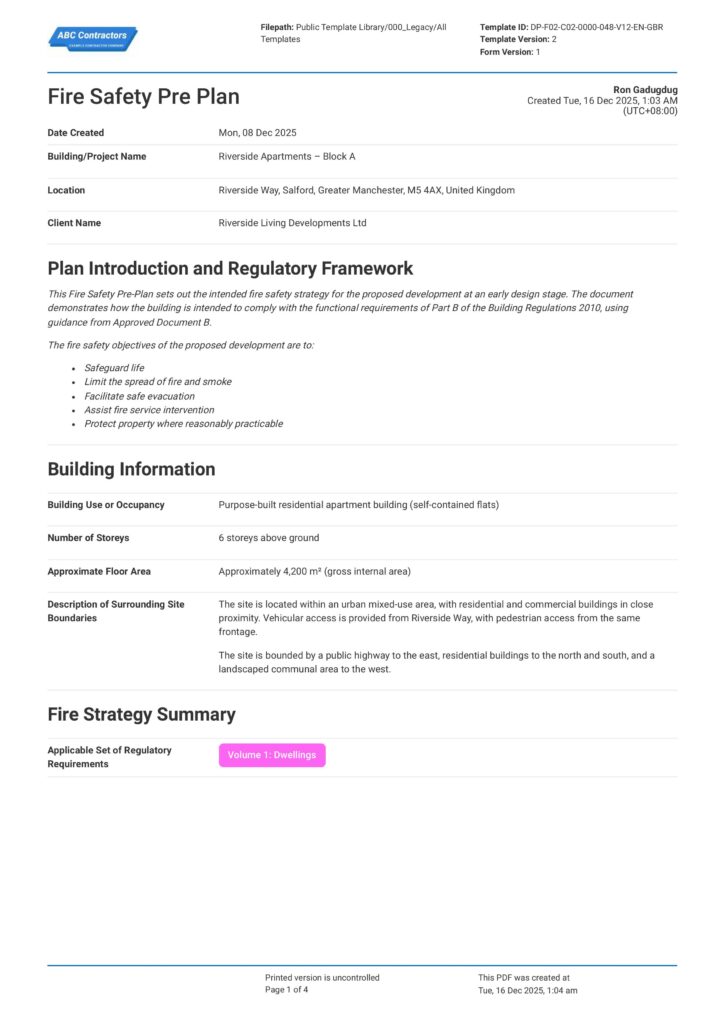
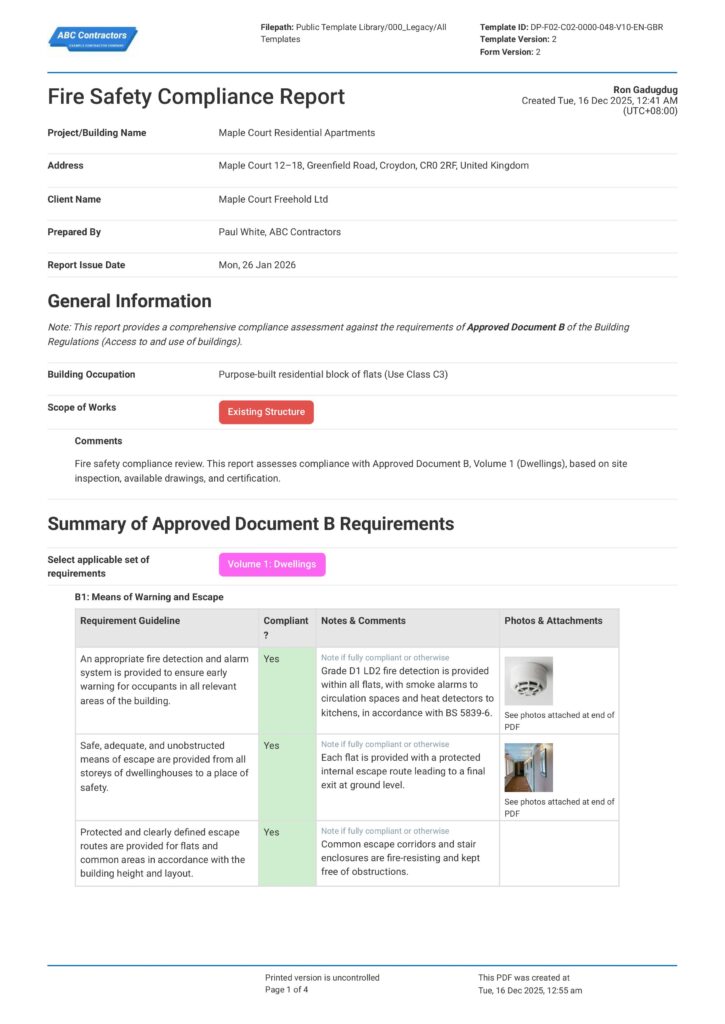
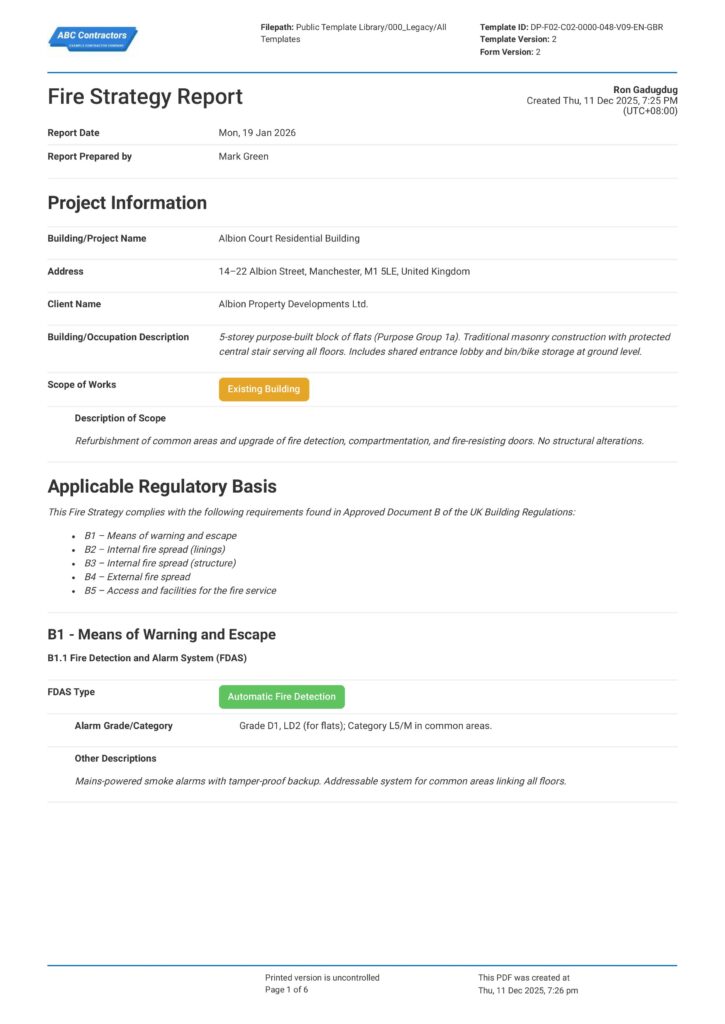
Start Faster With Built-In Incident Reporting Templates
See How Sitemate Has Already Helped Companies Like Yours
"Our process now is so much quicker, easier, and more efficient. It's improved tenfold."
- Shane Russo, Site Manager
500+ employees
Zero paperwork
6 regions
Site data unified across 6 regions
Incident analytics and compliance reporting
Flowsite transforms incident data into automated safety dashboards, tracking incident rates across projects, response times, and regulatory compliance metrics for executive and client reporting.
Comparison: Paper Incident Reporting vs Digital Incident Reporting
Most project teams already know paper and spreadsheets aren't cutting it. Here's what changes when you move your method statements to a digital system.
Real-time incident capture
Automatic GPS and weather data
Digital witness statements
Photo evidence management
Audit trail tracking
Actions and follow-ups
Incident trend analysis
Regulatory compliance reporting
Search and retrieval

Paper
Frequently asked questions about Incident Reporting
What if AI misses critical safety details in the incident report?

AI drafts reports from actual photos and voice recordings captured at the scene, but every detail is reviewed by a qualified safety officer before submission. Nothing gets reported without human approval, ensuring all critical safety information is verified and accurate.
How quickly can incident reports be submitted after an event?
With Sitemate, complete incident reports can be submitted within minutes of the event occurring. The AI drafts the report from scene photos and voice recordings, then the safety officer reviews and submits while all details are still fresh and witnesses are on-site.
Are digital witness statements legally valid for regulatory purposes?
Yes, digital witness statements captured through Sitemate include timestamps, GPS coordinates, and digital signatures that create a complete audit trail. This digital documentation is often more reliable than paper statements that can be lost or damaged.
Can incident reports meet WorkSafe and HSE regulatory requirements?
Sitemate incident reports include all required regulatory fields including timestamps, GPS location, weather conditions, and properly formatted incident descriptions. Reports can be configured to meet specific WorkSafe, HSE, or other jurisdiction requirements.
What happens if there's no mobile coverage at the incident site?
Sitemate mobile forms work offline, allowing teams to capture photos, voice recordings, and witness statements without connectivity. All data syncs automatically when mobile coverage returns, ensuring no incident details are lost.
How does voice recording transcription handle technical construction terminology?
The AI transcription is trained on construction and civil terminology, accurately capturing equipment names, procedures, and industry-specific language. Safety officers review all transcriptions to ensure technical accuracy before report submission.
Can multiple people contribute to the same incident report?
Yes, multiple team members can add photos, voice notes, and witness statements to the same incident. All contributions are timestamped and attributed, creating a comprehensive record while the safety officer maintains control over the final report submission.
 English (United States)
  English (Australia)
  English (UK)
  English (New Zealand)
  English (South Africa)
  German