Vibration Monitoring Risk Assessment Report Template

Start with a free 30-day trial. No credit card required.
Need a complete Vibration Monitoring Risk Assessment Report you can still make your own? This template comes pre-built with sections for reviewing site conditions, recording vibration-related hazards from construction, demolition, excavation, piling, and other high-impact activities, and noting nearby sensitive structures, occupied buildings, utilities, or vibration-sensitive equipment. It also includes sign-off fields so findings can be confirmed and shared with the relevant parties. You can edit any part of it to match how your company monitors vibration on site, and the report will still hold up against the regulations and audits you'd face.
This Vibration Monitoring Risk Assessment Report is an easy-to-use form that your workers can use to assess vibration risks before and during high-impact work, capture all vibration-related information in one place, collect sign-offs, and protect both workers and adjacent properties. When the report is complete, they can save or export it to PDF or CSV for easy sharing.
 100% fully editable Vibration Monitoring Risk Assessment Report
Export your Vibration Monitoring Risk Assessment Report to PDF or CSV
Access your Vibration Monitoring Risk Assessment Report on mobile, tablet or computer
Trusted by companies, projects and teams of all sizes















What is Vibration Monitoring Risk Assessment Report?
A Vibration Monitoring Risk Assessment Report is a document that engineers and site personnel use to evaluate the risk of vibration from activities such as construction, demolition, piling, blasting, heavy machinery operation, or industrial work. It identifies what could be affected, such as buildings, structures, utilities, equipment, workers, or occupants, and assesses the likelihood and severity of vibration-related damage or disruption.
Typically, a well-built vibration risk assessment usually includes vibration sources, monitoring locations, baseline conditions, acceptable vibration limits, risk ratings, and recommended controls. Additionally, it helps project management teams implement appropriate safety control measures, comply with relevant safety regulations, and reduce the chance of structural damage, complaints, delays, or other unnecessary losses.
Compare this Vibration Monitoring Risk Assessment Report with Word or Excel forms
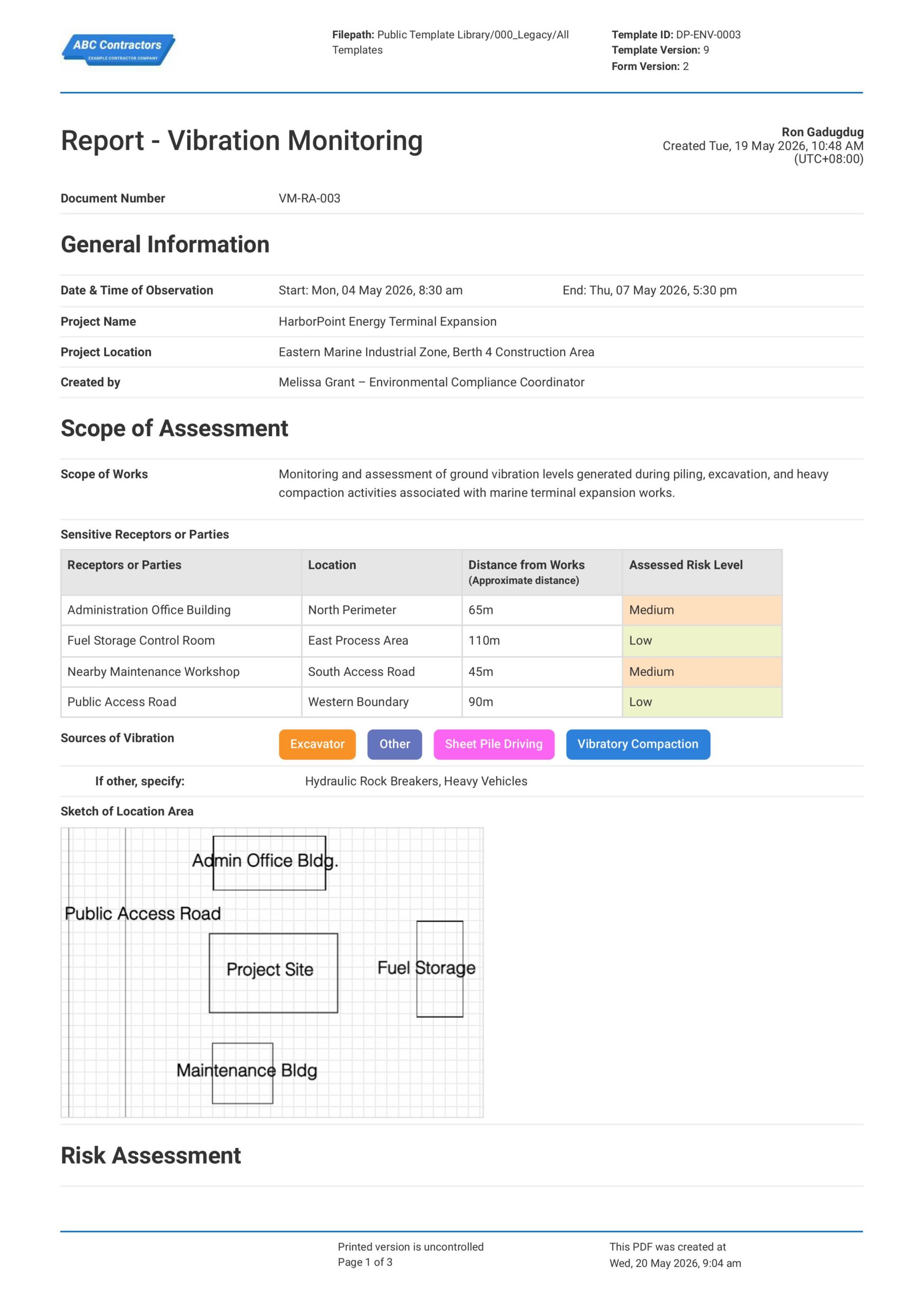
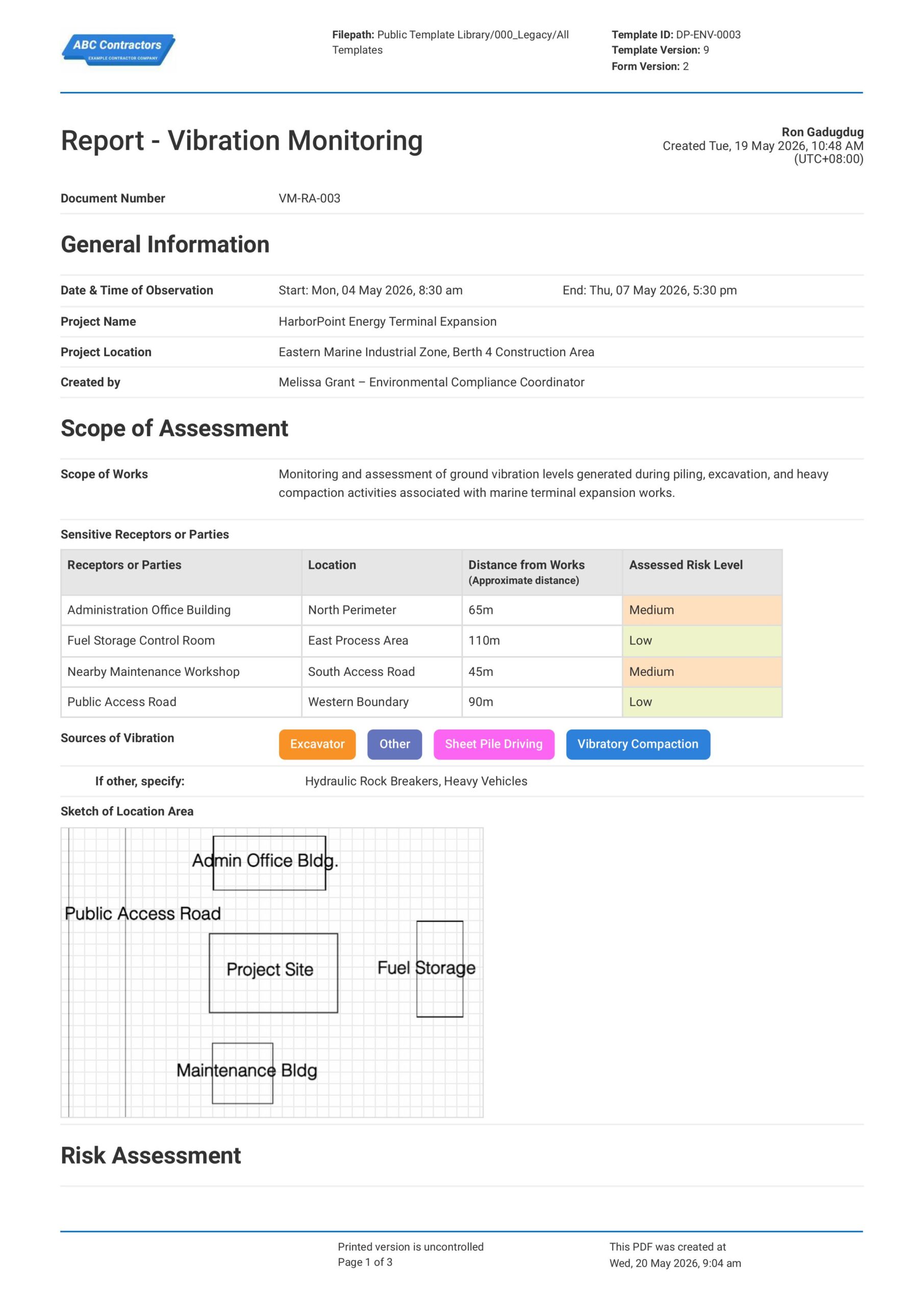
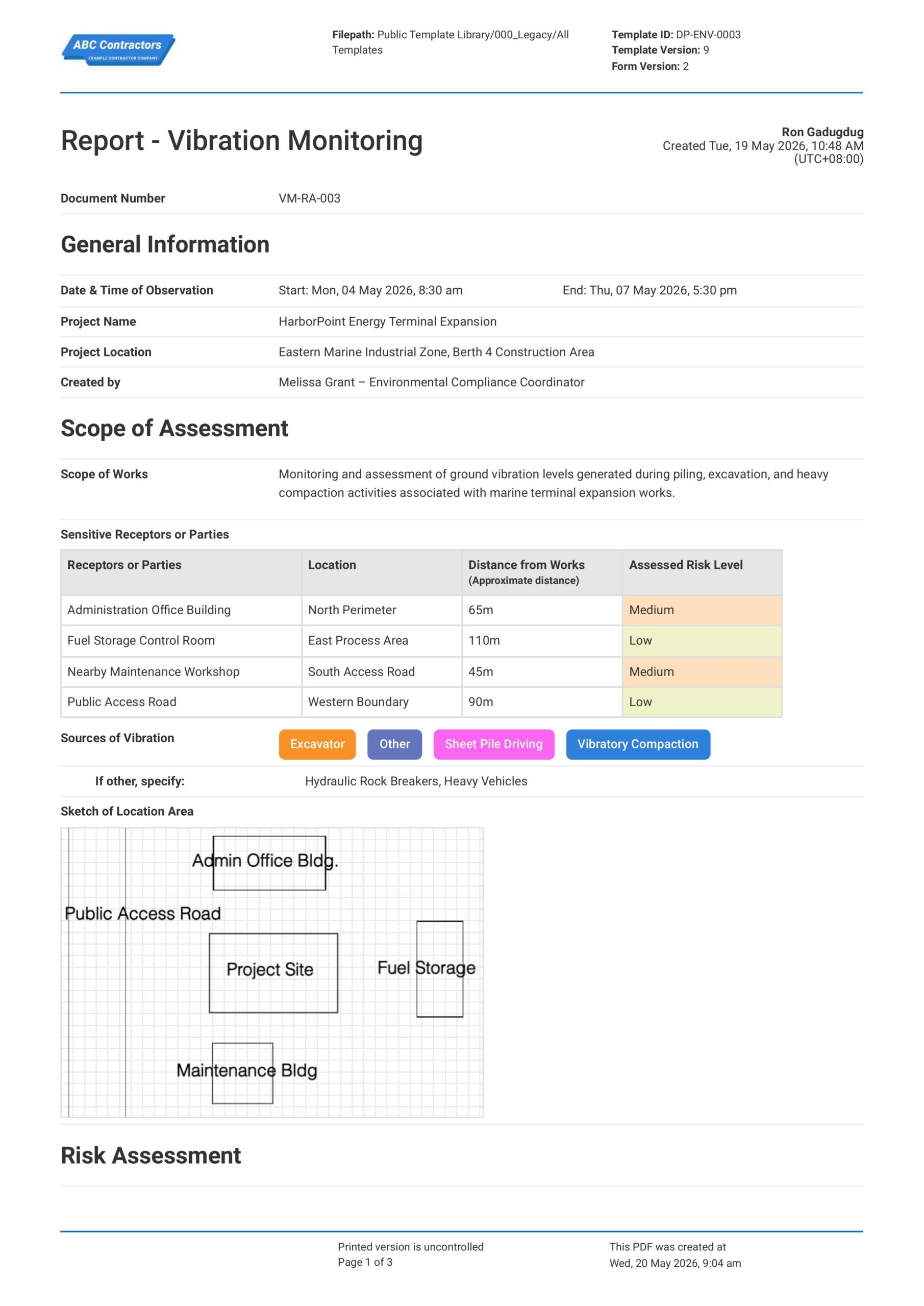
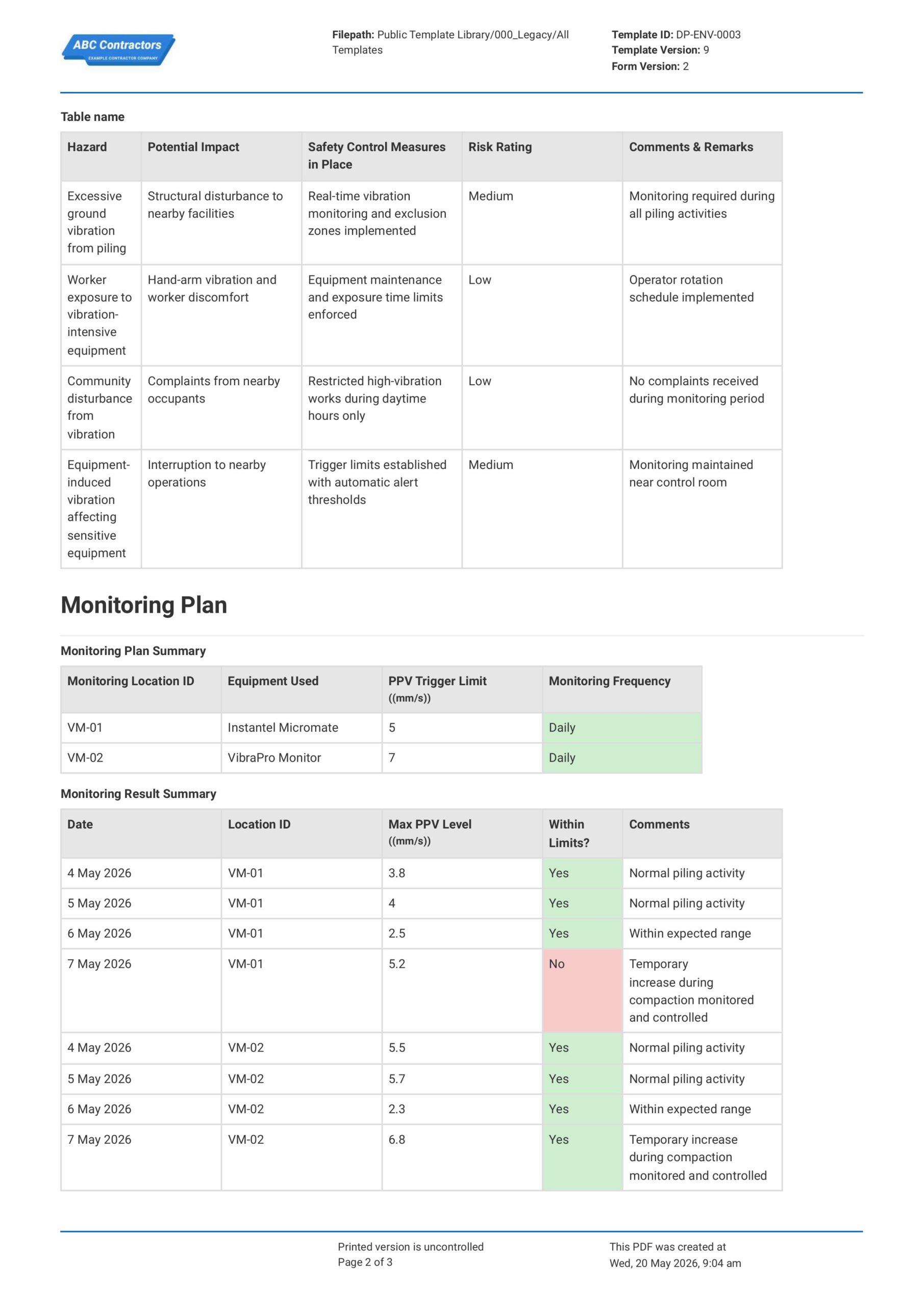
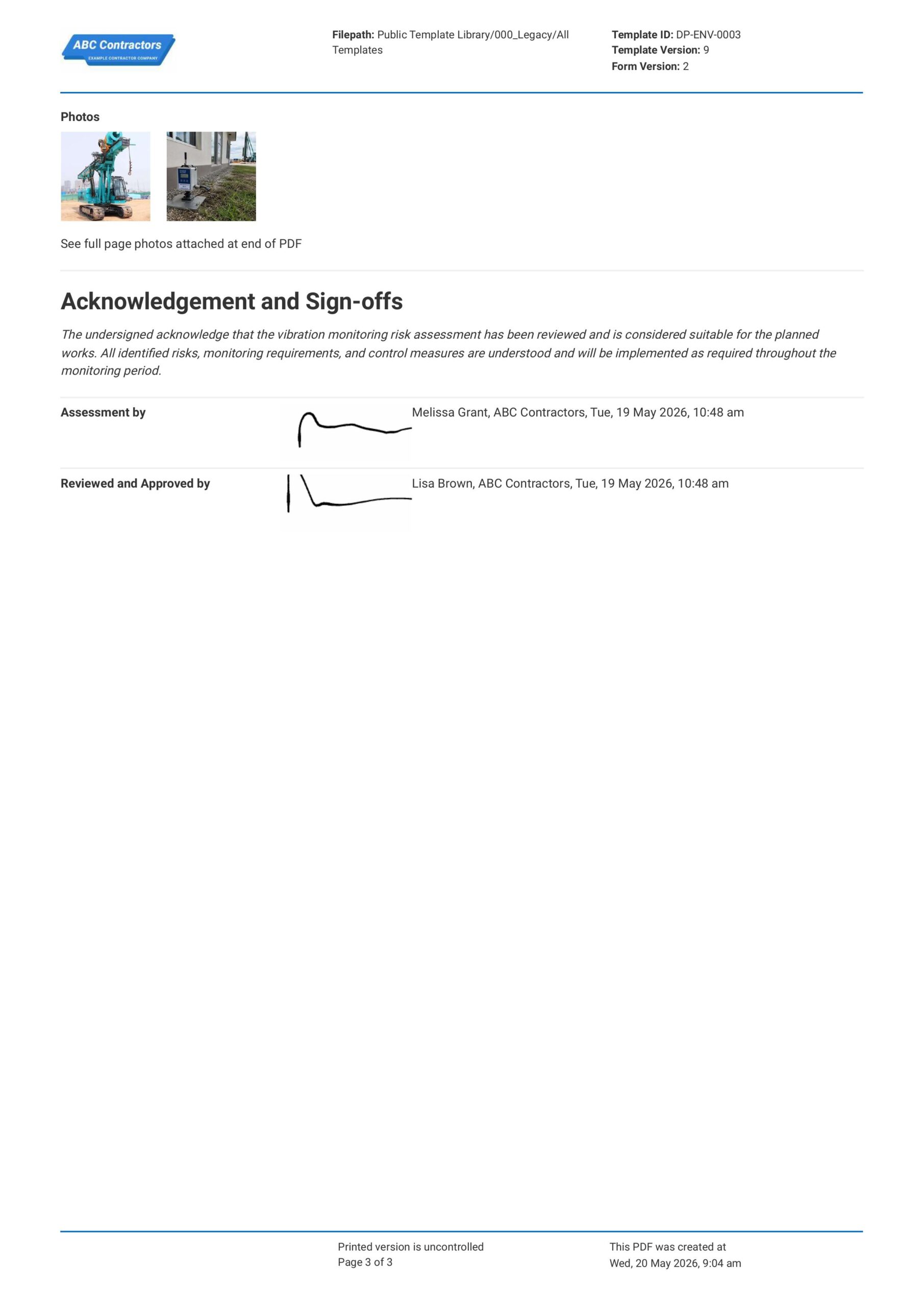
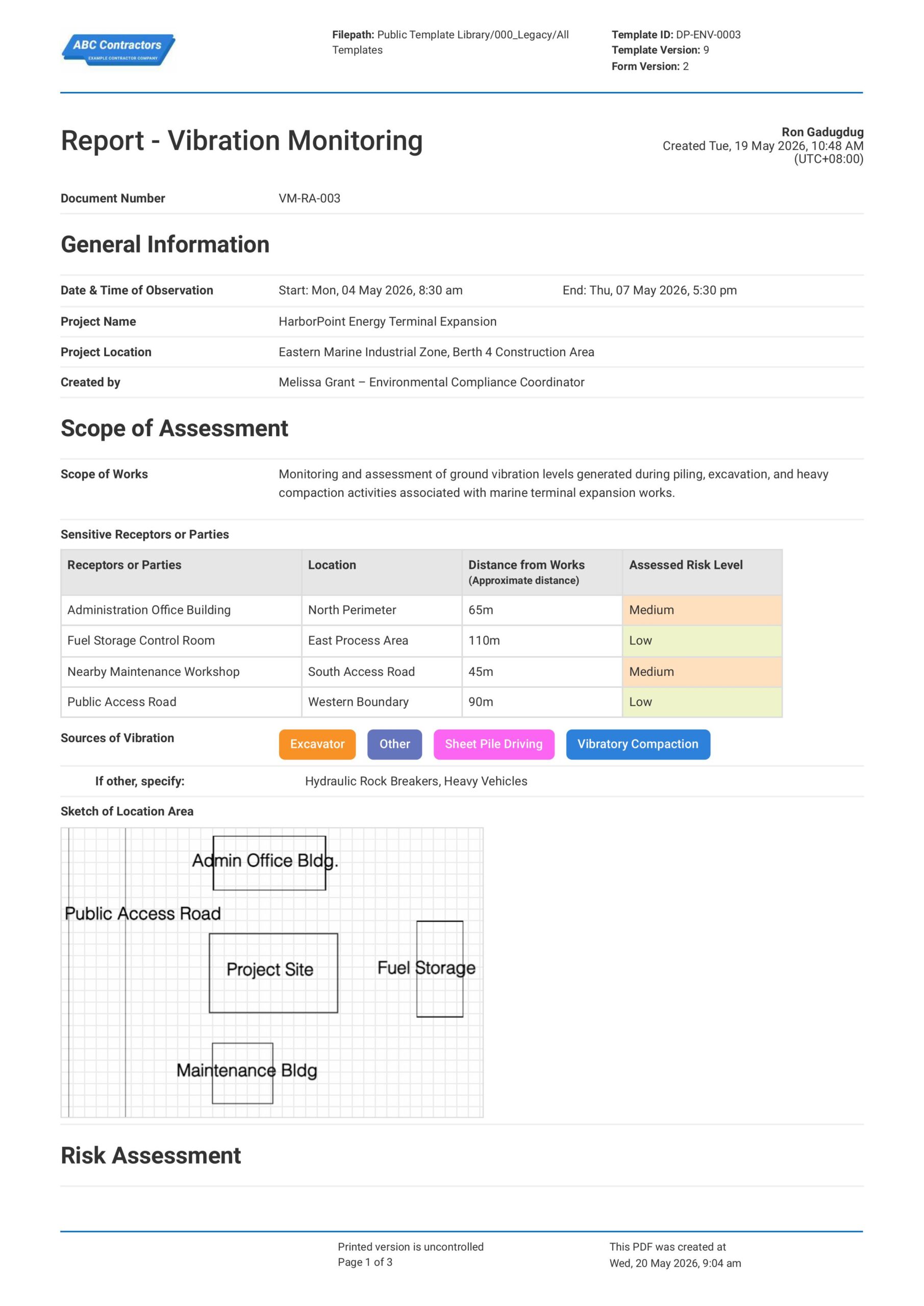
Curious how this Vibration Monitoring Risk Assessment Report works? Check out the example below to see exactly what a completed report looks like, from site conditions and vibration hazards through to the sign-off section. You can generate your own version in a few clicks, export it as a custom form with your company details, and fill in the relevant information to have a ready-to-use Vibration Monitoring Risk Assessment Report in a matter of minutes.
Use this Vibration Monitoring Risk Assessment Report template for free

Generate this template automatically with Storm
You don't have to build the Vibration Monitoring Risk Assessment Report field by field. Let Storm, the AI Data Capture Agent inside Dashpivot, build the template for you in seconds.
Describe what you need
Tell Storm the form you want in plain language and it builds a structured digital template from scratch, with fields, tables, and signatures in place.
Upload what you already use
Drop in your existing PDF, Word, Excel, or even a photo of a paper form. Storm rebuilds it as a smart digital template with the structure intact.
 Storm
Storm
Generate a Vibration Monitoring Risk Assessment Report form template that I can use for my business
Applicable Standards and Policies for Vibration Monitoring Risk Assessment Report
There are no requirements, regulations, or legislation that covers how Vibration Monitoring Risk Assessment Reports are formatted. However, several regulations across regions cover workplace safety requirements that are directly related to vibration risk assessment and other vibration monitoring standards. Here are some examples of these regulations that you should know:
- ISO 2631 provides guidance for assessing human exposure to whole-body vibration.
- ISO 5349 covers measurement and assessment of hand-arm vibration exposure.
- BS 5228 gives guidance on noise and vibration control for construction and open sites.
- DIN 4150 and similar standards are commonly used to assess vibration effects on structures.
Staff Members and Parties that use Vibration Monitoring Risk Assessment Report
A Vibration Monitoring Risk Assessment Report is used by businesses involved in activities that generate ground, structural, or equipment vibration. This is particularly important in construction, demolition, rail, mining, and infrastructure projects. Here are some examples of parties that use Vibration Monitoring Risk Assessment Reports:
- Contractors and project teams
- Environmental consultants and vibration specialists
- Health and safety teams reviewing worker exposure risks
- Structural engineers concerned with structural movement or damage
Business Risks Reduced by Vibration Monitoring Risk Assessment Report
Using a Vibration Monitoring Risk Assessment Report helps reduce the likelihood of structural damage, worker health issues, and stakeholder disputes caused by excessive vibration levels. However, it also benefits businesses by:
- Reducing risk of damage to nearby buildings, utilities, and infrastructure.
- Lowering worker exposure to harmful vibration-related health conditions.
- Helping reduce community complaints and disputes with nearby parties
- Reducing exposure to legal claims, enforcement action, and project stoppages
- Helping avoid reworks, equipment damage, and delays linked to uncontrolled vibration
Business Opportunities Created by Vibration Monitoring Risk Assessment Report
A Vibration Monitoring Risk Assessment Report can transform businesses that work in the construction and industrial industries into companies that are viewed as more reliable and responsible by clients, regulators, and surrounding communities. Here are some of the most impactful ways Vibration Monitoring Risk Assessment Report can help businesses:
- Builds client confidence through documented monitoring and mitigation practices.
- Supports environmental reporting and compliance management initiatives.
- Improves planning and control of high-impact construction or demolition work.
- Strengthens reputation for responsible project delivery and stakeholder management.
What are the Required Sections for a Vibration Monitoring Risk Assessment Report?
There usually isn’t any fixed or legally mandated format for a Vibration Monitoring Risk Assessment Report. However, there are some key elements that local legislation and industry standards commonly require for any risk assessment:
- Risk identification: sources, affected people, structures, utilities, or equipment.
- Exposure assessment: measured or predicted vibration levels against criteria.
- Controls/action plan: mitigation, trigger levels, responsibilities, and response actions.
- Monitoring method: locations, equipment, methodology, and records.
- Review and records: findings, health surveillance where relevant, and review dates.
Why Vibration Monitoring Construction Matters in the Built World
Vibration monitoring matters in the built world because even common construction, demolition, piling, compaction, blasting, rail, and heavy plant work can transfer harmful levels of vibration through the ground into nearby properties and third-parties. By monitoring and reducing the exposure to vibrations emitted by these works, engineers and site personnel can ensure the safety of adjacent properties, concerned nearby parties, and even the environment.
A key measure is PPV, or Peak Particle Velocity, which is the maximum speed of ground or structural movement during vibration, which is typically measured in mm/s. PPV limits are commonly used as trigger values, or as maximum values of acceptable vibrations, which are set by regional standards or legislation. It is important to note that these levels differ across regions, as acceptable limits depend on structure type, condition, sensitivity, and vibration frequency.
How to Create a Vibration Monitoring Risk Assessment Report
A Vibration Monitoring Risk Assessment Report requires a well-thought out design and build in order for it to effectively help your team control vibration risks. In this section, we discuss how you can create your own assessment report to document vibration monitoring plans.
Before creating a Vibration Monitoring Risk Assessment Report, you are going to need this things to be prepared and ready:
- Project scope and methods
- Nearby receptors and site plans
- Applicable PPV limits or criteria
- Baseline condition information
- Monitoring setup and locations
- Response actions and responsibilities
- Stakeholder or asset owner requirements
-
Capture Important General Information First
Placing high-level general information at the beginning of the report establishes the scope and context of the vibration monitoring activity. Be sure to include the following information:
- Date of Assessment
- Project or Work Activity Name
- Monitoring Location
- Assessor’s Name and Role
- Type of Vibration Monitoring Being Conducted
- Relevant Standards, Limits, or Guidelines Referenced
-
Identify the Site Conditions and Sensitive Areas
Documenting site conditions and nearby sensitive areas helps determine where vibration impacts may occur. Here are some examples of site conditions that you should keep an eye out for when inspecting your job site:
- Ground and Soil Conditions
- Nearby Buildings or Structures
- Public Areas and Occupied Spaces
- Sensitive Equipment or Infrastructure
- Environmental Conditions Affecting Vibrations
-
Identify Sources of Vibration and Work Activities
Listing vibration-generating activities ensures all major vibration sources are considered during the assessment. Here are some examples of the most common sources of vibrations typically found at a job site:
- Construction or Demolition Activities
- Heavy Machinery and Equipment in Use
- Pile Driving, Drilling, or Excavation Works
- Vehicle Movement and Traffic Exposure
-
Perform a Vibration Hazard and Risk Assessment
Next, assessing vibration-related hazards helps determine the potential impact of these vibrations on people, structures, and equipment to ensure vibration levels do not exceed regulatory limits. Be sure to consider the following factors in your assessment:
- Likelihood and Severity of Vibration Exposure
- Risk to Workers from Hand-Arm or Whole-Body Vibrations
- Potential Structural Damage Risks
- Disturbance to Nearby Occupants or Businesses
- Risk Ratings for Hazards Before and After Controls
-
Identify Existing Control Measures and Monitoring Procedures
Documenting existing safety control measures and monitoring procedures can provide insight into how existing safeguards, if any, are reducing actual vibration output of your job site. Additionally, this helps determine whether further corrective action is required. Here are some examples of safety control measures you can implement at your job site:
- Use of Vibration Monitoring Equipment
- Use of Vibration Dampeners, where applicable
- Exclusion Zones or Restricted Areas
- Maintenance Programs for Equipment
- Work Scheduling to Reduce Exposure
-
Complete Review, Approval, and Sign-Off
Finishing the report with review and sign-off confirms that monitoring activities, risks, and safety control measures have been acknowledged by responsible personnel. Here are some examples of the fields you need to add to this section:
- Names and Roles of Reviewers and Approvers
- Signatures of Responsible Personnel
- Date of Review and Approval
- Comments or Additional Observations
- Next Scheduled Monitoring or Review Date
Frequently asked questions
How to create your Vibration Monitoring Risk Assessment Report in an App or Software System
Streamline your Vibration Monitoring Risk Assessment Report and ensure it is well-designed to capture site data, evaluate risks, mitigate hazards, and implement safety controls.
Medium difficulty
-
Start your Vibration Monitoring Report with General Information
Begin your Vibration Monitoring Report with high-level project details to allow users to easily track specific works, critical locations, and relevant personnel involved with the assessment. Be sure to include the following fields for this section:
- Automated Form Counter for the Document Number
- A required Date & Time selector for Date & Time of Observation
- Text field for Project Name
- Text field for Project Location
- Text field for Name and Information of the Assessor
-
Create a Section for the Scope of Assessment
Next, create a section for users to provide further details on the work activity, the vibration assessment, job-site conditions, and other factors that could affect the assessment. Here are some examples that you will have to mark as required fields in your assessment report:
- Multi-line text field for Scope of Works
- Multi-line text field for Sources of Vibration
- Optional: Sketch field for users to draw the Location Area
-
Under Scope of Assessment, Create a Table for Sensitive Receptors or Parties
Vibration risk often depends on the receptor location and distance from the work area, so it is important that you determine all possible receptors (i.e. adjacent properties and occupants). For this section we recommend using a 4-column with the following columns in order:
- First column for Receptors or Parties
- Second column for Location
- Third column for Distance from Works
- Fourth column for Assessed Risk Level
-
Create a Table for the Risk Assessment
Next, the Risk Assessment section should be built as a table so each vibration hazard can be reviewed together with its impact, controls, and risk rating. We recommend using a 5-column table this time, with the following column-format in order:
- First column for Hazard Name
- Second column for Potential Impact of the Hazard
- Third column for Safety Control Measures in Place
- Fourth column for Risk Rating
- Fifth column for Comments & Remarks
-
Add a Table for the Monitoring Plan
Next, you will want a section for users to input the monitoring plan for your jobsite. We recommend using a table for this as well, with 4 columns intended for the following fields:
- First column for Monitoring Location ID
- Second column for Equipment Used
- Third column for PPV Trigger Limit ((mm/s))
- Fourth column for Monitoring Frequency
-
Create a Table for the Monitoring Result Summary
The Monitoring Result Summary should record the actual readings gathered during the monitoring period. We recommend using a table here so users can compare PPV levels against the trigger limits and clearly identify readings outside the required limits.
- First column for Date of Monitoring
- Second column for Location ID
- Third column for Max PPV Level (mm/s)
- Fourth column for a drop-down Yes/No selector to identify if Max PPV Level Exceeded Thresholds
- Fifth column for Comments & Remarks
-
Include a Section for Photos
Next, add a section where users can attach photos of inspections, site conditions, and other attachments to support the monitoring and assessment. Here are some examples of fields you can add to this section:
- Photo upload fields
- File upload fields
-
End your Vibration Monitoring Report with Acknowledgement and Sign-offs
Finally, end your report with an acknowledgement and sign-off section where responsible personnel can sign-off on the assessment report. If your app or software allows, be sure to take advantage of automated e-signature features to help quicken this process. Here are some key components that you should include:
- Pre-filled text field for the Acknowledgement Statement
- E-signature fields for the Assessor
- E-signature fields for the Approver of the Report
- Automatic Date and Time Stamp
About the author

Ron Gadugdug
Content Engineer
 LinkedIn
Education
Cebu Institute of Technology - University - Civil Engineering
Bio
Ron is a Civil Engineer with 6 years of experience in the construction industry, primarily focused on quantity surveying, cost estimation, project management, quality control, contract administration, and property & engineering insurance. At Sitemate, he writes about practical applications of evolving technologies and digital solutions that support construction professionals in improving efficiency, compliance, and project delivery across the built world.
Past Projects
Quantity Surveying & Cost EngineeringPerformed quantity take-offs of several high-rise and horizontal structures using sheets and applications like Revit and Bluebeam Revu, and spearheaded trials with Building Information Modeling (BIM) software.
Project Management & ConsultancyCoordinated with project management teams during the construction of local projects such as a 4-tower hotel & resort, a 22 storey condominium project, and a school dormitory project.
Contract AdministrationAssisted during contract biddings and negotiations with general contractors and sub-contractors, and oversaw progress reporting, billings, and payment.
Property & Engineering InsuranceDedicated non-life claims handler, overseeing property and contractor all-risk insurance claims, risk management, and bonds.
Version History:
Related apps and templates
Noise Risk Assessment
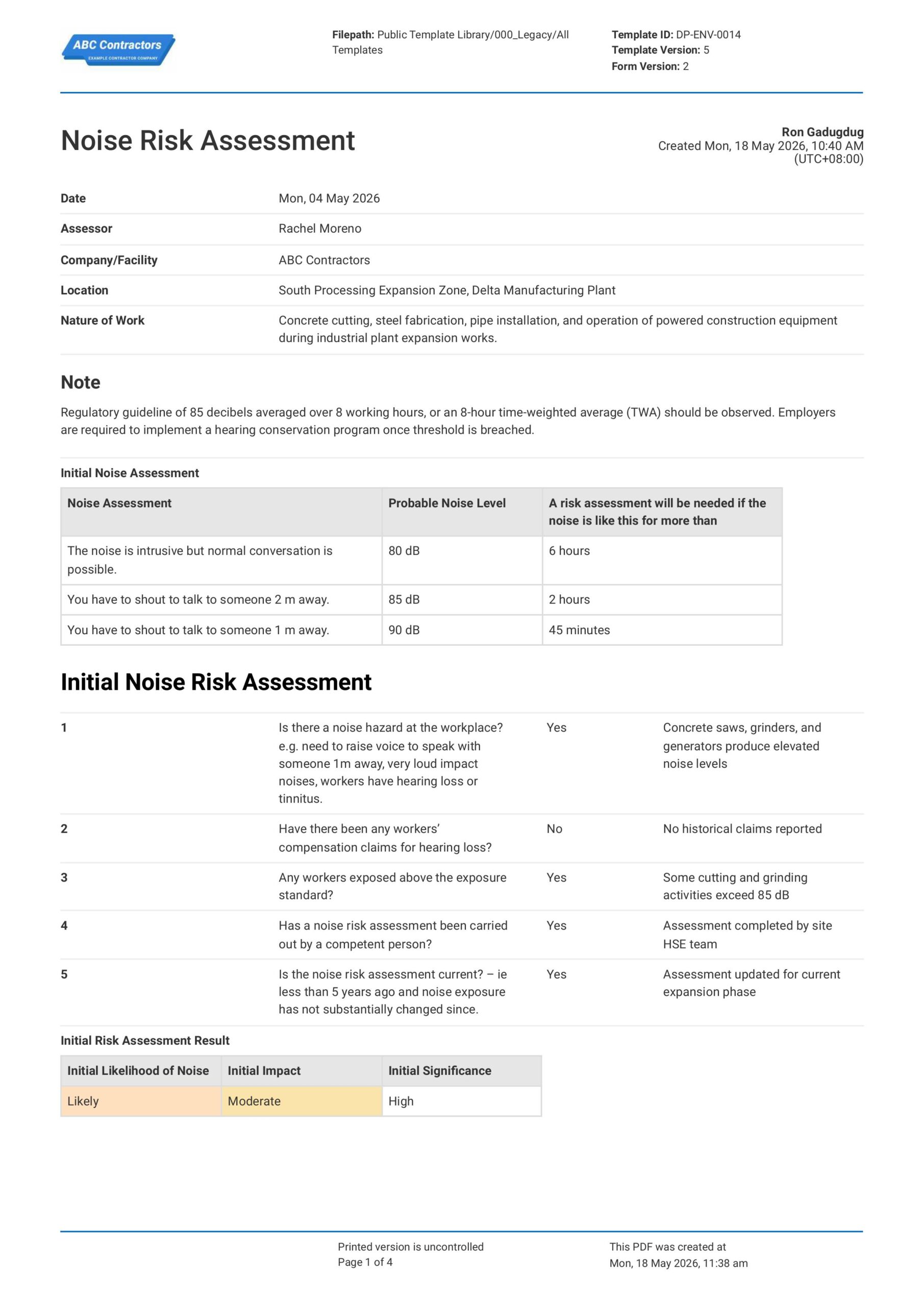
This Noise Risk Assessment is a form that can help your team protect workers, adjacent properties, and the environment by mitigating the effect of disruptive noise that comes from construction works. With this form,
View template
Fatigue Risk Management Plan
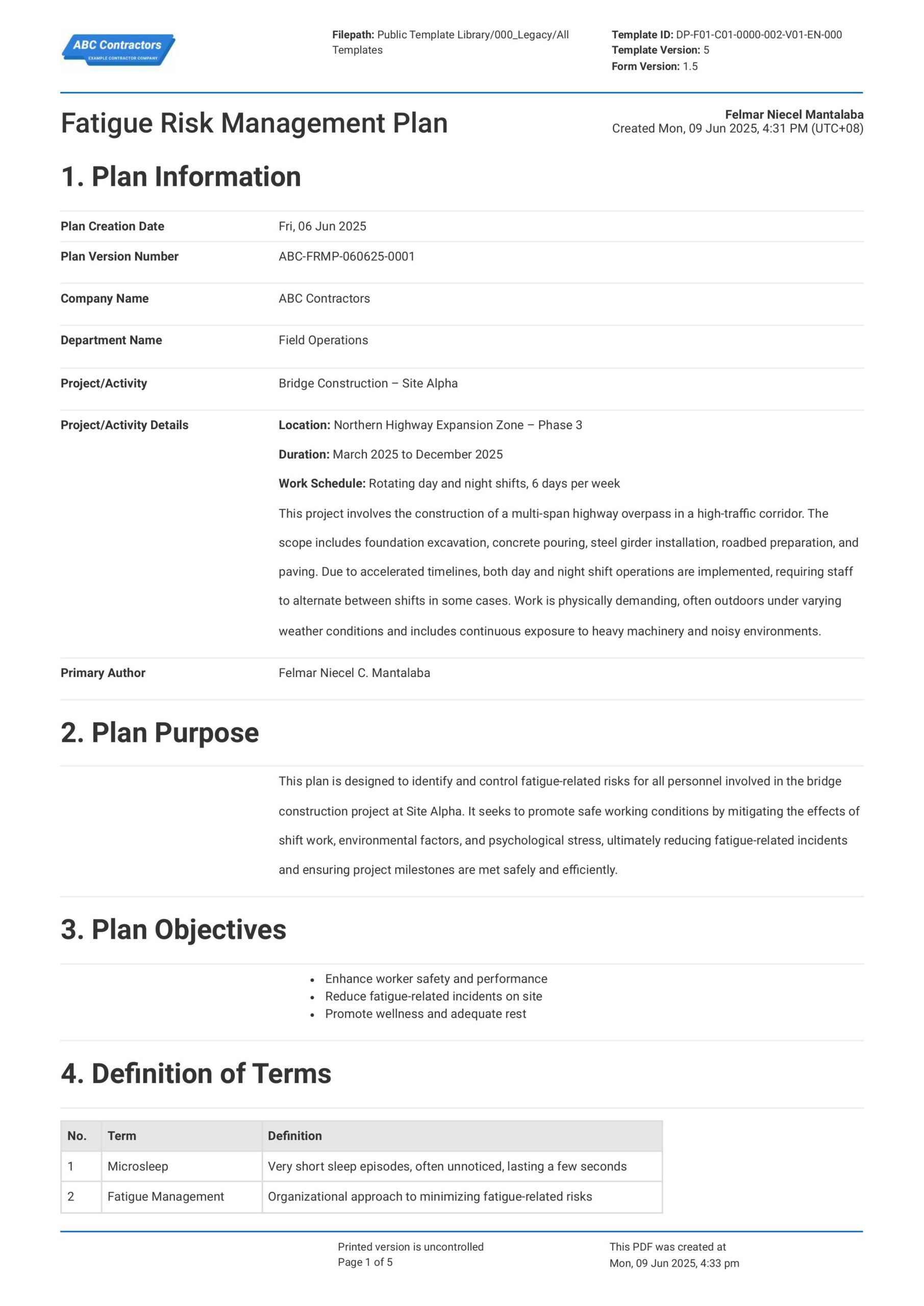
Sitemate's Fatigue Risk Management Plan Template is free and readily usable for businesses to help them establish a complete and compliant Fatigue Risk Management Plan. Using this template ensures proper fatigue
View template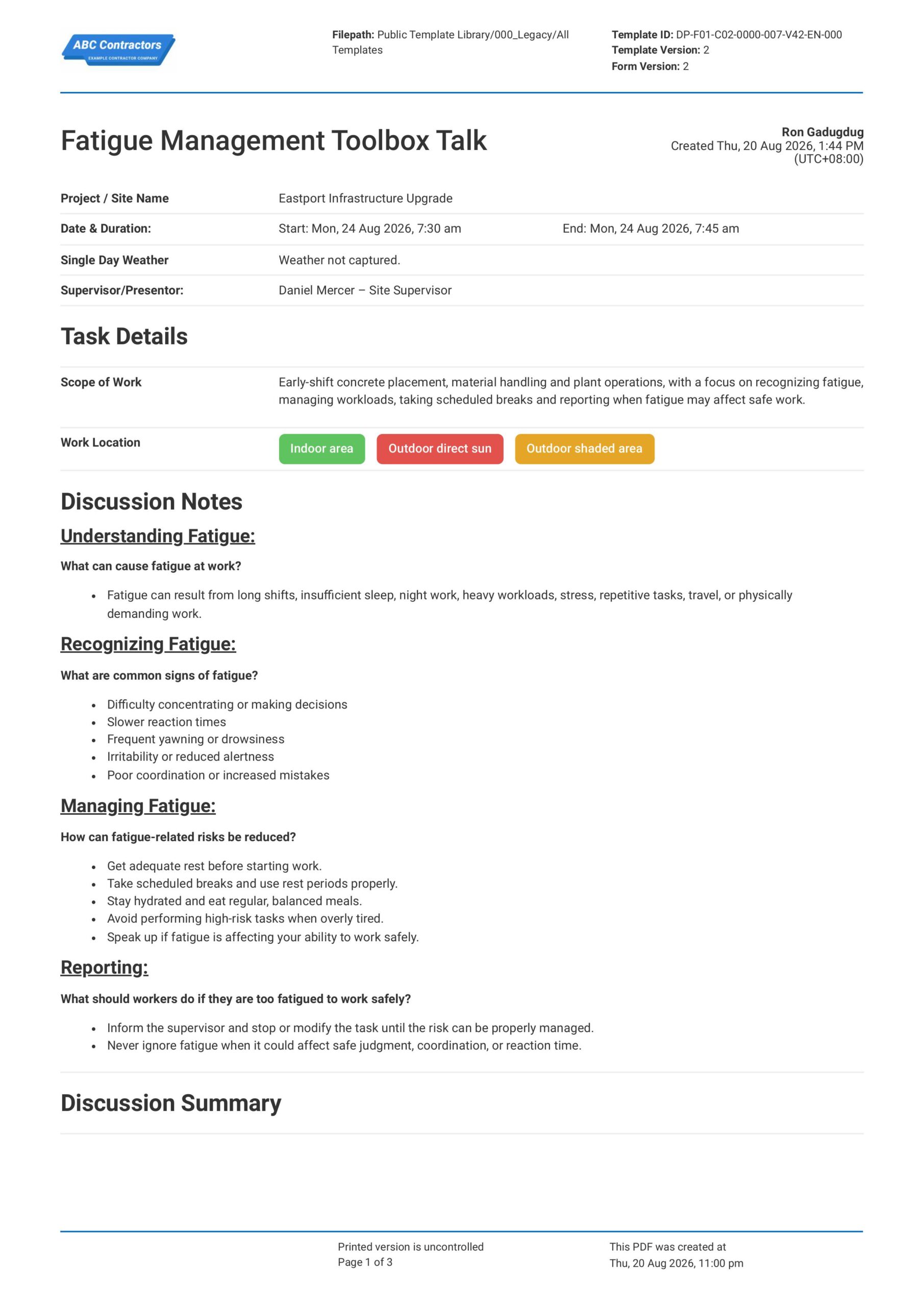
Fatigue Management Toolbox Talk
This Fatigue Management Toolbox Talk is an easy-to-use form that your workers can use to discuss fatigue risks, warning signs, and safe work practices before starting physically demanding, long-hour, shift-based, or
View template