Take the note, keep the record
Site walks, pre-starts, client walkarounds and verbal instructions all produce decisions that matter later. Most of them live in a notebook, a phone note, or someone's memory. Talk through what happened and the record is drafted in Dashpivot, filed against the right job, ready for you to check and sign off.

Trusted by companies, projects and teams of all sizes















The short answer
An AI construction note taker turns what you say on site into a structured record. Talk through a site walk, a pre-start or a client instruction, add photos if you have them, and it fills out the record with the location, crew, conditions and actions already in place. You check it and sign it off before anything is filed.
The note is not the problem, the writing up is
Nobody struggles to notice things on site. Supervisors spot the defect, hear the instruction, and register that the client changed their mind. What fails is the gap between noticing and recording: the notebook that stays in the ute, the phone note nobody can find, the detail that was obvious at the time and vague by Friday.
By the time it matters, usually in a claim, a dispute, or an audit, the note either exists or it doesn't. And the person who would have written it was busy doing the work it describes.
Why nobody hired a note taker before
No project ever employed someone to follow a supervisor around and write down what they said. The value was never quite enough to pay a person for it, and the supervisor was never going to stop and do it while the work was in front of them.
So the note stayed spoken. What changed isn't that site notes suddenly matter more. It's that capturing one stopped costing somebody their afternoon.
Why site notes go missing
The best information on a project is spoken. It gets said standing in front of the work, by the person who knows it, to whoever happens to be there. Then it has to survive the rest of the day, the drive home, and the week, before anyone writes it down.
The client says they never asked for it. The supervisor remembers the conversation clearly. Neither of them wrote it down.
How an AI note taker works
Three steps, from standing in front of the work to a record filed against the job. None of them ask you to stop and write anything up, and the judgement about what actually happened stays with the person signing it off.
-
Step 1
Talk through what happened
Record a voice note while you're still in front of the work. Or type it, or add photos. It reads all of it together rather than as separate attachments.
-
Step 2
It comes back as a record
What was said is mapped to the right fields, and the context around it's captured without being dictated.
- Location and time
- Crew, plant and materials on site
- Weather and site conditions
- Actions, with owners attached
-
Step 3
You check it and file it
Correct anything misheard, add what was missed, and approve. The record lands in Dashpivot against the right project, searchable, rather than in a notes app on one person's phone.
What crews capture this way
- Site walk observations and defects
- Pre-start and toolbox briefings
- Client walkarounds and instructions
- Verbal variations, before they become a claim
- Daily diary notes and progress against program
- Handovers between shifts and subcontractors
Everyone on site can contribute
Crew speak in their own language and the record still lands in your workspace's working language. The person closest to what happened describes it, rather than the nearest person who can write it up in English.
What to look for in an AI note taker app
Most note taking apps were designed for meeting rooms, where there's one clear speaker, a stable connection, and someone with a keyboard. A construction site has none of that. The features that matter are the ones that survive the conditions.
- Voice capture that works through machinery and wind, without a headset
- Accents and trade language understood, so nobody has to slow down and enunciate
- Workers can contribute in their own language, with the record landing in yours
- Knows a variation from a defect, rather than treating it all as generic text
- Location, time, crew, plant and weather pulled in automatically rather than typed
- Photos read as evidence, not filed as attachments
- Offline capture, because the detail is on site and the signal often isn't
What to avoid
The common failure isn't a bad transcript. It's an app that produces something nobody can use later: a long block of text, sitting somewhere personal, with no link to the job it describes.
- Transcript-only output, which moves the writing up rather than removing it
- Tools that need a stable connection to capture anything at all
- Anything that files a record automatically, with no one checking it
- Notes stored against a person instead of a project
- Separate apps for notes, photos and forms, so one event ends up in three places
- General business AI that doesn't know a variation from a defect
- Anything that requires a laptop to review or approve
Common problems, and how to avoid them
Rollouts usually fail for practical reasons rather than technical ones. These are the ones that come up.
- Nobody knows which notes to capture. If the answer is everything, people capture nothing. Agree the handful of moments that matter, such as client instructions and defects, and start there.
- The record has no owner. A note with no action and no owner is a diary entry. Anything that needs doing should leave the note with a name against it.
- Review becomes a second job. If checking the record takes as long as writing it did, people stop. Review should be a scan and a correction, on a phone, before leaving site.
Nothing is filed without you
Nothing is filed automatically. Every output is a draft for human review, and admins control what can be written to.
That's the whole point on a note. A site record is evidence, and evidence that nobody checked is worth less than no record at all. What goes away is the writing up, not the judgement about what happened.
What it can do today
Everything here works today in the Sitemate Mobile App, on Dashpivot forms. Capture runs offline and processes in the background, so nobody stands on site waiting for a spinner.
- Record a voice note, type it, or add photos, and have all three read together
- Pull location, time, weather, crew and plant in automatically
- Capture offline and process once you're back in range
- File the finished record against the right project in Dashpivot
What it cannot do
Some of these are deliberate. A note that files itself isn't a feature on a record that might end up as evidence. Others are simply where the product is today.
- Submit anything on its own. Every output is a draft until a person saves it
- Write to a template or field an admin hasn't allowed it to touch
- Work outside a Dashpivot workspace, so the free Sitemate App on its own doesn't have it
- Decide what mattered. It records the conversation, it doesn't judge it
How the record gets there
A note is only worth taking if someone can still find it in six months. That's the difference between an app that records and a system that keeps, and it's three things working together.
-
Storm
Storm is the capture layer. It listens through machinery and wind, reads your photos as data rather than attachments, and pulls location, weather and crew in on its own.
-
Dashpivot
Dashpivot is where the note stops being a note. It lands as a record against the right project, in a template your business controls, and anyone who needs it can find it later.
-
Sitemate MCP
Sitemate MCP connects ChatGPT, Claude or Copilot to Dashpivot, so a question about the job is answered from your own records rather than the internet. Your own permissions still apply.

Capture site notes with AI in Dashpivot
The AI behind your notes is Storm, Sitemate's data capture agent for the front line of the built world. Voice, photos and site conditions go in. Structured, auditable records come out, built for the conditions where most software fails.

AI Form Fill
Capture what you see and say, and the AI fills the form for you. The details land in the right fields automatically, so a complete record exists the moment the work is done.

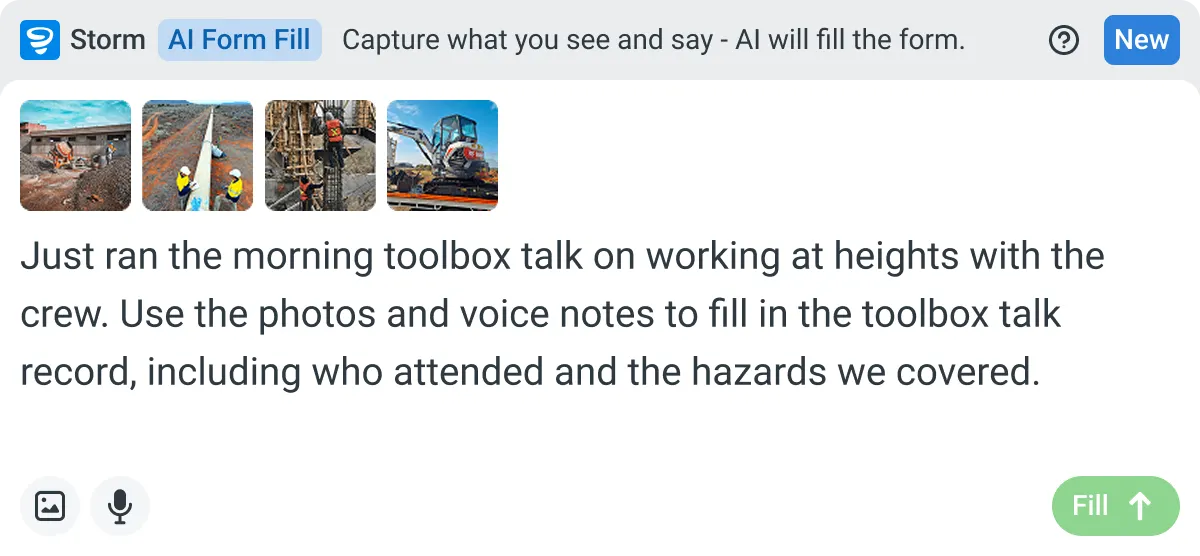

Listens to the work
Captures voice cleanly through machinery, wind, and movement. Accents and trade language understood. No headset needed.

Sees the site
Photos read as primary data, not attachments. Equipment, defects, PPE, and conditions are all interpreted directly from what's in frame.

Knows the context
Location, time, crew, plant, and materials pulled automatically. Critical for inspections, incidents, and time entries.
Frequently Asked Questions
What can I use a construction note taker for?

Anything spoken that needs to survive the day: site walk observations, pre-start briefings, client walkarounds, verbal instructions and variations, defects you spot in passing, and decisions made standing in front of the work.
Do I have to type anything?
No. Talk through what happened and the record is drafted for you. You can type notes instead, or add photos, and it reads all of the inputs together rather than treating them separately.
Will it work with the noise on site?
Voice capture is built for machinery, wind and movement, and it understands accents and trade language. No headset needed.
Where do the notes end up?
As a structured record against the right project, not in a notes app on someone’s phone. Location, time, crew, plant and materials are pulled in automatically, so the note is searchable and linked to the job rather than floating loose.
Can I check it before it becomes a record?
Yes, and nothing is filed without you. Nothing is committed automatically: every output is a draft for human review. You correct anything it misheard, add what it missed, and approve.
What if the person on site doesn't speak English?
They can speak in their own language and the record still lands in your workspace’s working language, so the note stays usable in the office without excluding anyone on site.
 English (United States)
  English (Australia)
  English (UK)
  English (New Zealand)
  English (South Africa)
  German