Cranes Safe Work Method Statement Template

Start with a free 30-day trial. No credit card required.
Looking for a ready-to-use Cranes Safe Work Method Statement (SWMS) that still fits how your team works? This template comes pre-filled with crane job steps, risk assessments, control measures, and method statements covering common lifting and load-moving activities, so your team is not starting from a blank page. You can edit any of it to match your company's procedures, site conditions, crane type, and lifting gear, and the finished document will still hold up against the Australian regulations and site audit requirements your business needs to meet.
This Cranes Safe Work Method Statement (SWMS), or Cranes SWMS, is an easy-to-use form that your workers can use to plan and manage crane operation risks before lifting or moving loads. Select the scope of work, relevant hazards such as dropped loads, ground instability, overhead services, and exclusion zone management, and the required PPE from ready-made lists, then work through pre-built job steps and risk ratings your crew can review, sign off on any device, and export as a PDF or CSV when the job is done.
 100% fully editable Cranes Safe Work Method Statement
Export your Cranes Safe Work Method Statement to PDF or CSV
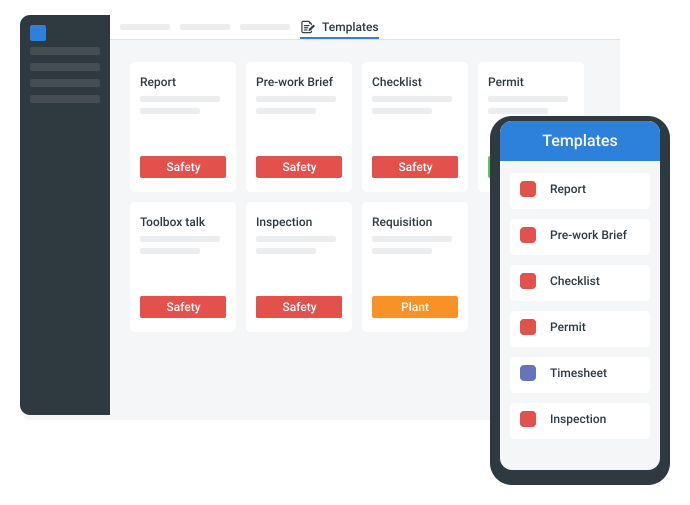
Access your Cranes Safe Work Method Statement on mobile, tablet or computer
Trusted by companies, projects and teams of all sizes















What is Cranes Safe Work Method Statement?
A Cranes Safe Work Method Statement, or Cranes SWMS, is a document used by site teams, supervisors, crane operators, and lifting crews to plan how crane operations will be carried out safely. This SWMS usually includes details on the crane type, work area, load, lifting gear, ground conditions, lift path, exclusion zones, communication methods, PPE, job steps, hazards, risk ratings, and control measures.
Due to the risks that come with crane operations, hazards such as dropped loads, struck-by incidents, crane rollovers, ground instability, overhead services, poor communication, and working near people or structures have to be planned around to lessen potential accidents. This makes Cranes SWMS documents highly relevant in Australian construction, infrastructure, civil works, mining, utilities, ports, manufacturing, and industrial projects where cranes are used to lift, move, or place heavy materials and equipment.
See how this Cranes Safe Work Method Statement compares with traditional Word, Excel, and PDF-based processes
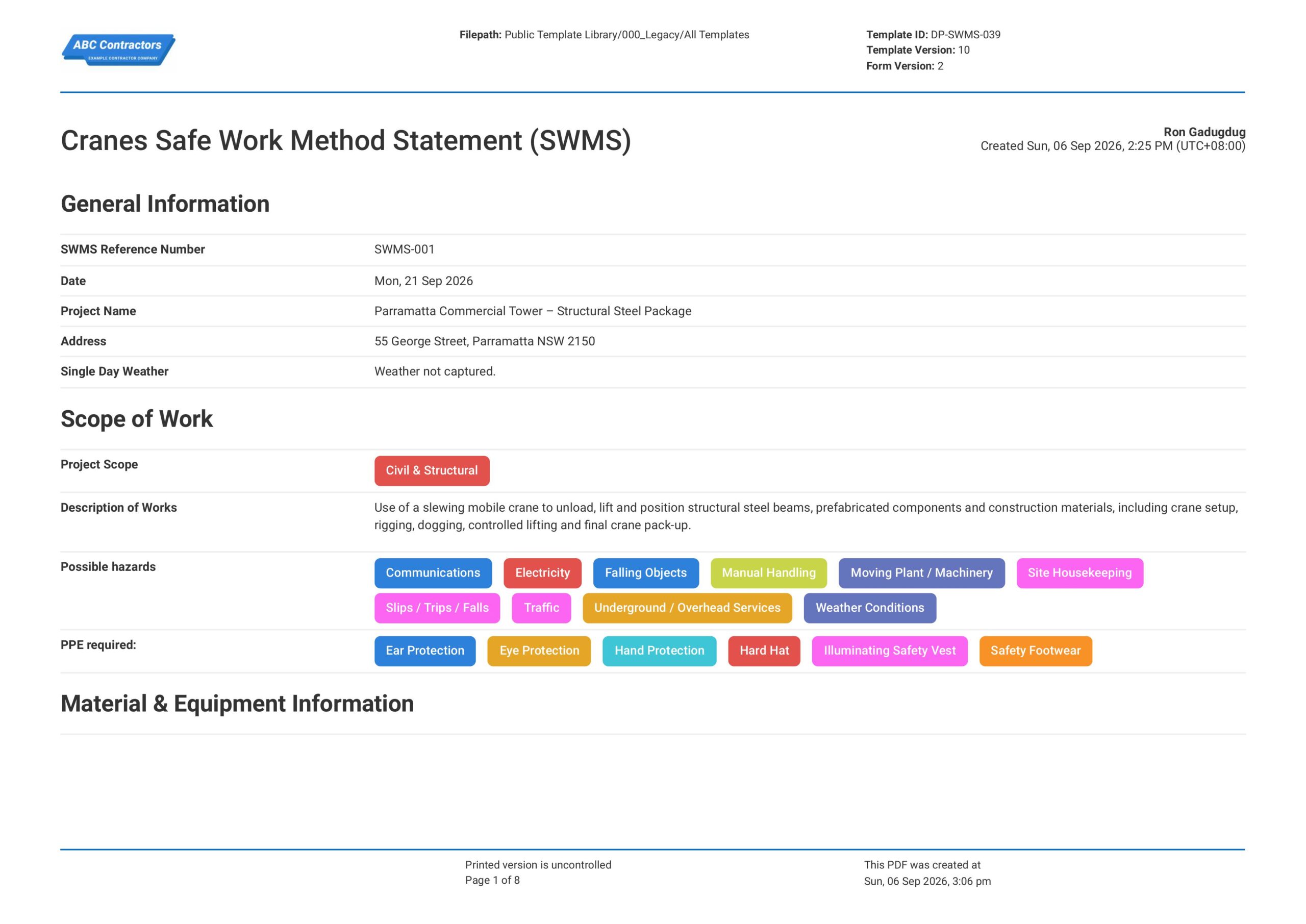
Curious how this Cranes Safe Work Method Statement (SWMS) works? Check out the example below to see what the completed form looks like, including how the crane job steps, hazard assessments, and control measures are laid out. You can generate your own version, fill in your site details, crane type, lift plan, and crew sign-offs, and have a ready-to-use Cranes SWMS in minutes. From there, export it as a custom PDF or CSV to share with your team or keep on file for your records.
Use this Cranes Safe Work Method Statement template for free

Generate this template automatically with Storm
You don't have to build the Cranes Safe Work Method Statement field by field. Let Storm, the AI Data Capture Agent inside Dashpivot, build the template for you in seconds.
Describe what you need
Tell Storm the form you want in plain language and it builds a structured digital template from scratch, with fields, tables, and signatures in place.
Upload what you already use
Drop in your existing PDF, Word, Excel, or even a photo of a paper form. Storm rebuilds it as a smart digital template with the structure intact.
 Storm
Storm
Generate a Cranes Safe Work Method Statement form template that I can use for my business
Applicable Standards and Policies for Cranes Safe Work Method Statement
There are generally no explicit formatting requirements for a Cranes Safe Work Method Statement. However, Australian WHS laws require PCBUs to prepare a SWMS for high-risk construction work where applicable, and to document hazards, risks, and control measures involved in crane operations, lifting activities, load movement, exclusion zones, and work near people or other plant. A Cranes SWMS is a good document to support compliance to this.
- Model WHS Regulations require a SWMS for high-risk construction work in Australia
- Safe Work Australia guidance covers cranes, lifting operations, and dogging work
- Safe Work Australia guidance covers falling objects, suspended loads, and exclusion zones
- State and territory WHS laws commonly require risk controls for crane and lifting work
- Local site and principal contractor requirements commonly require SWMS documents for crane operations
Staff Members and Parties that use Cranes Safe Work Method Statement
A Cranes SWMS is primarily used by project teams that manage crane operations, lifting work, rigging, dogging, load movement, and work near suspended loads. Here are examples of other common parties that use a Cranes SWMS:
- Site supervisors and project managers
- Crane operators
- Riggers and doggers
- Health and safety teams
- Contractors and subcontractors involved in lifting operations
Business Risks Reduced by Cranes Safe Work Method Statement
A Cranes SWMS puts controls in place for the hazards behind most crane incidents, such as dropped loads, crane instability, struck-by incidents, incorrect rigging, powerline contact, poor communication, and unsafe exclusion zones. Applied consistently, it reduces the following business risks.
- Injuries, fatalities, and crane-related incidents
- Non-compliance with Australian SWMS and lifting operation safety requirements
- Legal claims, enforcement action, and incident-related costs
- Project delays from crane incidents, failed lifts, investigations, and site shutdowns
Business Opportunities Created by Cranes Safe Work Method Statement
A well-prepared Cranes SWMS helps businesses improve control over crane operations, lifting activities, suspended loads, and high-risk construction work. Here are some ways a well-designed Cranes SWMS can help businesses:
- Improve worker confidence before crane operations begin
- Strengthen contractor prequalification and tender-offer competitiveness
- Improve coordination between supervisors, crane operators, riggers, doggers, and site teams
- Build trust with clients, regulators, insurers, and project stakeholders
What Should be Included in a Cranes SWMS?
A Cranes SWMS should be prepared before crane activities are carried out as part of high risk construction work. While exact requirements can vary across Australian states, territories, projects, and principal contractor requirements, there are some core elements that are typically included that you should know about:
- Scope of work, site location, crane type, lifting area, and responsible persons
- Job steps for crane setup, pre-start checks, rigging, lifting, slewing, landing loads, pack-up, and shutdown
- Hazards such as dropped loads, crane overturning, power line contact, unstable ground, lifting failure, plant interaction, and nearby workers
- Required controls such as lift plans, exclusion zones, ground checks, outriggers, communication methods, spotters, taglines, and operator competency
- Risk ratings, emergency procedures, worker consultation, sign-off, and review requirements
Why are Cranes SWMS Important?
Cranes SWMS are important because crane activities can expose workers, nearby trades, plant, structures, and the public to serious lifting risks. This is critically important on construction, civil, infrastructure, industrial, and maintenance sites where cranes may operate near power lines, excavations, temporary works, traffic routes, or occupied areas.
Essentially, a Cranes SWMS helps confirm that the work steps, lift plan, ground conditions, exclusion zones, communication methods, and emergency procedures have been reviewed before lifting begins. Additionally, it gives project management teams clear documentation of the due diligence performed, supporting consultation, site coordination, and compliance with Australian WHS requirements for high risk construction work.
How to Create a Cranes Safe Work Method Statement (SWMS)
Creating your own Cranes SWMS forms doesn’t have to be complicated. In this section, we break down the process step by step.
Before starting your Cranes Safe Work Method Statement (SWMS) form, the following pre-requisites should be ready.
- Project or site details are required.
- Crane type and lifting scope must be listed.
- High-risk construction work details must be covered.
- Hazards, risks, and control measures must be stated.
- Operator, rigger, and dogger competency must be included.
- Load, ground, overhead, and exclusion zone controls must be noted.
- Worker sign-off and SWMS review requirements must be recorded.
-
Start with Project and SWMS Information
First, you need to place high-level general information at the beginning of your Cranes Safe Work Method Statement to help establish context for the work to be done. Here are some examples of core elements that you can use:
- Project name and site location
- SWMS title and document reference number
- Description of crane activities to be completed
- Name of the PCBU, contractor, or subcontractor
- Names and roles of workers, supervisors, crane operators, doggers, and riggers
-
Define the Scope of Crane Operations
Next, you will want to define the scope of work so it is clear what crane activities are covered by the SWMS. For example, you will want to list the following information in your Cranes SWMS:
- Type of crane being used
- Load type, weight, dimensions, and lifting points
- Lift area, crane position, and landing area
- Rigging gear, lifting accessories, and attachments required for the task
- Exclusion zones, access routes, and nearby work areas
-
Assess Crane Operation Hazards
It is important that potential hazards are identified before crane operations start so the appropriate safety control measures can be implemented. Common hazards that you should look out for include:
- Suspended loads moving over workers or active work areas
- Contact with power lines, structures, plant, or nearby equipment
- Crane instability from poor ground, slopes, or incorrect set-up
- Dropped loads, rigging failure, or load swing
- High winds, poor visibility, rain, or changing site conditions
-
Record Safety Control Measures and Work Method
After the hazards are identified, you will want to determine the appropriate safety control measures to reduce risks for your workers and nearby site personnel. Be sure to document the following information in your SWMS:
- Operator, dogger, and rigger competency requirements
- Crane pre-start checks, load chart checks, and lift planning requirements
- Outrigger, crane mat, ground bearing, and set-up requirements
- Communication method between the crane operator, dogger, riggers, and spotters
- Work sequence for set-up, rigging, lifting, slewing, landing, de-rigging, and pack-up
-
Complete Review, Approval, and Worker Sign-Off
Complete your Cranes SWMS with review, approval, and worker sign-off to confirm that the work method and safety control measures have been communicated before work starts. Here are some examples of fields you can include:
- Names and roles of reviewers and approvers
- Date of review and approval
- Worker confirmation that the SWMS has been read and understood
- Supervisor or person in charge sign-off
- Revision number and next review trigger
Frequently asked questions
How to create your Cranes Safe Work Method Statement in an App or Software System
A well-designed Cranes Safe Work Method Statement ensures workers clearly understand the hazards, risks, and required control measures to perform high-risk work, while enabling your team to easily document, review, and share safe work procedures before work begins.
40 minutes
Medium difficulty
-
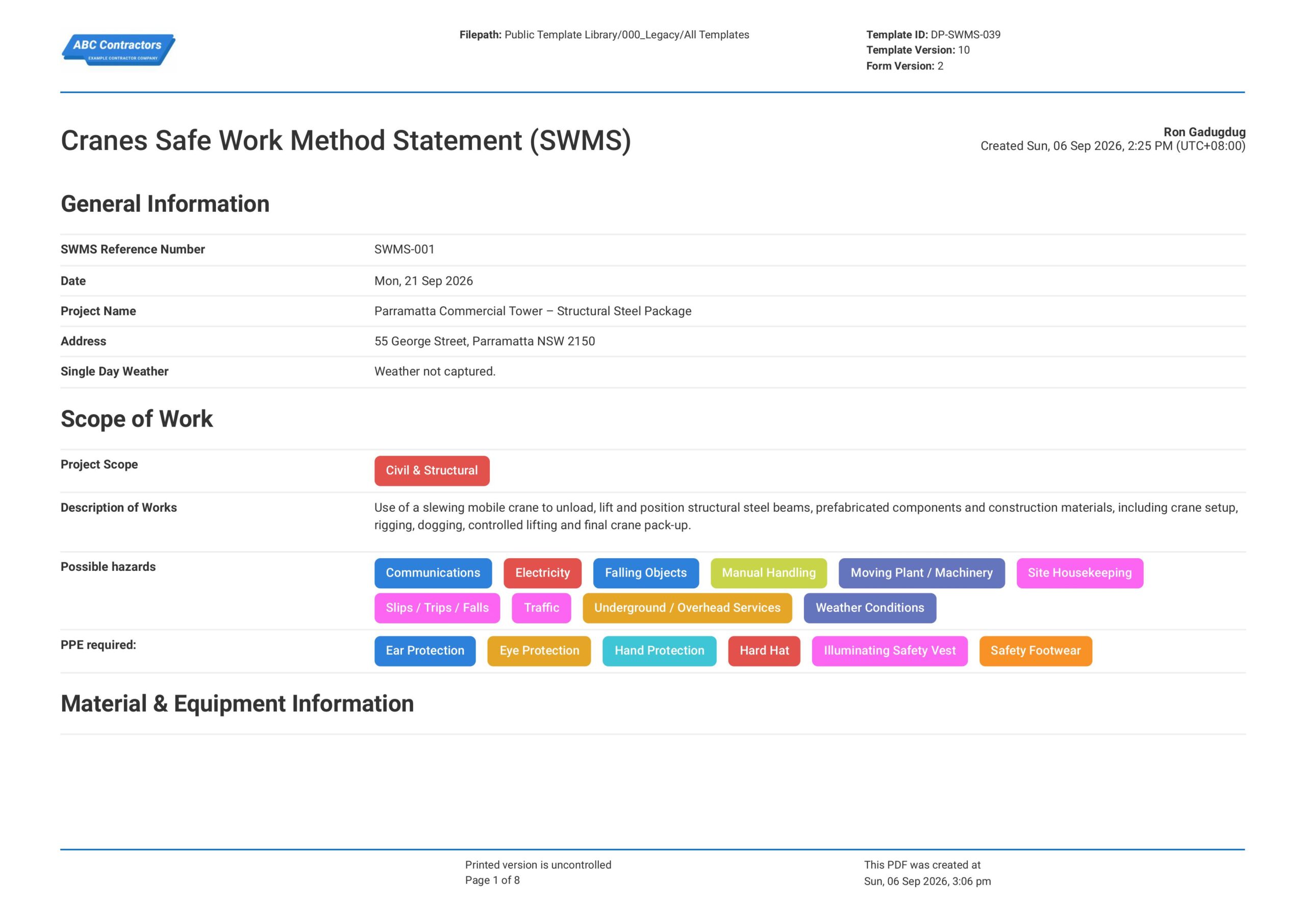
Start your Cranes SWMS with General Information
It is important to begin your Cranes Safe Work Method Statement (SWMS) with key project, site, date, reference, and location details so the document can be traced to the correct crane lifting activity. This section should use simple text and date fields for fields such as:
- Text field or Automatic Form Counter for SWMS Reference Number
- Date selector field for Date
- Text fields for Project Name and Address
- Text field or Automatic Single Day Weather capture
- Multi-line text field for Description of Work
-
Create a Section for Scope of Work, Hazards, and PPE
Next, create a section where users can select the project scope, possible hazards, and required PPE for the crane works. For simplicity, we recommend using multiple-choice selector fields for this section, with fields such as:
- Multiple-choice selector field for Project Scope
- Multiple-choice selector field for Possible Hazards
- Multiple-choice selector field for PPE Required, including Ear Protection
- Conditional text field for other hazards or PPE not listed in the pre-filled choices
-
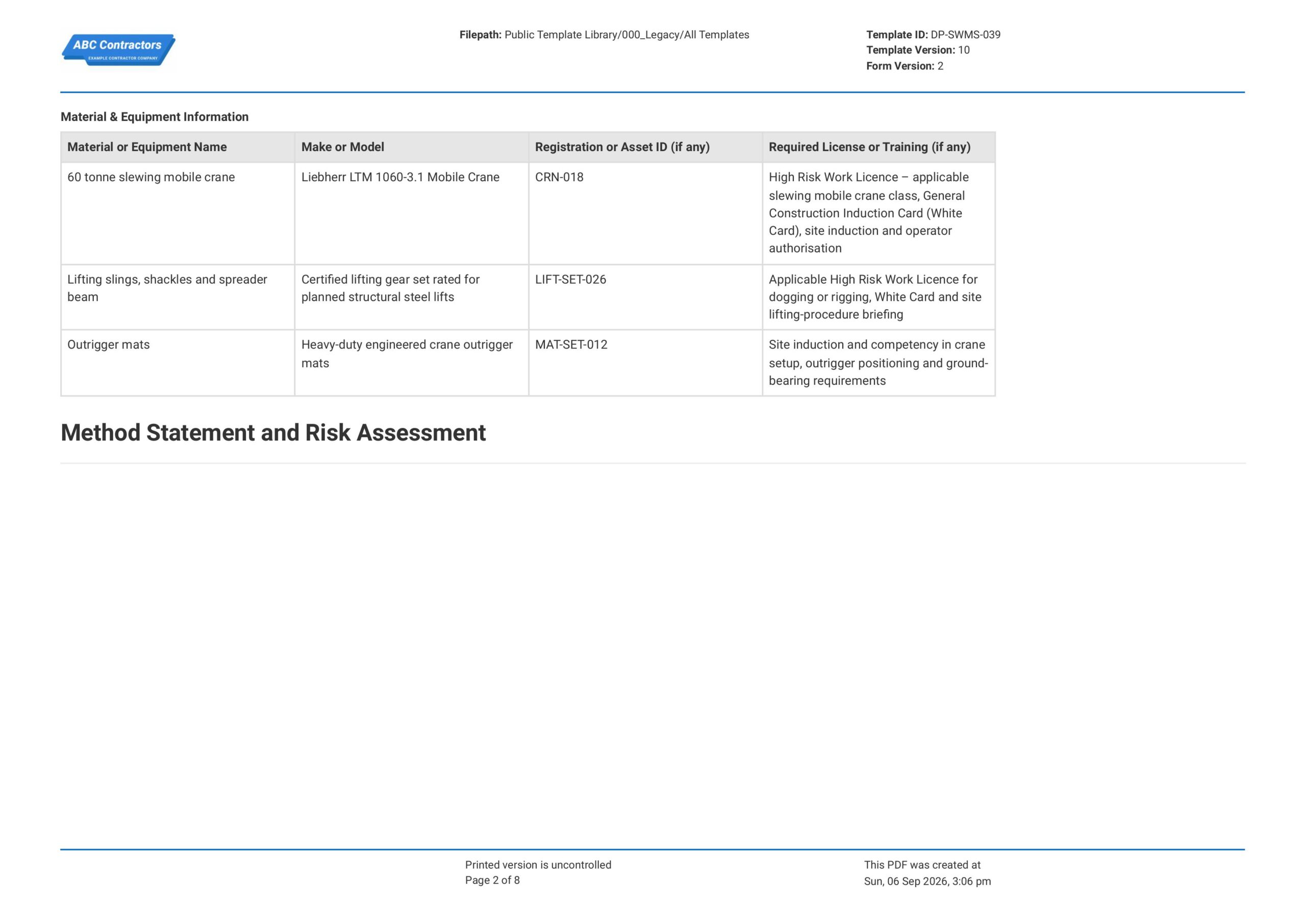
Create a Table for Material and Equipment Information
Users will next need to list down the crane, lifting gear, outrigger mats, and other equipment required for the task. We highly recommend using a table for this section so each item can be recorded with its make, asset details, and required training information.
- First column for Material or Equipment Name
- Second column for Make or Model
- Third column for Registration or Asset ID, if any
- Fourth column for Required License or Training, if any
-
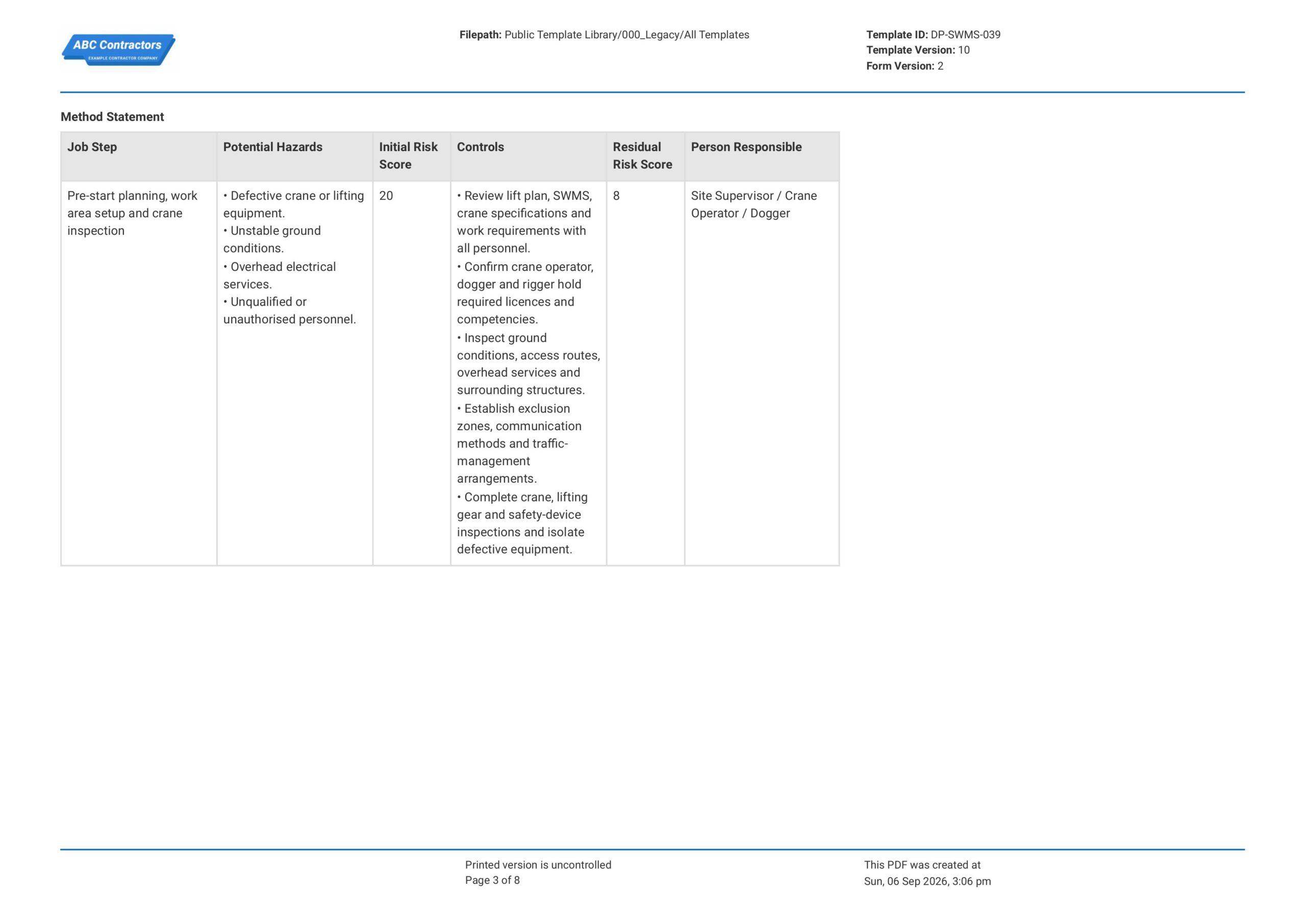
Create a Table for the Method Statement and Risk Assessment
Next, create the main SWMS table where users can record each crane job step, hazards, risk scores, controls, and responsible persons. We highly recommend using a table for this section, with the following formatting for the columns:
- First column for Job Step
- Second column for Potential Hazards
- Third column for Initial Risk Score
- Fourth column for Controls
- Fifth column for Residual Risk Score
- Sixth column for Person Responsible
-
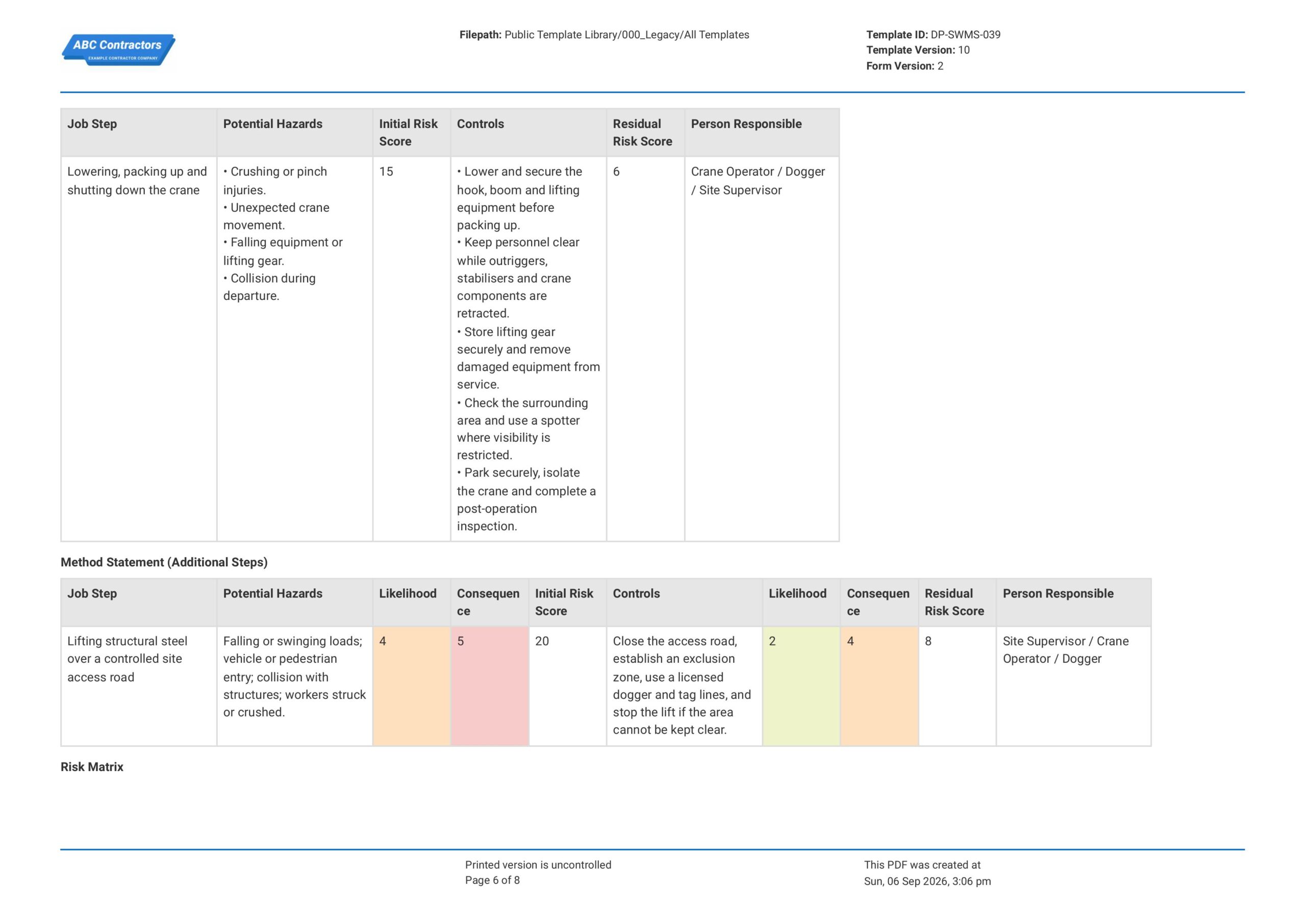
Add Pre-filled Method Statement Rows for Crane Work
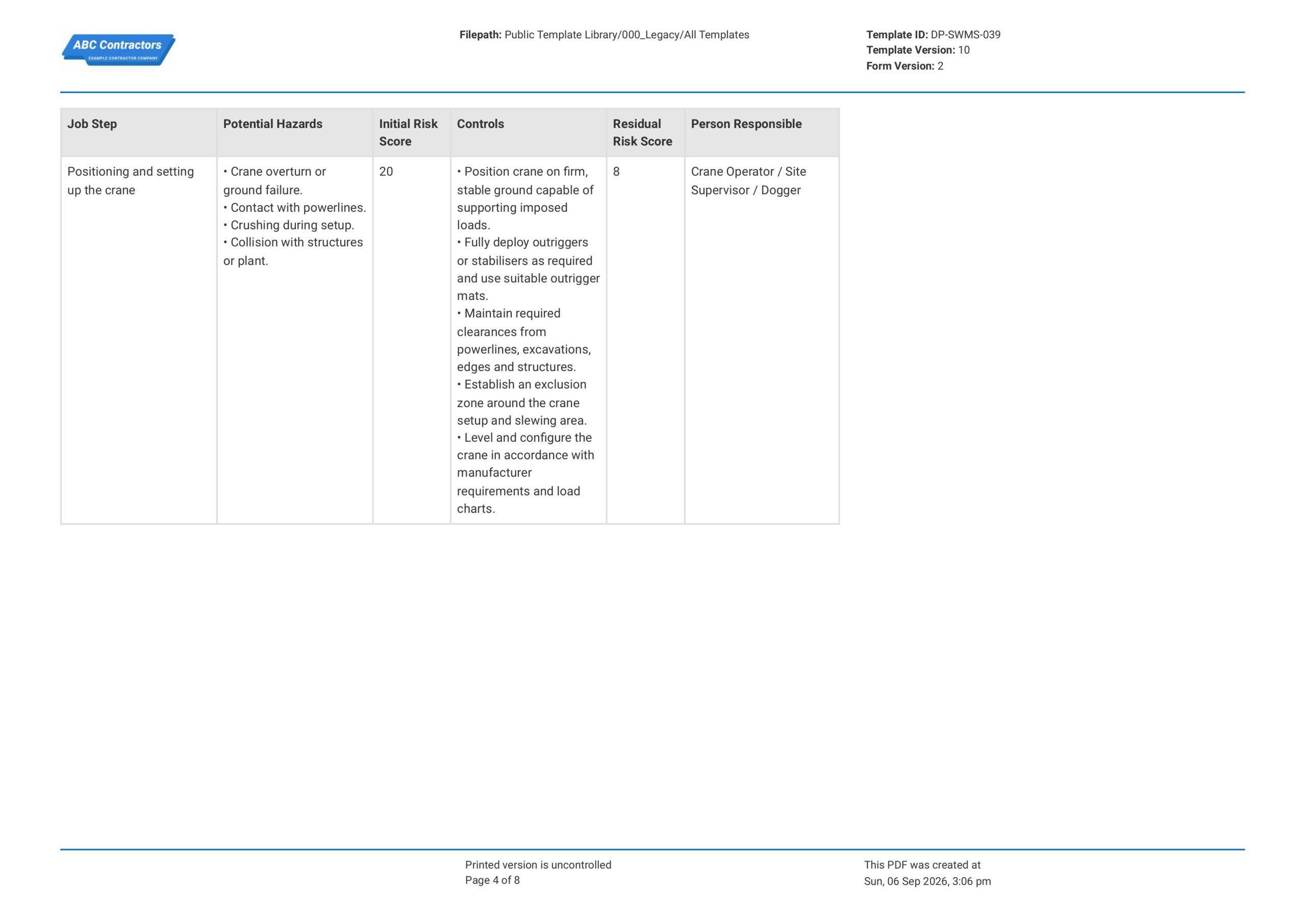
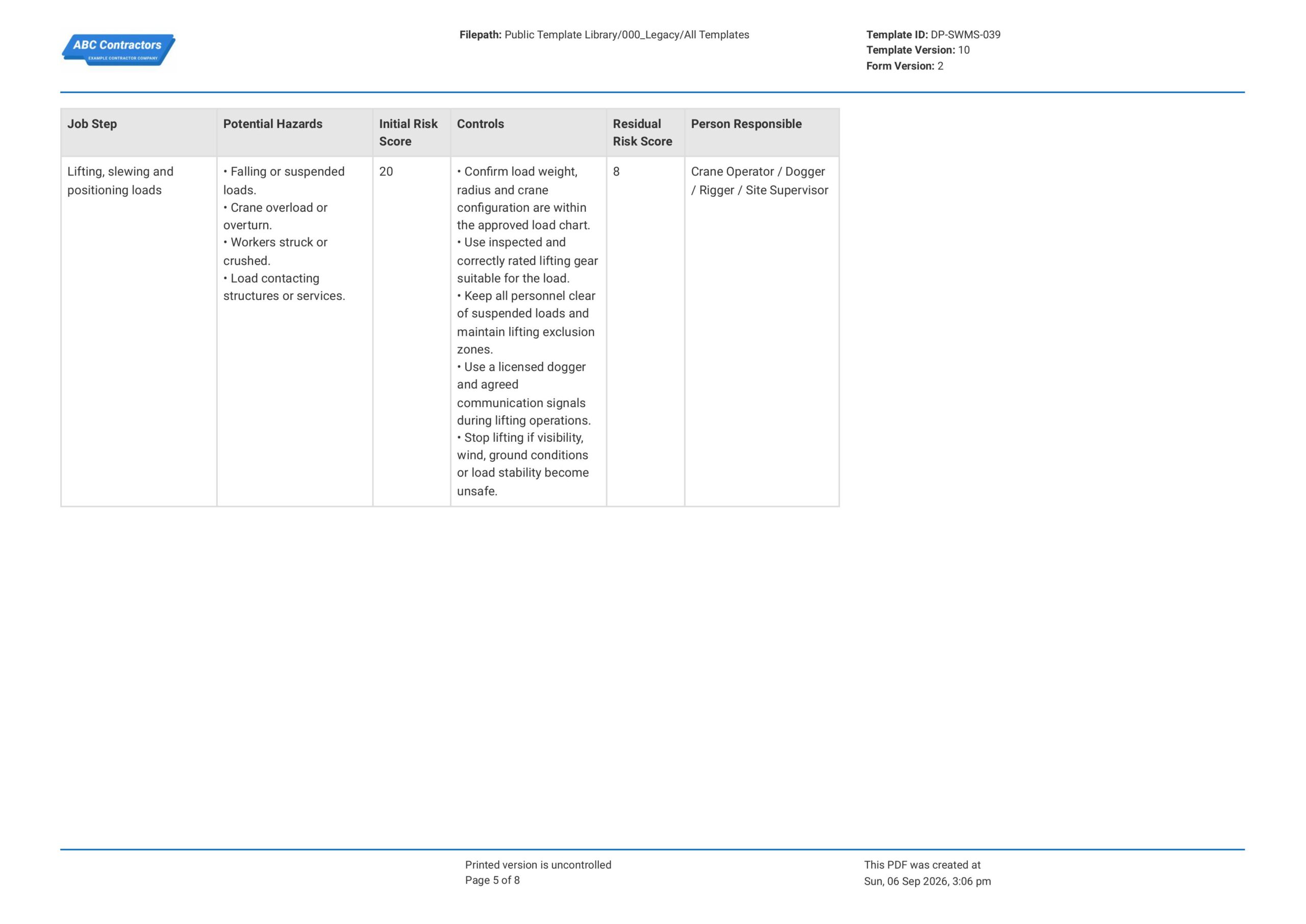
After the main table is created, add pre-filled rows that reflect the most common crane job steps in the attached SWMS. These rows help users complete the form faster while still allowing the SWMS to be adjusted for the actual site task.
- Row for Pre-start planning, work area setup and crane inspection
- Row for Positioning and setting up the crane
- Row for Lifting, slewing and positioning loads
- Row for Lowering, packing up and shutting down the crane
-
Create a Section for Additional High-Risk or Site-Specific Steps
Some crane tasks may require extra job steps depending on controlled access roads, suspended loads, pedestrian routes, vehicle movement, nearby structures, or the type of lift being completed. We highly recommend creating an additional method statement table so users can add extra risk assessment rows when needed.
- Columns for Job Step, Potential Hazards, Likelihood, Consequence, Initial Risk Score, Controls, Residual Risk Score, and Person Responsible
- Dropdown fields for Likelihood and Consequence scores
- Risk Score = Likelihood Rating x Consequence Rating
-
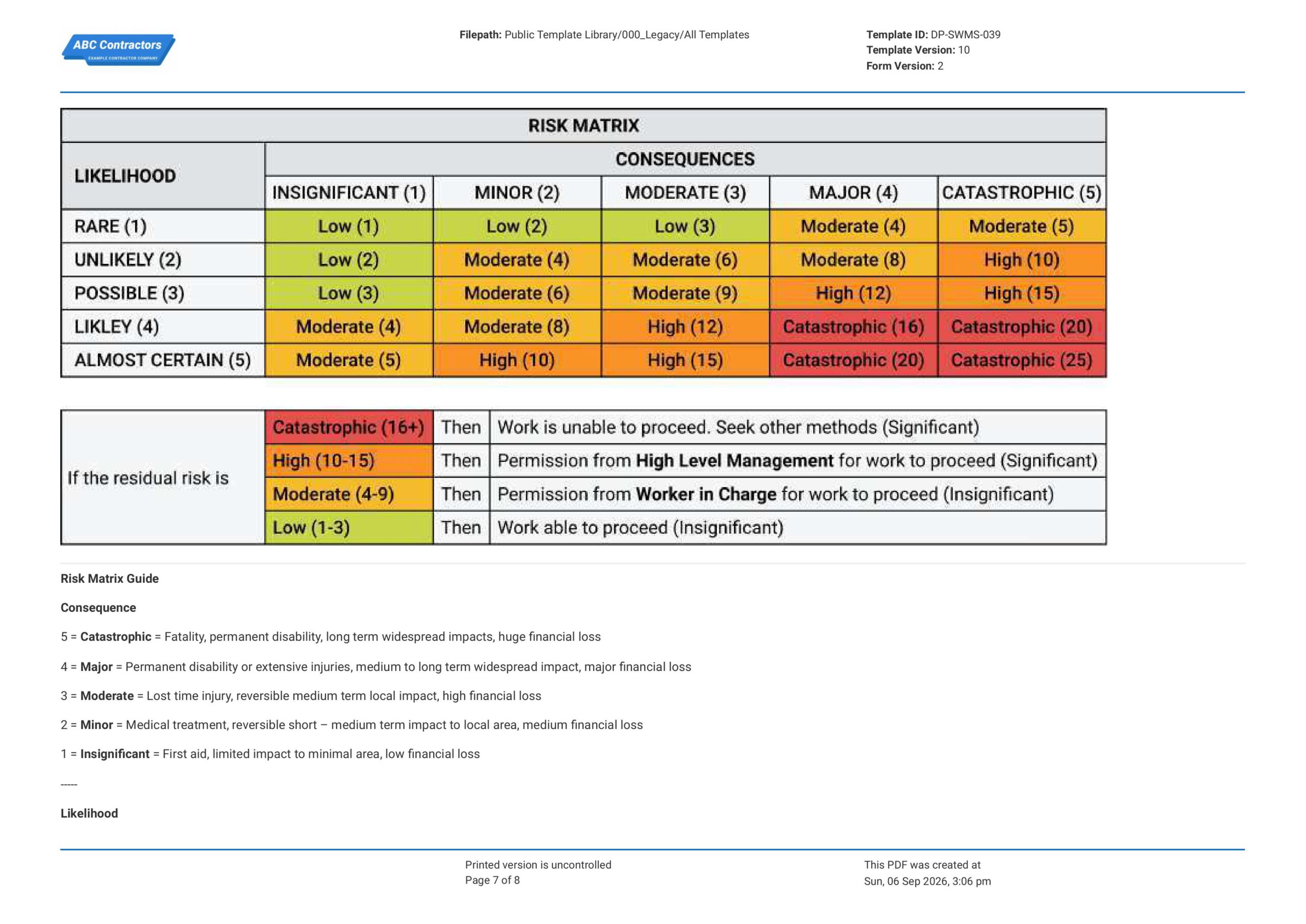
Create a Section for Risk Matrix Guidance
Next, add a risk matrix section as a guide for users to assess initial and residual risk scores for any additional job steps they may add. We highly recommend using the following fields and features to help guide users:
- Pre-filled or photo of the Risk Matrix table showing Likelihood, Consequence, and Risk Score levels
- Pre-filled text field for Consequence ratings from 1 to 5
- Pre-filled text field for Likelihood ratings from 1 to 5
- Pre-filled guide for residual risk actions
-
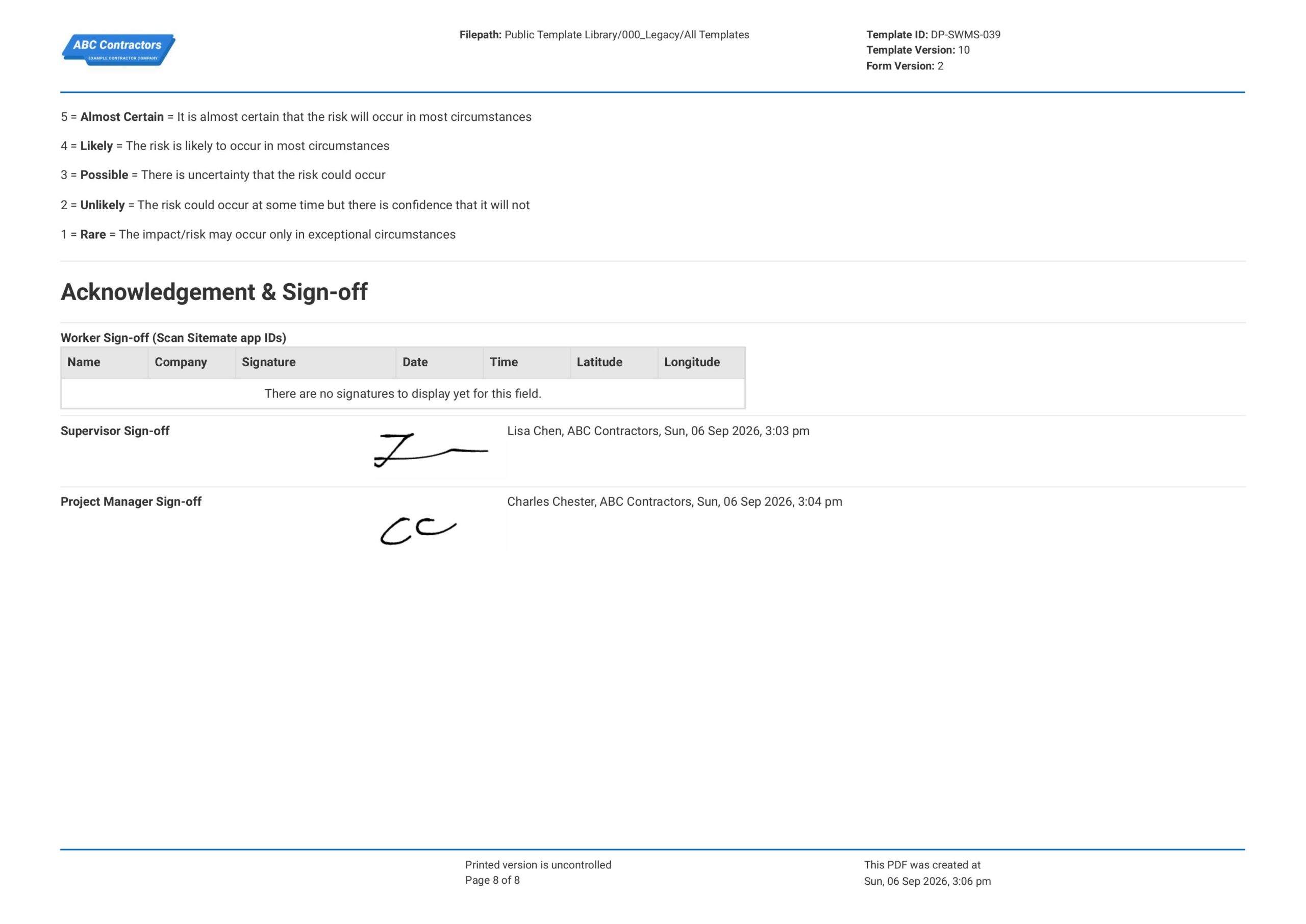
End your Cranes SWMS with Worker and Supervisor Sign-offs
Finally, complete the Cranes Safe Work Method Statement (SWMS) with worker confirmation and sign-off fields for the responsible parties. If your app or software allows, use scan-to-sign and automatic e-signature fields to keep the sign-off process digital.
- A scan to sign-on table for workers’ sign-off
- E-signature field for Supervisor Sign-off
- E-signature field for Project Manager Sign-off
- Automatic date and time stamp fields for each sign-off
About the author

Ron Gadugdug
Content Engineer
 LinkedIn
Education
Cebu Institute of Technology - University - Civil Engineering
Bio
Ron is a Civil Engineer with 6 years of experience in the construction industry, primarily focused on quantity surveying, cost estimation, project management, quality control, contract administration, and property & engineering insurance. At Sitemate, he writes about practical applications of evolving technologies and digital solutions that support construction professionals in improving efficiency, compliance, and project delivery across the built world.
Past Projects
Quantity Surveying & Cost EngineeringPerformed quantity take-offs of several high-rise and horizontal structures using sheets and applications like Revit and Bluebeam Revu, and spearheaded trials with Building Information Modeling (BIM) software.
Project Management & ConsultancyCoordinated with project management teams during the construction of local projects such as a 4-tower hotel & resort, a 22 storey condominium project, and a school dormitory project.
Contract AdministrationAssisted during contract biddings and negotiations with general contractors and sub-contractors, and oversaw progress reporting, billings, and payment.
Property & Engineering InsuranceDedicated non-life claims handler, overseeing property and contractor all-risk insurance claims, risk management, and bonds.
Version History:
Related apps and templates
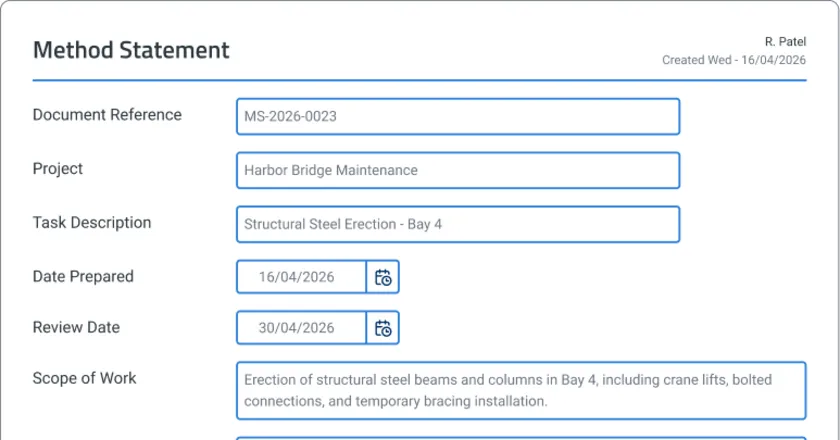
Safe Work Method Statement App
Sitemate’s safe work method statement app template helps supervisors draft, review, sign off, and store SWMS fast. Try free — no credit card
View app
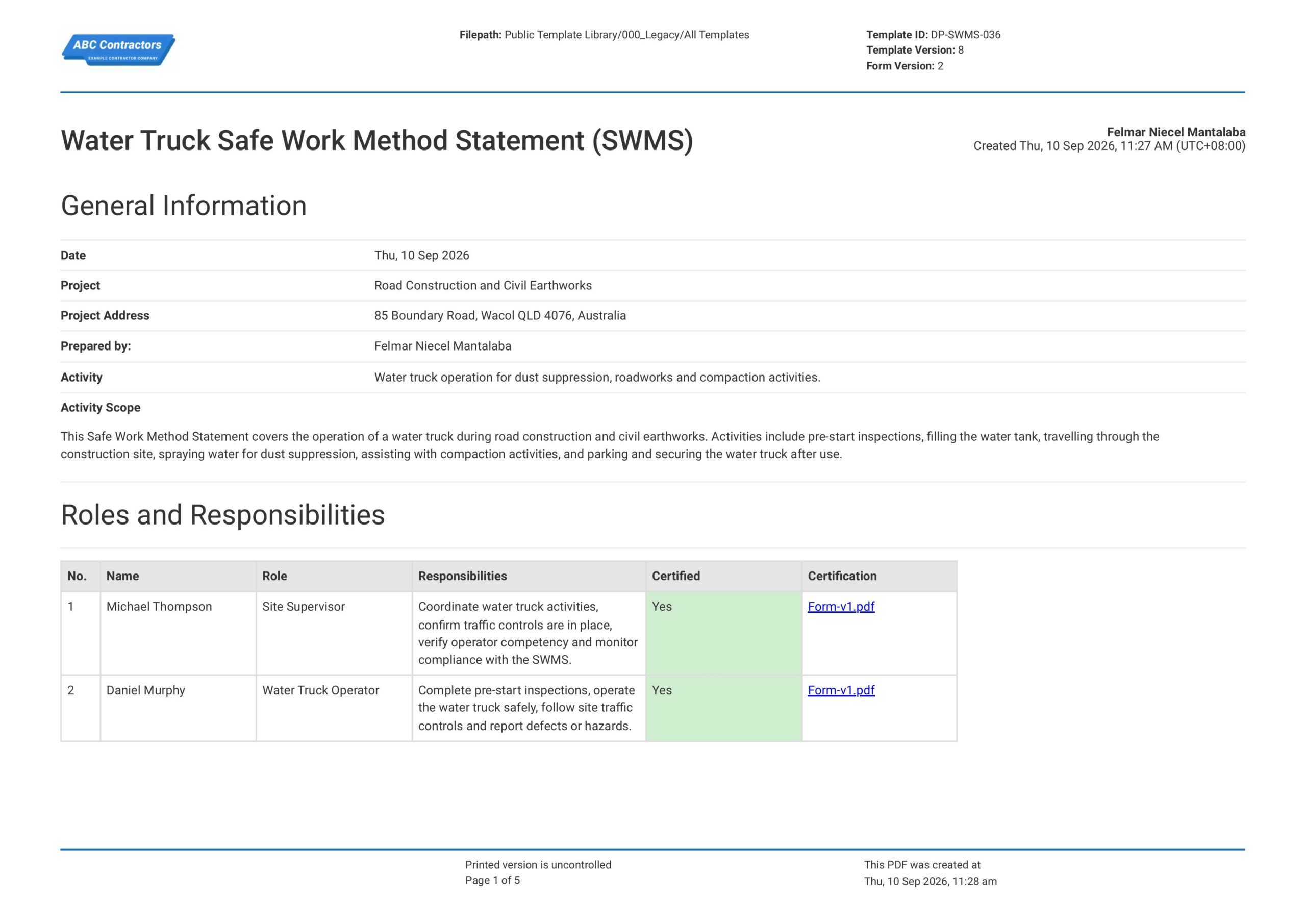
Water Truck Safe Work Method Statement
This Water Truck Safe Work Method Statement (SWMS) is free and readily available to document identified hazards, safety control measures, and safe procedures for all water truck activities. The template already contains
View template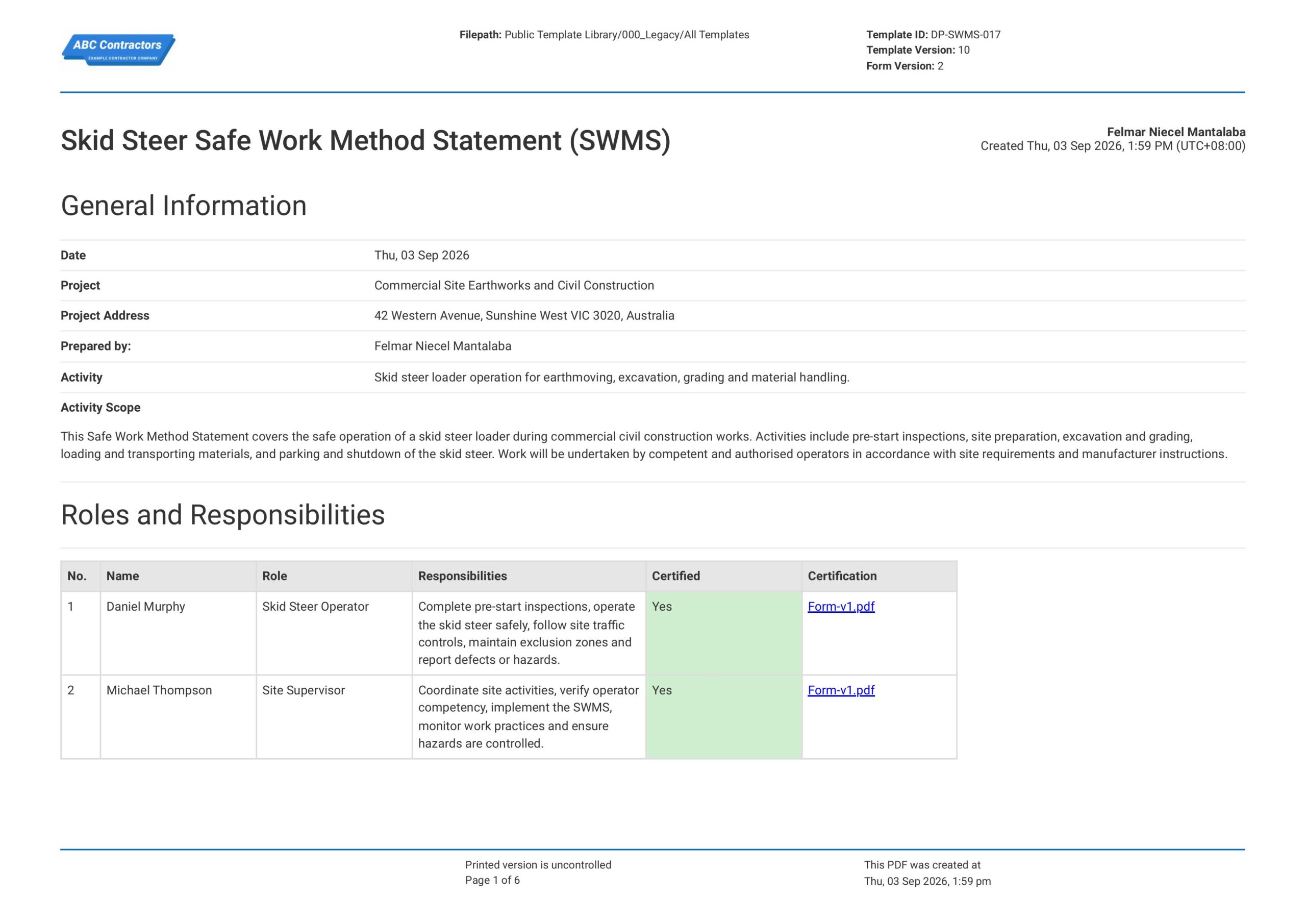
Safe Work Method Statement for Skid Steer Loader
This free Safe Work Method Statement for Skid Steer Loader enables a company and workers to structure how they approach a specific high-risk activity involving bobcats. This template already contains all the standard
View templateThis SWMS form was generated with Dashpivot software
- Access, edit and complete your Cranes Safe Work Method Statement from any device - mobile, tablet or computer.
- Print, download or send your Cranes Safe Work Method Statement as perfectly formatted PDF documents with your company logo.
- Store your Cranes Safe Work Method Statement securely online, where they can be searched and found in seconds
- Invite internal and external parties to see, edit and sign off on Cranes Safe Work Method Statement online.