AI Tool for Creating Progress Reports
Progress reports tend to get written late on a Friday from memory and a camera roll, right when the client wants an update or the monthly claim is due. Describe the period, or talk it through while you walk the site, and the report is drafted for you with work completed and delays logged by date. Check it against what was built and sign it before it goes to the client.

Trusted by companies, projects and teams of all sizes


The short answer
An AI progress report tool drafts your weekly or monthly report from what happened on site: work completed, plant and crew, weather and delays. Describe the period or hand over your notes and photos, and the first draft comes back in your format. The site supervisor checks quantities and dates against what was built and signs it before it goes out.
How a Progress Report Gets Made Today
Most progress reports start as last month's, opened from the hard drive and typed over on a Friday afternoon. Some people are still using a template they brought from a previous job. Others download a free one and spend an hour forcing it to fit a civil project. Either way, old dates and quantities slip through, and the client often spots them first.
- Copying last month's report and typing over it
- Using a template from a previous employer
- Downloading a free template and hoping it fits
- Writing it from memory days after the period ended
What an AI Tool for Progress Reports Does Instead
An AI progress report tool takes what happened on site over a week or a month and drafts the report from it. You give it the work completed, the crew and plant on site, the weather and any delays, plus photos if you have them. It returns a structured draft with those details in the sections your client expects. The site supervisor then checks the draft and signs it before it goes anywhere. What it saves is the typing: the hour in the car at the end of the day, or the Friday afternoon spent merging daily diaries into a weekly report by hand. Most tools give you an editable document. Some go further and keep the report as a record against the job.
How to Write a Progress Report with AI
There are three steps, from describing the job to a signed progress report ready for the client update or the monthly claim. You start with what happened on site that period: the work done and what held it up. You finish with a report someone has checked line by line. Each step works with whatever tool you use. The generator handles the first draft. The call on what goes to the client stays with the site supervisor who signs it, because they're the one who knows whether the numbers match what's on the ground.
-
Step 1
Describe the work, or bring your format
Describe the period and the job, or bring your own format. Type what the report covers. For example: week six of a stormwater upgrade on a suburban road, the pipe laid so far, the excavator and crew hours, two days lost to rain, and the reinstatement still to come. The more of the site you put in, the less the draft has to guess. If your client or head contractor already expects a set layout, upload the progress report format you use instead. That keeps your sections, your claim headings and your sign-off fields. A draft that matches what the client is used to reading saves you a reformat at the end of the month.
-
Step 2
Record the work as it happens
Record the work while it's in front of you. The site supervisor walks the job, takes photos of what's been finished, and notes what held things up, whether that was a late concrete delivery, a wet morning, or plant that sat idle waiting on an inspection. Voice notes work as well as typing for this, because most of the detail gets lost on the drive back to the office. Feed those notes and photos into the generator alongside the description from step one. It drafts the report around them: work completed, what's behind and why, the weather, and who and what was on site. If you're building a weekly or monthly report, give it the daily entries instead of asking it to recall the period. A report put together from the week's actual records holds up when a variation claim lands. One rebuilt from memory two days later usually doesn't. Depending on which tool you use, the process may vary. We cover the route we build later on this page.
-
Step 3
Review the draft, then sign off
Review every line, then sign off. The site supervisor checks the quantities against what was built and fixes any hours or weather that came through wrong. Anything the notes missed gets added before the report goes to management or the client. A wrong figure here flows straight into cost and delay claims, so this check matters more than the drafting. If something in the draft can't be backed by a photo, a diary entry or a docket, take it out. The draft saves the typing, not the decision.
Where to Make a Progress Report
For a quick document, use an existing generator. There are multiple document generation apps available online, so see if one already covers progress reports. A generator gives you a static document in seconds and captures nothing once it's downloaded. That's fine if all you need is the file.
Otherwise, start with Storm in Dashpivot and generate one with a simple prompt. Storm builds a progress report template with AI Templates, either from a description or from the format your client already accepts. The site supervisor then fills it in from a phone on site, adding photos as the work goes and recording the weather alongside. It also works with no signal. You review and sign before anything goes out. The signed report is filed against the job and date, so it's there when the monthly claim is due.
- An existing generator, for the document on its own. There are multiple document generation apps available online, so see if one already covers progress reports. Describe the job and the period, and a static document comes back in seconds, often free. That's where it ends. Nothing is captured once you've downloaded it. There's no invited crew, no sign-on and no record kept against the job, and nothing flows into reporting. If you need a report to attach to an email this afternoon, that's enough. If you'll need to find it again when a claim is disputed, you'll be relying on wherever the file was saved.
- Storm in Dashpivot, for a report that keeps working after it's written. Start with a simple prompt describing the report you need, or upload the progress report format your client already accepts. Storm builds it into a Dashpivot template with AI Templates and keeps your sections, claim headings and sign-off fields. From there it's a live form. The site supervisor fills it in on a phone during the period, adds photos against each item of work, and records weather and delays as they happen. It works offline in a trench or out of range and syncs when there's signal again. Storm can also fill entries from a voice note or photos with AI Form Fill, and the supervisor checks every field before it counts. You invite the people who need to contribute. The report is reviewed and digitally signed before it goes to management or the client, and the signed version is filed against the site and the date. That makes it a record you can pull up by job when the client asks for proof of progress. The data also feeds Dashpivot's analytics and exports, so it doesn't sit in a PDF.
- The flow further down this page. It walks through the Dashpivot route from the first description through to the signed record. Read it if you're deciding whether the free document is enough, or whether the report needs to live somewhere your team can find it later.
How to Prompt an AI Progress Report Generator
Longer prompts work better. Across our document generators, a prompt under 10 words completes 15% of the time. At 10 to 19 words that rises to 51%, and at 20 words or more it's 62%. For a progress report, name the job and the period, the site and the plant on it, what got done, and what held it up. Add the region if the report feeds a contract claim so the terms match the contract you're working under.
- "Weekly progress report, suburban stormwater upgrade, excavator and crew of five, on track despite two rain days"
- "Monthly progress report, Brisbane apartment build, levels 3 and 4 slabs poured, crane down a day, steel late"
- "Daily report, Auckland resurfacing night shift, paver and roller, start delayed an hour by traffic control"
When the Generated Progress Report Misses the Mark
When the draft comes back generic or wrong, look first at what went in. Name the site and the period, and list the plant that was on the job. If your template has no field for delays or weather, the draft won't have one either. Add those sections to the form before you generate again. A missing field is easier to fix up front than to patch into every report afterwards.
- It reads generic: the prompt named the job but not the site
- Delays are missing: no delay or weather notes were given
- Hours look wrong: the draft guessed instead of using daily entries
- It's in the wrong layout: no report template was supplied
- Photos aren't placed: they weren't tied to an item of work
Limitations of an AI Progress Report Tool
A progress report tool is great at the part that eats your Friday afternoon: turning a week of notes and photos into a report that's easy to read. It can't do the part that needs someone who was on site. It drafts from what you give it, so a missed rain day or a pour that slipped to Tuesday stays missing unless someone adds it. That matters, because this week's report is the one you'll pull out months later for a variation claim or a disputed monthly claim. If the weather or hours are wrong, the record is harder to stand behind. So the site supervisor reads every line, checks it against what was built and signs before it goes to the client. Nothing goes out unsigned.
What It Can Do for Your Progress Report
Tell it what got built and what held things up, and you'll get a draft progress report laid out the way you'd write it. It takes care of the typing. The site supervisor still checks every line before it goes anywhere.
- Drafts the report in seconds from a description of the job and period
- Keeps the format your client already accepts
- Lays out work done, plant, crew, weather and delays
- Turns your notes and photos into a first draft
What It Can't Do on a Progress Report
It only knows what you tell it. It can't see the site, so if a pour slipped and nobody noted it, the draft won't mention it. It can't vouch for quantities or sign anything. That's for the site supervisor who ran the job.
- See what was actually built on site
- Know about delays nobody recorded
- Confirm quantities match what's in the ground
- Sign the report for the site supervisor
What a Good Progress Report Contains
A good progress report reads like it came from someone who was there. It ties each item of work to the schedule and says plainly what's behind and why. It records weather and delays by date, because that's what a variation or extension of time claim gets tested against. Photos sit next to the work they show. A generic one is easy to spot. It lists activities any job could have and gives no reason for a slip. If you couldn't hand it to the client without rewriting half of it, it isn't finished.
- Progress measured against the schedule
- Weather and delays recorded by date
- Dated photos of the work completed
- Signed by the supervisor who ran the job
What to Look for in an AI Tool for Progress Reports
Judge a progress report tool on what happens around the draft. Can it take the format your client already accepts, or does it force its own? Will it work where the job is, including a site with no signal? Does it stick to the facts you gave it instead of filling gaps with guesses? Once the supervisor signs, the report should stay findable by job and date for the next claim.
- Takes your existing report format
- Works offline on site
- Keeps the record after sign-off
- Sticks to the facts you gave it
What to Avoid in a Progress Report Tool
Avoid a tool that writes the same report for every job, or one that skips the review and sends straight to the client. Watch for output that only exists as a PDF, because the figures then get re-keyed into the weekly and monthly reports by hand. If there's no trail of who approved which report, you'll struggle to back it up when a claim is disputed.
- Generic output that fits any job
- No review before it reaches the client
- Output trapped as a PDF
- No trail of who approved what
How to Generate and Fill a Progress Report with Storm
The generated report gives you something to send. In Dashpivot, Storm turns the same report into a live form that the site supervisor fills in during the week, with photos and weather attached as the work happens. Once it's reviewed and signed, it's filed against the job. It's ready when the client update or the monthly claim comes due.
-
Generate the Progress Report Template
Describe the job and the reporting period, or upload the progress report format your client already accepts. Storm builds the template from either one with AI Templates.
-
Fill It In on Site Through the Week
The site supervisor fills it in on a phone through the week, with photos against each item of work. It works with no signal and syncs later, and the crew can enter details in their own language.
-
Sign It Off and File It Against the Site
The supervisor reviews and signs before it goes to the client. The signed report is filed against the site and date, so you can find it when a variation claim or the monthly claim comes in.

Build Progress Reports with Storm in Dashpivot
Storm is Sitemate's data capture agent for the front line of the built world. It's purpose-trained on real built-world documents, so it knows a progress report from a site diary and a delay from a variation.

AI Form Fill
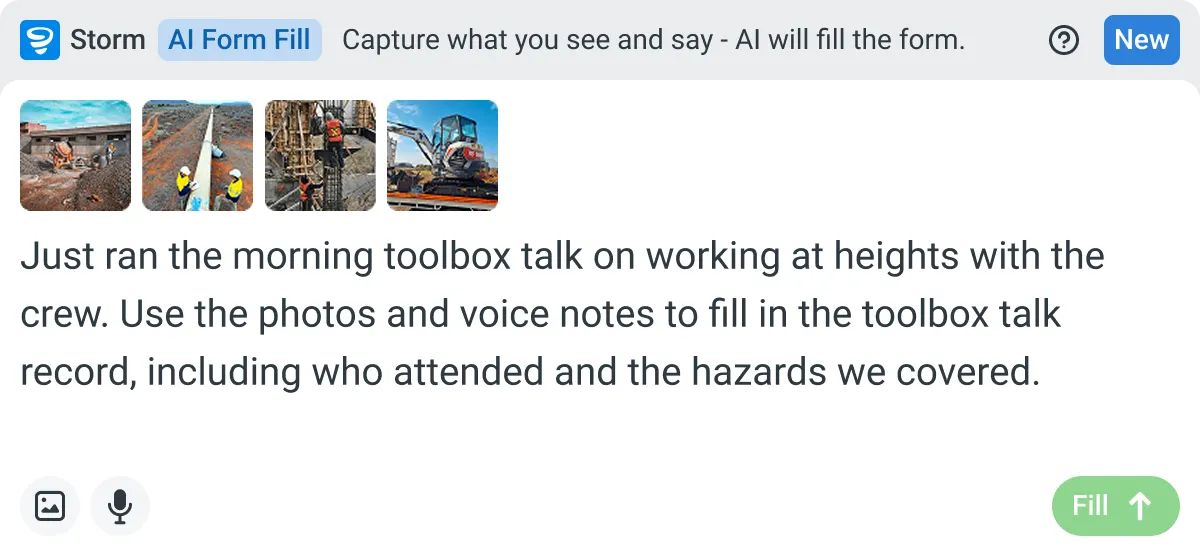
Capture what you see and say, and Storm drafts the form for you. The details land in the right fields, so there is a record to check the moment the work is done, and you review and submit it yourself.


Listens to the work
Captures voice cleanly through machinery, wind, and movement. Accents and trade language understood. No headset needed.

Sees the site
Photos read as primary data, not attachments. Equipment, defects, PPE, and conditions are all interpreted directly from what's in frame.

Knows the context
Location, time, crew, plant, and materials pulled automatically. Critical for inspections, incidents, and time entries.
Frequently Asked Questions
Is the progress report it drafts ready to send?

No, it’s a first draft. The site supervisor checks the quantities against what was built, adds anything the notes missed, and signs it off before the client sees it.
Can it use the progress report format our client already accepts?
Yes. Upload your current format as a PDF, Word or Excel file and Storm builds a template from it with AI Templates. Your client gets the layout they know, and the supervisor still reviews every report before it goes out.
Is there a free progress report generator?
There are plenty of free document generators online, so check whether one covers progress reports. Most give you a static document and stop there. If nothing fits, try Storm in Dashpivot and generate a template from a simple prompt. The report then becomes a live form the supervisor fills in during the week, with photos and weather attached and the final report filed against the site and date.
Can the supervisor fill it in on site with no signal?
Yes, in Dashpivot. The supervisor can fill it in on their phone through the week, even out of range, and it syncs when they’re back in coverage. Photos can be added against each item of work as it’s done.
Where does the signed progress report end up?
Once signed, the report is filed in Dashpivot against the site and date. When a variation claim or monthly claim comes in, you can find the right report without digging through emails or someone’s laptop.