AI Site Supervisor Agent
For most site supervisors, the shift doesn't really end at knock-off. There's still the site diary to write, usually in the car or at home, from memory and a camera roll. An AI site supervisor agent works from what your crew records during the day, and Storm drafts the daily report from those voice notes and photos in your own template. The supervisor checks it, fixes anything that's off and signs before it goes anywhere.

Trusted by companies, projects and teams of all sizes


The short answer
An AI site supervisor agent drafts the site diary from what your crew records throughout the day. Supervisors and leading hands capture voice notes and photos as the work happens, and Storm, Sitemate's agent, turns them into a draft daily report in your template. The supervisor reviews every report, corrects anything that's wrong and signs before it reaches the project manager or client.
The Shift Ends, the Site Diary Doesn't
An AI site supervisor agent is an app that drafts the daily paperwork a supervisor would otherwise type up after a shift. The crew records the day by voice and photo on site, and the agent turns that into a site diary or daily report in your own template, ready for the supervisor to check and sign. In Dashpivot, Storm does the drafting. The record gets written while the day is still fresh, instead of from memory two days later.
- Drafts the site diary from the crew's voice notes and photos
- Uses your own daily report template
- Works offline on site and syncs later
- Picks up delays and plant from what the crew says
- Doesn't file anything until the supervisor has signed it off
Why the Site Diary Always Needed Someone to Type It
Before AI, there was no way to turn a supervisor's spoken notes and a camera roll into a finished site diary. Someone still had to sit down and type it, so the record was only ever as good as their memory at the end of the day. Drafting a structured report from loose voice notes and photos needs software that understands what was said on site. Until now, that's a job nobody could hand off.
Why Site Diaries Get Written From Memory
Site diaries usually get written at the end of a long day, or two days later when the office starts chasing. By then, the weather, the hours and the reason the pour slipped are all coming from memory, and handwritten pages don't always make it back legible. Someone in the office types it all up again into Excel or an email, then stitches the dailies together into the monthly report. Nobody notices the gaps until a variation claim lands and that diary is the evidence you need.
How an AI site supervisor app works
The crew records the day on the phone as they go, and Storm turns that into a draft site diary. Nobody types it up in the car after work. The supervisor still reads and signs every report before it leaves site, and that check is the last step below.
-
Step 1
Record the day by voice and photo
The supervisor or crew leader records the day while it's happening, with a voice note when the excavator goes down and photos of the slab before it's covered. It works on the phone in a trench with no signal, and syncs once you're back in range.
-
Step 2
It comes back as a draft site diary
Storm uses AI Form Fill to complete your daily report template from the voice notes and photos: delays, plant, who was on site and work done, with each photo against its entry. It's your own form, in the layout your client expects.
-
Step 3
You check it and sign it off
The supervisor reads the draft and corrects anything Storm got wrong before signing it. Until that signature is on it, the report doesn't go to the project manager or the client. If an hour count or a delay is off, this is where it gets caught.
What crews capture this way
On a normal day that's the site diary or daily report, plus the dockets for plant hire and the delay notes you'll need when a variation claim lands. Shift reports and the progress report for the monthly claim come from the same recordings, so the crew isn't telling the story twice.
- A voice note the moment rain stops work on site
- Photos of the trench before it's backfilled and gone
- Which plant turned up, and how long each machine ran
- Who was on site and the hours each person worked
- A delay from a late concrete delivery, logged as it happened
- A verbal instruction from the client's rep, recorded on the spot
What to Look for in an AI Site Supervisor App
Judge an AI site supervisor app on the report it hands back. Record a real day with your own crew, then check whether the draft matches what happened and how long the supervisor spends correcting it. If they're rewriting most of it, the app isn't saving anyone time. Test it somewhere with poor signal too.
- Drafts into your existing daily report template
- Works with no signal and syncs when back in range
- Handles voice notes from a noisy site
- Keeps every photo attached to the entry it belongs to
- Needs the supervisor's signature before anything is sent
- Keeps an audit trail of who changed what
- Lets the office pull up reports by site or job number
What to avoid
Most of the risk sits in what happens after the draft. Watch for anything that sends reports straight to the client, or that turns a vague voice note into a confident number nobody said. A draft is only useful if the person who was on site can see where each line came from and correct it.
- Reports that go to the client before anyone has signed them
- Hours or quantities the crew never actually said
- An app that stops working the moment signal drops
- Photos saved in one place and the report in another
- A fixed format you can't match to your own template
- Drafts with no record of who edited them
Nothing Leaves Site Without a Signature
Storm can draft a full site diary from a day's voice notes and photos, and on most days that saves the supervisor almost all the typing. But it only drafts from what was recorded. If nobody mentioned the second excavator or photographed the formwork before the pour, it won't be in the draft, and Storm won't guess. It leaves the field blank so the supervisor can see the gap and fill it in.
The signature stays with a person for good reason. A signed site diary is something your business may need to stand behind in a dispute or claim, and that responsibility belongs to the supervisor who was on site. Until it's signed in Dashpivot, the report doesn't go to the project manager or client.
The lists below show what Storm handles today and where the supervisor still steps in. If you're testing it, record a real day with your own crew and check the results against both.
What it can do today
Storm drafts the site diary from your crew's voice notes and photos, using AI Form Fill to complete your own daily report template. The crew can record without signal and it syncs later. Once the supervisor signs, the report is stored against the site.
- Drafts the site diary from voice notes and photos
- Fills your daily report template field by field
- Keeps each photo with the right entry
- Works offline and syncs once you're back in range
What it cannot do
Storm only knows what the crew put into their phones that day. It can't see the site, so it won't know a delivery arrived two hours late unless someone said so. It also can't tell whether a delay was caused by weather or a subcontractor running behind, and that distinction can decide a variation claim. That call belongs to the supervisor.
- Sign a report for the supervisor
- Send a report before it's signed
- Check that the crew's hours are correct
- Replace the supervisor's own site walk
ANZ buyers raise daily reporting most often
These are recorded sales calls where buyers raised daily reporting, split by region, from Sitemate's analysis of 11,787 calls over twelve months. Australia and New Zealand lead by a distance. Getting the site diary written and back from site is a standing problem, and it's the job this kind of app takes on.
How the record gets there
On Sitemate, the agent is built from products you may already run. Storm drafts the report inside Dashpivot, where your site diary and sign-offs already live, and Sitemate MCP connects the signed result to the rest of the business. Here's what each one does on a normal day.
-
Storm
Storm works through the day's voice notes and photos, then uses AI Form Fill to draft the site diary in your template. It drafts from what the crew recorded and leaves anything missing for the supervisor to add.
-
Dashpivot
Dashpivot is where the drafted diary lands. The supervisor reviews and signs it there, and the signed report is stored against the site with its photos and an audit trail, so it can be found when a variation claim comes in.
-
Sitemate MCP
Sitemate MCP opens the signed records to AI tools such as Claude or ChatGPT. A project manager can ask what held up the job last week and get an answer drawn from the diaries the supervisor has already approved.

Draft Site Diaries With Storm in Dashpivot
The agent behind your site diary is Storm, Sitemate's agent for the supervisors and crews doing the work. Voice notes and photos go in, even with no signal. A drafted daily report comes out in your own template, and nothing leaves site until the supervisor signs it.

AI Form Fill
Capture what you see and say, and Storm drafts the form for you. The details land in the right fields, so there is a record to check the moment the work is done, and you review and submit it yourself.

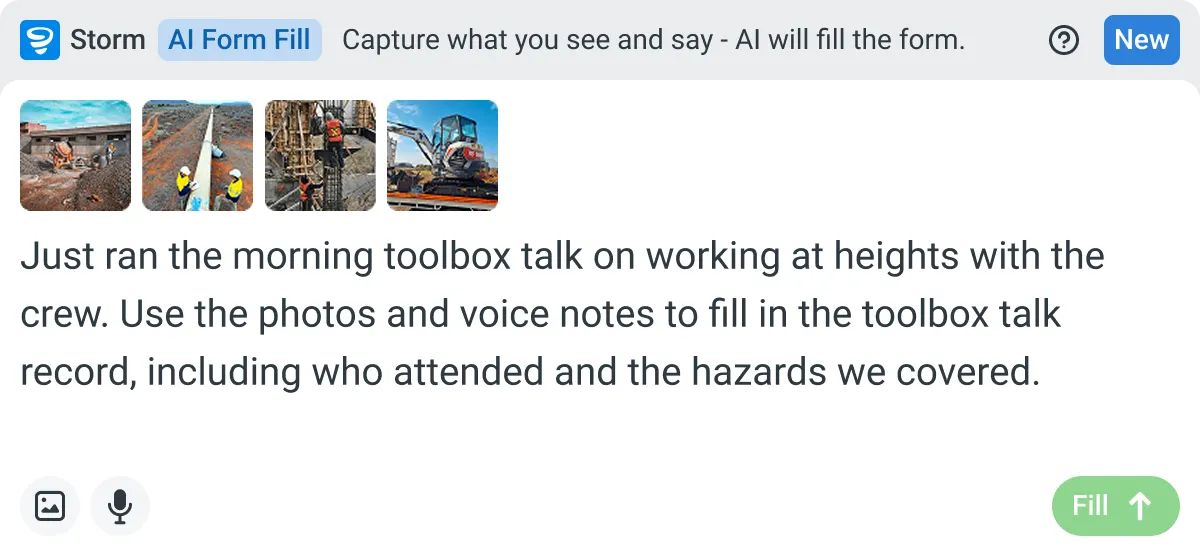

Listens to the work
Captures voice cleanly through machinery, wind, and movement. Accents and trade language understood. No headset needed.

Sees the site
Photos read as primary data, not attachments. Equipment, defects, PPE, and conditions are all interpreted directly from what's in frame.

Knows the context
Location, time, crew, plant, and materials pulled automatically. Critical for inspections, incidents, and time entries.
Frequently Asked Questions
Can the crew record the site diary with no signal?

Yes. The crew can record voice notes and photos in a trench or out of range, and everything syncs once they’re back in coverage. Storm drafts the report from there, and the supervisor still reviews and signs it.
Will it use our own daily report template?
Yes. Storm uses AI Form Fill to complete the template you already use, with your fields, layout and sign-off. You don’t need to rebuild anything to suit the app.
What happens if the crew forgets to mention something?
It won’t be in the draft. Storm leaves missing details blank, so the supervisor can see the gap and fill it in before signing.
Can I pull up reports by site or job?
Yes. Every signed report is stored against its site in Dashpivot, with photos and an audit trail. When a variation claim comes in, filter by site and the diary for that day is right there.
Does the report go to the client automatically?
No. Nothing goes out until the supervisor has read the draft, made any fixes and signed it. Only signed reports go to the project manager or client.