Plaud Alternative for Construction
Plaud captures what gets said on site, and plenty of supervisors like having it clipped on during a busy day. But the site diary still has to be written from those recordings, usually in the car or the next morning. Dashpivot by Sitemate takes the supervisor's voice notes and photos and fills in the diary directly. Storm does the first pass, and the supervisor checks and signs it before it goes to the office.

Trusted by companies, projects and teams of all sizes


The short answer
Keep Plaud if you need transcripts of meetings and conversations. If you want a signed site diary every day, Dashpivot by Sitemate is the better fit, because Storm fills it in from the supervisor's voice notes or photos and the supervisor signs it on site. You can also use both.
What Plaud and the NotePin Are Built For
Plaud makes wearable voice recorders, including the NotePin, which you can wear as a pendant, on your wrist, on a clip or as a magnetic pin. It records conversations and transcribes them in 112 languages, showing who said what. It then creates summaries, to-do lists and mind maps from templates. With around 20 hours of recording on 64GB, it can handle a full day of meetings. People buy it so they can stop taking notes and still have an accurate record of what was said.
Why Teams Look for a Plaud Alternative
Plaud captures the day as notes, but the site diary needs plant, hours, weather and delays in the fields your office and client expect. Someone still has to read the summary and type it all in again. Teams tell us that re-keying is pure double handling, often done from memory a day or two later while the office chases it up. And that late version is the one that turns up when a variation claim comes in.
What Dashpivot by Sitemate Does for the Site Diary
Dashpivot by Sitemate is built for the records a construction site has to keep, and the daily report or site diary is where most teams start. The supervisor fills it in on the Sitemate Mobile App, on the phone they already carry, and it works offline in a trench or out of range, syncing once there's signal. Each entry holds the plant on site, crew hours, weather, delays and photos taken against the work. If the supervisor would rather talk than type, Storm can draft the diary from a voice note or photos using AI Form Fill. The supervisor reviews every report and signs it before it goes to management or the client. Each signed report is kept in Dashpivot against its site, so the office can find last Tuesday's diary for one job without chasing anyone.
- Site diary, plant, hours, weather and delays
- Photos, taken against each entry

Fill and Sign the Site Diary in Dashpivot
In Dashpivot, the site diary is a template your team sets up once, and the supervisor fills it in on the Sitemate Mobile App during the day. Storm can fill it from a voice note or photos, and the supervisor checks every entry and signs before it files back into Dashpivot.

AI Form Fill
Capture what you see and say, and Storm drafts the form for you. The details land in the right fields, so there is a record to check the moment the work is done, and you review and submit it yourself.

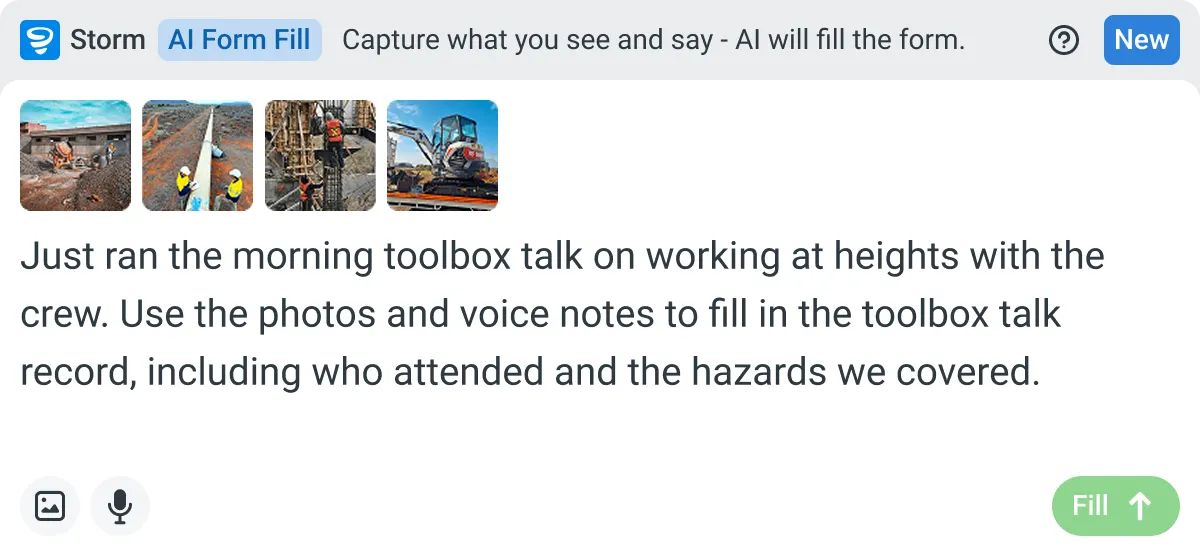

Listens to the work
Captures voice cleanly through machinery, wind, and movement. Accents and trade language understood. No headset needed.

Sees the site
Photos read as primary data, not attachments. Equipment, defects, PPE, and conditions are all interpreted directly from what's in frame.

Knows the context
Location, time, crew, plant, and materials pulled automatically. Critical for inspections, incidents, and time entries.
How a Site Diary Runs in Dashpivot
You set the site diary template up once in Dashpivot. From there the supervisor fills it in on the Sitemate Mobile App during the day, and once it's signed, the record files itself back into Dashpivot.
-
Step 1
Set up your site diary template
Start in Dashpivot with the site diary or daily report your team already fills in, so the fields match what the office and the client expect to see. You check the template and adjust any field before it goes out to the crew on site.
- Template library, start from a ready-made site diary
- AI Templates, Storm builds it from your diary file or a description
-
Step 2
Record the day on the phone
The supervisor fills in the diary on the Sitemate Mobile App as the day runs, with or without signal. Storm can fill the form from a voice note or photos with AI Form Fill, and the supervisor checks every entry before it's submitted.
- Photos per entry
- Weather
- Plant, hours and delays
- Storm, filling it from a voice note
-
Step 3
A signed record you own
The signed diary files itself back into Dashpivot against the site, so the office can pull up any day by job. It's your company's record, there when a variation claim comes in or the client asks for proof of progress.
- Supervisor's digital signature
- Full edit history
What Dashpivot doesn't replace
The site diary is the one record a supervisor owes the office every day, and it's the one that usually slips. Dashpivot is built to get it done before the supervisor leaves site. They record a voice note or take photos as the day goes on, and Storm fills in the diary with AI Form Fill, putting plant, hours, weather and delays into the fields your office already uses. The supervisor reviews every entry and signs it in the Sitemate Mobile App, with or without signal, so the office gets a checked record instead of a draft. That's a narrower job than Plaud's. Dashpivot isn't built to keep a word-for-word record of a two-hour design review, and if that's what you need, a recorder that labels each speaker is the right tool.
What Dashpivot Does for the Site Diary Today
Dashpivot gets the site diary done on the day, filled in from what the supervisor said and photographed, and signed before the office needs it.
- Fills in the site diary from a voice note
- Attaches photos to each entry
- Works without signal
- Captures the supervisor's signature
What Dashpivot Doesn't Do That Plaud Does
Dashpivot is for the site record, not meeting recordings. There's no device to wear, so the supervisor uses the phone they already carry.
- Full meeting transcripts showing who said what
- A wearable recorder you clip on and leave running all day
This table compares Plaud and Dashpivot on two things a supervisor's voice is used for each day: recording what was said, and turning the day into a signed site diary. Plaud wins on meetings and recording, because that's what it's made for. Dashpivot wins on the diary itself. We've left pricing out, since Plaud's plans change often.
- Capability | Plaud | Dashpivot by Sitemate
- What it records | Conversations, meetings, interviews and voice memos | The site diary, with plant, hours, weather, delays and photos
- Hardware | A wearable recorder worn as a pendant, on the wrist, on a clip or as a magnetic pin | The Sitemate Mobile App on the supervisor's phone
- Meeting transcripts | Transcription in 112 languages, showing who said what | Not designed for it, since voice notes go into the diary
- What you get at the end | Summaries, mind maps and to-do lists from templates | A completed site diary, checked and signed by the supervisor
- From a voice note | Transcribed and turned into notes | Storm fills the diary fields with AI Form Fill, then the supervisor checks them
- The record kept | Notes and summaries of the conversation | A signed diary filed against the site in Dashpivot, with full edit history
Where Plaud and Dashpivot Differ for the Site Diary
Both are for people who'd rather talk through the day than type it up. Plaud and Dashpivot each turn speech into writing, and for a lot of supervisors that's the whole appeal. The difference is what that writing becomes and who it's for. Plaud gives you notes from a conversation. Dashpivot gives your company a signed site diary filed against the job.
- Meeting transcripts. Plaud identifies each speaker across 112 languages, which suits client meetings and design reviews.
- A diary at the end of it. Storm fills the diary from a voice note or photos, and the supervisor checks and signs it.
- Where the record lives. The signed diary is filed against the site, so the office can pull up any day by job.
Where each of these is the better choice
When the conversation itself is the record, Plaud is the better choice. Client meetings, design reviews and interviews are where a transcript showing who said what really earns its keep, especially when more than one language is spoken. If you don't need a site diary out of it, Plaud does the job with less setup.
- You need transcripts of client meetings or design reviews
- Your meetings involve several languages
- You don't need a signed site diary from the recording
How teams move across
Most teams don't replace anything on day one. A move usually starts with one site diary on one job, filled in through Dashpivot for a couple of weeks, and a decision about whether Plaud still has a job to do next to it.
-
Step 1
Decide
Stay with Plaud if what you need is a record of conversations, like client meetings or design reviews, where a transcript with speaker labels matters more than a form. It transcribes in 112 languages and the pin can be worn all day. Move when the job is a site diary that has to be signed and filed.
-
Step 2
Convert
Upload the site diary you use now, whether it's a PDF, a Word document or an Excel sheet, and Storm builds a Dashpivot template from it with AI Templates. You check every field against what the office needs before it reaches the crew.
-
Step 3
Pilot
Run the new diary on one site for a few weeks while everything else stays as it is, including Plaud for meetings. The supervisor fills it in on the Sitemate Mobile App and signs it each day, and the office checks it's arriving on time.
-
Step 4
Roll out
Once the pilot site's diaries are coming in signed and on time, add the next jobs one at a time. The office spends less time chasing the field, and each day on each site ends with a signed record it can find.
Frequently Asked Questions
Can Plaud fill in a site diary?

Not directly. It produces transcripts, summaries and to-do lists, so someone still has to copy the details into the diary form. In Dashpivot, Storm fills the diary from a voice note with AI Form Fill, and the supervisor checks it before signing.
Can the crew fill in the site diary with no signal?
Yes. The supervisor can fill it in on the Sitemate Mobile App with or without signal, and it syncs to Dashpivot once they’re back in range.
Can I keep Plaud for meetings and use Dashpivot for the diary?
Yes. Plaud handles meeting transcripts and Dashpivot handles the site diary. They don’t really overlap.
Can I pull up diaries by site or job?
Yes. Every signed diary is filed against its site, so the office can open one job and see every day in one place.
Can we use the site diary we already have?
Yes. Upload it as a PDF, Word or Excel file and Storm builds a Dashpivot template from it with AI Templates. Check every field before the crew starts using it.