Free Safety template
Daily Safety Report Template
No credit card required.
Need a complete and compliant Daily Safety Report? Sitemate's Daily Safety Report Template already includes the standard-required fields of a proper report. It includes key sections that safety officers need to record observations, identified hazards, and any accidents or near misses, structuring the documentation needed for safety audits.
Sitemate's Daily Report template has a user-friendly design, which helps users complete the report much more efficiently. It contains easy-to-fill fields and drop-down fields, helping users structure a compliant report with just a few taps and clicks.
- 100% fully editable Daily Safety Report
- Export your Daily Safety Report to PDF or CSV
- Access your Daily Safety Report on mobile, tablet or computer
- Thousands of templates including other Safety templates
 Click to preview
Trusted by thousands of companies, projects & teams worldwide


See how this Daily Safety Report compares with traditional Word, Excel, and PDF-based processes
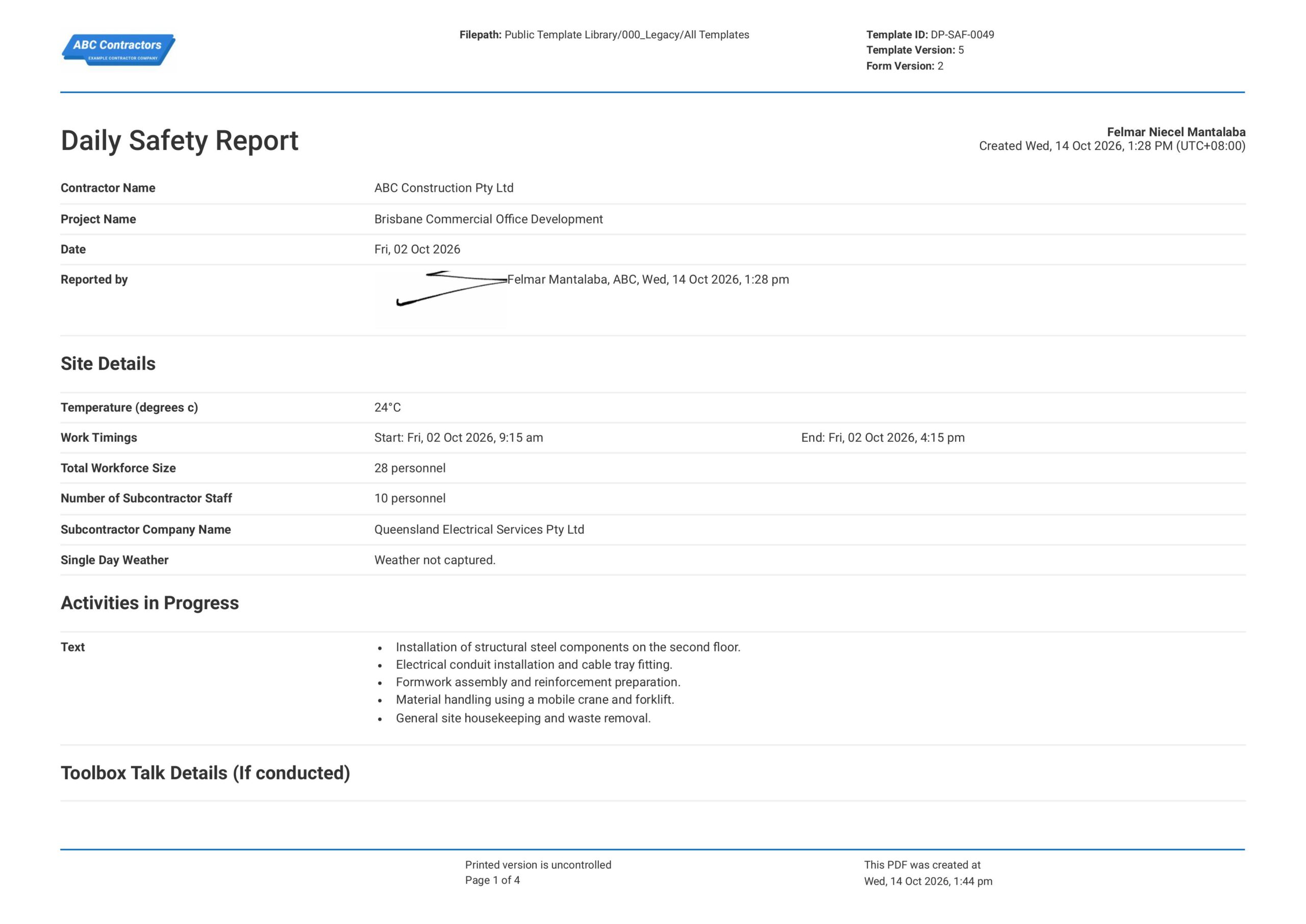
Curious how this Daily Safety Report works? Check out the example below to see exactly what comes pre-built and how the form is structured to capture daily site safety observations, hazard logs, corrective actions, and sign-offs in a single document. You can generate your own version just as quickly, export it as a custom form with your company branding and project details, and have a finished, field-ready Daily Safety Report in your hands within minutes.


This Daily Safety Report was generated using Dashpivot's safety management platform, incorporating the key sections and fields that safety officers and site supervisors need to complete a thorough daily safety observation report in the field. The template structure follows the EHS daily reporting best practices and supports compliance with OSHA recordkeeping, ISO 45001, and project-specific safety documentation requirements.
- Access, edit and complete your Daily Safety Report from any device - mobile, tablet or computer.
- Print, download or send your Daily Safety Report as perfectly formatted PDF documents with your company logo.
- Store your Daily Safety Report securely online, where they can be searched and found in seconds
- Invite internal and external parties to see, edit and sign off on Daily Safety Report online.
Need a version for your own site?
Storm, the AI agent in Dashpivot, can build one from a short description or the form you already use.


 GLOBAL


What is a Daily Safety Report?
A Daily Safety Report is a structured document used by safety officers, site supervisors, and project teams to record the safety status of a worksite on a day-by-day basis. It captures what happened on site from a safety perspective during a given shift or working day, including hazards observed, near misses, incidents, toolbox talks conducted, PPE compliance, equipment checks, and any corrective actions taken.
Applicable Standards and Policies for Daily Safety Report
Providing a safe and healthy environment is the topmost priority of any employer, especially those businesses that belong to high-risk industries, such as construction, mining, and chemical plants. Regulatory bodies around the world want to ensure that the best safety practices are integrated into the safety management system; therefore, companies need to provide verification that they have done so. Making a Daily Safety Report is one of the ways to provide proof. These reports detail the safety procedures implemented for each day. Completing the report daily ensures that you meet the following standards:
- OSHA 29 CFR 1926 (Construction Industry)
- OSHA 29 CFR 1904 (Recordkeeping)
- ISO 45001:2018 (Occupational Health and Safety Management Systems)
- ANSI/ASSP Z10.0 (Occupational Health and Safety Management Systems)
- Safe Work Australia — Model WHS Regulations:
- Construction (Design and Management) Regulations 2015 (UK)
- Project and Client Contract Requirements
Staff Members and Parties That Use the Daily Safety Report
Daily Safety Reports require personnel who understand the processes behind every activity conducted. In order for the report to be accurate and useful, the following staff members should be involved in making a Daily Safety Report:
- Safety officers or HSE representatives: These are the personnel who primarily fill out the report. They record every detail of the activity while it is in progress on site. They record the work performed, the safety procedures, and the findings.
- Managers and supervisors: These personnel watch and lead the activity according to the construction plan. It is in their jurisdiction that tasks are completed based on quality and safety standards.
- Workforce: The workforce directly faces the hazards. Part of their duty is to guarantee that they perform the provided method statement; therefore, their participation in creating and completing the report is essential. Their exposure and firsthand knowledge of the hazards also enable them to provide diverse perspectives on the observable hazards they encounter while performing their activities.
Business Risks Reduced by the Daily Safety Report
Hazards in the workplace should never be underestimated. Without the proper safety precautions, one accident can cost the company a financial blow. Implementing safety procedures, such as conducting a Daily Safety Report, can significantly lower or even eliminate the chances of an accident happening. Staying complacent can expose the company to the following business risks:
- Increased expense owing to unanticipated work stoppage
- Increased expense due to accidents and injuries
- Increased expense owing to non-compliance with regulations
- Increased rate of lost time incidents (LTI)
- Delayed timetables and deadlines
- Negative impact on company reputation
Business Opportunities Created by the Daily Safety Report
Maintaining an effective safety management system does more than protect the health and safety of employees. Implementing safety methods, such as the Daily Safety Report, provides multiple benefits for the company. Businesses that maintain a strong safety record are more likely to get customers, as they are less likely to expose investors to financial risks. Continuous implementation of safety procedures such as the safety report will also provide the following business opportunities:
- More cost savings over time
- Lower insurance premiums
- Stronger relationships among employers, employees, and stakeholders
- Better output quality
- Enhanced company reputation
Why have the Daily Safety Report?
Here are the following applications of the Daily Safety Report:
- Legal and regulatory compliance
- Hazard tracking
- Safety control monitoring
- Historical trend
- Shift communication
- Insurance premium management
How to Create a Daily Safety Report
Building an effective Daily Safety Report requires a clear structure, the right information captured in the right order, and a format that safety officers can complete quickly in the field without missing critical details. The following steps explain how to create a daily safety report from scratch, whether you are building it in Word, Excel, PDF, or a digital safety platform.
Prerequisites before making a Daily Safety Report
- Project name, site address, and contract or project reference number are confirmed
- The roles responsible for completing and reviewing the daily safety report are defined
- The key hazard categories relevant to the site or project type are identified
- Any client or principal contractor daily safety reporting format requirements have been reviewed
- Applicable safety regulations and recordkeeping obligations for the jurisdiction have been confirmed
- A process for distributing and storing completed daily safety reports is established
- Supporting tools such as cameras for photo evidence and devices for digital sign-off are available on site
Add an information section
This section will provide an overview of the activities, the personnel involved, and the report details. It should have the following fields:
- Contractor name
- Project name
- Date
- Report name and signature
- Temperature
- Work timings
- Total workforce size
- Number of subcontractor staff
- Subcontractor company name
- Single-day weather
- Activities in progress
Add a toolbox talk section
This section will provide a summary of the toolbox talk conducted for the activities. This section will serve as evidence that proper safety talks were conducted. It should contain the following fields:
- Toolbox talk topic
- Date the toolbox talk was CONDUCTED
- Personnel who conducted the talk
- Number of attendees
Add a safety document details section
This section will provide a summary of all the safety documents required for the activities of the day. It should contain the following fields:
- Document type
- Date issued
- Document number
- Nature of job
- Competent person's name
Add the safety report checklist
This section should include a checklist of all vital safety measures that must be implemented while conducting the activities. It should have the following fields:
- Checklist items
- Comments
- Photos
- Attachments
Add a night shift section
This is a special section for activities conducted during the night shift. It should have the following fields:
- Work timings
- Total workforce
- Verification if activities were approved
- Verification if a supervisor will be present during the activity
- Verification if standby first aiders will be available
- Number of first aiders
Add an inspection details section
This section verifies whether safety protocols are followed accordingly at the end of the activity. It should contain the following fields:
- Checklist items
- Comments
Add a signature field
This section verifies the report. It should have the following signatures:
- Reporter signature
Daily Safety Report: Recording Site Safety Conditions and Incidents
Daily site activities can expose workers to hazards such as unsafe work practices, poor housekeeping, faulty equipment, missing personal protective equipment, and changing site conditions. If workers do not identify and record these issues promptly, they can lead to injuries, near misses, property damage, or repeated safety problems. A Daily Safety Report helps supervisors and safety personnel document site inspections, hazards identified, incidents, corrective actions, and other important safety observations throughout the day. It also provides a record of whether site personnel follow safety requirements and whether they have addressed reported issues. Keeping these reports up to date helps improve communication between site personnel, supports timely corrective action, and promotes a safer working environment.
How to Create Your Daily Safety Report in an App or Software System
A well-designed Daily Safety Report ensures that hazards are identified, recorded, and actioned every single day, not just when an incident has already occurred. When daily safety reports are completed consistently using a structured format, safety officers can focus on what they observe on site rather than how to fill out the form, and project managers gain a reliable, up-to-date picture of site safety without needing to be physically present. The result is faster hazard resolution, better communication between site and office, and a complete safety record that holds up under audit or legal scrutiny.
How to create a Daily Safety Report in an app
Using an app that employs digital forms instead of paper-based ones may help improve the process by:
- Assistance with artificial intelligence (AI).
- Having fewer manual data entries.
- All produced forms are stored in a single-access cloud.
- Reformatting is straightforward and can be adapted to new protocols or updated standards.
- Formula integration is much simpler.
- Workflows and notifications may be automated and scheduled.
- Improved template design and look.
Creating the information section
- Add text fields for the following information: contractor name, project name, temperature, total workforce size, number of subcontractor staff, and subcontractor company name.
- Provide a date field for the report date and a date and time range for work timings.
- Add a weather field for the single-day weather.
- Provide a multiple-text field for the activities in progress.
- Add a signature field for the reporter
Creating the toolbox talk details section
- Provide a 5-column table where users can freely add rows.
- Format the first column as a text field for the toolbox talk topic.
- Format the second column as a date field for the date when the talk was conducted.
- Format the third column as a text field for the personnel who conducted the talk.
- Format the fourth column as a number field for the number of attendees at the meeting.
- Format the fifth column as an attachment field to allow users to directly upload the toolbox talk document.
Creating the safety document section
- Provide a 6-column table where users can freely add rows.
- Format the first column as a text field for the document type.
- Format the second column as a date field for when the safety document was issued.
- Format the third column as a text field for the document number.
- Format the fourth column as a text field for the nature of the job.
- Format the fifth column as a text field for the name of the competent person.
- Format the sixth column as an attachment field to allow users to directly upload the safety document.
Creating the safety report section
- Provide a 5-column table where users can freely add rows.
- Format the first column as a text field for the checklist items.
- Format the second column as a selection field that contains the following options: yes, no, and NA.
- Format the third column as a text field for the comments.
- Format the fourth column as a photo field to allow users to directly upload or add photos of findings during the inspection.
- Format the fifth column as an attachment field to allow users to directly upload relevant attachments to the findings.
Creating the night shift section
- Provide a yes or no field that asks users if the activity will be conducted during the night shift.
- Provide a logic that when a user prompts "yes," additional fields will appear. The following fields should be present: work timings, total workforce, verification of whether activities were approved, verification of whether a supervisor will be present during the activity, verification of whether standby first aiders will be available, and number of first aiders.
- Work timings, total workforce, and number of first aiders should be text fields.
- All verification items should be yes or no fields.
Creating the inspection details section
- Provide a yes or no field with a comment for every safety, health, and environmental requirement needed for the activity.
- Provide a pre-filled text field to provide a note that reports should be submitted daily, before 09:00 am, for the previous day.
- Provide a signature field for the reporter.
Frequently Asked Questions
When should the Daily Safety Report template be completed?
The report should be completed daily, based on the site's reporting requirements. Safety observations, incidents, inspections, and corrective actions should be recorded as they occur or as soon as practical.
Can photos and supporting documents be attached to the report?
Yes. Photos and relevant supporting documents can provide evidence of site conditions, identified hazards, completed corrective actions, inspection findings, and other safety-related observations.
Who should complete the Daily Safety Report?
The report should be completed by the responsible supervisor, site manager, or safety representative, depending on the site's procedures. The appropriate person should escalate any significant hazards, incidents, or unresolved safety issues.
Can the Daily Safety Report template be reused each day?
Yes. The template can be used for daily reporting across different shifts or projects, but the date, site details, observations, incidents, and corrective actions must be updated for each reporting period.
About the Author

Felmar Mantalaba
Content Engineer
 LinkedIn
Education
Cebu Institute of Technology - University - Mechanical Engineering with Mechatronics
Bio
Felmar is a mechanical engineer, whose four years of experience in the mining industry inspired him to write and share stories to progress the revolution of new technologies and create smarter, smoother ways of living.
Past Projects
Safety, Health, and Environment Management System (SHEMS) CoordinationSHEMS Coordinator at Atlas Consolidated Mining, ensuring organizational compliance with ISO 14001 and ISO 45001 standards, performing risk assessments, developing policies, and conducting audits and inspections to maintain a safe and environmentally responsible workplace.
Maintenance Management and OptimizationSenior Maintenance Manager (OIC) leading equipment maintenance and operational efficiency initiatives, reducing downtime by 10%, improving Mean Time Between Failure (MTBF) and Mean Time To Repair (MTTR) for major equipment, and managing maintenance schedules, manpower, and materials, while overseeing capital project optimization.
Inspection Engineering and Equipment ReliabilityInspection Engineer responsible for technical blueprint interpretation, vendor collaboration, preventive maintenance scheduling, and data collection for vibration and temperature readings, delivering actionable recommendations and comprehensive reports to improve equipment reliability and operational performance.
End-to-End Operational Oversight in Mining EngineeringContributed to multiple facets of operational management, including SHEMS compliance, maintenance optimization, inspections, and capital project evaluation, integrating safety, reliability, and efficiency improvements across all stages of copper production operations.
Version history
Last edited on 16 October 2026, template version 25-11-v2