HandsHQ alternative for RAMS
HandsHQ is UK RAMS and COSHH software built around a legislation-maintained content library, digital signatures, and an internal approval workflow. If you're weighing it against a broader field system, this page gives you an honest read on where each one fits, and whether switching to a Dashpivot by Sitemate alternative is worth it for how your team works.

Trusted by companies, projects and teams of all sizes















The short answer
The HandsHQ alternative for RAMS is Dashpivot by Sitemate. If your team needs RAMS plus the rest of field reporting in one system, Dashpivot is worth the switch. If fast, compliant RAMS and COSHH off a maintained UK legislative library is the whole job, HandsHQ may still fit.
What HandsHQ Is Built For
HandsHQ is purpose-built for UK contractors who need to produce RAMS and COSHH assessments quickly and compliantly. It gives teams a trade-specific content library, maintained against UK legislation, with multi-user approval and digital signatures built in.
- Creating RAMS and method statements from a maintained, trade-specific content library
- Producing COSHH assessments with legislation-backed controls
- Running a multi-user approval workflow with digital signatures
- Integrating RAMS data with Procore
Why Teams Look for an Alternative
HandsHQ does RAMS and COSHH well, but it stops there. Teams that also need to manage inspections, permits, site diaries, or subcontractor records end up running a separate tool for everything outside RAMS, and that fragmentation is the most common reason buyers start looking.
- RAMS and COSHH are the only document types, so every other safety or field record lives in a different system
- No shared register across job types, so RAMS sit in one place and everything else sits elsewhere
- Tool consolidation: paying for HandsHQ plus separate tools for inspections, timesheets and diaries adds up
- Teams wanting Storm to draft a first RAMS from the work scope won't find that in HandsHQ
It's 6am, the job starts at seven, and the RAMS is a Word file nobody can find on SharePoint. The client wants it signed and emailed before anyone's on site.
What Dashpivot by Sitemate Is Built For
Dashpivot by Sitemate is a field system for building, running and signing off safety documents like RAMS, then keeping the record. You build the RAMS once, run it on any device, and every version stays filed against the job.
- RAMS and method statements built from a reusable template, not retyped for every job
- Sign-on on site so the crew is recorded against the RAMS they were actually briefed on
- One register of every RAMS, across every job and every subcontractor


AI Templates
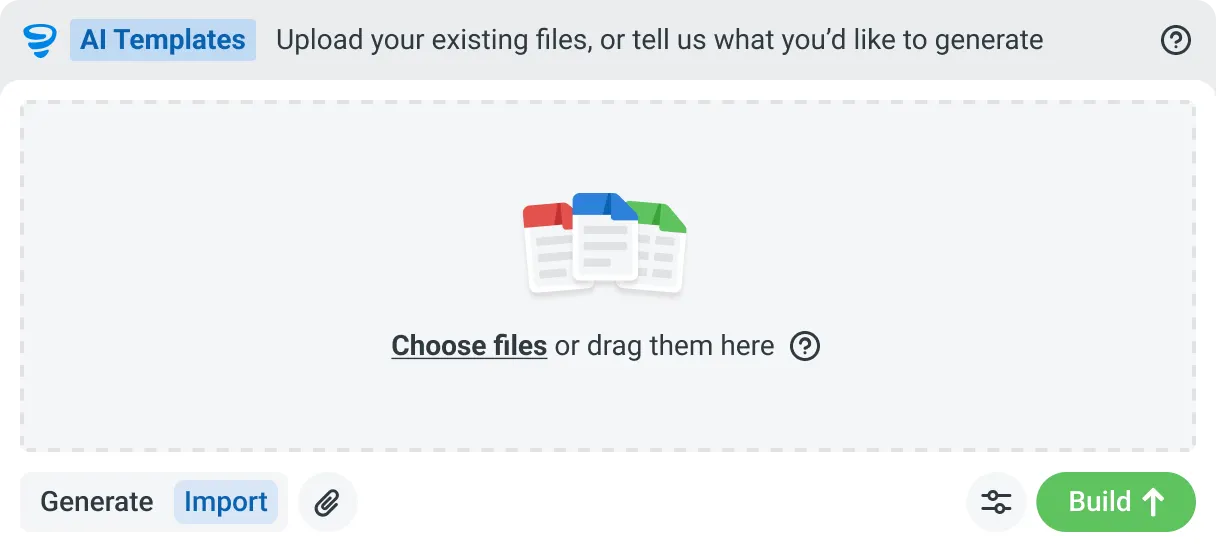
Describe the template you need in plain language, or upload an existing PDF, Word or Excel document. Storm builds the structure, with the right fields, sections, columns and workflow attached, and you review and refine it before you save.

AI Form Fill
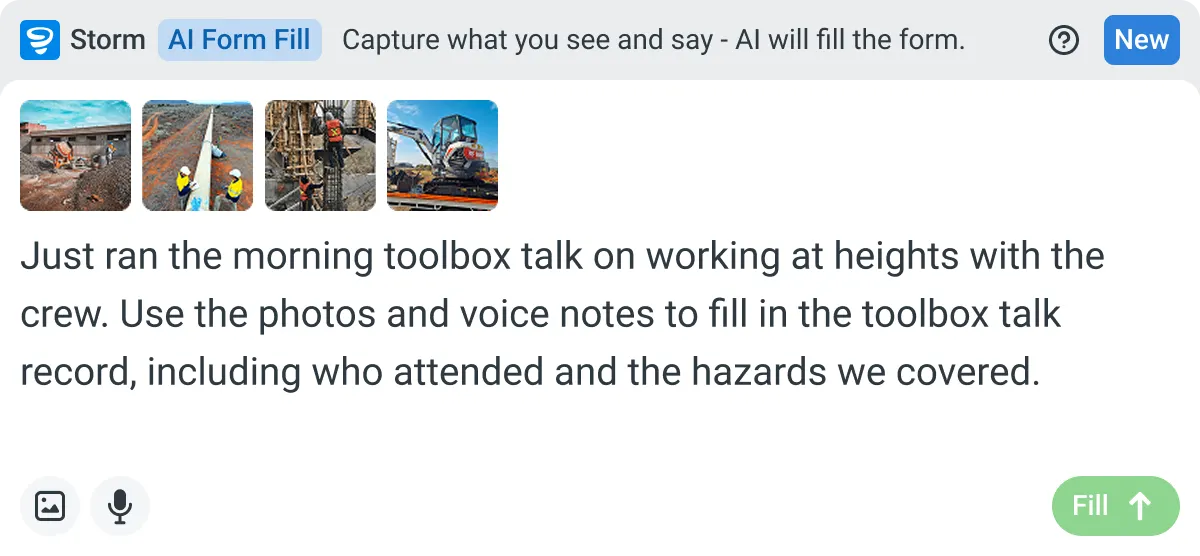
Capture what you see and say, and Storm drafts the form for you. The details land in the right fields, so there is a record to check the moment the work is done, and you review and submit it yourself.

Works on site
Built for gloves, cabs, and screen protectors. Captures inputs offline and processes in the background. No waiting on the field.

You stay in control
Storm never commits a record on its own. Every output is a draft for human review. Admins control what Storm can write to.
How Dashpivot does [the job]
Three steps, and you own the record at the end of all of them. Set the RAMS up once, run and sign it on site, and keep every version filed against the job it belongs to.
-
Step 1
Set the RAMS Up Once
Build your RAMS with the hazards, risk scores, controls and method steps your work needs, or start from a free template and adjust it. It becomes the form every job runs from.
-
Step 2
Run and Sign It On Site
Fill it on any device, offline if the site has no signal. Storm can draft the first version from the work scope, and the crew signs onto it before the job starts.
-
Step 3
Keep the Signed Record
Every RAMS is filed against its job and date, versioned and audit ready. Export it to PDF, email it to the client, and it stays yours after the job closes.
What Dashpivot Does Not Replace
Dashpivot runs the RAMS process and holds the record. It doesn't decide whether your controls are adequate, and it isn't a legal sign-off. A competent person still reviews the hazards and signs the method as safe for the job in front of them.
What Dashpivot Does for RAMS Today
What ships today, and nothing that doesn't:
- Build RAMS and method statement templates with hazards, risk scoring and controls
- Draft the first version with Storm from the work scope, then edit it
- Sign the crew onto the RAMS on site, on any device, offline
- Keep every RAMS in one register, versioned and audit ready
- Export to PDF and email it to the client or principal contractor
Where Dashpivot Stops
The honest gaps, and we'd rather you know them now:
- Decide whether a control is adequate. A competent person owns that call
- Act as legal or regulatory sign-off on your RAMS
- Replace a dedicated estimating, accounting or design tool
Both build a RAMS off a template. The difference is what happens after the document exists: whether the crew signs onto it on site, and whether it's one record in a wider safety system or a standalone file.
- Columns: Capability | Dashpivot | HandsHQ
- RAMS and method statement authoring | Yes, from a reusable template | Yes, its core strength
- COSHH assessments | Yes | Yes, legislation-maintained library
- Digital signatures and an approval workflow | Yes | Yes
- Other safety records in the same system (inspections, permits, diaries) | Yes | No, RAMS and COSHH only
- One register across every job and subcontractor | Yes | Within RAMS and COSHH
- Storm drafts the first version from the work scope | Yes | No
Where the Two Actually Differ
Both tools let you author RAMS, collect signatures, and keep a record. The gap opens up the moment you need anything beyond RAMS and COSHH, and in how the first draft gets made.
- HandsHQ covers RAMS and COSHH; Dashpivot covers RAMS plus inspections, permits, diaries, and other safety and field records in the same system
- HandsHQ draws from a maintained UK legislative content library; Dashpivot lets you build reusable templates and uses Storm to draft the first version from the work scope
- HandsHQ keeps one register for RAMS and COSHH; Dashpivot keeps one register across every document type, every job, and every subcontractor
- HandsHQ pricing is structured in named individual and team tiers billed annually; Dashpivot pricing covers the full system, not a single document type
Where HandsHQ Is the Better Choice
If your team's entire output is RAMS and COSHH, and speed to a compliant, legislation-backed document is the priority, HandsHQ's maintained content library is a genuine advantage that Dashpivot's template builder doesn't replicate in the same way.
- Your work is UK-based and RAMS and COSHH creation is the whole job, not one part of a wider field reporting need
- You want a pre-built, trade-specific content library maintained against UK legislation without building your own templates
- Your team's approval workflow is RAMS-only and you don't need other safety or field records tied to the same system
How Teams Move From HandsHQ
Nobody moves every RAMS at once. You decide whether it's worth it, bring one job across, then widen out once a crew has signed onto a live one.
-
Step 1
Decide
If HandsHQ already turns out RAMS fast and COSHH is all you need beside it, staying put is reasonable. Move when your RAMS, inspections and sign-offs live in separate tools and nobody owns the whole safety record.
-
Step 2
Convert
Bring one job's RAMS across. Rebuild it as a Dashpivot form, or start from the free RAMS template and add your hazards and method steps. Word and PDF documents can ride along while you switch.
-
Step 3
Pilot
Run it live on one job. The crew signs onto the RAMS on site, and you keep exporting the PDF you send the client, so nothing you depend on switches off while you test it.
-
Step 4
Roll Out
Once one crew has run a live RAMS end to end, add the rest of your jobs and subcontractors. Every RAMS lands in one register, and the visibility gap closes.
Frequently Asked Questions
Is Dashpivot a replacement for HandsHQ?

For the RAMS itself and everything around it, yes. Where HandsHQ stops is the rest of the site work: timesheets, inspections and daily records live in other tools, and Dashpivot runs them in the same system.
Can we use both?
Yes. Some teams keep HandsHQ for its content library and run the signed record in Dashpivot. That’s a deliberate choice rather than a workaround.
Does HandsHQ do RAMS better than Dashpivot?
For producing a RAMS off a maintained library of trade and legislation content, it’s purpose-built and fast, and that’s a real advantage. We don’t ship that library.
Do we have to use Storm to write a RAMS?
No. The RAMS is a form, and filling it in works like any other Dashpivot form. Storm is there if you’d rather speak it than type it, and AI Templates can build the template itself from a document you already use.
Can we use our existing RAMS format?
Yes. Upload the RAMS you already issue and Storm rebuilds it as a Dashpivot template with AI Templates, so the document the principal contractor expects doesn’t change.
Where does the signed RAMS end up?
Against the job in Dashpivot, signatures on the form, in the same place as the timesheets and inspections for that job rather than in a separate RAMS tool.