Labor Hours Verification Report Template

Start with a free 30-day trial. No credit card required.
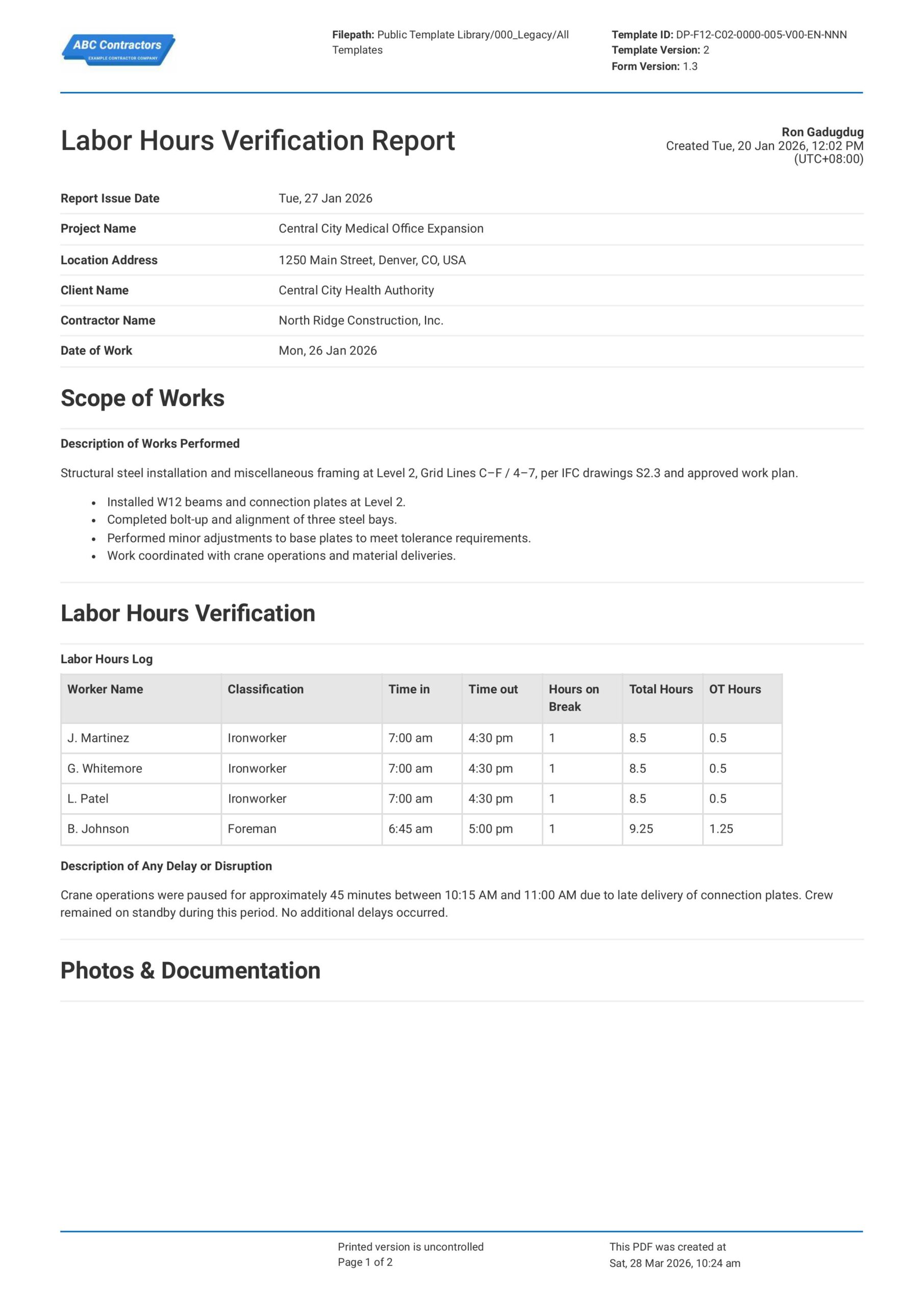
This is a Labor Hours Verification Report you and your team can use to record and verify the actual hours rendered by workers in any project. List daily hours worked by specific employees, indicate any reasons for delays or disruptions, and even attach photos and perform sign-offs - all on one form.
Still creating work hours verification letters manually? Looking for a way to streamline and simplify record keeping? This Labor Hours Verification Report was made to assist engineers and site supervisors accurately document their workers' daily hours worked. Plus, when you're finished creating the report, you can easily share the document with other stakeholders, or export it to PDF or CSV.
 100% fully editable Labor Hours Verification Report
Export your Labor Hours Verification Report to PDF or CSV
Access Verification of Hours Form on mobile, tablet or computer


Trusted by companies, projects and teams of all sizes















What is Labor Hours Verification Report?
A Labor Hours Verification Report is a formal log of workers' actual hours rendered during a day's work on site. This includes information such as the employee's name and role, time-in and time out, overtime details (if any), and certification of the log by a supervisor.
Essentially, it serves as validation and proof of the hours worked by site workers. Simple timesheets and manual logs rarely capture the entire context and conditions present at the job site. This makes a Verification of Hours Form highly relevant in the construction industry because of the specificity of the scope of work and higher probability of delays or disruptions.
Compare this Labor Hours Verification Report to Word or Excel Based Forms
Curious to see how much easier our Labor Hours Verification Report makes validating work hours? This form allows for quick and simple data entry, and automatically calculates total regular and overtime hours. You can even directly attach photos and supporting documentation to the form to really round out your report.
Use this Labor Hours Verification Report template for free

Generate this template automatically with Storm
You don't have to build the Labor Hours Verification Process field by field. Let Storm, the AI Data Capture Agent inside Dashpivot, build the template for you in seconds.
Describe what you need
Tell Storm the form you want in plain language and it builds a structured digital template from scratch, with fields, tables, and signatures in place.
Upload what you already use
Drop in your existing PDF, Word, Excel, or even a photo of a paper form. Storm rebuilds it as a smart digital template with the structure intact.
 Storm
Storm
Generate a Labor Hours Verification Process form template that I can use for my business
Applicable Standards and Policies for Labor Hours Verification Report
There is no single, explicit law or regulation that requires a standard format for Labor Hours Verification Reports. However, rules on documentation and validation of hours rendered by workers are covered by a mixture of labor laws and industry regulations in the USA. For example:
- Fair Labor Standards Act (FLSA)
- Davis-Bacon Act
- ISO 9001 (Quality Management)
- Other state-specific laws and regulations
Staff Members and Parties that use Labor Hours Verification Report
Labor Hours Verification Reports are used by both employers and employees to document and track the work hours rendered during each day at site. This is especially important for validating timesheets before payroll and to support progress billings. As such, the parties that make use of these reports the most are:
- General contractors
- Subcontractors
- Project managers / site supervisors
- Owners / developers
- Consultants and auditors
Business Risks Reduced by Labor Hours Verification Report
Primarily, Labor Hours Verification Reports reduce the risk of disputes and misreporting. Proper reports ensure that the recorded work hours are accurate, traceable, and easily supported by evidence and documentation. Ultimately, a Verification of Hours Form helps avoid:
- Unnecessary delays and disruptions
- Unnecessary overhead costs
- Waste of time on administrative and reconciliation work
Business Opportunities Created by Labor Hours Verification Report
Businesses can take advantage of the data they gather from their Labor Hours Verification Reports to streamline their operations. This data can be for various applications, depending on a variety of site-specific factors. For example, these reports enable:
- Data-driven, high-level decision making
- Accurate and competitive bidding for future projects
- Stronger trust with clients due to transparency
- Improved profitability by identifying cost leaks
Components of a Labor Hours Verification Report
Labor Hours Verification Reports are an important part of the labor management, record-keeping, and audit processes at a job site. While there are no standard formats required by law or regulation, most reports include a few core components:
- Project or job name
- Employee name & role
- Dates & hours worked (regular and overtime)
- Task or work description
- Details of any delays or disruptions
- Supervisor or manager approval/signature
- Relevant supporting documentation (timesheets, logs, photos, etc.)
How Labor Hours Verification Reports Connect to Employment Verification
Another critical use of Labor Hours Verification Reports is the support and data they provide for a formal verification of hours worked letter. While a verification of hours form is an operational document usually meant for internal reporting, a document such as an Employment Hours Verification Letter serves as proof to external parties that an employee actually rendered work.
Specifically, employees can use documents like Work Hours Verification Letters to prove income and employment to banks and immigration offices. These letters rely on the accuracy of the data in Labor Hours Verification Reports, making those reports critical for producing credible proof of hours worked, especially in the construction industry.
Steps in creating a Labor Hours Verification Report
Creating a Labor Hours Verification Report format can be quick and easy. Below we discuss the step-by-step process of creating your own report that includes all the necessary core components.
Before you start creating your Labor Hours Verification Report, you're going to need to prepare a few things.
Make sure you have this information at the ready:
- Employee and role details
- Project and cost code information
- Dates, shifts, and hours worked
- Work performed / task descriptions
- Source records (timesheets, daily logs, attendance)
- Supervisor review and approval
- Compliance with policies and contract requirements
Begin the Labor Hours Verification Report with General Information
Place high-level project and contract information at the very top of your verification hours form. For example, here are some fields that are commonly highlighted:
- Project name and location
- Reporting period (i.e. dates covered)
- Company, contractor, and subcontractor name
Identify the Scope of the Work Performed
Next, you need to state the details of the work or task that was performed. This is important to verify whether the reported labor hours are aligned with the workload. Make sure to include:
- Exact work task description
- Locations and site identifiers where the task was performed
- Details on task completeness
- Any other relevant site conditions
List the Workers and the Hours Worked
A clear list of the workers and their respective rendered hours is a critical element in any Labor Hours Verification Report. In order to avoid confusion, be sure to highlight the following information:
- Worker names and roles / classification
- Time-in and time-out for each worker for daily reports
- Total hours worked for each worker
- Total time on break for each worker
- Details on any overtime rendered
Add Supporting Documentation
Complete the body of your report by attaching any supporting documentation relevant to the task/s identified in the Scope of Work. Here are a few examples of supporting documentation you can use:
- Photos or videos of the task being performed
- Time-in and time-out sheets
- Attendance sheets
- Progress reports
Approval and Certification
Add a section for appropriate supervisory personnel to sign-off on your verification hours form. In essence, this section should accomplish the following:
- Give clear approval and acceptance of the reported work hours
- Certify that the reported work hours comply with company policy
Frequently asked questions
How to create Labor Hours Verification Process in an App or Software System
A proper Labor Hours Verification Process ensures that recorded work hours are accurate, defensible for billing and audit purposes, and structured in a way that can be easily reviewed.
30 minutes
Easy difficulty
Add Text Fields for General Information
Text fields that are easy to fill-in are essential to quickly creating and reproducing reports. Here are some fields that you can add to your own Labor Hours Verification Report:
- Project details (name, location, type, etc.)
- Date the report was created
- Dates covered by the report
- Task/s involved in the reported work
Tabulate Labor Hours Data
Placing the Labor Hours Verification Report data in a table is an easy way to simplify both creation and analysis of your report. As you can imagine, creating several reports involving dozens of workers can get overwhelming. You can streamline this process by creating a table with these columns in order:
- First column for Worker Name
- Second column for Classification
- Third and fourth column for Time-in & Time-out
- Fifth column for Breaks (e.g. lunch breaks)
- Sixth column for Overtime Hours
- Final column for Total Work Hours
Automate Computing for Total Work Hours
If your app or software allows the use of formulas in your table, we highly recommend using formulas to speed up calculation of Total Work Hours. The formula for Total Work Hours is shown here:
- Total Work Hours = ((Time-out) – (Time-in)) – Hours on Break
Use Formulas to Calculate for Overtime Hours
Similarly, you can also use formulas to automate calculating Overtime Hours in your report. The typical 8-hour work day can be used as a standard for calculating overtime, but you can adjust this value depending on your specific situation. The formula for Overtime Hours is shown here:
- Overtime Hours = Total Work Hours – Standard Work Day Hours
Add a Section for Attachments
Some apps or software allow you to add drag-and-drop functions or “upload” buttons where users can easily attach relevant supporting documents to the report. Some examples of the attachments you should account for are:
- Media files like photos or videos of the task in progress
- Soft-copies of other relevant documents such as progress billings, progress reports, etc.
- Any other relevant documentation
Complete your Labor Hours Verification Report with a Section for Approvals and Sign-Offs
Finally, provide sections where the appropriate personnel can sign off on the report. If your app or software allows, make use of automated e-signature features to keep everything online. Be sure to add fields for the following parties:
- Supervisors and team leads who create the report
- Project Managers who review and approve the report
About the author

Ron Gadugdug
Engineering Content Writer

Education:
Cebu Institute of Technology - University - Civil Engineering
Bio:
Ron is a Civil Engineer with 6 years of experience in the construction industry, primarily focused on quantity surveying, cost estimation, project management, quality control, contract administration, and property & engineering insurance. At Sitemate, he writes about practical applications of evolving technologies and digital solutions that support construction professionals in improving efficiency, compliance, and project delivery across the built world.
Project Details:
Quantity Surveying & Cost Engineering
Performed quantity take-offs of several high-rise and horizontal structures using sheets and applications like Revit and Bluebeam Revu, and spearheaded trials with Building Information Modeling (BIM) software.
Project Management & Consultancy
Coordinated with project management teams during the construction of local projects such as a 4-tower hotel & resort, a 22 storey condominium project, and a school dormitory project.
Contract Administration
Assisted during contract biddings and negotiations with general contractors and sub-contractors, and oversaw progress reporting, billings, and payment.
Property & Engineering Insurance
Dedicated non-life claims handler, overseeing property and contractor all-risk insurance claims, risk management, and bonds.
Version History:
Other popular templates you can use and edit for free


This report was generated with Dashpivot software
- Access, edit and complete your Labor Hours Verification Process from any device - mobile, tablet or computer.
- Print, download or send your Labor Hours Verification Process as perfectly formatted PDF documents with your company logo.
- Store your Labor Hours Verification Process securely online, where they can be searched and found in seconds
- Invite internal and external parties to see, edit and sign off on Labor Hours Verification Process online.

 English (United States)
  English (Australia)
  English (UK)
  English (New Zealand)
  English (South Africa)
  German