SiteDocs Alternative for SWMS
SiteDocs is a construction safety compliance app with deep roots in North America. Some Australian teams use its checklists and sign-offs for their Safe Work Method Statements (SWMS). If that sounds like you, here's how it compares with Dashpivot for high-risk construction work.

Trusted by companies, projects and teams of all sizes


The short answer
Dashpivot by Sitemate is the top SiteDocs alternative for SWMS. It's worth a look if subcontractor sign-in is holding up your start, or if price rises keep outpacing what you're getting. If SiteDocs suits how your team works and the cost is steady, there's not much reason to move.
What SiteDocs Is Built For
SiteDocs is a safety management and compliance app built around checklists, sign-offs and the paperwork that comes with them. Its core workflows are solid, and some Australian teams use it for SWMS.
- Checklists and sign-off workflows for the crew
- Safety documentation and compliance records
- A dedicated safety product, not a general forms tool
- A strong base in North American construction
Why Teams Look for a SiteDocs Alternative
Most teams we speak with are happy enough with SiteDocs checklists. When they look elsewhere for SWMS, it's usually because subcontractor sign-in takes too many steps, or because the price jumps at every renewal.
- Steep yearly price increases without improvements to match
- Sign-in runs through an email, then a link, then a QR code, which slows down shift start
- Buyers report slow support, with time zone delays and issues blamed on their devices
- User caps that bite as soon as you add more crew
The subcontractors are at the gate at seven, the SWMS sign-in link is sitting in an email none of them opened, and the crane's already set up.
What Dashpivot by Sitemate Does for SWMS
Dashpivot by Sitemate is a field system that holds SWMS alongside quality and field reporting. You build the SWMS once as a form. Every worker signs it on site, subcontractors included, and each signed version is filed against the job.
- Master SWMS, one template for every job
- Subcontractor sign-on with a QR scan and their Sitemate ID, no email link to chase
- One system across quality, site records and safety
- Your own account, where records stay versioned and ready for audit

Write and Sign SWMS in Dashpivot
The crew works from a Dashpivot form on the Sitemate Mobile App. Subcontractors sign on with one QR scan, and the signed record stays on your own account, next to your quality and field records.
Safe Work Method Statement App
Build the SWMS once and run it on every job. Storm, Sitemate's data capture agent, can draft the first version from the work scope for a supervisor to check, subcontractors sign on with a QR scan, and every signed version is filed against the job.


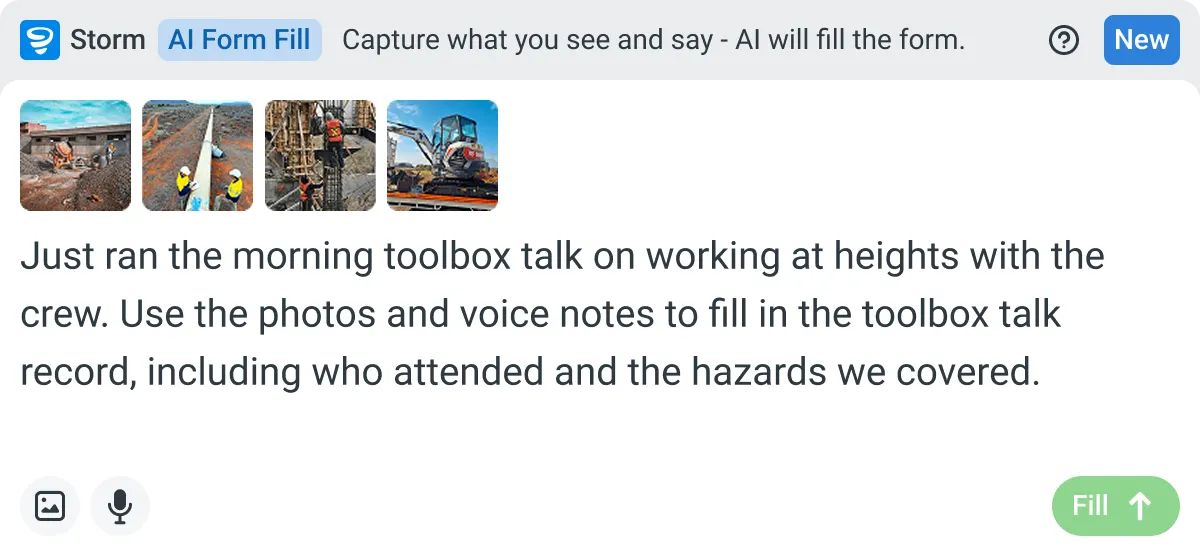
AI Form Fill
Capture what you see and say, and Storm drafts the form for you. The details land in the right fields, so there is a record to check the moment the work is done, and you review and submit it yourself.
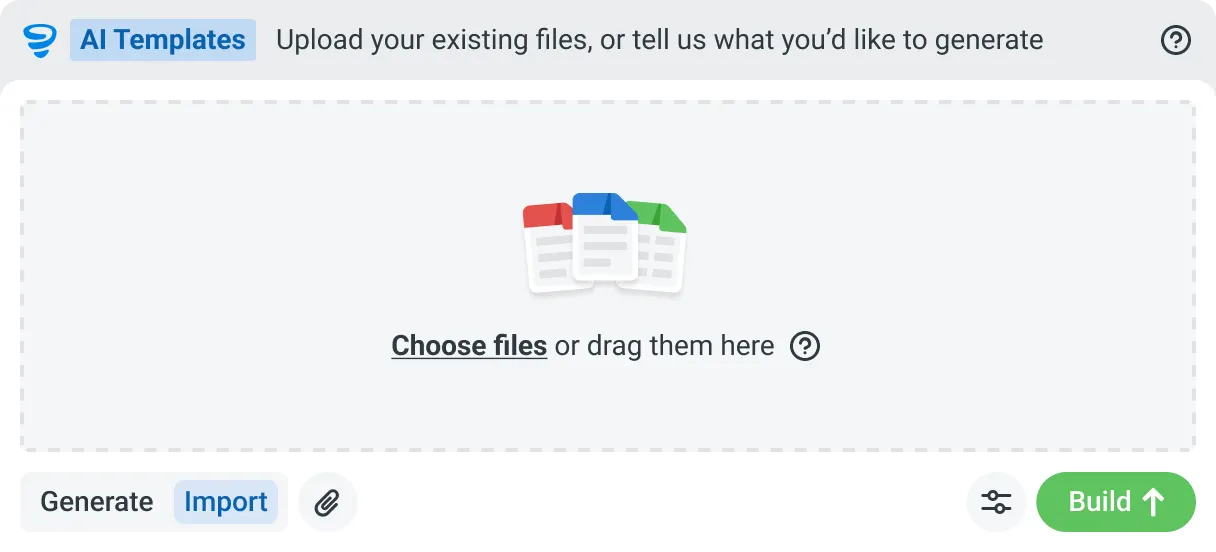
AI Templates
Describe the template you need in plain language, or upload an existing PDF, Word or Excel document. Storm builds the structure, with the right fields, sections, columns and workflow attached, and you review and refine it before you save.
How a SWMS Runs in Dashpivot
You set the SWMS up once in Dashpivot. The crew signs on site before work starts, and the signed version is filed against the job on your own account.
-
Step 1
Set the SWMS Up Once
Start from the SWMS format you use now, with the risk matrix and job steps left as they are, in the format principal contractors already accept. It becomes the form every job runs from.
- AI Templates, where Storm, Sitemate's data capture agent, builds the template from an uploaded PDF, Word or Excel file, or from a description you type. You review it before it's used.
- Drag-and-drop editor if you'd rather build it yourself, adding signature, photo and location fields.
-
Step 2
Run It and Sign On
The supervisor briefs the crew on site with the form open on the Sitemate Mobile App, online or offline. If the site throws up a hazard the SWMS didn't cover, they add the control on the phone.
- Subcontractor sign-on with a QR scan and Sitemate ID, or a digital signature on the device
- Photos attached to the step they relate to
- Storm, if you want it, drafts the steps, hazards and controls from a spoken description of the scope
- Supervisor review, editing site-specific details and signing before work starts
-
Step 3
Keep Every Version
Each signed SWMS is timestamped and filed against the job. Every version is kept, ready for an audit, and stays on your Dashpivot account after the job closes.
- Change history for every version, showing who changed what
- Sign-on record of who signed which SWMS version
- One register holding all your SWMS across jobs and subcontractors
- PDF export for the principal contractor
- Excel export for your own reporting
What Dashpivot Doesn't Replace
Dashpivot runs your SWMS process and keeps the record. It doesn't assess whether your controls suit the work, and it isn't regulator approval. Your competent person reviews the hazards and signs off each job.
What Dashpivot Does for SWMS Today
All of this is available today.
- SWMS templates with job steps, hazards, risk ratings and controls
- Storm drafts the first version from your work scope, and a supervisor reviews it before use
- Subcontractors sign on with a QR scan and their Sitemate ID
- Works on any device, online or offline
- One versioned, audit-ready register, with quality and field reporting built in
Where Dashpivot Stops
Some limits come with the nature of SWMS. One comes down to SiteDocs' longer track record.
- Judging whether a control is adequate, which is the competent person's call
- Acting as a WHS regulator
- Approving a SWMS on anyone's behalf
- Matching SiteDocs' standing in North American safety
SiteDocs vs Dashpivot by Sitemate for SWMS
This table focuses on the SWMS areas where the two differ, including where SiteDocs leads.
| SiteDocs | Dashpivot by Sitemate | |
|---|---|---|
| Built for | Dedicated safety compliance with checklists and sign-offs | Safety, quality, field reporting and plant |
| Subcontractor sign-on | Several steps: email, link, then QR code | QR scan plus Sitemate ID, or a signature on the supervisor's device |
| Building a SWMS | From safety forms and checklists | Storm with AI Templates, or built in the editor |
| Best fit | Teams whose SWMS fits SiteDocs workflows | Teams running SWMS alongside other field records |
Where SiteDocs and Dashpivot Differ for SWMS
Day to day, both put the SWMS on a phone and collect signatures. What usually makes the difference is how subcontractors sign on and what other records you need to keep.
- Subcontractor sign-on. SiteDocs needs an email, a link and a QR code. Dashpivot needs one scan and a Sitemate ID.
- Scope. SiteDocs focuses on safety compliance. Dashpivot adds quality and field reporting, so your SWMS sits with the rest of the job's records.
- Track record. SiteDocs has been in safety longer.
- North America. SiteDocs is better known there.
Where SiteDocs Is the Better Choice
SiteDocs is purpose-built for safety compliance, and its checklists and sign-offs work well. If it's doing the job for your team, switching may not be worth the disruption.
- Your crews work across North America and Australia
- All your safety already runs on SiteDocs and the workflows fit
- Your SiteDocs price has stayed steady
- You only need safety, not quality or field reporting
How Teams Move From SiteDocs
Most teams move gradually. Once you've decided a move is worth it, start with one job's SWMS and expand after a crew has signed it live.
-
Step 1
Decide
Stay on SiteDocs if it fits how your crews work and the price has held steady. Move if subcontractor sign-in is slowing the start of shift, or you want quality and field reporting in the same system.
-
Step 2
Convert
Take one job's SWMS as a PDF, Word or Excel file. Storm rebuilds it as a Dashpivot template with AI Templates, keeping the risk matrix and wording, and you check the result.
-
Step 3
Pilot
Pilot on one job with one crew, subcontractors included. SiteDocs keeps running on your other jobs, and nothing that depends on it gets switched off.
-
Step 4
Roll Out
Once one crew has signed a live SWMS end to end, save it as an account template and add your other jobs. Every SWMS then sits in one register.
Frequently Asked Questions
Is Dashpivot a replacement for SiteDocs for SWMS?

For most Australian teams, yes. Dashpivot handles both the SWMS and the sign-on, alongside the rest of your field work. SiteDocs remains a dedicated safety product with a long history in North American construction.
How do subcontractors sign onto the SWMS?
They scan a QR code with their Sitemate ID, which is their worker profile in the Sitemate Mobile App, or they can sign on the supervisor’s device. Teams often tell us SiteDocs’ multi-step sign-in is what made them start looking around.
Does Dashpivot cover more than safety?
Yes. It covers quality and field reporting too, so your SWMS sits with your inspections and site records.
Do we have to use Storm to write the SWMS?
No. Your team can fill in the SWMS like any other form. If you’d like a head start, Storm, Sitemate’s data capture agent, can draft the job steps, hazards and controls from the work scope or a voice note. A supervisor or competent person reviews and signs it before it’s issued.
How do we bring our SWMS across from SiteDocs?
Start with one job. Upload your current SWMS as a PDF, Word or Excel file, and Storm rebuilds it as a Dashpivot template with AI Templates. Once you’ve reviewed it, new SWMS are signed and filed in your own Dashpivot account.