Free Field Reporting template
Construction Site Daily Progress Report Template
No credit card required.
This free Construction Site Daily Progress Report template gives site teams a ready-to-use format for recording what happened on site each day: work completed, crew and hours, plant, deliveries, delays, weather, and any issues that need following up. The fields are already laid out, so the site engineer or supervisor fills it in on site rather than reconstructing the day from memory back in the office. Every completed report becomes a time-stamped record of progress that the project manager, client, and office team can read the same day.
- 100% fully editable Construction Site Daily Progress Report
- Export your Construction Site Daily Progress Report to PDF or CSV
- Access your Construction Site Daily Progress Report on mobile, tablet or computer
- Thousands of templates including other Field Reporting templates
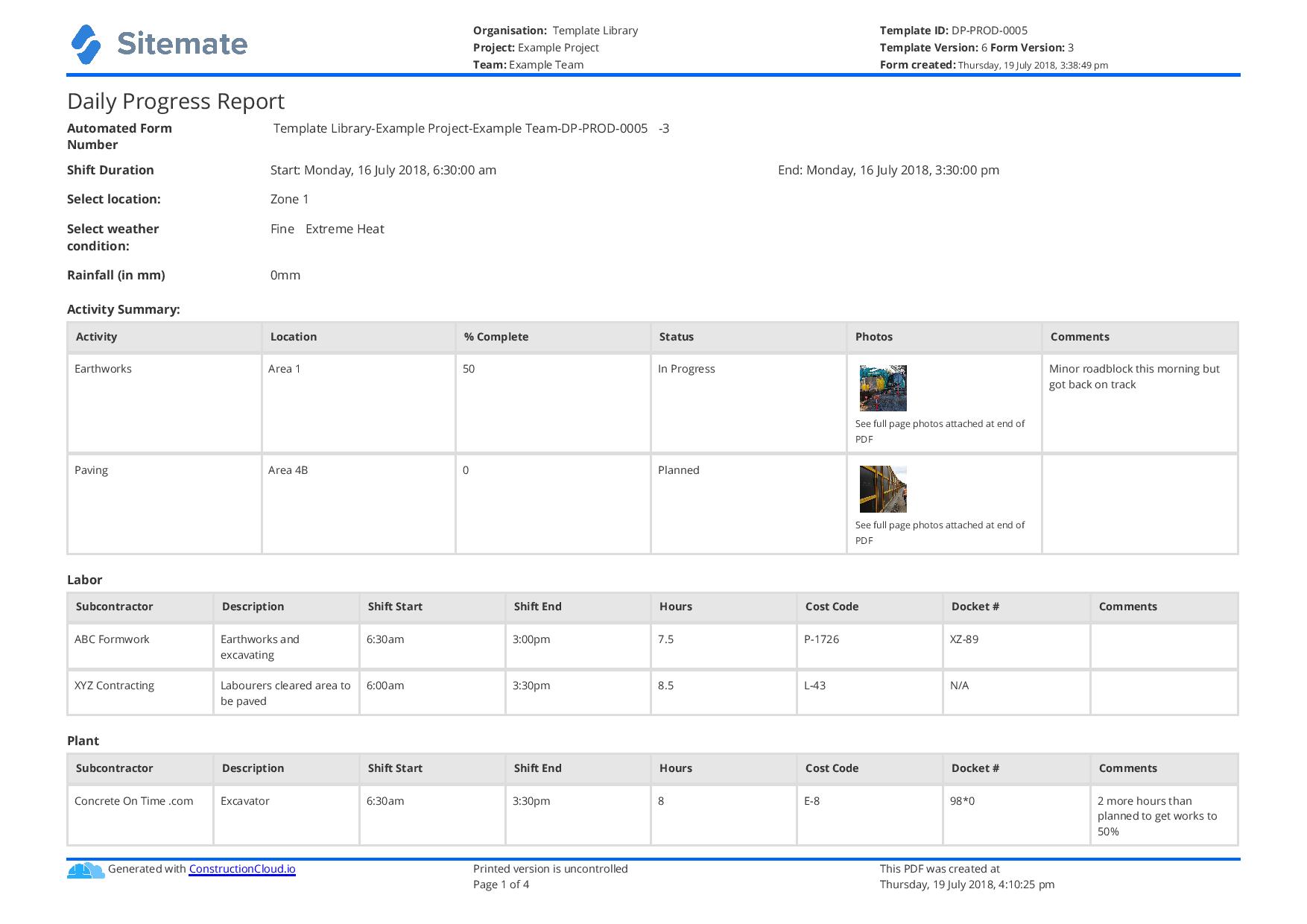 Click to preview
Trusted by thousands of companies, projects & teams worldwide


Compare this Construction Daily Progress Report to paper forms and Excel spreadsheets
A paper or Excel construction site daily progress report has the same fields but none of the structure to make them useful over time. The report sits in a folder on site or in someone's email, and when the project manager needs last Tuesday's entry for a particular trade or location, it means searching through files manually. Photos live separately from the report, if they were taken at all. Reviewing a month of reports to build a progress summary means opening each one individually.
A digital construction daily progress report keeps every entry tagged to its project, date, and location. The supervisor completes it on their phone on site, attaches photos directly to the relevant entries, and signs it off before they leave. The office has the signed report the same day, and searching back through any date range or filtering by location takes seconds. The format stays consistent across every site, every supervisor, and every day, which is what makes the records usable when it matters most.

This Construction Site Daily Progress Report Sample Was Generated With Dashpivot

This Construction Site Daily Progress Report is a structured daily reporting form built in Dashpivot's digital form builder, with fields covering work completed, labour, plant, deliveries, delays, safety observations, and supervisor sign-off. The template is ready to use as-is or can be adjusted to match your contract requirements and site reporting format.
- Access, edit and complete your Construction Site Daily Progress Report from any device - mobile, tablet or computer.
- Print, download or send your Construction Site Daily Progress Report as perfectly formatted PDF documents with your company logo.
- Store your Construction Site Daily Progress Report securely online, where they can be searched and found in seconds
- Invite internal and external parties to see, edit and sign off on Construction Site Daily Progress Report online.
Need a version for your own site?
Storm, the AI agent in Dashpivot, can build one from a short description or the form you already use.


 GLOBAL


What is a Construction Site Daily Progress Report?
A Construction Site Daily Progress Report is the daily written record of activity on a construction site. It captures what work was done, who was on site, what plant and equipment was used, what deliveries arrived, what held things up, and what the weather was doing. It is the document that answers 'what happened on this job today' and it is the evidence base for progress claims, variation records, delay notices, and client reporting.
In practice, most sites still run this report on a paper form or a spreadsheet filled in at the end of the day, which means it often arrives late, gets filled in from memory, or goes missing before it reaches the office. A digital construction site daily progress report changes that: the person on site completes it on their phone as the day unfolds, attaches photos against each entry, and the report is ready by the time they leave site.
The construction daily progress report is also the document that matters most when a dispute or delay claim lands. A contemporaneous record, completed and signed on the day, carries more weight than a summary written a week later. Getting the format right and filling it in consistently is what gives it that value.
Applicable Standards and Policies for Construction Site Daily Progress Report
Construction site daily progress reporting is shaped by contract requirements and local regulatory obligations that vary by region, but several standards and frameworks apply broadly:
- AS 4000-1997 (Australia) — General conditions of contract for construction, which establishes the contractor's obligation to maintain contemporaneous site records including progress documentation.
- NZS 3910:2013 (New Zealand) — Conditions of contract for building and civil engineering construction, requiring regular progress records to support payment claims and variation assessments.
- FIDIC Conditions of Contract — The Red and Yellow Book clauses on contemporaneous records (Clause 20) require contractors to keep daily records of resources on site as a condition of a valid delay or variation claim.
- JCT and NEC Contract Forms (UK) — Both require the contractor to maintain site records sufficient to support interim applications and to substantiate any extension of time or compensation event.
- OSHA 29 CFR 1926 (US) — Recordkeeping requirements for construction sites, particularly for incidents, near misses, and workforce data.
- ISO 9001:2015 — Quality management requirements for documented records of work activities, applicable where a contractor operates a certified quality management system.
In all jurisdictions, the most practical standard is the contract itself. The construction site daily progress report should capture what the contract says it should capture, completed and signed on the day it covers.
Staff Members and Parties That Use the Construction Site Daily Progress Report
The following people are involved in completing, reviewing, and using the Construction Site Daily Progress Report:
- Site Engineer / Site Supervisor — the person who completes the report each day. They record work completed, crew numbers, plant on site, deliveries, delays, and weather. They are accountable for the accuracy of the entry and sign it off at the end of the day.
- Foreman / Leading Hand — contributes to the report by confirming what their crew completed during the shift, the hours worked, and any issues that affected progress.
- Project Manager — reviews completed daily reports to track progress against programme, identify delay patterns, and prepare client updates and progress claims. The daily report is their primary source of contemporaneous project data.
- Contract Administrator / Quantity Surveyor — uses the daily record to assess progress payment claims, substantiate variation costs, and support delay or extension of time notices.
- Safety Officer / HSE Advisor — reviews daily reports for incident records, near misses, and any safety observations that require follow-up or inclusion in the project safety register.
- Client Representative — may review daily progress reports as part of contract oversight, particularly on cost-plus or alliance contracts where the client has visibility of daily resource levels.
Business Risks Reduced by the Construction Site Daily Progress Report
Inadequate progress records
- Incomplete or late daily reports leave the business without a contemporaneous record when a dispute or delay claim arises, which is the point at which the gap costs the most.
- Reports filled in from memory days after the fact are legally weaker and factually less reliable than same-day records.
Payment claim exposure
- Progress payment applications are only as strong as the records behind them. Missing or inconsistent daily reports mean variation claims and delay costs are harder to substantiate.
Programme and resource mismanagement
- Without a consistent daily record of what was achieved and what held it up, project managers are working from verbal updates rather than data, which makes replanning slower and less accurate.
Incident and delay documentation failures
- A delay or incident that is not recorded in the daily progress report on the day it happens is much harder to include in a formal notice or claim later.
Client and contractual non-compliance
- Many contracts require the contractor to maintain daily site records. Failure to produce them on request can constitute a breach of contract obligation independently of any other dispute.
Business Opportunities Created by the Construction Site Daily Progress Report
Stronger variation and delay claims
- A well-maintained Construction Site Daily Progress Report is the evidence base for every extension of time request and variation claim. Daily records completed on the day, signed by the site supervisor, carry significant weight in contract administration and dispute resolution.
Faster progress reporting to clients
- When the daily report is completed on site and the office receives it the same day, the weekly or monthly client progress report becomes a matter of pulling existing records rather than chasing data from supervisors.
More accurate payment applications
- Daily records of work completed, crew hours, and plant give the quantity surveyor or contract administrator the data to build payment applications from actual site records rather than programme projections.
Earlier visibility of problems
- A consistent daily record makes delay patterns visible early: if the same trade or activity is appearing in the 'delays' field three days running, the project manager sees it in time to act.
A reliable audit trail
- Consistent, signed daily reports form an audit trail that covers quality, safety, progress, and resource use across the project life cycle, which supports certification, client reporting, and any post-project review.
What does a Construction Site Daily Progress Report need to cover?
A complete construction site daily progress report should capture the following:
Project and date details
- Project name and number
- Site location
- Report date and report number
- Weather conditions (morning and afternoon)
- Completed by and supervisor sign-off
Work completed
- Description of work carried out, by trade or activity
- Location on site where work was performed
- Percentage or quantity completed against the programme
- Photos tied to the work entries
Labour and crew
- Number of workers on site, by trade or subcontractor
- Hours worked
- Any crew not on site who were expected (and reason)
Plant and equipment
- Plant and equipment on site
- Whether owned or hired
- Any plant that was idle and reason
Materials and deliveries
- Materials delivered to site
- Supplier and delivery docket reference
- Any materials rejected or awaiting inspection
Delays and issues
- Any delay to planned work and its cause
- Instruction or variation received
- Any access, weather, or design issue affecting progress
Safety and incidents
- Any incident, near miss, or safety observation
- Inspections or visits by regulators or the client
Sign-off
- Site supervisor signature
- Date of sign-off
How to Create a Construction Site Daily Progress Report
A construction site daily progress report is most useful when the format is consistent from day to day and project to project. Setting it up well at the start means every supervisor knows what to record and the records are usable when you need them.
Before creating a Construction Site Daily Progress Report, gather the following
- Project name, number, and site address
- Contract or programme details showing planned activities for the reporting period
- List of trades and subcontractors expected on site
- Plant and equipment schedule
- Any applicable contract requirements for daily reporting content or format
- Previous daily reports if continuing an existing project record
Step 1: Add project and report identification fields
- Project name and project number
- Site location or address
- Report date
- Report number (sequential)
- Prepared by (name and role)
- Weather conditions: morning and afternoon entries
Step 2: Add a work completed section
- A repeating table with columns for activity description, location on site, trade or subcontractor responsible, quantity or percentage completed, and a photo attachment field
- Allow multiple rows so the supervisor can record each distinct work activity separately
- Include a free-text field for any notes on work quality or outstanding items
Step 3: Add a labour and crew section
- A table recording each trade or subcontractor on site, number of workers, and hours worked
- A field for any crew expected but absent, with a reason
- A total labour count field for the day
Step 4: Add plant, equipment, and deliveries sections
- A plant and equipment table: item description, owned or hired, hours in use, and any idle plant with reason
- A deliveries table: material description, supplier, docket reference, and whether accepted or rejected
Step 5: Add a delays, issues, and safety section
- A delays field: description of any delay, cause, and trades or activities affected
- A field for instructions or variations received during the day
- An incidents and near misses field: description, persons involved, and immediate action taken
- A field for any regulatory or client visits to site
Step 6: Add a sign-off section
- Signature field for the site supervisor or engineer completing the report
- Date and time of sign-off
- Optional: a second signature field for the project manager or site manager if your contract requires countersignature
- Confirm that the report cannot be submitted without a signature, so every record in the system is a signed document
Using the Construction Site Daily Progress Report to support delay and variation claims
The construction daily progress report is most valuable on the day a dispute starts, which is usually not the day anyone thought to start keeping better records. When a contractor needs to demonstrate that a delay was caused by a third party, that additional labour was deployed to meet a client instruction, or that adverse weather prevented progress on a specific date, the daily report is the contemporaneous evidence that makes the claim credible.
What makes a daily progress report useful for this purpose is consistency and timing. A report completed and signed on the day it covers, with specific entries about what work was done, what was delayed, and why, is far more useful than a summary reconstructed from programme data weeks later. The format matters too: a report that records weather conditions twice a day, names the trades on site and their hours, and includes photos tied to specific work descriptions gives the contract administrator or adjudicator the detail they need to assess a claim fairly. A report that records 'general construction works' against a crew of twelve tells them very little.
Building that habit across every supervisor and every project is the practical challenge. A standard construction site daily progress report format, used consistently, is the most straightforward way to do it.
How to Create Your Construction Site Daily Progress Report in an App or Software System
Managing the Construction Site Daily Progress Report in a digital app removes the two points where the paper process breaks down most often: the report not being completed on the day, and the completed report not reaching the office until days later. When the supervisor fills in the report on their phone on site, photos attach directly to each work entry, the labour hours carry through to timesheets without being re-entered, and the signed report is in the project manager's queue before the crew leaves site. The office has a real-time view of what happened on each project each day, without chasing anyone for a file.
Over a project's life, the difference in record quality compounds. Every Construction Site Daily Progress Report completed on the day builds a contemporaneous record that is searchable by date, location, trade, or any other field. When a delay claim needs to be substantiated or a variation priced, the records are there in a form that can be filtered and exported, not scattered across folders or inboxes. The supervisor still reviews and signs every entry. The signed version is the version of record.
Step 1: Set up project and date fields in the app
- Add a text field for project name and a text field for project number
- Add a text field for site location
- Add a date field for the report date
- Add an auto-incrementing number field for the report number so each report gets a unique reference without the supervisor having to track it
- Add a text field for the name of the person completing the report
- Add two selection fields for weather conditions: one for morning and one for afternoon, with options covering clear, overcast, rain, wind, and extreme heat
Step 2: Format the work completed and crew sections
- Add a repeating table for work completed with columns for activity, location, trade, quantity or percentage, and an attachment field for photos
- Add a repeating table for labour: trade or subcontractor name, number of workers, and hours worked
- Add a formula field that totals the labour hours across all rows so the supervisor doesn't have to add them up manually
- Add a text field for absent crew and reason
Step 3: Format the plant, deliveries, and issues sections
- Add a repeating table for plant: item, owned or hired, hours in use, and an idle/reason field
- Add a repeating table for deliveries: material, supplier, docket number, and an accept or reject selection field
- Add a text field for delays: description and cause
- Add a text field for instructions or variations received
- Add a text field for incidents or near misses, with an attachment field for any photos taken at the time
Step 4: Configure the sign-off and approval workflow
- Add a signature field for the site supervisor completing the report
- Add a date and time field that stamps automatically when the signature is added
- Set the workflow so the completed report routes to the project manager for review before the record is locked
- Add an optional countersignature field for the project manager if your contract requires it
- Configure a notification to the office when the supervisor signs off, so the daily report reaches the project team the same day without anyone having to chase it
Frequently Asked Questions
What is a daily progress report in construction?
A daily progress report in construction is the written record of what happened on site that day. It captures work completed, crew on site and hours worked, plant and equipment used, materials delivered, delays or issues, and weather conditions. It is both an internal management tool and a contractual document: when a delay or variation needs to be substantiated, the daily progress report is the contemporaneous evidence that supports the claim.
What is a progress report in construction?
A progress report in construction records how the project is tracking against its programme and planned scope of work. Daily progress reports capture what happened on each individual day; monthly construction progress reports pull those daily records together into a summary for the client or project board, showing percentage complete, work done in the period, upcoming activities, and any delays or issues affecting the programme. The daily record is the input that makes the monthly report accurate.
What format should a daily progress report for a construction site use?
A daily progress report for a construction site should cover: project identification and date, weather conditions, work completed by activity and location, labour on site by trade and hours, plant and equipment, materials delivered, delays and their causes, any incidents or safety observations, and supervisor sign-off. The format should be consistent from day to day so records are comparable across the project. Many contractors use a standard PDF or Excel template, though a digital format makes it easier to attach photos, search back through records, and get the signed report to the office the same day.
What is a construction site daily log book?
A construction site daily log book is a bound or digital record of daily site activity kept across the life of a project. It is the cumulative collection of daily progress reports, each covering one day, that together form the project's contemporaneous site record. Some contracts require a physical bound log book; others accept digital records provided they are signed and date-stamped. The log book is particularly important for projects where delay or variation claims are likely, because it provides the day-by-day evidence trail that supports those claims.
About the Author

Jam Tanga-An
Content Engineering Manager
 LinkedIn
Education
Cebu Institute of Technology - University - Mechanical Engineering
Bio
Jam is a multi-disciplinary engineering professional and content marketer with hands-on experience across the construction and manufacturing verticals, operating to industry standards, and testing and compliance requirements. They apply their engineering background across core functions including Health and Safety, Quality, Design, Production and Construction, and Operations, ensuring consistency and compliance across projects and content.
Past Projects
High-rise building developmentMEPF Engineer Intern primarily supporting the design, coordination, and implementation of the building’s wastewater treatment system, while also contributing to multidisciplinary MEPF coordination and on-site implementation.
Product engineering and manufacturing projectHardware Engineer responsible for product design, testing, packaging, and transport of user-facing proprietary electromechanical systems, including cost-reduction analyses and improvement initiatives across the product lifecycle
Shipping test and compliance operationsShipping Test Laboratory In-Charge overseeing destructive and performance testing of products, transport documentation, data analysis, regular machine maintenance, while managing end-to-end testing procedures and technical reporting
Industrial machinery R&D project end-to-end machine designContributed to the full engineering lifecycle of bespoke industrial cutting machineries from concept design, 3D models, manufacturing drawings, to fabrication, supported by Finite Element Analysis (FEA) for structural validation
Version history
Last edited on , template version 25-11-v1