Electrical Installation Condition Report Template

Start with a free 30-day trial. No credit card required.
This free Electrical Installation Condition Report streamlines the process of ensuring that all electrical systems in a property are safe and functional. This report involves a detailed inspection and testing process to identify any potential hazards or faults early, thus preventing accidents.
Want a more detailed report? This Electrical Installation Condition Report covers various factors of the installation such as the integrity of wiring, the adequacy of earthing and bonding, and the effectiveness of protective devices. This assessment confirms if the electrical installation is safe for continued use.
 100% fully editable Electrical Installation Condition Report
Export your Electrical Installation Condition Report to PDF or CSV
Access Electrical Safety Check on mobile, tablet or computer


Trusted by companies, projects and teams of all sizes















What is Electrical Installation Condition Report?
An Electrical Installation Condition Report (EICR) is a document created by an electrical inspector after a thorough examination of a building's or property's electrical system. An EICR will detect indicators of age, wear and tear, and damage, guaranteeing that the property electrical installation is safe for use and does not pose any risk of fires or electric shocks caused by defects in the installation.
Check out this free Electrical Installation Condition Report
Preview and download this Electrical Installation Condition Report pdf, and see how it improves your process compared to traditional paper-based files, like Word or Excel.
Use this Electrical Installation Condition Report template for free

Generate this template automatically with Storm
You don't have to build the Electrical Installation Condition Reporting field by field. Let Storm, the AI Data Capture Agent inside Dashpivot, build the template for you in seconds.
Describe what you need
Tell Storm the form you want in plain language and it builds a structured digital template from scratch, with fields, tables, and signatures in place.
Upload what you already use
Drop in your existing PDF, Word, Excel, or even a photo of a paper form. Storm rebuilds it as a smart digital template with the structure intact.
 Storm
Storm
Generate a Electrical Installation Condition Reporting form template that I can use for my business
Applicable Standards and Policies for Electrical Installation Condition Report
The health of electrical components in a building is a significant factor when it comes to safety on the property. Faulty wiring and electrical components have the potential to cause fires or explosions that place the occupants of the building at risk of injury or fatality. The United Kingdom has mandated strict regulations regarding the maintenance of electrical systems in a property to establish standard procedures, such as the EICR, to maintain a safe and comfortable property. Here are the mandates related to the need for an Electrical Installation Condition Report:
- Electricity at Work Regulations 1989: This provision defines the responsibility of employers, landlords, and duty holders to make sure that electrical systems operate and are maintained in a safe condition.
- British Standards (BS) 7671—Requirements for Electrical Installations: This is the national standard for electrical installations in the UK. This standard requires frequent inspection of installed electrical systems to ensure safety on the property.
- Health and Safety at Work, etc. Act 1974: This act defines the duty of the employer to maintain a safe and healthy environment for the workers and the public. Part of this act is the requirement to ensure electrical systems are operating safely.
- Regulatory Reform (Fire Safety) Order 2005: Faulty electrical wiring is known to be the leading cause of fires in the UK. Included in this regulation is a requirement that a responsible person must conduct an assessment of electrical systems to prevent the event of a fire.
Staff Members and Parties that use Electrical Installation Condition Report
An Electrical Installation Condition Report documents buildings or properties that are already operating and occupied. This means that most of the people involved in the safety inspection process are the admin and maintenance staff of the building. Here are the specific staff involved in completing the Electrical Installation Condition Report:
- Property Owner: This is the person who is legally responsible for maintaining the safety of the building. Part of their duty is to ensure that installed electrical systems run safely and optimally. The property owner handles all identified safety issues, especially those concerning the electrical systems.
- Building Manager: This person handles the day-to-day operations of a building. One of the matters that this staff is responsible for is the scheduling of safety inspections. The building manager will also be the one to coordinate and appoint the inspector for any safety inspections, like the Electrical Installation Condition Report.
- Electrical Safety Inspector: This person is considered to be a competent person who has sufficient knowledge and skills to inspect the operability and safety of installed electrical systems in the building. They will be the ones who complete the Electrical Installation Condition Report.
- Building Maintenance Manager: The building maintenance manager will be the one to assist the electrical safety inspector. This staff will manage all the necessary maintenance and repairs based on the inspector’s findings.
Business Risks Reduced by Electrical Installation Condition Report
Businesses should place importance on maintaining the electrical systems in a property. Leaving these systems without an electrical safety assessment does not just increase the likelihood of a fire but also places businesses at risk that can negatively impact their standing. Here are business risks that would directly manifest if an Electrical Installation Condition Report is not completed and implemented:
- High costs due to non-conformance to regulations
- High costs due to damaged property
- Lawsuits and compensation claims
- Operational and Occupant disruption due to repairs
- Poor business reputation
- Loss of occupants, renters, and possible buyers
Business Opportunities Created by Electrical Installation Condition Report
Creating an efficient Electrical Installation Condition Report does more than just guarantee ongoing safety in a structure or property. It offers companies benefits and business opportunities that could help them improve their standing. Businesses can take advantage of the following business opportunities by using an Electrical Safety Check:
- Advantages of increasing the number of tenants, residents, customers, or visitors
- Good property reputation for health and safety
- Excellent results in compliance audits
- Reduced insurance premiums
- Greater trust from potential purchasers, owners, and tenants.
- Consistent business operations
- Enhanced property value and marketability
Important sections inside an Electrical Installation Condition Report
These are the sections that must be present in an Electrical Installation Condition Report.
- Information on who conducted the work order
- Information on the installed electrical system
- Scope and limitations of the test
- Schedules
- Supply characteristics and earthing arrangements
- Electrical installation specifications
- Observations
- Tools used for the test
- Electrical system condition summary
- Recommendations
- Declarations
Electrical Installation Condition Report certificate
All electrical installations are subject to wear over time. That is why all property owners should get their building’s electrical systems tested on a regular basis. The British Standards Institute, which established the BS 7671 standard, prescribed that business owners conduct an EICR every five years. The same frequency is recommended for landlords, or whenever there is a change of tenancy. Finally, homeowners should schedule EICR testing at least once every ten years. Once completed, business owners will receive an EICR certificate highlighting any concerns in four categories:
- C1—Danger present. Risk of injury. Immediate remedial action required
- C2—Potentially dangerous. Urgent remedial action required
- C3—Improvement recommended
How to make an Electrical Installation Condition Report template?
This is a thorough and complete guide to creating an effective Electrical Installation Condition Report.
Prerequisites in making an Electrical Installation Condition Report
- Complete information on the property and electrical system
- A defined scope of inspection
- All applicable regulations and standards
- Compiled records of previous inspections
- Risk assessment for the inspection process
- Established criteria for inspection
- Availability of testing tools
Add Information on who conducted the work order
This section must contain the following items:
- Name of client
- Address of the work order
- Reason for the report
- Date of inspection
Add information on the installed electrical system
Formatting this section requires the following items:
- Occupier
- Address
- Description of premises
- Estimated age of wiring systems
- Verification of additions or alterations
- Verification of availability of installation records
- Date when the system was last inspected
Add the scope and limitations of the test
This section should have the following key items:
- Scope of the test
- Reasons for scope and limitations
- Verification if checklist aligns with scope
- Operational limitations
Add the supply characteristics and earthing arrangements
This section should have the following key items:
- Earthing arrangements
- Number and type of live conductors
- Nature of supply parameters
- Characteristics of primary overcurrent protective device(s)
- Confirmation of supply polarity
Add the electrical installation specifications
These are the key items that need to be present in this section:
- means of earthing
- specifications for earthing conductor
- specifications for main protective bonding conductor
- specifications for main bonding
- specification for main switch/switch-fuse/circuit breaker/RCD
Add an observations section
Please provide the following in this section:
- A legend for the four classification code of an EICR Certificate
- Observation item number
- Observation
- Classification code
Add the tools used for the test
This section should allow for the input of tools used for:
- Earth fault loop impedance
- Insulation resistance
- Continuity
- RCD
- MFT
Add an electrical system condition summary
This section should provide a summary of the following:
- General condition of the installation
- Overall assessment of the installation
- Verification if there is another supply source
Add a space for recommendations and declarations
Please provide the following items in this section:
- Recommendations
- Declaration for completeness and correctness
- Signatures
Frequently asked questions
How to create Electrical Installation Condition Reporting in an App or Software System
An effective Electrical Installation Condition Report can easily help identify faulty components of an electrical system and streamline the process of providing the needed corrective action. Dashpivot’s platform provides real-time data capture and integrated corrective action tracking, ensuring that it addresses identified electrical hazards immediately. The system’s mobile features allow for immediate inspections at equipment sites, including direct attachment uploads, while cloud-based storage ensures that critical safety information is available to all relevant workers, regardless of physical location. This digital technology also allows for trend analysis across several EICRs, which helps businesses locate systemic safety issues and improve the needed control measures across the whole building.
35 minutes
Medium difficulty
How to make an Electrical Installation Condition Report in an app
Creating a template in an app can significantly accelerate the process of preparing and filling out the Electrical Installation Condition Report. An app can be used to do the following:
- Generates a more professional and structured template.
- Reduces the number of handwritten data entries.
- Creates a single entry point for all plans that have been produced.
- Simple reformatting to accommodate new protocols or revised requirements.
- Allows for the quick attachment of linked files.
Creating the client details section
These are the required fields and information needed to create this section in an app:
- Add a date field for date of inspection
- Provide text fields to allow the input of the following information:
- Name
- Address
- Reason for producing this report (multiple text field)
Creating the subject details section
These are the required fields and information needed to create this section in an app:
- Add a date field for date of last inspection
- Provide text fields to allow the input of the following information:
- Occupier
- Address
- Estimated age of the wiring system
- Provide a “yes or no field” to verify the following:
- If there is evidence of additions or alterations
- If installation records available
- Add a multiple-choice field to allow users to select the description of premises. Each selection item can be integrated with colors to make the report more appealing. Here are the selection items you can use:
- Domestic
- Commercial
- Industrial
Creating the scope of inspection section
These are the required fields and information needed to create this section in an app:
- Provide text fields to allow the input of the following information:
- Extent of the electrical installation covered by this report.
- Agreed limitations, including the reasons
- Operational limitations including the reasons
- Provide a “yes or no field” to verify if the checklist agrees with the limitations
Creating the supply characteristics and earthing arrangements section
These are the required fields and information needed to create this section in an app:
- Add a multiple-choice field to allow users to select the earthing arrangement. Each selection item can be integrated with colors to make the report more appealing. Here are the selection items you can use:
- TN-S
- TN-C-S
- TT
- IT
- TN-C
- Add a text field for number and type of live conductors
- For the nature of supply parameters, create a default table element with four columns. This will allow users to add more rows if needed. Format each column as a text field and provide the following header titles:
- Nominal voltage U
- Nominal frequency f
- PFC IPF
- External loop impedance
- Add another default table element with four columns for the characteristics of the primary overcurrent protective device(s). Each column must be formatted as text fields, and the heading titles are as follows:
- BS (EN)
- Type
- Rated current
- short circuit capacity
- Provide a “yes or no field” to confirm supply polarity.
Creating the specifications of installation section
These are the required fields and information needed to create this section in an app:
- Create a default table element with five columns for the means of earthing. This feature will allow users to add more rows if needed. Format each column as a text field and provide the following header titles:
- Distributors’ Facility
- Type
- Resistance to earth
- Installation of an earth electrode
- Location of the earth electrode
- Create a default table element with four columns for the specifications of the earthing conductor and the main protective bonding conductor. This feature will allow users to add more rows if needed. These are the fields and information needed for the two tables:
- Format the first and second columns as text fields for Conductor material and Conductor CSA.
- Format the third column as a list field for the verification of connection or continuity. List options for this column are yes and no.
- Format the last column as a text field to allow users to input comments.
- Create a default table element with five columns for the specifications of the main bonding. This feature will allow users to add more rows if needed. Format each column as a text field and provide the following header titles:
- Water installation pipes
- Structural steel
- Gas installation pipes
- Oil installation pipes
- Comments
- Create a default table element with nine columns for the specifications of the main switch/switch-fuse/circuit breaker/RCD. This feature will allow users to add more rows if needed. Format each column as a text field and provide the following header titles:
- Type BS (EN)
- Number of poles
- Supply Conductor
- Conductor CSA
- Voltage rating
- Current rating
- Rated time delay
- Rated RCD operating current
- RCD operating time
Creating the observation section
These are the required fields and information needed to create this section in an app:
- Provide a prefilled text field to create a legend for the EICR category. The legend should be presented like this:
- C1—Danger present. Risk of injury. Immediate remedial action required
- C2—Potentially dangerous. Urgent remedial action required
- C3—improvement recommended
- Create a default table element with five columns for the observations. This feature will allow users to add more rows if needed. The following are the columns’ instructions.
- Make the first column a text field to allow users to input the item number of the observation.
- Also format the second column as a text field to allow users to input the findings
- Format the third column as a list field to allow users to select the EICR category. Each selection item can be integrated with colours to make the report more appealing. Here are the list items with an example associated colour:
- C1: Green
- C2: Orange
- C3: Red
- Format the fourth and fifth columns as text fields to allow users to input the needed corrections and the responsible person, respectively.
Creating the Summary section
These are the required fields and information needed to create this section in the app:
- Add a multiple-choice field to allow users to select the overall assessment of the installation. Each selection item can be integrated with colors to make the report more appealing. Selection items you can use are satisfactory and unsatisfactory. The following colors can be used on each selection item:
- satisfactory: green
- unsatisfactory: red
- Provide a “yes-no-na with text field” to verify whether there is an alternate supply source.
- Add a prefilled table element with 6 columns and 5 rows for the tools and instruments used in the safety inspection.
- The first column should present the tests conducted. It should have the following items on each row:
- Earth fault loop impedance
- Insulation resistance
- Continuity
- RCD
- MFT
- The second and third columns should be formatted as text fields to allow users to input the tool used and tool number.
- The third and fourth columns should be date fields to allow users to directly input the date last inspected and calibrated.
- Format the last column as a text field to allow users to input notes or comments.
- Add a prefilled text field after the table to create the declaration.
- Add signature fields for personnel who complete and review the report.
About the author

Felmar Mantalaba
Engineering Content Writer

Education:
Cebu Institute of Technology - University - Mechanical Engineering with Mechatronics
Bio:
Felmar is a mechanical engineer, whose four years of experience in the mining industry inspired him to write and share stories to progress the revolution of new technologies and create smarter, smoother ways of living.
Project Details:
Safety, Health, and Environment Management System (SHEMS) Coordination
SHEMS Coordinator at Atlas Consolidated Mining, ensuring organizational compliance with ISO 14001 and ISO 45001 standards, performing risk assessments, developing policies, and conducting audits and inspections to maintain a safe and environmentally responsible workplace.
Maintenance Management and Optimization
Senior Maintenance Manager (OIC) leading equipment maintenance and operational efficiency initiatives, reducing downtime by 10%, improving Mean Time Between Failure (MTBF) and Mean Time To Repair (MTTR) for major equipment, and managing maintenance schedules, manpower, and materials, while overseeing capital project optimization.
Inspection Engineering and Equipment Reliability
Inspection Engineer responsible for technical blueprint interpretation, vendor collaboration, preventive maintenance scheduling, and data collection for vibration and temperature readings, delivering actionable recommendations and comprehensive reports to improve equipment reliability and operational performance.
End-to-End Operational Oversight in Mining Engineering
Contributed to multiple facets of operational management, including SHEMS compliance, maintenance optimization, inspections, and capital project evaluation, integrating safety, reliability, and efficiency improvements across all stages of copper production operations.
Version History:
Other popular templates you can use and edit for free
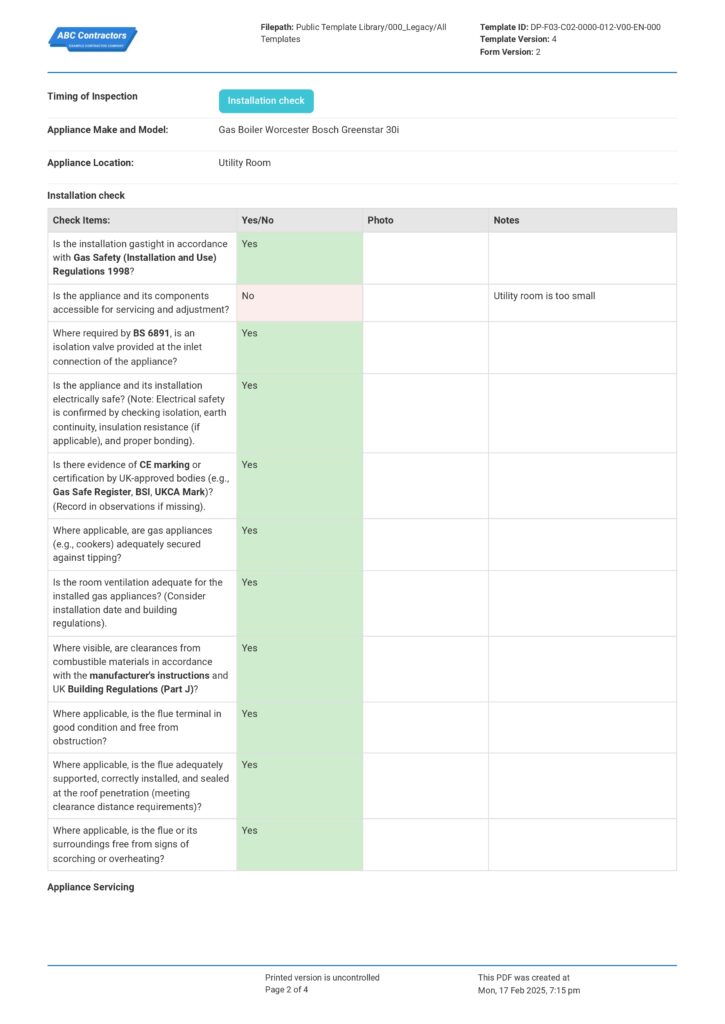

This electrical installation condition report sample was generated with Dashpivot software
- Access, edit and complete your Electrical Installation Condition Reporting from any device - mobile, tablet or computer.
- Print, download or send your Electrical Installation Condition Reporting as perfectly formatted PDF documents with your company logo.
- Store your Electrical Installation Condition Reporting securely online, where they can be searched and found in seconds
- Invite internal and external parties to see, edit and sign off on Electrical Installation Condition Reporting online.

 English (United States)
  English (Australia)
  English (UK)
  English (New Zealand)
  English (South Africa)
  German