How to use Microsoft Copilot to draft Toolbox Talks
Every week the same job comes round: a Toolbox Talk that fits what the crew is actually doing, not a generic one pulled off the internet. The hard part was never the talk, it was starting from a blank page each time. Describe the topic, the crew and the site to Copilot and it drafts one you can run in minutes. You read it, tighten it to the job, then deliver it and capture the sign-on where it belongs.

 Microsoft Copilot
Here's a Toolbox Talk you can run:
Working at heights, roof edge work, Northgate Stage 2.
Why it matters this week: the crew is working within 2m of an unprotected edge on the east face.
Before you start, check: - Edge protection is up and rated, with no gaps at corners or access points - Every anchor point is tagged and in date, and harnesses are inspected before use - The exclusion zone below is set and signed, so nobody works underneath
Ask the crew: what is the plan if someone spots a gap in the edge protection mid task?
Want me to shape this to your Dashpivot Toolbox Talk template, ready to capture on site?
Trusted by companies, projects and teams of all sizes















The short answer
Tell Copilot what the talk is about, which crew is running it and what's happening on site, and it drafts a Toolbox Talk: the hazards that matter, the controls, a few discussion prompts and a sign-on line. You read the draft against the job, tighten it, then run it.
How to get Copilot drafting your Toolbox Talks
A talk worth running comes down to three things, and none of them is a long prompt. Give Copilot the specifics of the job, tell it the shape your talk needs, then tighten what comes back. Do it properly once and you have a pattern you reuse every week, where only the topic and the crew change.
-
Step 1
Give Copilot the topic and the job
The draft is only as specific as what you give it. Name the topic, the crew, the site and what has actually been happening: a near miss last week, a new subcontractor on site, a change in the sequence. A talk on working at heights for a crew doing roof edge work reads nothing like a generic one, and that's the whole point.
- The topic, and why it matters this week
- The crew and the site, so the language fits the job
- Anything recent worth naming: a near miss, an incident, a new hazard
- The length you want, so it fits the time you have
-
Step 2
Tell it the shape you need
Left open, Copilot writes an essay. Tell it the sections a talk actually needs and it drafts to that shape: the hazards that matter for this job, the controls, two or three discussion prompts, and a line for the sign-on. Match the shape to the form your crew fills out, so the draft is quick to drop into the template rather than being reworked.
- The hazards specific to this job, not a generic list
- The controls already in your SWMS or procedure
- Discussion prompts the crew answers out loud
- A sign-on line, so the talk is captured as a record
-
Step 3
Tighten it to the site
The first draft is a starting point, not the finished talk. Cut anything generic, add the hazards that are real on this site today, and make the language plain enough to read aloud. A minute spent tightening is what turns a passable draft into one the crew actually listens to.
Prompt guidance for drafting Toolbox Talks with Copilot
The prompt is the thing worth building, not the back and forth around it. Get it right once and it becomes your drafting prompt, where only the topic and the crew change. One rule matters more than the rest: the more specific the job you describe, the less generic the talk, so name the site, the task and the crew every time.
- "Draft a 5 minute Toolbox Talk on [topic] for a crew doing [task] at [site] this week."
- "Add the three hazards that matter most for this job, with the controls next to each."
- "Give me two discussion questions the crew answers out loud, not yes or no."
- "Rewrite it plainer, so it can be read aloud in five minutes."
- "Same shape, new topic: [topic] for [crew]. Keep the hazards specific to that job."
Troubleshooting prompts for drafting Toolbox Talks
A weak draft is usually a thin prompt, or a form that gives the talk nowhere to land, rather than a limit of the assistant. These are the fixes worth trying, in order, and most are about what you feed in and where the talk ends up.
- The talk reads generic: you named the topic but not the job. Add the crew, the site and the task, and it sharpens
- The hazards are wrong for the work: Copilot doesn't know your site, so paste the relevant part of your SWMS or procedure and ask it to draft from that
- It's too long to read aloud: ask for a time limit, five minutes or less, and it cuts to what matters
- There's nowhere to capture it: your Toolbox Talk form has no sign-on or attendee field, so add one to the template and the delivered talk becomes a record
- The fields don't match: the draft has sections your form template does not, so ask Copilot to match your form's field names
Limitations
Copilot drafts the talk. It doesn't deliver it, and it doesn't know your site the way the crew does. A draft that reads well but misses the hazard that's actually on site is worse than a plain one that names it, so the review is the job, not an optional step.
What it can do today
Given a specific brief, this is what it does well.
- Draft a Toolbox Talk on any topic, shaped to the job you describe
- Pull the hazards and controls that fit the task, when you give it the detail
- Write discussion prompts the crew answers out loud
- Match the talk to your form template, so it drops straight in
- Rework tone and length in seconds, so it reads aloud in the time you have
What it cannot do
And here's what it doesn't do, so nobody treats the draft as the finished job.
- Know your site. It drafts from what you tell it, not from what's happening on the ground
- Deliver the talk or take the sign-on. That happens in the field, with the crew
- Replace your SWMS or procedure. The talk points to the controls, it doesn't set them
- Guarantee it's right. You read the draft against the job before anyone runs it
What this assumes you already do
This page assumes your crews already run Toolbox Talks and sign on to them. Copilot drafts the talk, but it only helps if there's a habit of delivering it and capturing who was there. None of this is a setup step, it's the working practice the drafting sits on top of.
- Your crews run Toolbox Talks, most weeks
- There is a form or template the talk gets captured on, with a sign-on
- Someone owns delivering the talk and getting the crew to sign
- You know the job well enough to tell a good draft from a generic one
Why use Copilot to draft Toolbox Talks
The talk itself is not the hard part. Anyone can run five minutes on working at heights. The hard part is starting from nothing every week, for a crew whose job changed since the last one, when the person writing it is already stretched. So the talk gets skipped, or the same generic one gets run again, and the crew stops listening.
A specific starting point in a minute is what changes that. Copilot gives you a draft that already fits the job, and you spend your time tightening it rather than staring at a blank page. The talk gets run, it fits the work, and the crew hears something worth hearing.
What a good Toolbox Talk contains
A talk the crew actually listens to does a few things, and a good draft should hit all of them:
- A specific hazard for this job, not a general topic
- The controls that are already in place, named plainly
- Two or three prompts the crew answers out loud
- Language that reads aloud in the time you have
- A sign-on, so the talk becomes a record and not just a chat
It's Monday, a new crew starts on the roof edge, and there was a near miss on another site last week. The talk needs to name that hazard, this crew, today. Written from scratch, it doesn't get done before the crew starts. Drafted in a minute and tightened, it does.
Connecting Sitemate MCP to Copilot
Three things have to be in place, and the first two are not in Copilot. An Org Controller switches MCP access on in Dashpivot. Then, because the Sitemate app is a Microsoft 365 agent, a Microsoft 365 admin deploys it once for everyone from the Marketplace. You will also need a Microsoft 365 Copilot subscription, the premium plan rather than the basic add-on.
-
Step 1
Turn on MCP access in Dashpivot
An Org Controller opens Settings, then Security, and sets the MCP Access toggle to anything other than None. Save changes. Until this is on, the agent won't authenticate.
-
Step 2
Deploy the Sitemate app from the Microsoft Marketplace
A Microsoft 365 admin opens the Sitemate MCP listing on the Microsoft Marketplace, selects Get it now, and signs in with a Microsoft 365 admin account. That opens the Microsoft 365 admin console. Choose who gets access, everyone or a pilot group, accept the permissions, and finish the deployment. It then appears under Settings, Integrated apps.
-
Step 3
Check the agent is there
Open Microsoft Copilot at copilot.microsoft.com or in the Microsoft 365 app, and the Sitemate agent shows up as an available tool. Allow a few minutes after deployment for it to appear. Sitemate MCP is read-only, so Copilot can read your records but can't create, edit or delete anything.
If the agent will not appear
Three things account for almost every failed connection, and the first is the most common by a distance.
- Nothing connects at all: MCP Access is still off in Dashpivot, and only an Org Controller can turn it on
- The app can't be deployed: uploading the Sitemate agent needs a Microsoft 365 Global Administrator or AI Administrator role, plus a Microsoft 365 Copilot subscription
- The agent doesn't show after install: allow a few minutes to propagate, refresh Copilot or open a new chat, then check Integrated apps in the Microsoft 365 admin console
How the record gets captured
Copilot drafts the talk. Getting it in front of the crew, signed and kept, is what happens in Dashpivot. Here's how the draft becomes a form your crew fills in, and why the record matters as much as the draft.
-
Storm imports the draft, then captures it on site
Save the draft out of Copilot as a PDF, Word or Excel file, and Storm rebuilds it as a Dashpivot template with AI Templates. From there the talk gets delivered and filled in on a phone or tablet while the crew is standing there, with the sign-on attached, rather than written up on a sheet that has to be chased later.
-
Dashpivot holds it as the record
Each talk lands against its project as a structured record, with the sign-on attached, which is what makes it something you can stand behind later rather than a document in someone's inbox.
-
Sitemate MCP reads it back
With the talks captured, Copilot can read back across them the same way it helped draft this one: which topics you have covered, which crews signed on, and what is worth running next. Your own permissions still apply.

Storm captures the talk Copilot drafts
Copilot drafts the talk, but it still has to be delivered and signed. Storm captures the Toolbox Talk and its sign-on as it happens, on site, so the record is there before anyone goes looking for it.

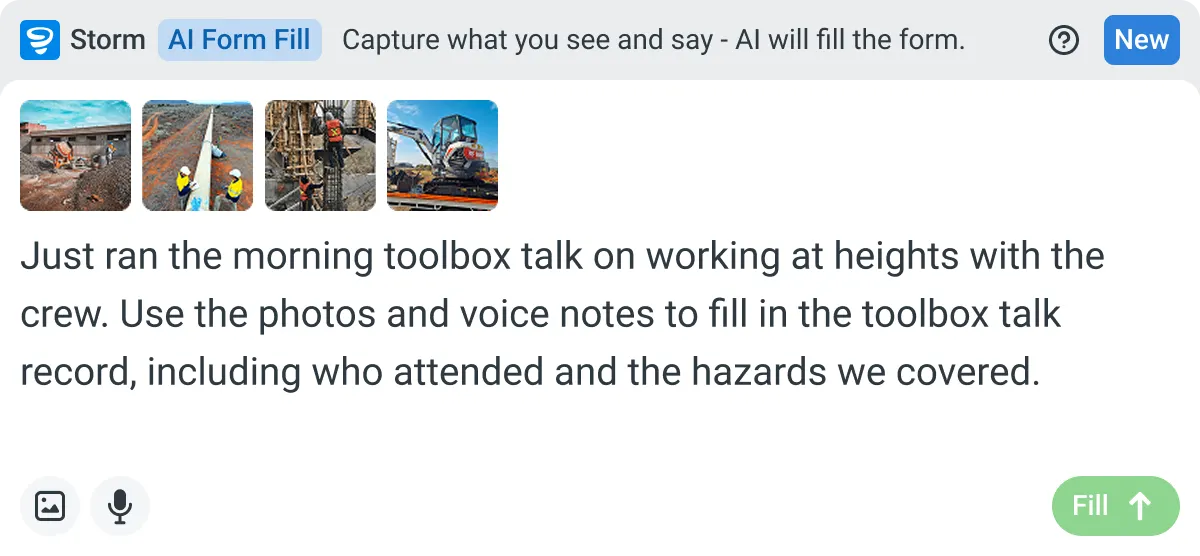
AI Form Fill
Capture what you see and say, and Storm drafts the form for you. The details land in the right fields, so there is a record to check the moment the work is done, and you review and submit it yourself.


Listens to the work
Captures voice cleanly through machinery, wind, and movement. Accents and trade language understood. No headset needed.

Works on site
Built for gloves, cabs, and screen protectors. Captures inputs offline and processes in the background. No waiting on the field.

You stay in control
Storm never commits a record on its own. Every output is a draft for human review. Admins control what Storm can write to.
Frequently Asked Questions
Does Copilot know my site and my hazards?

No. It drafts from what you tell it. Name the topic, the crew, the task and anything recent, and the talk fits the job. Leave it vague and you get a generic talk, so the detail you give it is what makes the draft worth running.
Will the talk be specific enough to actually use?
With a good brief, yes, but it’s a draft, not the finished talk. You read it against the job, cut anything generic, and add the hazard that’s real on site today. The review is quick, and it’s the part that makes the talk land.
Can I match the draft to our own Toolbox Talk form?
Yes. Tell Copilot the sections your form uses and it drafts to match them, so the talk is quick to drop into the template your crew already fills out, including the sign-on.
Where does the talk get captured?
In the field. Copilot drafts it, but the talk is delivered, signed and stored in Dashpivot as the record, captured on site with Storm. The draft is the start, the signed record is the proof it ran.
Does this work with Claude and ChatGPT as well?
Yes. The same approach holds whichever assistant your team already uses, and the Sitemate connection supports Claude, ChatGPT and Microsoft Copilot.
Do I still need to write Toolbox Talks myself?
You still own them. Copilot takes away the blank page, not the thinking. You decide what the crew needs to hear, and it gives you a specific draft to start from instead of nothing.