Kraaft alternative for RAMS
Need an alternative for Kraaft to produce and manage your risk assessment method statement (RAMS)? While HandsHQ helps you streamline communication on the site, Sitemate's Dashpivot provides a broader approach to managing safety documentation. Dashpivot also has an AI assistant that can help users create and complete forms more efficiently.

Trusted by companies, projects and teams of all sizes


The short answer
Use Kraaft if you just want to establish smooth communication and reporting. However, if you want a whole safety system that is flexible to your workflow, Dashpivot would be the perfect fit. Dashpivot can generate, complete, compile, edit, and send RAMS all in one software.
What Kraaft Is Built For
Kraaft is a communication software that is designed to lessen the friction in field communication. It is often referred to as the "WhatsApp" for construction. All employees using the software can immediately communicate progress, situations, or hazards in real-time to all relevant stakeholders.
- Heading: What Kraaft Is Built For
- Fast on-site photo capture
- Voice-to-form capture
- Field-to-office communication with traceability
- Daily reports
- PDF export
- Chat-based coordination of the site team
Why Teams Look for an Alternative
Kraaft is decent software for communication. However, the platform doesn't offer standard templates, which is necessary for documentation, like RAMS. It lacks the following key features that people are looking for, especially when creating and completing a RAMS:
- Heading: Why Teams Look for an Alternative
- Kraaft: no structured template builder
- Missing: hazard identification, risk scoring, controls
- Kraaft: no RAMS approval workflow
- Kraaft: no formal on-site sign-off
- Kraaft: no single RAMS register
- Register gap spans jobs and subcontractors
- Kraaft: no first-draft method statement from work scope
It's 6am, the job starts at seven, and the RAMS is a Word file nobody can find on SharePoint. The client wants it signed and emailed before anyone's on site.
What Dashpivot by Sitemate Is Built For
Dashpivot by Sitemate is a field system for building, running and signing off safety documents like RAMS, then keeping the record. You build the RAMS once, run it on any device, and every version stays filed against the job.
- RAMS and method statements built from a reusable template, not retyped for every job
- Sign-on on site so the crew is recorded against the RAMS they were actually briefed on
- One register of every RAMS, across every job and every subcontractor


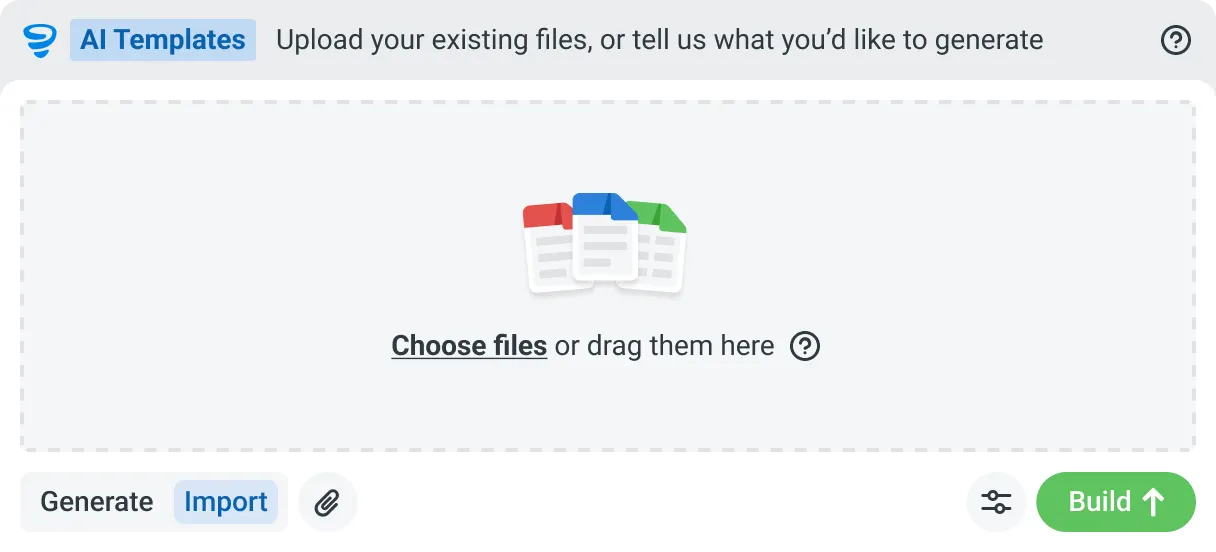
AI Templates
Describe the template you need in plain language, or upload an existing PDF, Word or Excel document. Storm builds the structure, with the right fields, sections, columns and workflow attached, and you review and refine it before you save.

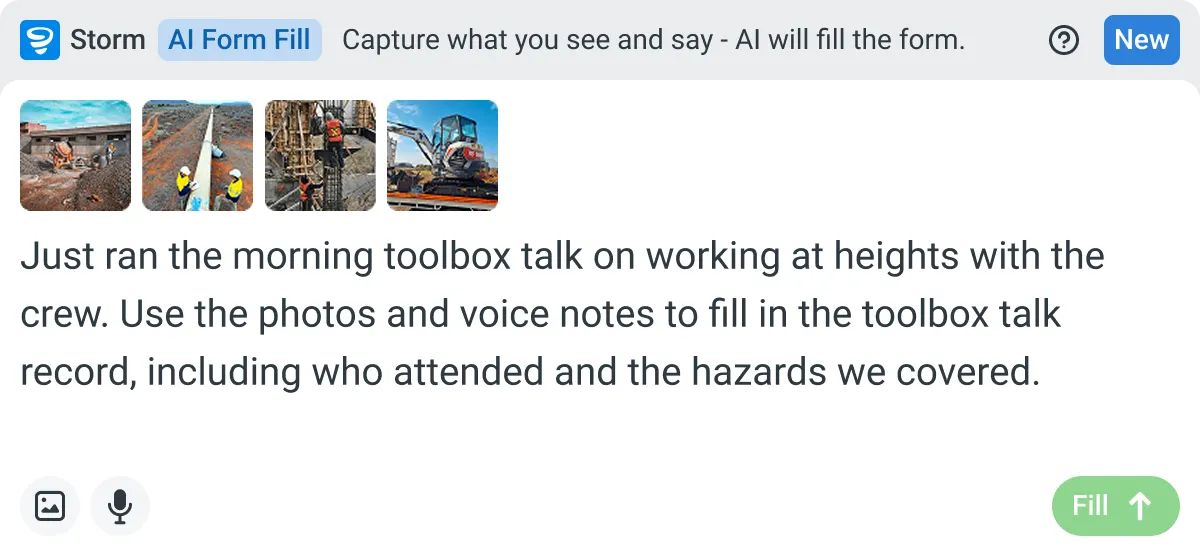
AI Form Fill
Capture what you see and say, and Storm drafts the form for you. The details land in the right fields, so there is a record to check the moment the work is done, and you review and submit it yourself.

Works on site
Built for gloves, cabs, and screen protectors. Captures inputs offline and processes in the background. No waiting on the field.

You stay in control
Storm never commits a record on its own. Every output is a draft for human review. Admins control what Storm can write to.
How Dashpivot does [the job]
Three steps, and you own the record at the end of all of them. Set the RAMS up once, run and sign it on site, and keep every version filed against the job it belongs to.
-
Step 1
Set the RAMS Up Once
Build your RAMS with the hazards, risk scores, controls and method steps your work needs, or start from a free template and adjust it. It becomes the form every job runs from.
-
Step 2
Run and Sign It On Site
Fill it on any device, offline if the site has no signal. Storm can draft the first version from the work scope, and the crew signs onto it before the job starts.
-
Step 3
Keep the Signed Record
Every RAMS is filed against its job and date, versioned and audit ready. Export it to PDF, email it to the client, and it stays yours after the job closes.
What Dashpivot Does Not Replace
While the use of Dashpivot can effectively help streamline the whole RAMS process, it has limitations on what it can do.
What Dashpivot Does for RAMS Today
Dashpivot is a powerful platform that assists users in streamlining their workflows. Dashpivot can significantly improve the process of creating a RAMS template and completing it in the field.
- RAMS and method statement templates
- Templates cover hazards, risk scoring, controls
- Storm drafts first version from the work scope
- First draft editable, reviewed before anyone signs
- Crew sign-on to the RAMS on site
- Any device, works offline
- Every RAMS in one register
- Register versioned and audit ready
- PDF export
- Email to client or principal contractor
Where Dashpivot Stops
The human factor is always needed when completing documents. AI bots are smart and knowledgeable. However, it is not good practice to let AI bots decide whether the RAMS is fully complete and adequate enough to effectively manage hazards. Its limits are:
- Heading: Where Dashpivot Stops
- Doesn't decide whether controls are adequate
- Competent person owns the adequacy call
- Not a legal or regulatory RAMS sign-off
- Doesn't replace estimating, accounting or design tools
- Kraaft quicker for chat-style field communication
Dashpivot is used as an industry-specific platform, whereas Kraaft assists users by providing an integrated communication system. To get a clearer picture of the difference between the two, here is a side-by-side comparison:
- Capability | Dashpivot | Kraaft
- RAMS as a structured, controlled document | yes | messaging-first, not built for controlled forms
- Approval workflow and on-site sign-off | yes | limited
- One RAMS register across jobs and subcontractors | yes | chat and photo threads
- First RAMS version drafted from work scope | yes, Storm drafts it | no
- Fast field capture and communication | yes | yes, its core strength
Where the Two Actually Differ
The two platforms provide an excellent tool for streamlining communication. However, there are key differences that make them unique in their own ways.
- Heading: Where the Two Actually Differ
- Dashpivot: structured RAMS template
- Template holds hazards, risk scoring, controls
- Kraaft: messaging-first, not built for controlled forms
- Dashpivot: approval workflow and on-site crew sign-off
- Kraaft: limited formal sign-off support
- Dashpivot: one versioned RAMS register across jobs
- Kraaft: information sits in chat and photo threads
- Storm drafts first RAMS version from work scope
- Draft reviewed and signed by the team
- Kraaft: no Storm equivalent
Where Kraaft Is the Better Choice
Kraft is a messaging app built for the construction industry. It helps users provide immediate information to all personnel involved in a project. It can help users with the following:
- Main pain is field communication, not RAMS
- Main pain is daily reporting, not RAMS
- Need: very fast photo and voice capture
- Need: minimal onboarding friction for crews
- RAMS already managed in another system
- No plan to consolidate systems
How Teams Move From Kraaft
Nobody moves every RAMS at once. You decide whether it's worth it, bring one job across, then widen out once a crew has signed onto a live one.
-
Step 1
Decide
If your crews mainly need fast field communication and photo capture, Kraaft does that well. Move when a RAMS has to be a controlled document with hazards, approvals and sign-on, not a message thread.
-
Step 2
Convert
Bring one job's RAMS across. Rebuild it as a Dashpivot form, or start from the free RAMS template and add your hazards and method steps. Word and PDF documents can ride along while you switch.
-
Step 3
Pilot
Run it live on one job. The crew signs onto the RAMS on site, and you keep exporting the PDF you send the client, so nothing you depend on switches off while you test it.
-
Step 4
Roll Out
Once one crew has run a live RAMS end to end, add the rest of your jobs and subcontractors. Every RAMS lands in one register, and the visibility gap closes.
Frequently Asked Questions
Can Kraaft complete a RAMS?

No. Kraaft is designed to ease job communication. It serves as a direct bridge from what is happening onsite to all relevant stakeholders in real time. While it can make reports of identified hazards, it cannot provide or generate a RAMS.
How do users create a RAMS template in Dashpivot?
Dashpivot has a template library for prebuilt templates for RAMS, like construction RAMS or scaffolding RAMS. These templates are easily editable to match the users’ workflow. If users want to start from scratch, they can make use of the AI assistant to help them structure their template.
Does Kraaft require the internet to make a report?
No. In Kraaft, users can create and fill in reports even without any internet connection. All data encoded will be directly synced when connectivity returns.
Can I complete a RAMS document even when offline in Dashpivot?
Yes. Dashpivot can still function even when offline. Dashpivot allows users to still record or upload data in the RAMS form even without internet connectivity. The app just automatically syncs recorded data when connectivity returns.
What happens to all reports created in Kraaft?
All completed reports in Kraaft are consolidated in its corresponding site history, becoming a part of the site’s official documentation history.
What happens with the final document in Dashpivot?
The RAMS is stored in a cloud storage location and will also be distributed directly to personnel who need to be notified.