How to Use Claude to Draft SWMS
No SWMS, no high-risk work. That's the rule on Australian sites. The trouble is, most SWMS get recycled from the last job with a new name slapped on top. Give Claude the work, the site and the crew, and you'll have a draft written for this job in minutes, ready for your competent person to check and sign.

Trusted by companies, projects and teams of all sizes


The short answer
Tell Claude what the high-risk work is, where it's happening and who's doing it, and it writes a SWMS draft in the chat. The draft covers job steps in order, hazards for each one, risk ratings before and after controls, the controls themselves and a sign-on section. Your competent person checks it against the site, fixes anything that's off and signs it before work starts.
How to Get Claude Drafting Your SWMS
You don't need a long prompt. Give Claude the specifics of the work and the sections the SWMS needs, then tighten the draft it returns. Next job, reuse the same prompt and change only the work and the site.
-
Step 1
Give Claude the Work and the Site
The draft is only as specific as what you give Claude. Name the task, the site, the plant and the crew, then say what makes this job different: an EWP working near power lines, a trench beside a public footpath, roof sheeting over a fragile skylight. Leave that out and you'll get a generic SWMS back.
- The high-risk construction work, named plainly
- The site and its conditions on the day
- Plant and access
- Any permits the work needs
- Who's exposed: the crew, other trades, the public
-
Step 2
Tell It the Sections a SWMS Needs
Left alone, Claude writes a SWMS as prose. Name the sections you need and it writes to them, matching the format your principal contractor accepts.
- Job steps in the order the crew does the work
- The hazards specific to the work at each step
- A risk rating before and after controls, using your matrix
- Controls by the hierarchy of control, with PPE last
- A sign-on section for every worker
-
Step 3
Tighten the SWMS to the Site
Treat the first draft as a starting point. Cut anything generic and add the hazard that's actually on site today. Check the steps match how the crew will really do the work, then a supervisor or safety officer reviews it and signs off.
Prompt Guidance for Drafting SWMS with Claude
The prompt is the part worth building. Get one that works and it becomes your standard SWMS prompt, with only the work and the site changing from job to job. Always name the plant and the site alongside the task. The more specific the description, the less generic the SWMS that comes back.
- "Draft a SWMS for [high-risk work] at [site] with [crew and plant]. Set out the job steps in order, the hazards for each step, a risk rating before and after controls, and the controls."
- "Draft a SWMS for roof sheeting from an EWP on a warehouse. There are fragile skylights in the roof and power lines along the rear boundary."
- "Rate each hazard with a 5 by 5 likelihood and consequence matrix, then give the residual risk after controls."
- "Order the controls by the hierarchy of control, with PPE last."
- "Add a sign-on table with columns for name, company, date and signature, and a supervisor approval line at the end."
- "Reuse the structure from the last SWMS for [new task] at [new site]. Keep the hazards specific to this job and list any assumptions you've made."
Troubleshooting Prompts for Drafting SWMS
A weak draft usually comes from a thin prompt or a template that's missing something. Work through the fixes in order. Most of them are template fixes.
- The SWMS reads as generic: the site isn't named. Add the location, the plant and who's working nearby.
- The hazards are wrong for the job: Claude doesn't know your site. Paste in an existing SWMS or the relevant section of your procedure.
- The risk ratings don't match yours: there's no risk matrix in the template. Put the matrix in the template and in the prompt.
- Sections come back that you don't use: Claude wasn't given a template. Give it your template headings by name.
- There's nowhere to sign on: the template has no sign-on table. Add one with name, date and signature, because the signed SWMS becomes the record.
- Controls drift away from the steps they belong to: they've been listed separately. Ask for one row per step with its hazards and controls together.
Limitations
Claude writes the draft and can help tidy the wording. It doesn't run the job. Your competent person reviews it, owns every control in it and signs it off before anyone starts.
What Claude Does Well When Drafting a SWMS
A detailed brief gets you a better first draft.
- Turns your description of the work into a full SWMS draft
- Lays out job steps in order, each with its hazards and controls
- Suggests risk ratings and controls you can change
- Writes to the headings in your own template
- Rewrites it in plain language for the crew
- Sharpens it up for the principal contractor
What Claude Leaves to You When Drafting a SWMS
The draft is a head start, not the finished SWMS. These parts are still yours.
- Knowing your site, since it only has what you tell it
- Deciding whether a control is adequate
- Signing off the SWMS
- WHS compliance
- Crew sign-on on site
- Running the job on the day
What This Assumes You Already Do
This page assumes your team already writes a SWMS for high-risk work and gets it signed. Claude drafts the document. The review habit and capturing every sign-on still have to be there.
- Your team prepares a SWMS before any high-risk construction work starts
- Your principal contractors already accept the SWMS format you use
- A competent person reviews and signs off each SWMS
- Workers sign on before starting, and sign on again whenever the SWMS changes
Why Use Claude to Draft SWMS
The person who knows the work best is usually the right one to explain how to do it safely, but they rarely have a spare hour to write it up. So on Friday afternoon, with a Monday start and a principal contractor who won't open the gate without a SWMS, last job's version gets a new name and goes out. The crew ends up signing for work that isn't what they're doing. Claude gets you a draft for the actual job in minutes, and your competent person's time goes on the real hazards instead of retyping.
What a Good SWMS Contains
A good SWMS is one your principal contractor accepts and your crew understands. It should meet the criteria below before a competent person signs it off.
- The high-risk construction work it covers, named plainly
- Job steps in the order the work is actually done
- The hazards for each step
- A risk rating before and after controls
- Controls set out by the hierarchy of control, with PPE only where nothing higher is practical
- How each control gets checked on the day, and by whom
- The names of the person who prepared it and the person who approved it
- Every worker who has signed on, named
- needs a real observation from Sitemate sales calls about SWMS, stated as ours, with a source line (number of calls, date range)
- current theme: principal contractor wants the SWMS before the crew's through the gate at 6am; only one on the laptop is for a different job
Connecting Sitemate MCP to Claude
With Sitemate MCP connected, Claude can read the signed SWMS records captured in Dashpivot by Sitemate. It's read-only, so Claude can't create, edit or delete anything. Connecting takes three steps, and the first happens outside Claude: an Org Controller turns on MCP access in Dashpivot. The connector won't authenticate until that's done.
-
Step 1
Turn On MCP Access in Dashpivot
An Org Controller goes to Settings > Security in Dashpivot, sets MCP Access to anything except None and saves the changes. The connector can't authenticate until this is done.
-
Step 2
Add the Sitemate Connector in Claude
In Claude, go to Settings > Connectors > Add > Browse connectors and search for Sitemate. Choose the connector tagged Community, click Connect, then sign in with your Sitemate credentials and approve access when prompted.
-
Step 3
Pick It in a Chat
Start a new chat, click the plus button and open Connectors, then select Sitemate. Claude is limited to your Dashpivot permissions, so connecting doesn't widen anyone's access.
If the Connector Won't Appear
Three causes account for almost every failed connection, and the first is the most common.
- Nothing connects: MCP Access is still off in Dashpivot, and only an Org Controller can turn it on
- Sitemate isn't in the list: search for "Sitemate" exactly and look for the Community tag
- Connected but not showing in the chat: start a new chat, click the plus button and open Connectors
How the SWMS Gets Captured
Claude's part ends with the draft in the chat. From there, Storm, Sitemate's data capture agent, imports it into Dashpivot and captures the SWMS on site, and Sitemate MCP comes last, reading the signed SWMS back.
-
Storm Imports the Draft into Dashpivot
Save the draft out of Claude as a PDF, Word or Excel file, and Storm rebuilds it as a Dashpivot SWMS template with AI Templates. A supervisor or safety officer checks the template before it reaches the crew.
-
Storm Captures It on Site
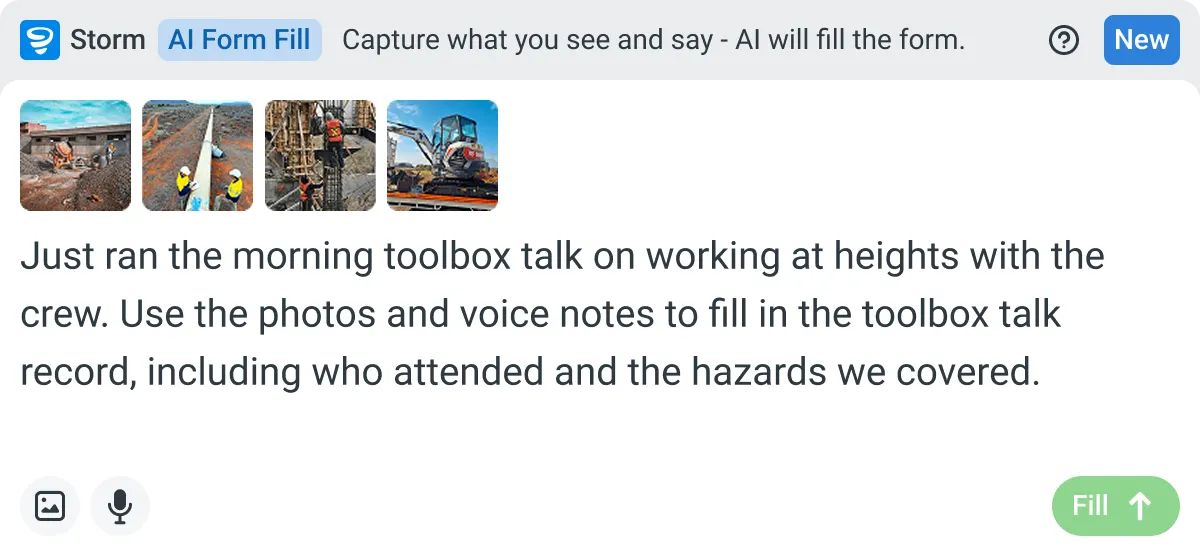
The crew opens the SWMS on a phone or tablet, and Storm fills in the site detail with AI Form Fill from what they say and photograph. The supervisor checks it and every worker signs on before starting. The signed SWMS is then held against the job in Dashpivot.
-
Sitemate MCP Reads It Back
Once SWMS are captured, Claude can read them through Sitemate MCP. Ask which jobs have a signed SWMS, or which workers haven't signed on yet. Access is read-only, and your existing Dashpivot permissions still apply. The review side is covered in How to use Claude to review SWMS.

Storm Captures the SWMS Claude Drafts
The crew fills in the SWMS on site as the job starts, and every sign-on is captured there and then. The supervisor checks it before work begins, so nobody's chasing signatures after the fact.

AI Form Fill
Capture what you see and say, and Storm drafts the form for you. The details land in the right fields, so there is a record to check the moment the work is done, and you review and submit it yourself.


Listens to the work
Captures voice cleanly through machinery, wind, and movement. Accents and trade language understood. No headset needed.

Works on site
Built for gloves, cabs, and screen protectors. Captures inputs offline and processes in the background. No waiting on the field.

You stay in control
Storm never commits a record on its own. Every output is a draft for human review. Admins control what Storm can write to.
Frequently Asked Questions
Can Claude write a SWMS for me?

It’ll write the first draft. Tell it about the high-risk work, the site, the plant and the crew, and it comes back with job steps, hazards, risk ratings and controls. A competent person reviews and signs it before anyone starts.
Does Claude know the WHS rules in my state or territory?
Name your state or territory in the prompt and Claude will draft with that in mind. It’s a starting point, not a compliance check. Your competent person still reviews it against the WHS duties that apply.
Can I match the draft to our own SWMS format?
Yes. Give Claude your headings and risk matrix and it’ll write to them, sign-on table and all, so the draft fits the template your principal contractors already accept.
What does Claude see of our SWMS and site data?
While drafting, only what you type or paste in. Connect Sitemate MCP and Claude can also read the records your Dashpivot permissions allow. It’s read-only, so Claude can’t create, edit or delete anything.
Where does the SWMS get signed on and stored?
On site, in Dashpivot by Sitemate. Save Claude’s draft as a PDF, Word or Excel file, and Storm, Sitemate’s data capture agent, turns it into a template with AI Templates. Your crew fills it in and signs on in Dashpivot, and it’s kept against the job.