Free Fleet Management template
Equipment Damage Report Template
No credit card required.
Need a damage report that completely outlines the equipment damage? Sitemate's Equipment Damage Report already contains standard-required fields, ensuring that all details from the damage are recorded. Having a detailed report can help provide accurate measures and the exact materials to fix the problem.
This template comes from a platform that assists users with an AI assistant. Users can verbally describe the equipment damage and take pictures, and AI can automatically fill out the fields in the form. Using this process can significantly improve the overall efficiency of completing an Equipment Damage Report.
- 100% fully editable Equipment Damage Report
- Export your Equipment Damage Report to PDF or CSV
- Access your Equipment Damage Report on mobile, tablet or computer
- Thousands of templates including other Fleet Management templates
 Click to preview
Trusted by thousands of companies, projects & teams worldwide















See how this Equipment Report template compares with traditional Word, Excel, and PDF-based processes
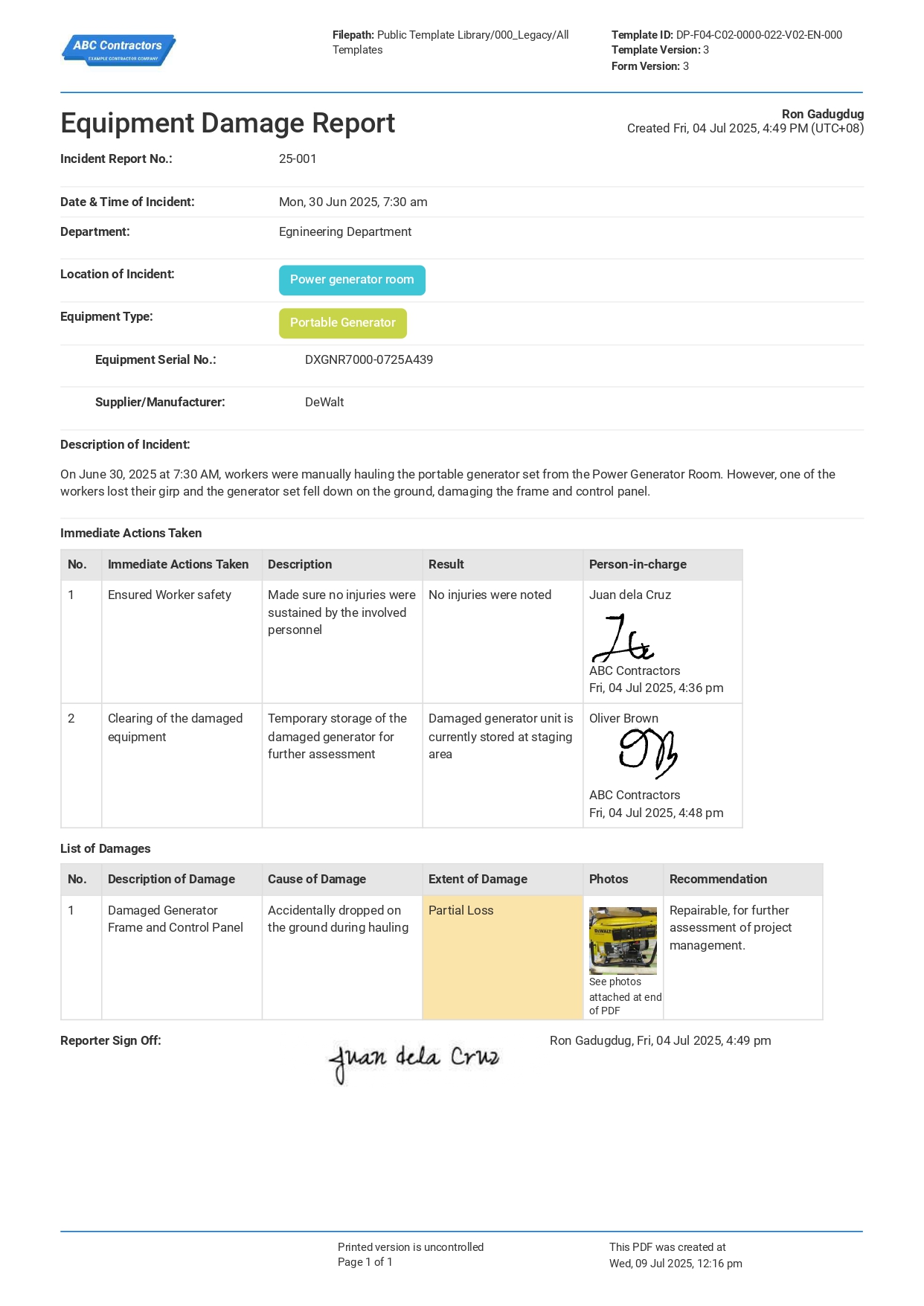
Curious how this Equipment Damage Report works? Check out the example below to see exactly what comes pre-filled and how the form is structured to capture equipment damage details from the first moment an incident is reported. You can generate your own version just as quickly, export it as a custom form with your company branding and details, and fill in the relevant information to have a completed, submission-ready Equipment Damage Report in a matter of minutes.


This Equipment Damage Report was generated using Dashpivot's fleet management platform, where teams can build custom damage reporting forms with photo attachments, e-signatures, automated notifications, and PDF export in just a few clicks. The template structure reflects best practices in equipment damage documentation and fleet incident reporting used across construction, mining, transport, and facilities management industries.
- Access, edit and complete your Equipment Damage Report from any device - mobile, tablet or computer.
- Print, download or send your Equipment Damage Report as perfectly formatted PDF documents with your company logo.
- Store your Equipment Damage Report securely online, where they can be searched and found in seconds
- Invite internal and external parties to see, edit and sign off on Equipment Damage Report online.
Need a version for your own site?
Storm, the AI agent in Dashpivot, can build one from a short description or the form you already use.


 GLOBAL


What is a Equipment Damage Report?
An Equipment Damage Report is a formal document used by fleet managers, site supervisors, operators, and maintenance teams to record the details of an incident in which a piece of equipment has been damaged, broken down, or rendered unserviceable. The report typically captures who was involved, what equipment was affected, when and where the incident occurred, what the damage looks like, and what immediate or corrective actions need to be taken. It serves as the official record of the event for internal maintenance teams, insurers, asset managers, and safety departments.
Applicable Standards and Policies for Equipment Damage Report
The Equipment Damage Report is the backbone of quality maintenance management. The report provides the exact details of what needs to be serviced and how it should be serviced. The data in this report provides vital information for stakeholders, especially for making crucial decisions. Furthermore, the report complies with the following regulatory provisions:
- OSHA Recordkeeping Requirements (29 CFR Part 1904)
- ISO 55001 – Asset Management Systems
- ISO 45001 – Occupational Health and Safety Management Systems
- Fleet Management Industry Standards (e.g., AS/NZS 4024, ANSI/ASSP Z244.1)
- Insurance Policy Requirements
- State and Territory Workers' Compensation Legislation
Staff Members and Parties That Use the Equipment Damage Report
Equipment Damage Reports require personnel who understand the processes behind every maintenance activity conducted. In order for the report to be accurate and useful, the following staff members should be involved in making an Equipment Damage Report:
- Technicians and field engineers: These are the personnel who primarily fill out the report. They record every detail of the activity while it is in progress on site. They record the work performed, the materials and parts used, the findings, and the total time spent on the activity.
- Managers and supervisors: These personnel watch and lead the maintenance activity according to the constructed plan. It is in their jurisdiction that tasks are completed based on quality and safety standards.
- Service dispatchers: These personnel use the Equipment Damage Report to record job completions and updates on schedules and ensure that records are provided for all stakeholders involved in the project.
- Safety and quality compliance coordinators: These personnel audit the quality of the job and the safety measures provided to control hazards.
Business Risks Reduced by the Equipment Damage Report
The Equipment Damage Report is a necessary document for maintaining both optimal performance and the safety of equipment. The damage report will serve as a guide for the decisions required for the needed fixes of the equipment. Failing to make this report or producing an inaccurate one could lead to the following business risks:
- Cash flow friction
- Delayed invoicing
- High potential for accidents and near misses
- Equipment failure
- Unattained targets and quotas
- Customer disputes and loss of trust
- Voided warranties
- High costs for non-compliance
- Damaged reputation
- Low chances of winning future bids
Business Opportunities Created by the Equipment Damage Report
An Equipment Damage Report can provide more than just information about an equipment issue. The report will serve as a record that helps teams know what to prepare for if the same problems reoccur in the future. The Equipment Damage Report will also present the following business opportunities:
- Data-driven decisions
- Bad-performing equipment is easily identified and replaced
- Predictive service plans
- Smarter scheduling
- Plans are tracked accurately
- More efficient performance
- Workplace injuries are eliminated
- Good company reputation
What should an equipment damage report include?
- General information
- Description of the incident
- Immediate actions taken
- List of damages
How to Create an Equipment Damage Report
Creating an Equipment Damage Report that captures everything your fleet management team, maintenance crew, and insurer will need requires the right structure and information from the outset. In this section, we explain how to build your own Equipment Damage Report from scratch.
Prerequisites before making an Equipment Damage Report
- Details of the equipment fleet or asset register format used by your team
- Site or project location details relevant to where equipment operates
- Internal incident reporting and approval workflow requirements
- Insurance policy requirements for documenting property damage incidents
- Relevant regulatory obligations for equipment incident reporting in your jurisdiction
- Photo attachment and export format requirements (PDF, CSV, etc.)
- Sign-off authority and escalation requirements for different levels of equipment damage
Add the information section
This section provides the details of the report. It should include the following fields:
- Report number
- Date and time of incident
- Location of incident
- Equipment type
- Equipment serial number
- Supplier or manufacturer
- Description of incident
Add the immediate action section
This section provides a summary of the immediate actions performed on the equipment. It should have the following fields:
- Actions taken
- Description of the action
- Result
- Person-in-charge
Add the list of damages section
This section provides a summary of identified damages. It should include the following fields:
- Description of damage
- Causes of damage
- Extent of damage
- Recommendations
Reporting and Managing Equipment Damage
Equipment damage can disrupt daily operations, delay project activities, and lead to unexpected repair or replacement costs. Damage may occur due to improper handling, equipment failure, collisions, or inadequate maintenance. Having a clear process for reporting equipment damage helps ensure that incidents are documented, the affected equipment is inspected, and the necessary repairs or corrective actions are carried out. An Equipment Damage Report provides a record of what happened, the extent of the damage, and the actions taken to address it. This helps businesses monitor equipment conditions, identify recurring issues, and prevent similar incidents from happening in the future.
How to Create Your Equipment Damage Report in an App or Software System
A digital Equipment Damage Report process significantly improves the speed, accuracy, and completeness of how damaged equipment incidents are captured and acted on across a fleet. When operators can complete a damage report directly from their mobile phone at the time of the incident, attaching photos, selecting contributing factors from a pre-filled list, and submitting for supervisor review in a single workflow, the quality of information reaching fleet managers, maintenance teams, and insurers is dramatically better than what paper-based or emailed forms typically deliver. Automated notifications mean supervisors are alerted the moment a report is submitted, so decisions about taking equipment out of service or dispatching a repair crew can be made without delay.
How to make an Equipment Damage Report in an app
Using an app that employs digital forms instead of paper-based ones may help improve the process by:
- AI assistance
- Having fewer manual data entries
- All produced forms are stored in a single-access cloud
- Reformatting is straightforward and can be adapted to new protocols or updated standards.
- Formula integration is much simpler
- Workflows and notifications may be automated and scheduled
- Improved template design and look
Creating the information section
- Add a text field for the report number.
- Add a date and time field for when the incident happened.
- Add a text field for the department involved.
- Add a selection field for the location. Provide the general location areas as selection items. You can provide colors to each selection item to make the report more presentable.
- Add a selection field for the equipment type. Provide all available equipment types that your company uses as selection items. You can provide colors to each selection item to make the report more presentable.
- Add two more text fields for the equipment serial number and the equipment supplier.
- Add a multiple-text field for the description of the incident.
Creating the immediate actions taken section
- Add a 4-column table where users can freely add rows.
- Edit the first column as a text field for the actions taken.
- Edit the second column as a text field for the description of the actions taken.
- Format the third column as a text field for the results.
- Edit the last column as a signature field for the person-in-charge.
Creating the list of damages section
- Add a 5-column table where users can freely add rows.
- Format the first two columns as text fields for the description of damage and the cause of damage.
- Format the third column as a selection field for the extent of damage. Use these two as selection items: total loss and partial loss. You can provide colors to each selection item to make the report more presentable.
- Format the fourth column as a photo field to allow users to upload photos relevant to the damage.
- Format the last column as a text field for the recommendations.
- Provide a signature field for reporter sign-off.
Frequently Asked Questions
Who should complete an Equipment Damage Report?
The person who discovers or is involved in the equipment damage should report the incident to their supervisor. The supervisor, equipment operator, or maintenance personnel can then complete the report with details about the damage, the circumstances surrounding the incident, and any immediate actions taken.
When should an Equipment Damage Report be completed?
An equipment damage report should be completed as soon as possible after the damage is discovered. This helps ensure that the details are accurately recorded while the incident is still fresh. If the equipment is unsafe to use, it should be taken out of service until it has been inspected and confirmed safe for operation.
Can this Equipment Damage Report be used for different types of equipment?
Yes. This Equipment Damage Report template can be used for different types of equipment, including machinery, tools, vehicles, and other worksite assets. It provides a structured way to document damage, record relevant details, and track the necessary repairs or follow-up actions.
Why is it important to keep records of equipment damage?
Keeping equipment damage reports helps businesses track recurring problems, monitor repair costs, and identify equipment that may require additional maintenance or replacement. These records also help supervisors investigate incidents, improve equipment handling procedures, and reduce the likelihood of similar damage occurring in the future.
About the Author

Felmar Mantalaba
Content Engineer
 LinkedIn
Education
Cebu Institute of Technology - University - Mechanical Engineering with Mechatronics
Bio
Felmar is a mechanical engineer, whose four years of experience in the mining industry inspired him to write and share stories to progress the revolution of new technologies and create smarter, smoother ways of living.
Past Projects
Safety, Health, and Environment Management System (SHEMS) CoordinationSHEMS Coordinator at Atlas Consolidated Mining, ensuring organizational compliance with ISO 14001 and ISO 45001 standards, performing risk assessments, developing policies, and conducting audits and inspections to maintain a safe and environmentally responsible workplace.
Maintenance Management and OptimizationSenior Maintenance Manager (OIC) leading equipment maintenance and operational efficiency initiatives, reducing downtime by 10%, improving Mean Time Between Failure (MTBF) and Mean Time To Repair (MTTR) for major equipment, and managing maintenance schedules, manpower, and materials, while overseeing capital project optimization.
Inspection Engineering and Equipment ReliabilityInspection Engineer responsible for technical blueprint interpretation, vendor collaboration, preventive maintenance scheduling, and data collection for vibration and temperature readings, delivering actionable recommendations and comprehensive reports to improve equipment reliability and operational performance.
End-to-End Operational Oversight in Mining EngineeringContributed to multiple facets of operational management, including SHEMS compliance, maintenance optimization, inspections, and capital project evaluation, integrating safety, reliability, and efficiency improvements across all stages of copper production operations.
Version history
Last edited on 19 October 2026, template version 25-11-v2