Pocket Alternative for Construction
Pocket is a small recorder that clips to the back of your phone and turns conversations into transcripts and summaries. It's handy for meetings and calls, but the site diary needs something else. With Dashpivot by Sitemate, the crew records the day in the Sitemate Mobile App, including hours, plant, weather, delays and photos. The supervisor signs it off before it's filed against the site.

Trusted by companies, projects and teams of all sizes


The short answer
Keep Pocket if you need a record of meetings and calls. For the site diary, use Dashpivot by Sitemate, either alongside Pocket or instead of it. Pocket gives you a transcript of what was said. Dashpivot gives you the day's record, signed by the supervisor and filed against the job.
What Pocket Is Built to Record
Pocket is a card-sized AI recorder that attaches to the back of your phone with MagSafe. Record a conversation or call, and the companion app turns it into a transcript and summary with action items. The company says recording, transcription and summaries don't need a subscription. If you spend half your week on the phone with clients and subcontractors, it means no more scribbling notes, and you can always check back on what was agreed.
Why Teams Look for a Pocket Alternative
A recording of the day isn't a site diary. Someone still has to go through the transcript, pull out the crew hours and delays, and type them into the diary, often in the car after work. That's exactly the job supervisors want to get rid of. And when a variation claim comes in months later, a conversation summary won't show what the weather was on Tuesday or who signed off the day.
What Dashpivot by Sitemate Does for Construction
Dashpivot by Sitemate is built for the records a construction job has to keep. The site diary and daily report come first, along with timesheets, progress reports and shift reports. The crew fills them in on the Sitemate Mobile App, on site and at the time, and the form works without signal and syncs once they're back in range. Each report has fields for crew hours, plant, weather and delays, so it holds up when a variation claim comes in. Storm can do the first pass with AI Form Fill, completing the form from a voice note, photos or a typed note, so the supervisor isn't typing it up in the car after work. The supervisor still reviews and signs every report before it goes to the office or the client. Each record lands in Dashpivot against its site, where the office can find it, export it or use it for the monthly claim.
- Site diaries and daily reports
- Offline on site, syncs later

Fill In and Sign Site Diaries in Dashpivot
In Dashpivot, the site diary is a template your team sets up once and then fills in on the Sitemate Mobile App on site. The supervisor signs each report, and it files itself against the site as your company's record.

AI Form Fill
Capture what you see and say, and Storm drafts the form for you. The details land in the right fields, so there is a record to check the moment the work is done, and you review and submit it yourself.

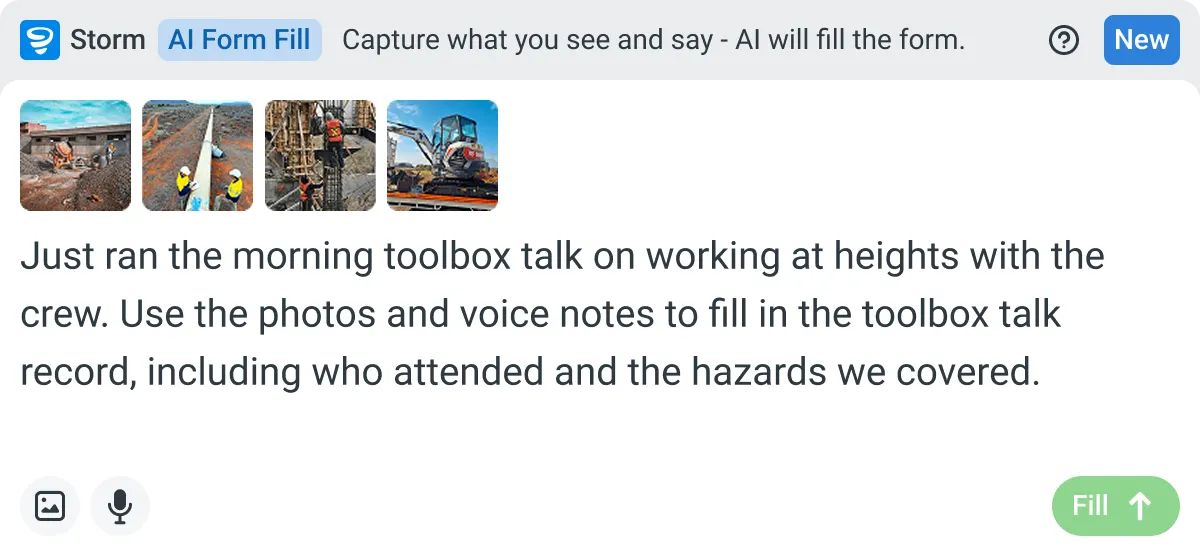

Listens to the work
Captures voice cleanly through machinery, wind, and movement. Accents and trade language understood. No headset needed.

Sees the site
Photos read as primary data, not attachments. Equipment, defects, PPE, and conditions are all interpreted directly from what's in frame.

Knows the context
Location, time, crew, plant, and materials pulled automatically. Critical for inspections, incidents, and time entries.
How a Site Diary Runs in Dashpivot
The template is set up once in Dashpivot. The crew fills in the day on the Sitemate Mobile App, and the signed report files itself back into Dashpivot against the site it belongs to.
-
Step 1
Start from your site diary
Most teams start from the site diary or daily report they already keep on paper or in Excel, so nobody has to rebuild it field by field. There are two ways to set it up in Dashpivot as a template you can reuse on every job.
- Template library, start from a ready-made template
- AI Templates, Storm builds it from a file you upload or a description you type
-
Step 2
Fill in the day on site
The crew fills in the diary on the Sitemate Mobile App as the day goes, adding photos where they help. No signal in a trench is fine, it syncs later. Or Storm fills the form from a voice note with AI Form Fill, and they check it before it goes in.
- Crew hours and plant
- Weather and delays
- Photos per entry
- Voice notes, via Storm and AI Form Fill
-
Step 3
A signed diary your team owns
The supervisor reviews and signs each report before it goes to the office or the client. It files itself in Dashpivot against the site. It's your company's record, there to export or pull up when a variation claim lands.
- Digital signature and date
- Filed against the site
What Dashpivot does not replace
Dashpivot covers the records a construction job needs to keep, from site diaries and daily reports to the timesheets and progress reports behind your monthly claim. It doesn't attend your meetings. When someone on the crew leaves a voice note about the day, Storm uses it to fill in the diary with AI Form Fill, and the supervisor checks the entries before signing. That's a short note made for a form. A forty-minute client meeting is a different kind of recording, and Pocket handles that well with a transcript and summary you can refer back to. Plenty of teams use both. Pocket keeps what was said, and Dashpivot keeps what happened on site, signed and filed against the job. The diary also works offline in a trench and syncs once you have signal, which matters far more on site than in a meeting room.
What Dashpivot Does for the Site Diary Today
Dashpivot runs the site diary and daily report on the phone, with supervisor sign-off built in. Storm can take the first pass from a voice note, and you check it before it's signed.
- Site diary filled in on the phone
- Works offline, syncs later
- Storm fills it with AI Form Fill
- Supervisor signs every report
Where Dashpivot Stops and Pocket Still Fits
Dashpivot isn't a meeting recorder. It keeps the site record, so conversations around the job, like calls with clients or subcontractors, need a home somewhere else.
- Recording and transcribing client meetings or phone calls
- Clipping onto your phone as a separate recorder
This compares a recorder with a site-records tool, so the rows focus on what construction teams weigh up when deciding where the day gets recorded. Pocket clearly wins on meetings and calls, and it's quicker to set up since there's no form to build. Dashpivot wins wherever the record needs to be signed, stored against a site and pulled up later for a claim. If most of your week is meetings, the first few rows will matter most.
- Dimension | Pocket | Dashpivot by Sitemate
- What it's built for | Recording conversations and calls | Keeping the site diary and daily reports
- What you get | Transcripts, summaries and action items | A signed daily record filed against the site
- Hardware | Card-sized recorder on the back of your phone | No extra device, just the Sitemate Mobile App on the crew's phones
- Meetings and calls | Records and transcribes them | Not built for it
- Voice input | Records the whole conversation | Storm fills the diary from a voice note with AI Form Fill
- Site details | Whatever was said out loud | Hours, plant, weather, delays and photos for each entry
- Record keeping | Notes and transcripts in the companion app | Signed reports filed against the site in Dashpivot
- Setup | Clip it on and start recording | Build the template once, from the library or with AI Templates
Where Pocket and Dashpivot Differ for Construction
Both turn spoken words into text, and both work from the phone you already carry. The difference is what the text is for. Pocket keeps conversations so you can look back on them. Dashpivot keeps the day's site record, signed by the supervisor and filed against the job, ready for when a claim comes in or a client asks.
- Conversations versus site records. Pocket records meetings and calls and gives you a transcript. Dashpivot keeps the site diary and daily report.
- Supervisor sign-off. Every Dashpivot report is reviewed and signed by the supervisor and filed against the site, ready for any variation claim.
Where each of these is the better choice
If the record you need is a conversation, Pocket is the better choice. When you're on the phone with clients and subcontractors all day, it records each call from the back of your phone and gives you a transcript and summary afterwards. There's no template to set up, no crew to train, and the company says the basics don't need a subscription.
- You need records of client meetings and phone calls without setting up a form
- You're the only one who needs the notes, so a phone recorder is simpler than a crew-wide app
- Your site diary already works well
How teams move across
A move usually starts with one site diary on one job. Before that, decide whether you need to switch at all. Pocket records conversations and Dashpivot keeps site records, so for some teams the answer is to keep Pocket and add Dashpivot.
-
Step 1
Decide
If what you need is a record of conversations, like a client meeting or a call with a subcontractor, Pocket is the better tool. It clips to the back of your phone and turns the talk into a transcript and summary with action items. Keep it for that. Move when the gap is the site diary itself.
-
Step 2
Convert
Take the diary you run today, whether it's in Word, Excel or a PDF, and upload it. Storm builds a Dashpivot template from it with AI Templates. Check the fields against what your supervisors actually fill in before anyone uses it on site.
-
Step 3
Pilot
Pick one job and one crew, and run the site diary in Dashpivot for a few weeks. Pocket stays on for meetings and calls. The old diary process can keep running too, until the supervisor trusts the new one.
-
Step 4
Roll out
Once the pilot crew's diaries are coming back on time and signed, add the next jobs. The office spends less time chasing the field, and each site's record is in Dashpivot when a claim or a client asks for it.
Frequently Asked Questions
Can I use Pocket to fill in my site diary?

Not directly. It gives you a transcript and summary, and someone still has to write up the diary from that. In Dashpivot, the crew fills in the diary on the Sitemate Mobile App, or Storm fills it from a voice note with AI Form Fill, and the supervisor checks it before signing.
Does Dashpivot record meetings like Pocket does?
No. Dashpivot keeps site records like the site diary, daily report and timesheets. If you want a transcript of a client meeting or call, Pocket is the better tool, and plenty of teams keep it for that.
Will the site diary work with no signal?
Yes. The crew can fill it in offline, in a trench or out of range, and it syncs when they’re back in signal.
Can we keep our own site diary format?
Yes. Upload your current diary as a Word, Excel or PDF file, and Storm builds a Dashpivot template from it with AI Templates. Check the fields against what your supervisors actually fill in before rolling it out.
Can I add photos to each diary entry?
Yes. Photos are attached to the entry they belong to and kept with the signed report, so you can see exactly what the site looked like on the day.