Free Fleet Management template
Field Service Report Template
No credit card required.
Need a Field Service Report template that helps you easily capture details of maintenance works in the field? Sitemate's Field Service Report is ready for recording all the details of maintenance tasks conducted in the field with just a few taps and clicks. It already contains all the standard fields in the report, ensuring quality and consistency of data recorded.
This template is also easily editable. Users can format it using a powerful drag-and-drop builder to match their company's workflow and local regulatory standards. Download and try Sitemate's Field Service Report Template and start making reports more efficiently.
- 100% fully editable Field Service Report
- Export your Field Service Report to PDF or CSV
- Access your Field Service Report on mobile, tablet or computer
- Thousands of templates including other Fleet Management templates
 Click to preview
Trusted by thousands of companies, projects & teams worldwide


See how this Field Service Report Template compares with traditional Word, Excel, and PDF-based processes
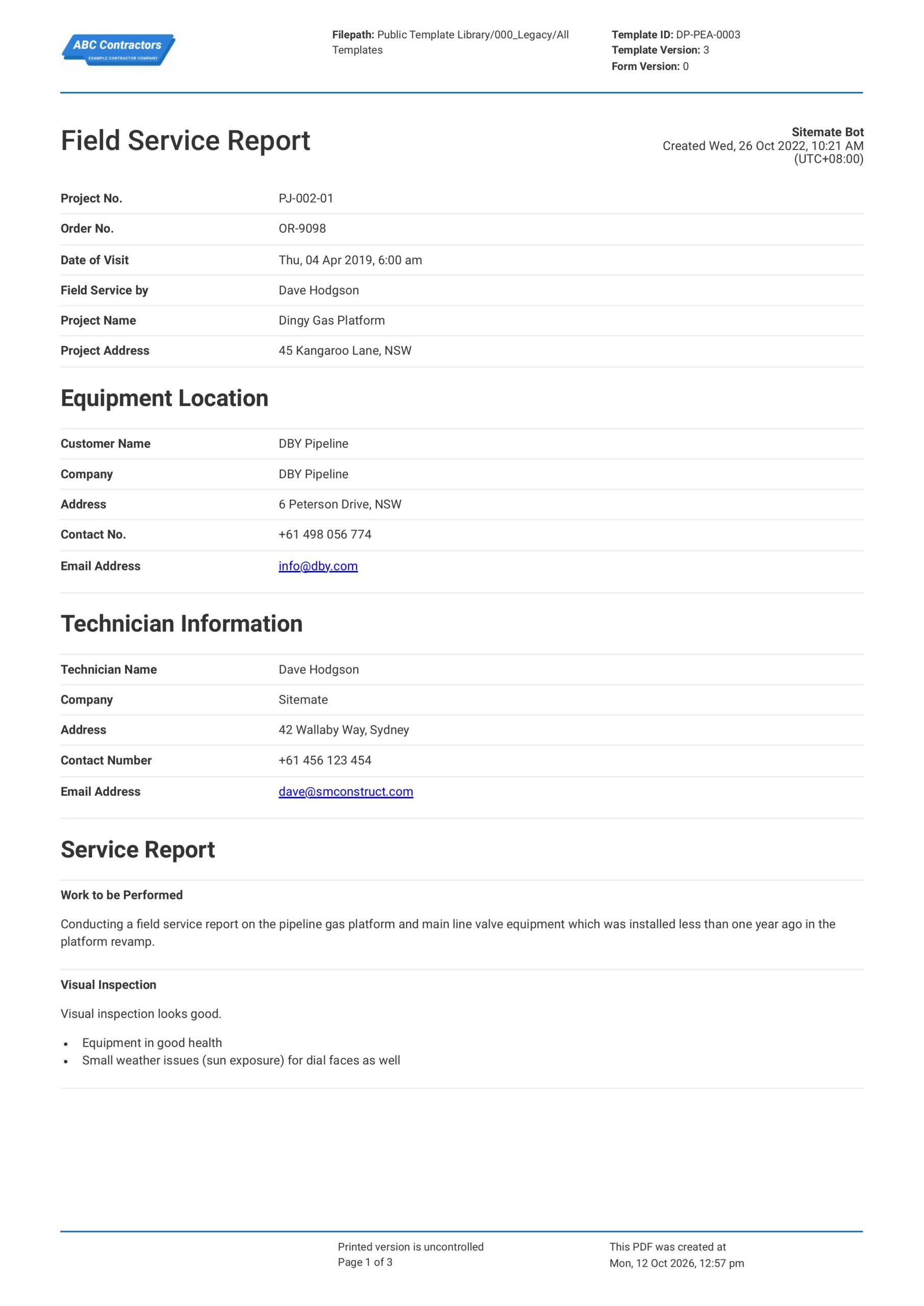
Curious how this Field Service Report Template works? Check out the example below to see exactly what the completed report looks like, from the service details and parts used through to the technician sign-off and customer confirmation sections. You can generate your own version just as quickly, export it as a custom form with your company branding and details, and fill in the relevant information to have a finished, ready-to-submit Field Service Report in a matter of minutes.


This Field Service Report Template was built using Dashpivot's field management platform, which enables service teams to create, complete, and submit professional field reports directly from a mobile device, with photo attachments, digital sign-off, and automated PDF export included as standard.
- Access, edit and complete your Field Service Report from any device - mobile, tablet or computer.
- Print, download or send your Field Service Report as perfectly formatted PDF documents with your company logo.
- Store your Field Service Report securely online, where they can be searched and found in seconds
- Invite internal and external parties to see, edit and sign off on Field Service Report online.
Need a version for your own site?
Storm, the AI agent in Dashpivot, can build one from a short description or the form you already use.


 GLOBAL


What is a Field Service Report?
A Field Service Report is a document used by maintenance staff, technicians, and field and service engineers to record the details of a maintenance task or service that was conducted. The report details the information about the equipment being maintained, the service provider, and the work carried out by the service provider. The report will serve as an official record of all maintenance activity, which is critical for client communication.
Applicable Standards and Policies for Field Service Report
Field Service Reporting is the backbone of quality maintenance management. The report provides the exact details of what equipment was serviced, why it was serviced, and how it was serviced. The data in this report provides vital information for stakeholders, especially for making crucial decisions. Furthermore, the report complies with the following regulatory provisions:
- ISO 9001 (Quality Management Systems)
- ISO 55001 (Asset Management)
- OSHA 29 CFR 1910.147 (Lockout/Tagout)
- DOT Federal Motor Carrier Safety Regulations (FMCSA)—for fleet operations
- Manufacturer warranty and maintenance schedule requirements
Staff Members and Parties That Use the Field Service Report
Field Service Reports require personnel who understand the processes behind every maintenance activity conducted. In order for the report to be accurate and useful, the following staff members should be involved in making a Field Service Report:
- Technicians and field engineers: These are the personnel who primarily fill out the report. They record every detail of the activity while it is in progress on site. They record the work performed, the materials and parts used, the findings, and the total time spent on the activity.
- Managers and supervisors: These personnel watch and lead the maintenance activity according to the constructed plan. It is in their jurisdiction that tasks are completed based on quality and safety standards.
- Service dispatchers: These personnel use the Field Service Report to record job completions and updates on schedules and ensure that records are provided for all stakeholders involved in the project.
- Safety and quality compliance coordinators: These personnel audit the quality of the job and the safety measures provided to control hazards.
Business Risks Reduced by the Field Service Report
The Field Service Report is a necessary document for checking both the quality and safety of a maintenance activity by proactively recording vital details. The record will serve as a guide for the decisions needed for the project to move forward without any delay. Failing to make this report or producing an inaccurate one could lead to the following business risks:
- Cash flow friction
- Delayed invoicing
- High potential for accidents and near misses
- Equipment failure
- Unattained targets and quotas
- Customer disputes and loss of trust
- Voided warranties
- High costs for non-compliance
- Damaged reputation
- Low chances of winning future bids
Business Opportunities Created by the Field Service Report
Completing a Field Service Report can provide more than just information about an ongoing or completed maintenance activity. The report will serve as a guide in moving the activity or project much more efficiently and helps identify potential problems that can be mitigated before they escalate into something major. The Field Service Report will also present the following business opportunities:
- Data-driven decisions
- Bad-performing equipment is easily identified and replaced
- Predictive service plans
- Smarter scheduling
- Plans are tracked accurately
- More efficient performance
- Workplace injuries are eliminated
- Good company reputation
What Should a Field Service Report Include?
The following fields should be included in a Field Service Report:
- General Information
- Equipment and assets used
- Activity details
- Safety and quality checklist
- Sign-off and verification
How to Create a Field Service Report
Building a useful Field Service Report Template requires the right structure, the right fields, and a layout that technicians can work through quickly while on-site. In this section, we walk through how to create a field service report from scratch.
Prerequisites before creating a Field Service Report
These are the key items needed before creating a field service report:
- Customer information
- Maintenance plan
- Maintenance procedures
- Equipment or asset data
- Competency record of employees involved in the job
- Hazard register
Add an information section
The primary section of the Field Service Report should contain vital information about the project. It should include the following fields:
- Project number
- Order number
- Date of visit
- Field service reporter
- Project name
- Project address
Add information on the equipment
This section should provide details on where the equipment or asset to be serviced is located. It should contain the following fields:
- Customer name
- Company
- Address
- Contact number
- Email address
Add information about the technician
Information on the service technician is also vital for a Field Service Report. This section should have the following fields:
- Technician name
- Company
- Address
- Contact number
- Email address
Add the report section
This section contains information about the field service to be conducted, as well as updates on the maintenance activity progress. It should have the following sections:
- Work to be performed
- Visual inspection
- Unit status
Add a functionality test section
This section verifies whether the maintenance activity conducted satisfied the customer's conditions and requirements. This section should have the following fields:
- Requirements and conditions
- A yes and no checkbox
- Comments and notes
- Follow-up action items
- Details of replaced parts or devices
Add a sign-off section
This section validates the report. This section should contain the following signature fields:
- Technician signature
- Customer signature
Field Service Report: Recording Service Activities and Outcomes
Field service work often involves attending customer sites, inspecting equipment, carrying out repairs, performing maintenance, and troubleshooting technical issues. Without proper documentation, important details such as reported faults, work completed, parts used, equipment condition, and follow-up requirements can be missed or incorrectly recorded. This can lead to communication gaps, repeat site visits, disputes over completed work, and delays in resolving service issues. A Field Service Report helps technicians record service activities, inspection findings, work performed, and any outstanding issues in one place. Keeping these records consistent makes it easier for supervisors and customers to review the work completed, track equipment performance, and determine the next steps.
How to Create Your Field Service Report in an App or Software System
A well-designed digital field service reporting process gives fleet managers and service operations teams real-time visibility over every maintenance visit, repair job, and site inspection, without relying on technicians to hand in paper forms or manually transfer data to a back-office system. When field service reports are completed on a mobile device and submitted directly from the field, the entire team has access to accurate, up-to-date job records the moment the technician leaves the site. This eliminates the delays, data gaps, and transcription errors that are common in paper-based reporting workflows and ensures that customers record the asset maintenance history.
How to make a Field Service Report in an app
Using an app that employs digital forms instead of paper-based ones may help improve the process by:
- Assistance with artificial intelligence (AI).
- Having fewer manual data entries.
- All produced forms are stored in a single access cloud.
- Reformatting is straightforward and can be adapted to new protocols or updated standards.
- Formula integration is much simpler.
- Workflows and notifications may be automated and scheduled.
- Improved template design and look.
Making the information section
- For the general information section, add text fields for the following information: project number, order number, field service reporter, project name, and project address. Additionally, include a date field for the date of visit.
- For the equipment location information, add the text fields for the following information: customer name, company, address, contact number, and email.
- For the technician information, add the text fields for the following information: technician name, company, address, contact number, and email.
Making the service report section
- Add a multiple text field for the work to be performed and a visual inspection field.
- Add a photo field so users can attach photos to support their inspection.
- For the unit status, add a 3-column table where users can freely add rows. Provide the following column headers for the table: unit, labeled, and actual.
Making the functionality test section
- Add a field where users can verify the requirements to fully close the maintenance task.
- The number of items should reflect the number of requirements the customer arranged.
- Each item should be answerable with a yes or no and should contain a field for customers to add notes and comments.
- For the follow-up items, add a 5-column table where users can freely add rows. Provide the following column headings for the table: target date, area, description of issue, description of open items, and recommended action. Format column 1 as a date field and the rest of the columns as text fields.
- For the replaced devices, add another table with 3 columns where users can also freely add rows. Provide the following column headings for this table: quantity, unit or code, and description. Format all cells in this table as text fields.
Making the signatory section
- Add a signature field for the technician.
- Add a signature field for the customer.
Frequently Asked Questions
Who completes the Field Service Report template?
The report is generally completed by the technician or field service worker who performed the work. A supervisor or service manager may review the report to confirm that the recorded information is accurate and complete.
When should a Field Service Report be completed?
The report should usually be completed after the service activity or site visit. Recording the details while the work is still fresh helps ensure that findings, actions taken, and outstanding issues are accurately documented.
Can photos be included in a Field Service Report?
Yes. Photos can help document equipment condition, faults, damage, completed repairs, and other site findings. They provide additional context for people reviewing the report.
Can the Field Service Report template be reused for different jobs?
Yes. The template can be used for different service activities, but the information should be updated to reflect the customer, equipment, work performed, findings, and requirements of each job.
About the Author

Felmar Mantalaba
Content Engineer
 LinkedIn
Education
Cebu Institute of Technology - University - Mechanical Engineering with Mechatronics
Bio
Felmar is a mechanical engineer, whose four years of experience in the mining industry inspired him to write and share stories to progress the revolution of new technologies and create smarter, smoother ways of living.
Past Projects
Safety, Health, and Environment Management System (SHEMS) CoordinationSHEMS Coordinator at Atlas Consolidated Mining, ensuring organizational compliance with ISO 14001 and ISO 45001 standards, performing risk assessments, developing policies, and conducting audits and inspections to maintain a safe and environmentally responsible workplace.
Maintenance Management and OptimizationSenior Maintenance Manager (OIC) leading equipment maintenance and operational efficiency initiatives, reducing downtime by 10%, improving Mean Time Between Failure (MTBF) and Mean Time To Repair (MTTR) for major equipment, and managing maintenance schedules, manpower, and materials, while overseeing capital project optimization.
Inspection Engineering and Equipment ReliabilityInspection Engineer responsible for technical blueprint interpretation, vendor collaboration, preventive maintenance scheduling, and data collection for vibration and temperature readings, delivering actionable recommendations and comprehensive reports to improve equipment reliability and operational performance.
End-to-End Operational Oversight in Mining EngineeringContributed to multiple facets of operational management, including SHEMS compliance, maintenance optimization, inspections, and capital project evaluation, integrating safety, reliability, and efficiency improvements across all stages of copper production operations.
Version history
Last edited on 13 October 2026, template version 25-11-v2