SiteDocs alternative for Toolbox Talks
SiteDocs is a construction safety compliance app that contractors use to manage safety documentation, including toolbox talks through checklists and sign-off workflows. Below, we discuss and compare alternatives that SiteDocs users can use to improve the way they run toolbox talks.

Trusted by companies, projects and teams of all sizes


The short answer
Dashpivot by Sitemate is a great alternative to SiteDocs if you're looking to manage toolbox talks alongside field reporting and quality documentation in the same system. You can also simplify the way subcontractors sign on to toolbox talks without adding separate workflows. SiteDocs may still be a good fit for North American safety teams whose existing workflows already meet their needs.
What SiteDocs Is Built For
SiteDocs is a safety management and compliance app that was made to help construction teams with compliance and recordkeeping. With it's strongest foothold in North America, many teams accross the United States and Canada use SiteDocs for essential documentation like safety checklists, sign-offs, and other documentation.
- Running templated safety and quality inspections on mobile
- Accessing a large library of ready-made forms for quick setup
- Capturing field evidence and generating PDF reports from checklists
- A free tier for individuals and small teams looking to get started quickly
Why Teams Look for an Alternative
SiteDocs works well as a safety compliance tool, but rising prices without matching new features, slow support resolution and a complicated subcontractor sign-in process for toolbox talks can make teams look for alternatives.
- Steep annual price increases reported by buyers without matching improvements to the software can make the cost harder to justify
- Multi-step subcontractor sign-on through emails, links and QR codes can slow down the start of every toolbox talk
- Support can be difficult to reach, with some users reporting that issues are blamed on their devices rather than resolved
- User caps can create friction as teams grow and additional crews join a project
Teams leaving SiteDocs describe pricing close to tripling year on year with nothing new to match, to the point that going back to pen and paper gets raised as the alternative.
What Dashpivot by Sitemate Is Built For
Dashpivot is the system of record for the work in the field. Forms your crews fill in on site, signed and filed against the job, covering safety, quality, field reporting and plant. The Toolbox Talk is one of those forms, filled out on the supervisor's phone on-site, and kept on your own account.
- Forms built from your own documents, using the template library, or AI Templates, where Storm builds the template from a document you upload or a description you type
- Filled out on the phone, in the field, online or off, by the crew doing the work
- Signed on the device, with digital signatures, QR check-in and a full audit trail
- Your account, your records, whoever runs the project you're on

Run Toolbox Talks in Dashpivot
It's a Dashpivot form, filled on the Sitemate Mobile App in the field. Speak the talk, sign it on site, and keep the record on your own account, whoever runs the project.
Toolbox Talk App
Run the Toolbox Talk the way you always have. The crew checks in digitally, Storm turns the spoken briefing into written discussion points, and the signed record is filed before anyone starts work.

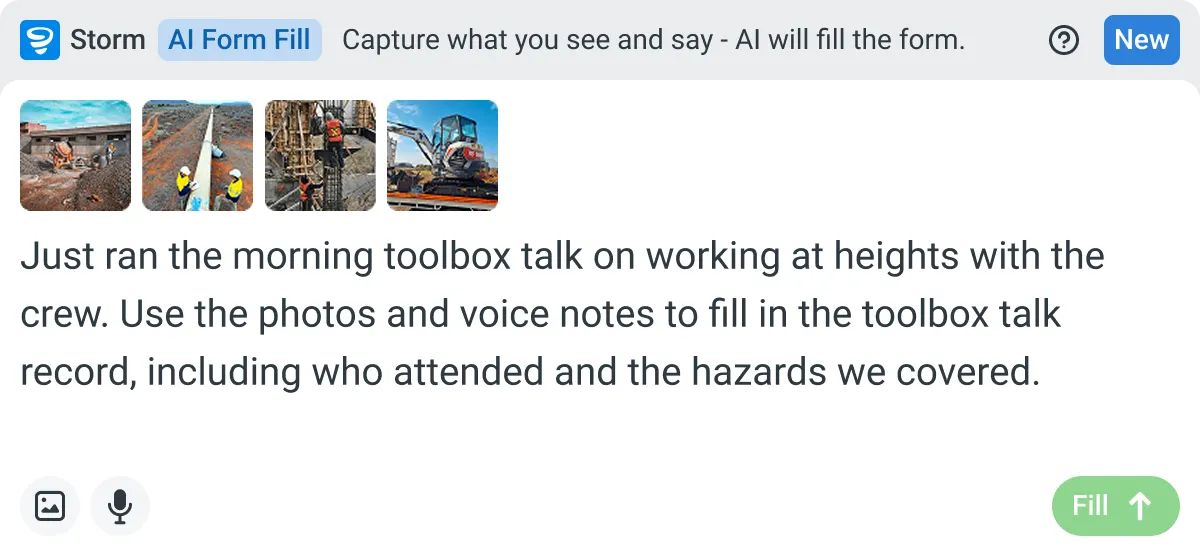
AI Form Fill
Capture what you see and say, and Storm drafts the form for you. The details land in the right fields, so there is a record to check the moment the work is done, and you review and submit it yourself.
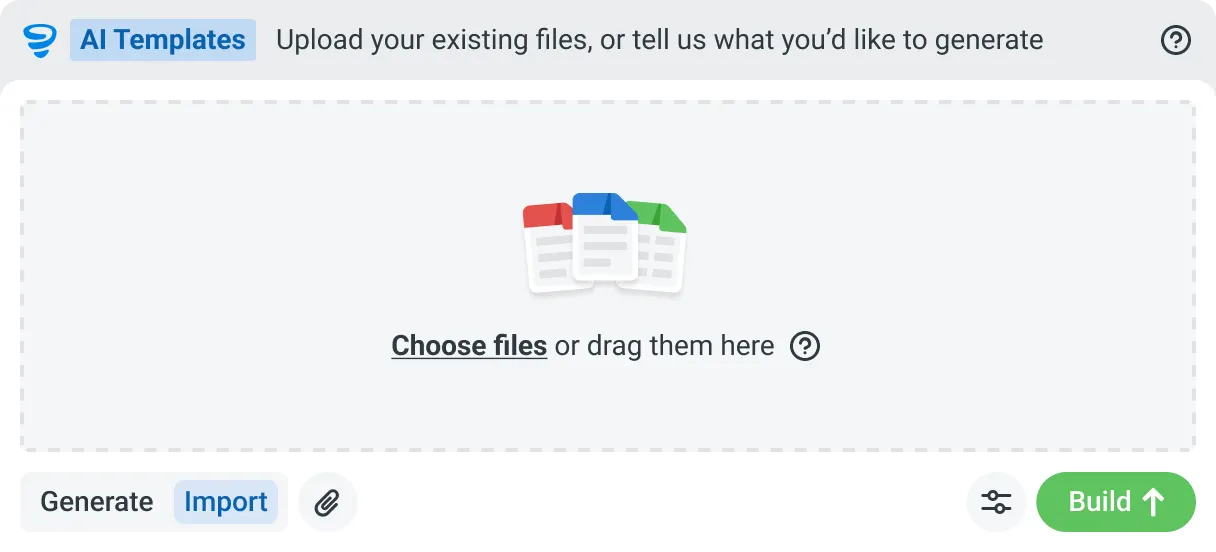
AI Templates
Describe the template you need in plain language, or upload an existing PDF, Word or Excel document. Storm builds the structure, with the right fields, sections, columns and workflow attached, and you review and refine it before you save.
How You Run a Toolbox Talk in Dashpivot
Three steps. You set the template up in Dashpivot, run the talk on the Sitemate Mobile App, and the signed record files itself back into Dashpivot. The talk itself doesn't change. What changes is where it gets filled in and how little gets typed afterwards.
-
Step 1
Get the Template
Four ways in, and none of them is starting from a blank page. The template is the Dashpivot form your crew fills in, so this is the part you set up once.
- Pick one from the template library, if a standard Toolbox Talk suits you
- Import the one you already run, so the wording your crews know stays the same
- Describe what you need and let Storm build it, section structure, fields and sign-off points included
- Build it yourself in the Dashpivot drag-and-drop editor, with photo, signature, location and weather fields
-
Step 2
Run the Talk and Capture It
The supervisor runs the talk as normal, with the form open on the Sitemate Mobile App. The record gets made while it happens rather than afterwards, and how much of it gets typed is up to you.
- The crew checks in by QR scan or by picking their name, with location and time stamps behind it
- Key points get logged as you go, typed on the device or spoken as a voice note
- Weather is captured automatically, so nobody writes down the conditions
- Storm is optional. Speak the talk and it drafts the discussion points into the fields for you
- You approve it. The supervisor checks attendance, edits the points and signs before the crew starts work
-
Step 3
Keep the Record
Signed, timestamped and stored in your own Dashpivot account, whoever owns the project.
- Every talk carries its own history, who filled it, who edited what, and who signed off
- Talks link to worker profiles, so attendance builds up per person across sites and meetings
- Export it or hand it to an auditor without asking anyone for access to their platform
What Dashpivot Does Not Replace
SiteDocs provides some value to contractors that Dashpivot doesn't. For example, Dashpivot doesn't offer the same dedicated North American safety compliance workflows or built-in library of region-relevant safety content. Teams that rely on these features to manage their safety requirements may still find SiteDocs a better fit.
What it can do today
Dashpivot can help you build and store your toolbox talk forms.
- Build toolbox talk forms based on existing formats your crew is familiar with
- Storm can be used to draft complete talks with prompts or even voice notes
- Crew can sign-off on a mobile device at the talk, or scan a QR code for attendance
- Fill and complete the form in real-time, no retyping needed later
- Can cover quality and compliance, not just safety
What it cannot do
Dashpivot doesn't cover some of the dedicated North American safety compliance capabilities that SiteDocs is designed to support, which can be important for safety teams already using SiteDocs.
- Cannot fully replace SiteDocs as a dedicated North American safety compliance platform
- Dashpivot doesn't offer the same built-in, region-specific safety compliance content out of the box
SiteDocs and Dashpivot by Sitemate for Toolbox Talks
Here we directly compare Dashpivot and SiteDocs, line-by-line, so you know exactly what SiteDocs is better at.
| SiteDocs | Dashpivot | |
|---|---|---|
| Capturing the talk | Safety checklist with sign-off | Filled on the device during the talk, or drafted by Storm from speech |
| Attendance | Sign-off recorded inside the SiteDocs app | Digital signatures on the form or QR check-in with Sitemate ID |
| Subcontractor sign-on | Multi-step process through email, links and QR codes | Single QR scan with Sitemate ID |
| Coverage | Safety compliance | Safety, quality, field reporting and plant management |
| Templates | Built-in safety template library | Import your own toolbox talk or have Storm build the template using AI Templates |
| Who holds the record | Stored within the SiteDocs account | Stored in your own account, regardless of who runs the site |
| Best fit | North American teams focused on safety compliance | Teams managing toolbox talks alongside quality and other field records |
Where the Two Actually Differ
Both help create and store toolbox talk forms. The key differences are how subcontractors sign on, what other records are managed in the same system, and who keeps the record after the job ends.
- Subcontractor Attendance: SiteDocs uses a multi-step process involving emails and links. Dashpivot lets subcontractors sign on with a single QR scan using Sitemate ID
- Scope of Use: SiteDocs focuses on safety compliance, while Dashpivot can be used for safety, quality, field reporting and plant management in one shared system
- Ownership: SiteDocs stores toolbox talk records within its platform account. Dashpivot stores records on your own account, so you keep them even after the job ends
- Preparation: SiteDocs provides a built-in safety template library. Dashpivot lets you import your own toolbox talks or have Storm draft them from speech, which you can review before signing
Where SiteDocs Is the Better Choice
You can get the maximum value out of SiteDocs if you're a North American construction team focused primarily on safety compliance. SiteDocs' real strength is its dedicated safety compliance workflows, making it a good fit for teams already using the platform to manage their safety requirements.
- You're a North American construction team focused on safety compliance, and your existing SiteDocs workflows already meet your needs
- Your safety team wants a dedicated safety compliance platform with a built-in library of region-relevant content that's ready to use without importing templates
- Your toolbox talks are purely for safety compliance records, and you don't need to manage quality, field reporting or plant documentation in the same system
How Teams Move From SiteDocs
Nobody switches everything at once. A move off SiteDocs usually starts with the documents that matter most, the Toolbox Talk and the pre-start, with the subcontractor sign-on made simple from day one.
-
Step 1
Decide
Talk to us about the job. If a dedicated North American safety compliance app is what you want and the price is fair, SiteDocs is built for that, and we'll say so. If the price is climbing or the sign-on is painful, that's the case for moving.
-
Step 2
Convert
Your current Toolbox Talk, as a PDF, an export, or a photo of the paper form, rebuilt by Storm as a smart digital template with the wording your crews already know.
-
Step 3
Pilot
One crew and its subcontractors, one week, running alongside SiteDocs. Nothing switched off, nothing migrated, and the sign-on is a single scan from the first talk.
-
Step 4
Roll Out
Held as an account template so the talk is identical in every workspace and edited centrally. Inductions and pre-starts follow once the Toolbox Talk has settled, and the record is yours from the first one.
Frequently Asked Questions
Is Dashpivot a replacement for SiteDocs?

Yes, Dashpivot can replace SiteDocs for toolbox talks and safety documentation, while also covering quality and field reporting within the same system. Subcontractors can also sign on to talks with a single QR scan. However, SiteDocs may still be a good fit for North American teams looking for a dedicated safety compliance platform.
How do subcontractors sign onto a talk?
Subcontractors can sign onto a toolbox talk with a single QR code scan using their Sitemate ID. This is one of the reasons teams look for alternatives to SiteDocs, which can involve multiple steps through emails, links, and QR codes to complete the sign-on process.
Do we have to use Storm to run a toolbox talk?
No, you don’t have to use Storm to run a toolbox talk, but you can use it to quickly create a draft of a toolbox talk form. Your workflow can work like this: speak directly with Storm, allow it to write up the toolbox talk draft for you, review and revise the form, run the talk, and gather signatures directly on the app.
How does attendance get recorded?
Attendance is recorded via digital signature fields on the toolbox talk form, or via a QR code the crew scans with the Sitemate app.
Does it cover more than safety?
Yes, while SiteDocs focuses on safety compliance, Dashpivot also lets you manage quality documentation and field reporting within the same system. This means your toolbox talks can be stored and managed alongside inspections and other site records without needing separate software.
What happens to the record if we leave?
Since you are the sole owner of your own system of record, all your documents and forms are securely stored in your Sitemate account. Your toolbox talk history and signed records remain yours, rather than being held within another platform’s subscription.