HammerTech Alternative for SWMS
HammerTech is the safety and induction platform a lot of Australian head contractors run, so if you're a contractor, it's often where your SWMS ends up. If you're looking for an alternative for the SWMS your crew can use to sign on, check out this page and where each product fits best.

Trusted by companies, projects and teams of all sizes


The short answer
Dashpivot by Sitemate is a HammerTech alternative for SWMS. If you're a contractor who wants your own record, signed by your own crew, and kept on your account after the contract ends, it's worth moving.
What HammerTech Is Built For
HammerTech is a safety platform built around worker onboarding and inductions. Head contractors and builders run it on large commercial projects. Its core job is controlling who gets on site and proving the whole workforce is inducted and compliant.
- Site access control on big commercial projects
- Worker onboarding and inductions
- Safety compliance across the builder's whole site
- Required by the builder, so subs are on it by default
Why Teams Look for a HammerTech Alternative
HammerTech serves the head contractor well. For subs, the catch is that your SWMS sits in someone else's system, and when the job wraps up, the signed record stays with the builder.
- Your SWMS sits in the builder's instance, with no own record you have
- Quality and field reporting are buried because it only focuses on safety, so there needs to be a separate tool to use
- Buyers tell us the field app is clunky, which slows sign-on at the work front
- more than 1 in 4 teams described HammerTech as a builder's or client's system they upload into, not one they chose
What Dashpivot by Sitemate Does for SWMS
Dashpivot by Sitemate is the field system a subcontractor runs for itself. You build the SWMS once as a form and the crew signs it on site. The signed copy files against the job on your own account, stored alongside your quality and field records.
- Master SWMS: built once as a template and used on every job
- Sign-on on site: digital signatures or QR check-in on the Sitemate Mobile App
- One system across disciplines: quality and site records sit beside safety
- Your account, your records: whichever builder runs the site

Write and Sign SWMS in Dashpivot
In Dashpivot, the SWMS is a form your team sets up and then opens on the Sitemate Mobile App where the work happens. Workers sign the exact version they're looking at, and you keep the record on your own account.
Safe Work Method Statement App
Build the SWMS once and run it on every job. Storm, Sitemate's data capture agent, can draft the first version from the work scope for a supervisor to check, the crew signs on from their phones, and every signed version stays on your own account.


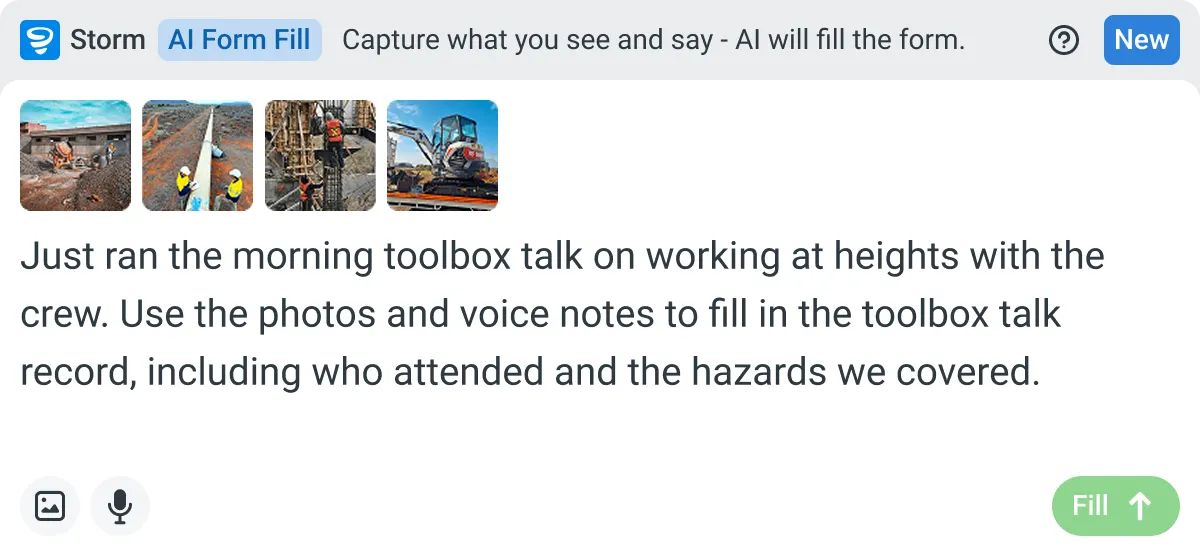
AI Form Fill
Capture what you see and say, and Storm drafts the form for you. The details land in the right fields, so there is a record to check the moment the work is done, and you review and submit it yourself.
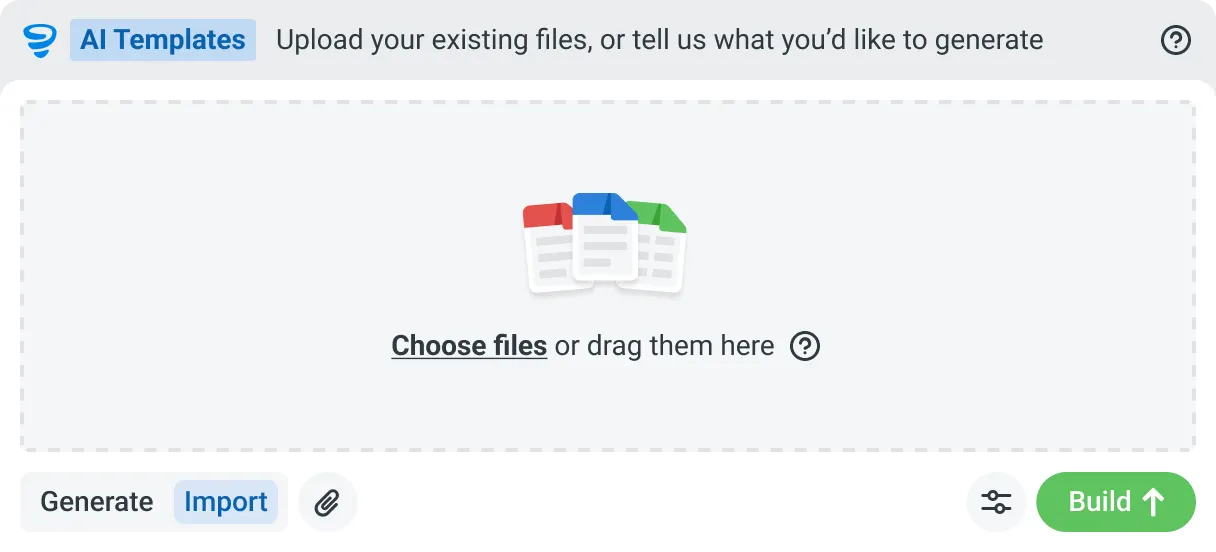
AI Templates
Describe the template you need in plain language, or upload an existing PDF, Word or Excel document. Storm builds the structure, with the right fields, sections, columns and workflow attached, and you review and refine it before you save.
How a SWMS Runs in Dashpivot
You set the SWMS up once in Dashpivot, and the crew signs it on site before work starts. The signed version files against the job on your account, with a copy submitted wherever the builder requires it.
-
Step 1
Set the SWMS Up Once
Start from the SWMS format you already use, with the risk matrix and job steps unchanged, so head contractors still accept it. It becomes the form every job runs from.
- AI Templates: Storm, Sitemate's data capture agent, builds the template from a PDF, Word or Excel file or a typed description, and you review it before use
- Drag-and-drop editor: build it yourself in Dashpivot, with signature, photo and location fields
-
Step 2
Run It and Sign On
The supervisor briefs the crew on site with the form open on the Sitemate Mobile App, online or offline. If the job throws up a condition nobody planned for, they add a site-specific control on the phone.
- Digital signature: each worker signs on the device
- QR check-in: workers scan in with their Sitemate ID
- Photos: attached to the step they relate to
- Storm, optional: speak the scope and Storm drafts the job steps, hazards and controls
- Supervisor sign-off: the supervisor checks and edits site-specific items, then signs before work starts
-
Step 3
Keep Your Own Record
Each signed SWMS is timestamped and filed against the job, with every version kept for audit. It stays on your Dashpivot account after the contract ends, whoever ran the site.
- Version history: who changed what, and which version each worker signed
- One register: every SWMS, across every job and every builder
- PDF export: send it in the format the builder asks for, and keep the original yourself
What Dashpivot Doesn't Replace
Dashpivot runs the SWMS and holds your record, but it doesn't run a builder's site access across every trade. It doesn't assess whether your controls are adquete enough because that's only done by a competent person such as a regulatory body or safety checker.
What Dashpivot Does for SWMS Today
All of the features listed below are readily available for use in Dashpivot.
- The SWMS templates include ample job steps, proper hazards, risk ratings, and controls
- Storm easily drafts the SWMS from the work, and the supervisor can simply check and edit before sending over to others
- Crew sign-on from any device, offline too
- Versioned, audit-ready records kept separate from the builder's platform
- Quality and field reporting in the same system
Where Dashpivot Stops
Ddashpivot stops when head contractors with broader large-site needs.
- If the head contractor mandates it, Dashpivot can't replace HammerTech but Dashpivot can be a good supplementary
- Doesn't have HammerTech's reach as the builders' platform
- Doesn't decide whether controls are enough, which can only be decided by a safety checker
HammerTech vs Dashpivot by Sitemate for SWMS
Here's how the two compare on SWMS, including where HammerTech comes out on top.
| HammerTech | Dashpivot | |
|---|---|---|
| Built for | Head contractors on large commercial projects | Subs and builders who keep their own records |
| SWMS location | The builder's HammerTech account | Your account, on every job you work |
| Site access and inductions | A core strength at full site scale | Forms and QR check-in for your crew |
| Beyond safety | Safety, onboarding and inductions | Safety, quality, field reporting and plant |
| Crew adoption | Mandated by the builder, so crews already use it | Chosen and set up by your team |
| Best fit | Builders who want access and inductions in one place | Subs who want their own record across every builder |
Where HammerTech and Dashpivot Differ for SWMS
Both store the SWMS and record who signed. It comes down to who owns that record and what else you need the system to do.
- Ownership. HammerTech keeps the record with the builder. Dashpivot keeps it with you, long after the contract ends.
- Scope. HammerTech sticks to safety. Dashpivot adds quality and field reporting, so you don't need a second tool.
- Reach. HammerTech wins here. Builders mandate it, so crews are already on it.
Where HammerTech Is the Better Choice
If you're the head contractor on a large commercial build, HammerTech is made for you. Controlling site access and proving every trade is inducted is what it does best, and it does it well.
- You're the builder, inducting and onboarding every trade on a large project
- The client has mandated HammerTech, so you submit there and use Dashpivot only for your own record
- You want SWMS and inductions tied directly to site access
- You don't need quality or field reporting
How Teams Move From HammerTech
No one moves everything off HammerTech at once, and most subcontractors don't leave it entirely. A move starts with one job's SWMS on your own account.
-
Step 1
Decide
If you're a head contractor who needs site access and inductions across every trade, stay on HammerTech. It's built for that. Move if you're a subcontractor who wants your own SWMS record.
-
Step 2
Convert
Take one job's SWMS as a PDF, Word or Excel file. Storm rebuilds it as a Dashpivot template with AI Templates, keeping the risk matrix and wording, and you check it before use.
-
Step 3
Pilot
Run it live with one crew on one job, and keep submitting to the builder's HammerTech instance. Nothing changes for the builder during the test.
-
Step 4
Roll Out
Once one crew has signed a live SWMS end to end, save it as an account template and reuse it on other jobs. Every SWMS then sits in one register on your account.
Frequently Asked Questions
Is Dashpivot a replacement for HammerTech?

Not across the board. HammerTech runs site access, onboarding and inductions for head contractors, and Dashpivot isn’t a site access platform. Subs switch to Dashpivot for a SWMS their crew signs and their own company keeps.
Can we use both?
Yes, and lots of subs do. You submit through the builder’s HammerTech account and keep your own signed copy in Dashpivot.
Who owns the SWMS record in Dashpivot?
You do. Every signed version stays in your account after the contract ends, whichever builder ran the site.
Can the whole crew sign onto the SWMS?
Yes. Each worker signs on the device before work starts. They can also check in with a QR scan using their Sitemate ID, which is their worker profile in the Sitemate Mobile App.
Do we have to use Storm to write the SWMS?
No. A SWMS in Dashpivot is a form, and you can fill it in yourself. If you’d like a head start, Storm, Sitemate’s data capture agent, can draft the job steps, hazards and controls from the work scope or a voice note. Your supervisor or competent person reviews and signs it before it’s issued.