HammerTech alternative for toolbox talks
HammerTech is a construction safety software Australian contractors use to manage their sites, and store safety documentation like toolbox talks. Below, we discuss and compare alternatives that subcontractors can use to improve the way they run toolbox talks.

Trusted by companies, projects and teams of all sizes













The short answer
Dashpivot by Sitemate is a great alternative to HammerTech if you're looking for seamless creation and storage of your toolbox talk forms. Take full advantage of AI-assisted workflows by using Dashpivot to draft your toolbox talk, leaving you to do the real work. If you're head contractor requires the use of HammerTech, you can even use both to augment each and streamline your entire workflow.
What HammerTech Is Built For
HammerTech is a safety, onboarding and induction platform run by head contractors and builders on large commercial projects. Its core job is controlling who comes onto site and proving the workforce is inducted and compliant, and builders mandate it onto their subcontractors as a condition of site access. For a subcontractor, that usually makes it the place a SWMS gets submitted for the builder to review.
- Site access control on large commercial projects
- Worker onboarding and inductions
- Safety compliance across a builder's whole project
- A platform builders mandate, so subcontractors are already on it by default
Why Teams Look for an Alternative
HammerTech works well for the head contractor managing safety across the project, but it can be less practical for subcontractors who run and document their own toolbox talks.
- Record of toolbox talk stays with the lead contractor's database, not with you
- No record of your own talks if and when you leave the project
- User experience with the fields are reported to be clunky, hurting integration with on-site crew
- Licensing might be expensive for subcontractors who don't already have subscriptions
More than one in four teams we spoke to described HammerTech as a builder's or client's system they upload into, rather than one they chose.
What Dashpivot by Sitemate is built for
Dashpivot is the system of record for the work itself. Forms your crews fill in on site, signed and filed against the job, covering safety, quality, field reporting and plant rather than safety alone.
- Forms built from your own documents, using the template library, or AI Templates, where Storm builds the template from a document you upload or a description you type
- Signed on the device, with digital signatures, QR check-in and a full audit trail
- One system across disciplines, so quality and site work sit beside safety instead of somewhere else
- Your account, your records, whoever owns the site you're on

Run toolbox talks in Dashpivot
It's a Dashpivot form, filled on the Sitemate Mobile App in the field. Speak the talk, sign it on site, and keep the record on your own account, whoever owns the job.
Toolbox Talk App
Run the toolbox talk the way you always have. The crew checks in digitally, Storm turns the spoken briefing into written discussion points, and the signed record is filed before anyone starts work.

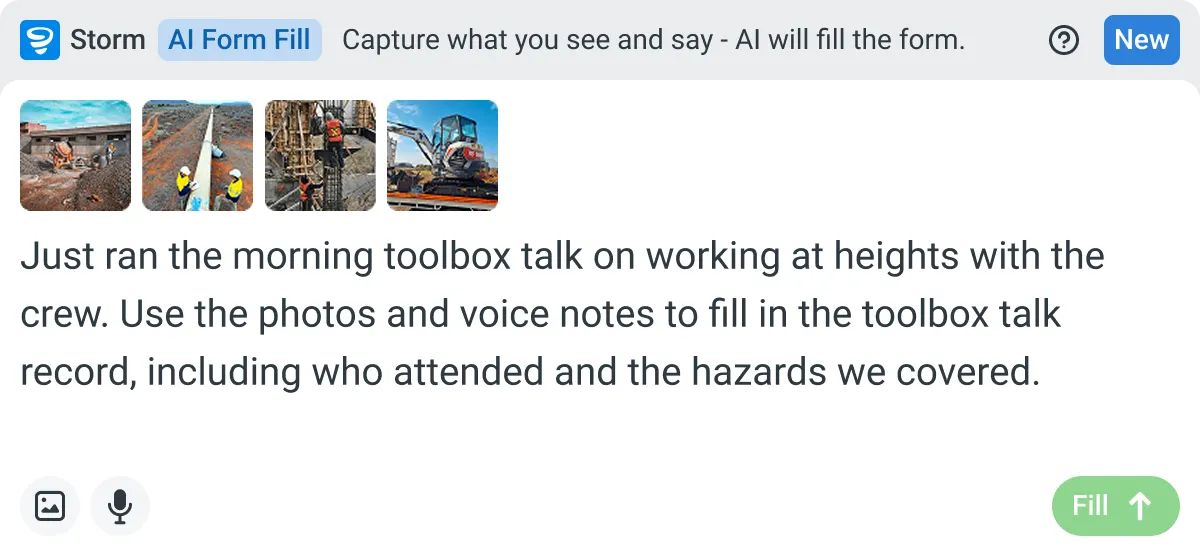
AI Form Fill
Capture what you see and say, and Storm drafts the form for you. The details land in the right fields, so there is a record to check the moment the work is done, and you review and submit it yourself.
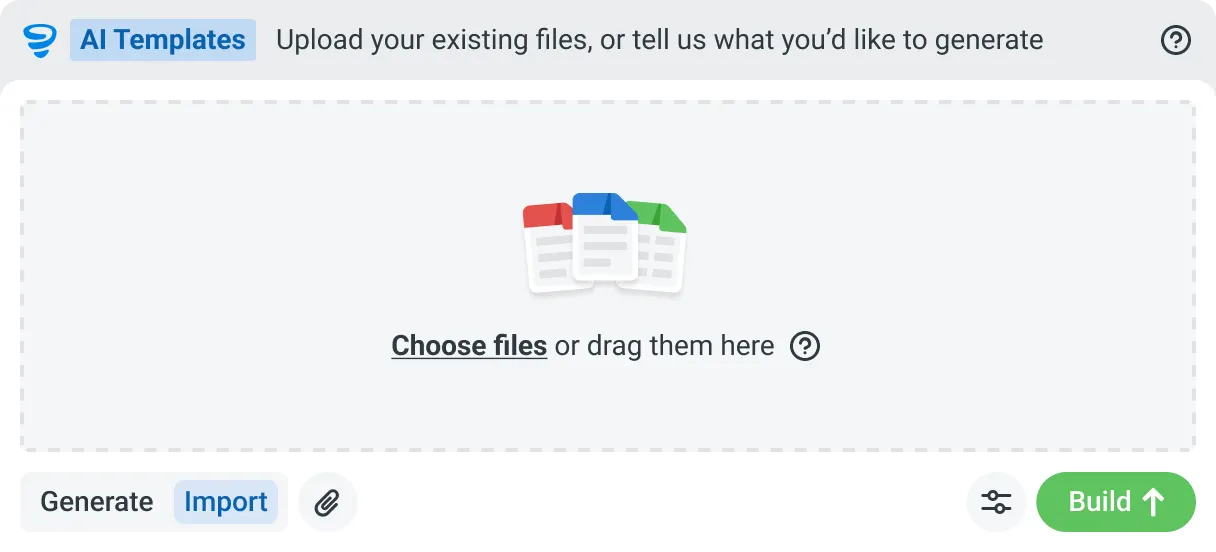
AI Templates
Describe the template you need in plain language, or upload an existing PDF, Word or Excel document. Storm builds the structure, with the right fields, sections, columns and workflow attached, and you review and refine it before you save.
How You Run a Toolbox Talk in Dashpivot
Three steps. You set the template up in Dashpivot, run the talk on the Sitemate Mobile App, and the signed record files itself back into Dashpivot. The talk itself doesn't change. What changes is where it ends up and how much of it you have to type afterwards.
-
Step 1
Get the template
Four ways in, and none of them is starting from a blank page. The template is the Dashpivot form your crew fills in, so this is the part you set up once.
- Pick one from the template library, if a standard toolbox talk suits you
- Import the one you already run, so the wording your crews know stays the same
- Describe what you need and let Storm build it, section structure, fields and sign-off points included
- Build it yourself in the Dashpivot drag-and-drop editor, with photo, signature, location and weather fields
-
Step 2
Run the talk and capture it
The supervisor runs the talk as normal, with the form open on the Sitemate Mobile App. The record gets made while it happens rather than afterwards, and how much of it gets typed is up to you.
- The crew checks in by QR scan or by picking their name, with GPS and time stamps behind it
- Key points get logged as you go, typed on the device or spoken as a voice note
- Weather is captured automatically, so nobody writes down the conditions
- Storm is optional. Speak the talk and it transcribes what you said and maps it into the fields
- You approve it. The supervisor checks attendance, edits the points and signs before the crew starts work
-
Step 3
Keep the record
Signed, timestamped and stored in your own Dashpivot account, whoever owns the site.
- Every talk carries its own history, who filled it, who edited what, and who signed off
- Talks link to worker profiles, so attendance builds up per person across sites and meetings
- Export it or hand it to an auditor without asking anyone for access to their platform
What Dashpivot does not replace
HammerTech provides alot of value to contractors that Dashpivot doesn't. For example, Dashpivot can't run access to the site or site documents across every trade and, in the case of toolbox talks, can't tell whether the people in attendance are complete or not. You still have to check through all the sign-ons per talk to make sure everyone signed-off.
What it can do today
Dashpivot can help you build and store your toolbox talk forms.
- Build toolbox talk forms based on existing formats your crew is familiar with
- Storm can be used to draft complete talks with prompts or even voice notes
- Crew can sign-off on a mobile device at the talk, or scan a QR code for attendance
- Fill and complete the form in real-time, no retyping needed later
- Can cover quality and compliance, not just safety
What it cannot do
Dashpivot doesn't cover managing numerous subcontractors across several large sites, which is where HammerTech is designed to support.
- Cannot provide automatic subcontractor prequalification support
- HammerTech can provide gating support on worker compliance, Dashpivot can't
- Cannot replace HammerTech, especially when a head contractor requires it
HammerTech and Dashpivot by Sitemate for toolbox talks
Here we directly compare Dashpivot and HammerTech, line-by-line, so you know exactly what HammerTech is better at.
| HammerTech | Dashpivot | |
|---|---|---|
| Capturing the talk | Typed again after the talk is over | Storm can summarize meeting recordings and fill-in your form |
| Proving attendance | Uses a QR gate sign-on for quicker review | Relies on actual attendee signatures and the Sitemate ID sign-on |
| Creating toolbox talk forms | Created by the user | User can create the form, or have Storm draft forms for them |
| Where forms are stored | Only on the lead contractor's paid platform | On your own account, whoever runs the site |
| Scope of use | Primarily safety & workforce management | Safety, quality, field reporting, plant & workforce management |
| Subcontractor prequalification | Fully supported | Not offered |
| Site entry | Full gate controls on compliance | Can only record manual checks, no gating support |
| Best fit | ENR Top 400 and tier one builders | Subcontractors, SMEs, tier one |
Where the Two Actually Differ
Both help create and store toolbox talk forms. The key differences are who fills the form, when it's filled, and who keeps record.
- Creation: HammerTech will need the talk to be typed up after the event for documentation. Dashpivot can fill the form on your device at the talk
- Attendance: HammerTech offers QR gate check-in support. Dashpivot relies on signatures on the form itself, and is only specific to that record
- Ownership: Toolbox talk forms are stored only on the builder's instance. Dashpivot stores toolbox talks on your account, so you keep records even after the job ends
- Scope of Use: HammerTech focuses on safety and workforce management, while Dashpivot can be used for safety, quality, field reporting, and more, in one shared system
Where HammerTech Is the Better Choice
You can get the maximum value out of HammerTech if you are the primary or lead contractor of a big project. HammerTech's real strength is being the right tool for a large job.
- You're a builder who needs one access, prequalification and induction platform across every trade on a large project
- Your client mandates HammerTech across the project, so you're submitting there regardless, and running Dashpivot alongside it for your own record is the realistic answer
- Your safety team wants toolbox talk forms, inductions and site access in the lead contractor's system and doesn't need quality or field reporting in the same place
How Teams Move From HammerTech
Nobody switches everything at once, and the first step is deciding whether to switch at all. A move usually starts with the documents that hurt most: toolbox talks, inductions and SWMS reviews.
-
Step 1
Decide
Talk to us about the job rather than the platform. If what you need is prequalification and control of who gets on site, HammerTech is the better tool and we'll say so.
-
Step 2
Convert
Your current toolbox talk, as a PDF, Word doc, Excel sheet or a photo of the paper form, rebuilt by Storm as a smart digital template with the wording your crews already know.
-
Step 3
Pilot
One crew, one week, running alongside whatever you use now. Nothing switched off, nothing migrated, and the crew that complains most about paperwork is the right one to start with.
-
Step 4
Roll out
Held as an account template so the talk is identical in every workspace and edited centrally. Inductions and SWMS reviews follow once the toolbox talk has settled, and the record is yours from the first one.
Frequently Asked Questions
Is Dashpivot a replacement for HammerTech?

Dashpivot isn’t a complete replacement for the HammerTech software, as HammerTech has unique capabilities such as prequalifying subcontractors and overall safety management tasks. Teams can use Dashpivot to quickly create safety forms and HammerTech to submit and store them within the head contractor’s database.
Can we use both Dashpivot and HammerTech together?
Yes, it is common to see teams run both software during a job. A typical real-world example is wehn a lead contractor requires its subcontractors to use the HammerTech platform for site safety management and compliance, but tasks within the subcontractor’s scope is done and documented within Dashpivot.
Does HammerTech do toolbox talks?
Yes, HammerTech has the capability to run toolbox talks within its safety meetings workflow. The wider platform application can also include inductions, permits, JHAs, etc.
Do we have to use Storm to run a toolbox talk?
No, you don’t have to use Storm to run a toolbox talk, but you can use it to quickly create a draft of a toolbox talk form. Your workflow can work like this: speak directly with Storm, allow it to write up the toolbox talk draft for you, review and revise the form, run the talk, and gather signatures directly on the app.
How does attendance get recorded?
Attendance is recorded via digital signature fields on the toolbox talk form, or via a QR code the crew scans with the Sitemate app.
What happens to the record if we leave the job?
Since you are the sole owner of your own system of record, all your documents and forms are securely stored in your Sitemate account. This is completely separate from the any other storage your head contractor may have had you use during the job.