Labor Variance Report Template

Start with a free 30-day trial. No credit card required.
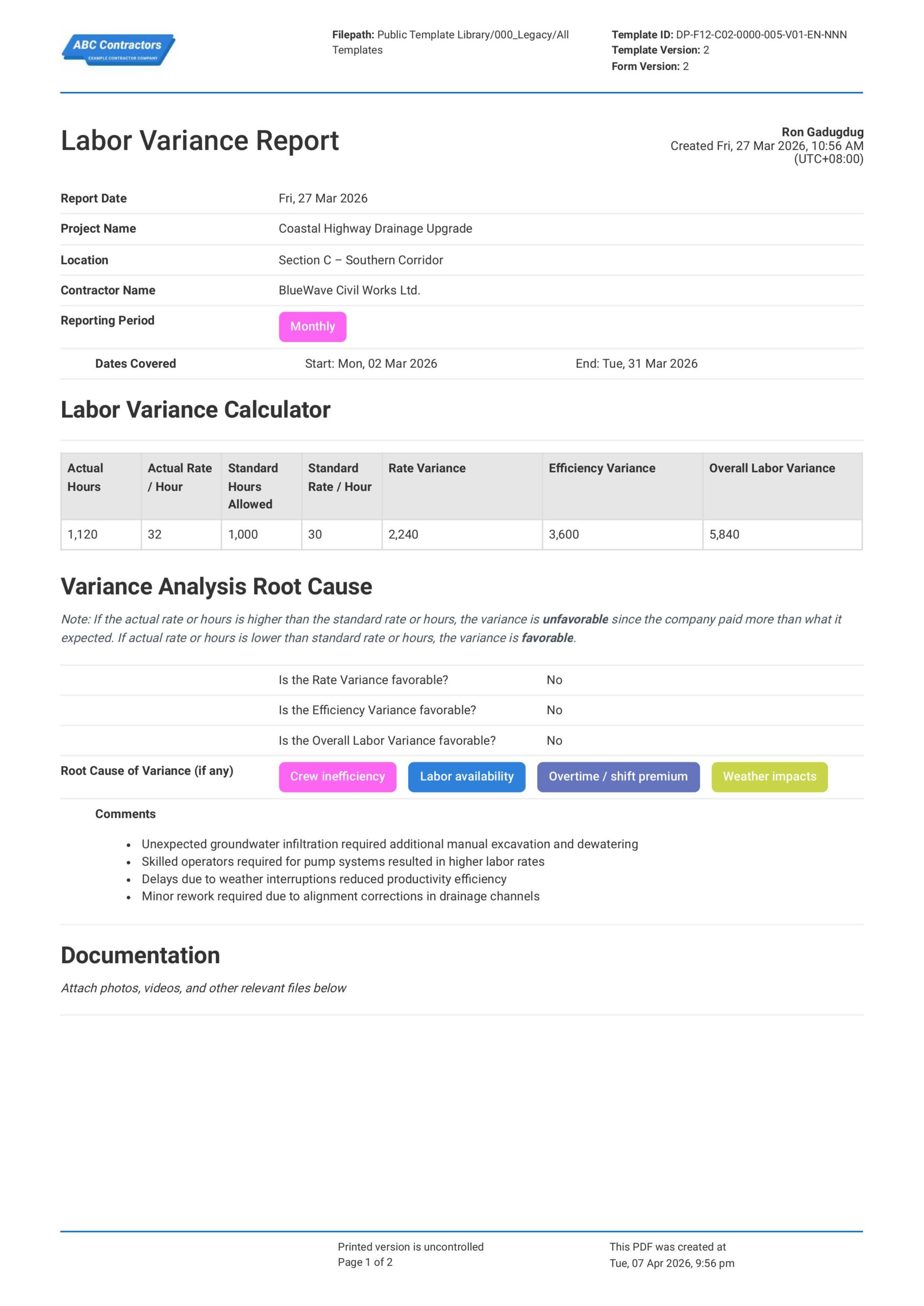
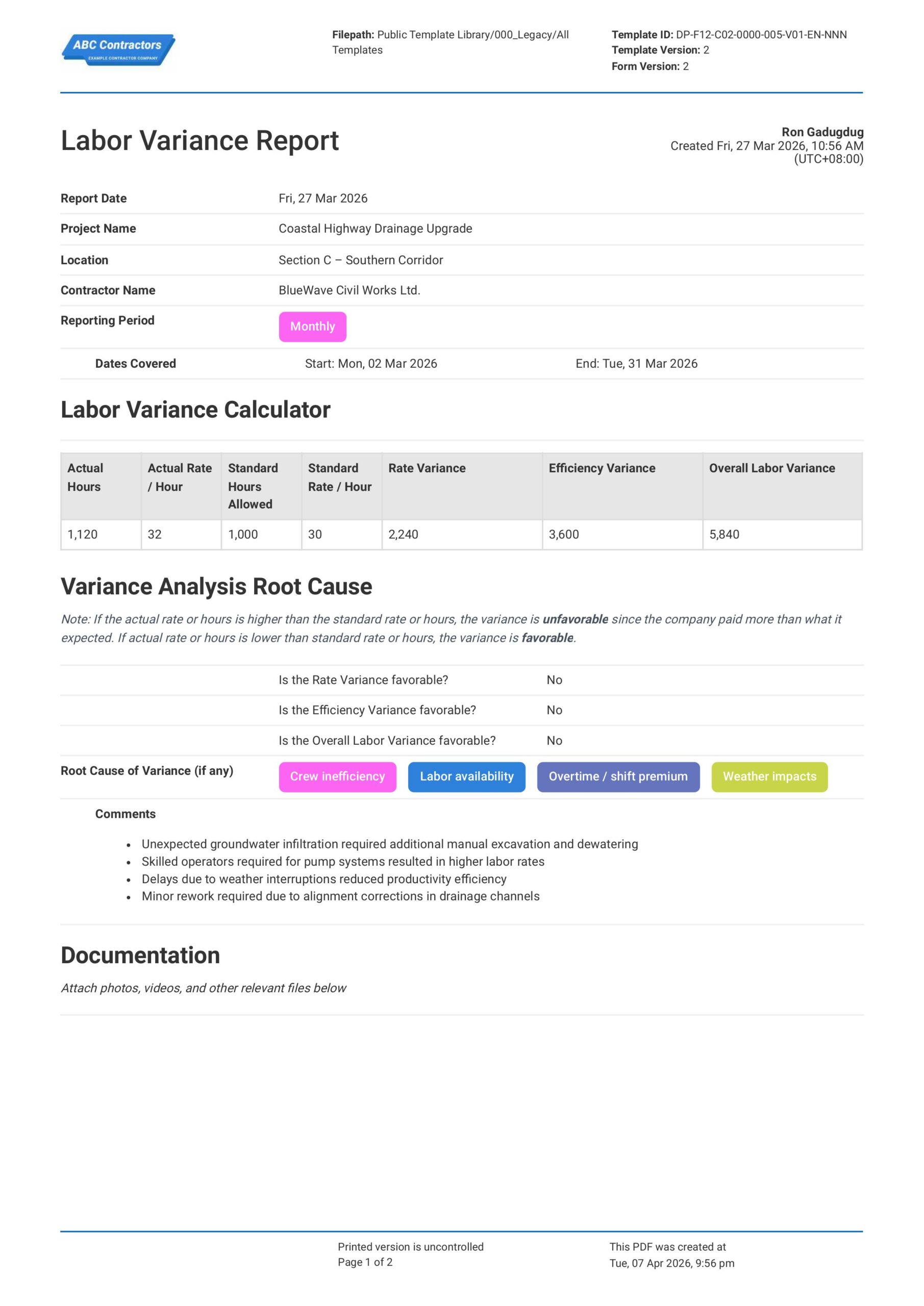
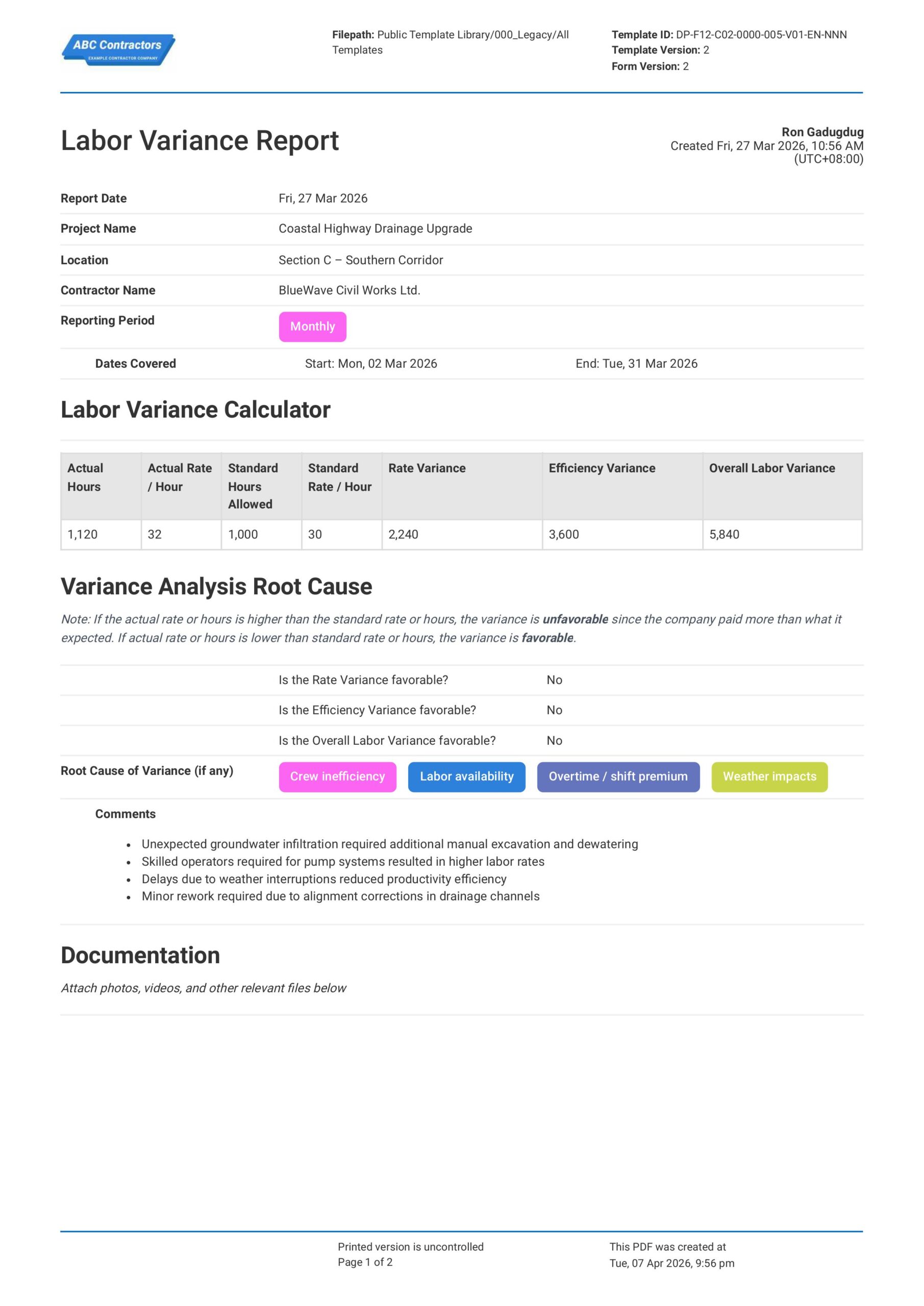
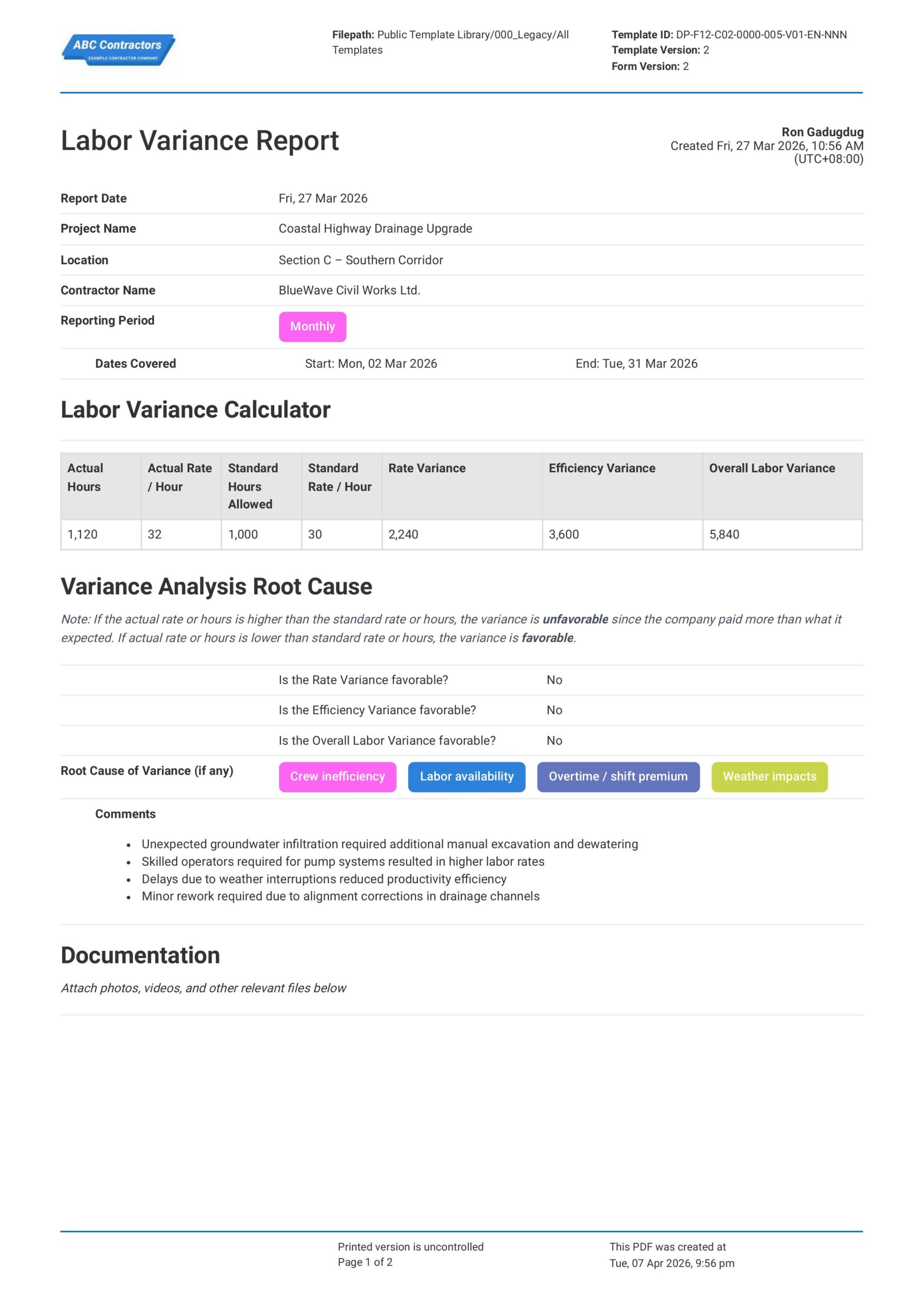
This Labor Variance Report is a document that your team can use to compare planned labor hours and hourly rates against the actual hours and rates for a project. Record important details for labor variance analysis, quickly compute the overall labor variance, take down notes and recommendations, and even attach photos and perform sign-offs - all on one form.
Looking for a clean, smart form you can use for labor rate variance analysis? The variance calculator built into the form can help you quickly calculate for overall labor variance and ensure your reports include all the necessary information for a holistic analysis. You can even export your reports to other formats like PDF or CSV when you're done.
 100% fully editable Labor Variance Report
Export your Labor Variance Report to PDF or CSV
Access Variance Report on mobile, tablet or computer
Trusted by companies, projects and teams of all sizes















What is Labor Variance Report?
A Labor Variance Report is a document primarily used for analysis of hourly rate and labor variance during a project cycle. Project managers and engineers use this report to compare the total labor cost versus what it actually cost to complete the project and highlight the differences (variances) and identify inefficiencies.
It is common to see engineers compute the Labor Variance in spreadsheets, where they list employee details, their hourly rate, number of hours worked, together with any breaks and overtime. Then, they compute the total labor cost from those raw values, and compare the total labor cost to the budgeted labor hours and rates. A variance report can then be created based on that comparison, through which further analysis can be performed.
Compare this Labor Variance Report to forms created on Excel, Word, or PDF
Curious to see how this Labor Variance Report stacks up against traditional formats? Feel free to check out the preview below for free, and you'll see just how easy you can create your reports.
Use this Labor Variance Report template for free

Generate this template automatically with Storm
You don't have to build the Labor Variance Reporting field by field. Let Storm, the AI Data Capture Agent inside Dashpivot, build the template for you in seconds.
Describe what you need
Tell Storm the form you want in plain language and it builds a structured digital template from scratch, with fields, tables, and signatures in place.
Upload what you already use
Drop in your existing PDF, Word, Excel, or even a photo of a paper form. Storm rebuilds it as a smart digital template with the structure intact.
 Storm
Storm
Generate a Labor Variance Reporting form template that I can use for my business
Applicable Standards and Policies for Labor Variance Report
As of this writing, there are no specific OSHA, ANSI, or federal laws that require a standard format for Labor Variance Reports in the U.S. or North America. However, several regulations and frameworks still require accurate labor tracking and variance analysis.
- Fair Labor Standards Act (FLSA) – Requires accurate tracking of hours worked
- Federal Acquisition Regulation (FAR) – Mandates labor cost tracking for government contracts
- GAAP / Project Accounting Standards – Encourages variance analysis for financial reporting
Staff Members and Parties that use Labor Variance Report
Labor Variance Reports are commonly used by project stakeholders to monitor and control labor costs. This is primarily done to improve efficiency of project expenditure and avoid unnecessary losses. For example, here are some of the most common parties that make use of variance reports:
- Project Managers and Site Supervisors
- Finance and Accounting Teams
- Executives / Leadership Teams
- Clients
Business Risks Reduced by Labor Variance Report
Labor Variance Reports help mitigate business risks by highlighting the differences between planned and actual labor usage before they escalate into major issues. Early visibility into these labor inefficiencies is critical for industries that heavily rely on manual labor and are susceptible to delays or disruptions.
- Cost overruns
- Billing inaccuracies
- Project delays
- Compliance and audit risks
Additionally, Storm, Sitemate’s AI agent, can also generate accurate content for important sections in your Labor Variance Report as well, such as listing relevant standards in your area. This takes some load off of report making from site personnel, reducing risks of human error as well.
Business Opportunities Created by Labor Variance Report
Labor Variance Reports can turn labor data into insights that leadership and management teams can use to make data-driven decisions. By using Storm to assist in report making, it also improves the accuracy of the outputs and the productivity of your workforce. Using historical labor variance data, businesses can improve planning and execution by:
- Improving future cost estimates
- Identifying best performing teams and best practices
- Avoiding cost leaks due to inefficiencies
- Strengthening client positioning
Key Metrics Needed for Variance Reporting
Labor Variance Reporting in construction projects requires several metrics and values you will need to accurately measure labor performance. These metrics should provide clear-cut insight into cost, time, and productivity differences. Here are some of the most common metrics that you can use:
- Rate Variance: The difference between the planned labor rate (cost per hour) and the actual rate paid
- Efficiency Variance: The difference between the planned labor hours and the actual hours used to complete work, indicating productivity gains or losses.
- Overall Labor Variance: The combined impact of rate and efficiency variance, showing the total variance between budgeted labor cost and actual labor cost.
Why is Labor Variance Report Analysis Important?
Labor Variance Report Analysis is important because it provides insight into how actual labor performance and cost compares against projected expectations. Engineers and project managers use insights taken from Labor Variance Reports during and after a project is completed to improve operations and avoid costly delays, disruptions, or other unnecessary losses.
It also plays a critical role in improving long-term business performance by highlighting trends in workforce productivity and cost control. This is especially important for improving estimates, project planning, and general decision-making. For example, Labor Variance Analysis can show you if the contractor you’re working with is efficient in the long-term or what jobsite conditions are affecting performance.
How to Create a Labor Variance Report
Creating a comprehensive Labor Variance Report can be a daunting task for the uninitiated. Below, we break down the process into simple steps you can follow to create your own report format.
Prerequisites in creating a Labor Variance Report
Before creating a Labor Variance Report in construction projects, your team will need to have systems in place to accurately gather data needed for variance analysis. Here are some of the most important prerequisites that you will need before starting:
- Defined labor budget and planned hours
- Accurate actual hours tracking
- Consistent cost coding structure
- Regular reporting intervals
- Supervisor review and validation
- Aligned schedule and scope
Always Start your Report with General Information
Important, high-level information must be placed at the very top of your Labor Variance Report for easy identification and tracking. Here are some examples of common general information:
- Project Name or Description
- Location or Address
- Contractor Details
- Client Name/s
- Date/s covered by the report
Create a Section for Labor Data Input
Labor Data is the meat of your Labor Variance Report. Make sure you lay out the following data so it is neat, easily understood, and avoids confusion:
- Actual Labor Hours
- Actual Hourly Rate for Labor
- Budgeted Labor Hours
- Budgeted Hourly Rate for Labor
Next, add a Section for Variance Analysis
In this section, you will need to highlight the differences to the actual labor data versus the budgeted projections, as well as provide an analysis as to why those differences occurred. Be sure to highlight the following:
- Rate Variance
- Efficiency Variance
- Overall Labor Variance
- Variance Analysis and Justifications
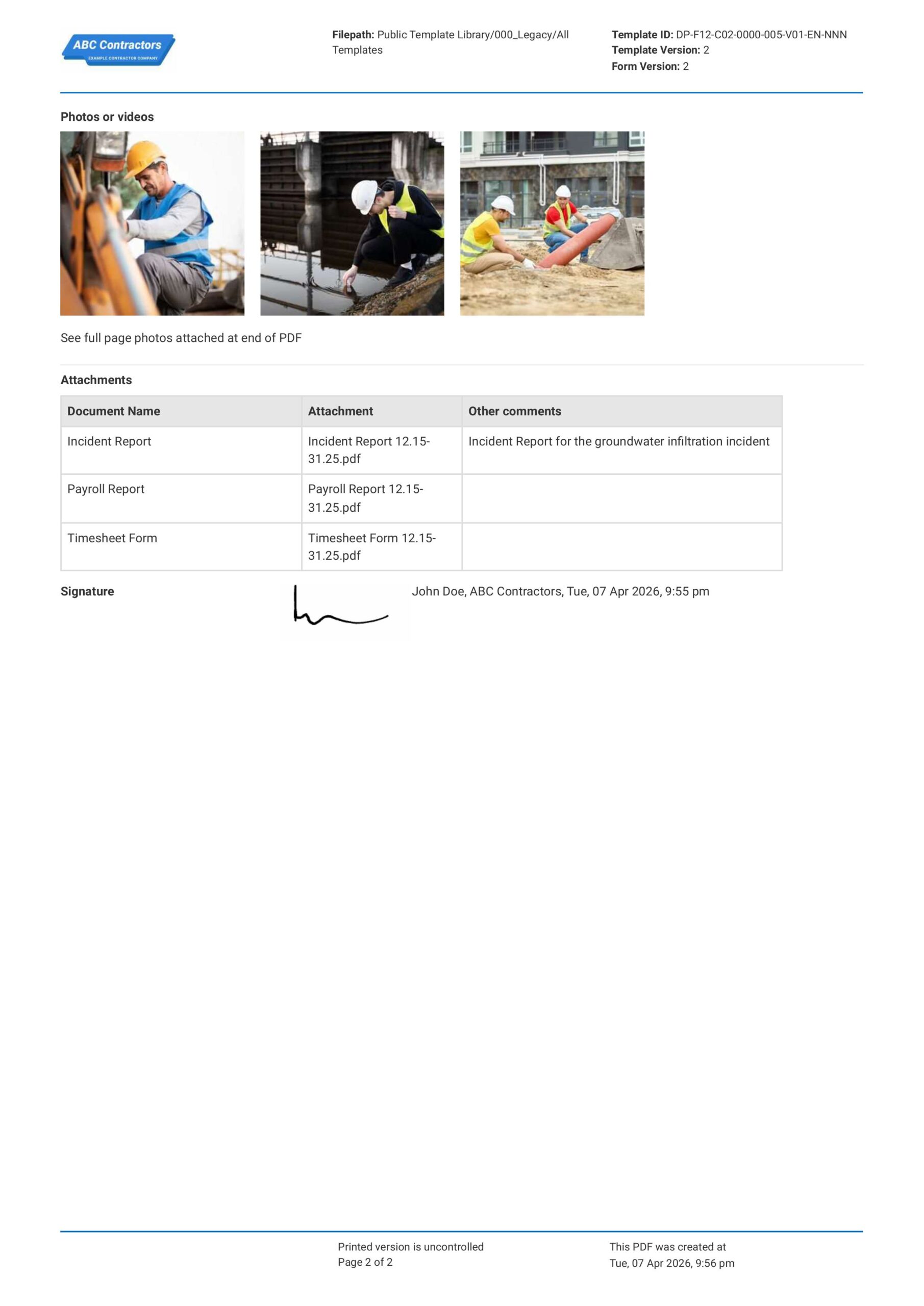
Attach Relevant Supporting Documentation
Round out your Variance Report by attaching supporting documentation to support or justify the data and analysis you created. Here are some samples of attachments you can use:
- Photos or Videos (if soft copy)
- Timesheets or Attendance Sheets
- Progress reports
- Incident Reports
Finish your Report with Sign-Offs or Acknowledgments
Your Labor Variance Report can only be formalized if it contains the acknowledgements and signatures of the appropriate personnel. Here are some of the people you will need to have your document signed by:
- Site supervisors
- Project managers
- Contractor Representative/s
Frequently asked questions
How to create Labor Variance Reporting in an App or Software System
Well-designed Labor Variance Reporting ensures that your team stays on top of your project’s labor costs and budget. Avoid cost overruns and operational inefficiencies by highlighting the differences between actual labor costs versus planned or projected figures and conducting analysis as to why it occurred.
40 minutes
Medium difficulty
Begin by Adding Text Fields for General Information
Allowing users to quickly fill-in general information is a key step to create a Labor Variance Report form that can easily be reproduced. Be sure to add the following fields:
- Date Report was Created
- Project Name or Task Description
- Location
- Date Period covered by the report
- Contractor Details
Add a Table for Labor Data
Next, you need a section where the user can input the raw labor data needed for variance analysis. We highly recommend using a table for this purpose to keep your data clean and easily understandable. Make sure to add these columns in order:
- First two columns for Actual Labor Hours & Rate
- The third and fourth column for Planned Labor Hours & Rate
- The fifth column for Rate Variance
- The sixth column for Efficiency Variance
- The final column for Overall Labor Variance
Add a Calculator to Solve Labor Rate Variance Formulas
If your app or software allows, take advantage of formula functions to automate calculations in your table. Here are the most important labor variance formulas you can use:
- Rate Variance = (Actual Rate − Planned Rate) × Actual Hours
- Efficiency Variance = (Actual Hours − Planned Hours) × Planned Rate
- Overall Labor Variance = Rate Variance + Efficiency Variance
It is important to note that a positive result from the above formulas is seen as unfavorable, as it means the actual data was more than the planned expectations. Conversely, a negative result is a favorable result as it means the project is within budget.
Provide Text Fields for Variance Analysis
Next, you will need to add text fields for users to add their analysis on the variance. Here are some examples of the type of comments you should expect:
- Justification of any delays or disruptions
- Incidents that caused delays
- Actionable Recommendations
Add Upload Fields for Attachments
You will want to add sections where users can attach relevant supporting documentation to the Labor Variance Report. Be sure to add appropriate upload options for the following:
- Media files like photos or videos
- Incident reports
- Progress reports
- Other file formats (.dwg, Excel files, etc.)
Finally, Add E-Signature Fields for Sign-Offs
Adding e-signature fields allows users to sign-off on your report digitally and speed up the reporting process. Be sure to include these personnel in your sign-offs section:
- Creator of the report
- Site supervisors
- Project managers
About the author

Ron Gadugdug
Engineering Content Writer

Education:
Cebu Institute of Technology - University - Civil Engineering
Bio:
Ron is a Civil Engineer with 6 years of experience in the construction industry, primarily focused on quantity surveying, cost estimation, project management, quality control, contract administration, and property & engineering insurance. At Sitemate, he writes about practical applications of evolving technologies and digital solutions that support construction professionals in improving efficiency, compliance, and project delivery across the built world.
Project Details:
Quantity Surveying & Cost Engineering
Performed quantity take-offs of several high-rise and horizontal structures using sheets and applications like Revit and Bluebeam Revu, and spearheaded trials with Building Information Modeling (BIM) software.
Project Management & Consultancy
Coordinated with project management teams during the construction of local projects such as a 4-tower hotel & resort, a 22 storey condominium project, and a school dormitory project.
Contract Administration
Assisted during contract biddings and negotiations with general contractors and sub-contractors, and oversaw progress reporting, billings, and payment.
Property & Engineering Insurance
Dedicated non-life claims handler, overseeing property and contractor all-risk insurance claims, risk management, and bonds.
Version History:
Other popular templates you can use and edit for free

This report was generated with Dashpivot software
- Access, edit and complete your Labor Variance Reporting from any device - mobile, tablet or computer.
- Print, download or send your Labor Variance Reporting as perfectly formatted PDF documents with your company logo.
- Store your Labor Variance Reporting securely online, where they can be searched and found in seconds
- Invite internal and external parties to see, edit and sign off on Labor Variance Reporting online.

 English (United States)
  English (Australia)
  English (UK)
  English (New Zealand)
  English (South Africa)
  German