Demolition Safety Toolbox Talk Template

Start with a free 30-day trial. No credit card required.
Looking for a ready-to-use Demolition Safety Toolbox Talk that still fits how your team works? This template already comes with the key discussion points your crew needs to cover before demolition begins, including structural stability, service isolation, falling materials, dust suppression, noise controls, exclusion zones, plant and equipment, PPE requirements, and emergency response procedures. Every section is pre-written so you can run your safety meeting without starting from scratch, and you can edit any part of it to match your site conditions, company procedures, or the specific demolition activity underway, whether that is strip-out work, structural demolition, mechanical demolition, or manual breaking, while the document still holds up against the safety regulations and audit standards your business would be measured against.
This Demolition Safety Toolbox Talk is an easy-to-use form that your workers can use to guide and record short safety discussions before demolition work begins. The form lets teams document the work activity, demolition area, identified structural hazards, hazardous materials, access restrictions, worker questions, attendance, and sign-offs in one place, then share the completed record with supervisors, safety managers, and other stakeholders by exporting it to PDF or CSV.
 100% fully editable Demolition Safety Toolbox Talk
Export your Demolition Safety Toolbox Talk to PDF or CSV
Access your Demolition Safety Toolbox Talk on mobile, tablet or computer
Trusted by companies, projects and teams of all sizes















What is Demolition Safety Toolbox Talk?
A Demolition Safety Toolbox Talk is a document used by supervisors, safety managers, and site teams to guide short safety discussions before demolition work begins. This toolbox talk usually includes discussion points on structural stability, service isolation, falling materials, dust, noise, plant movements, exclusion zones, PPE, emergency response, and worker responsibilities.
Due to the high-risk nature of demolition work, workers need to understand how to avoid hazards such as collapse, falling objects, buried or live services, hazardous materials, uncontrolled dust, noise, and unsafe access. This makes Demolition Safety Toolbox Talks highly relevant in construction, civil works, renovation, industrial maintenance, utilities, and infrastructure projects, where structures, surfaces, or services are being removed or altered.
See how this Demolition Safety Toolbox Talk compares with traditional Excel, PDF, and email-based processes
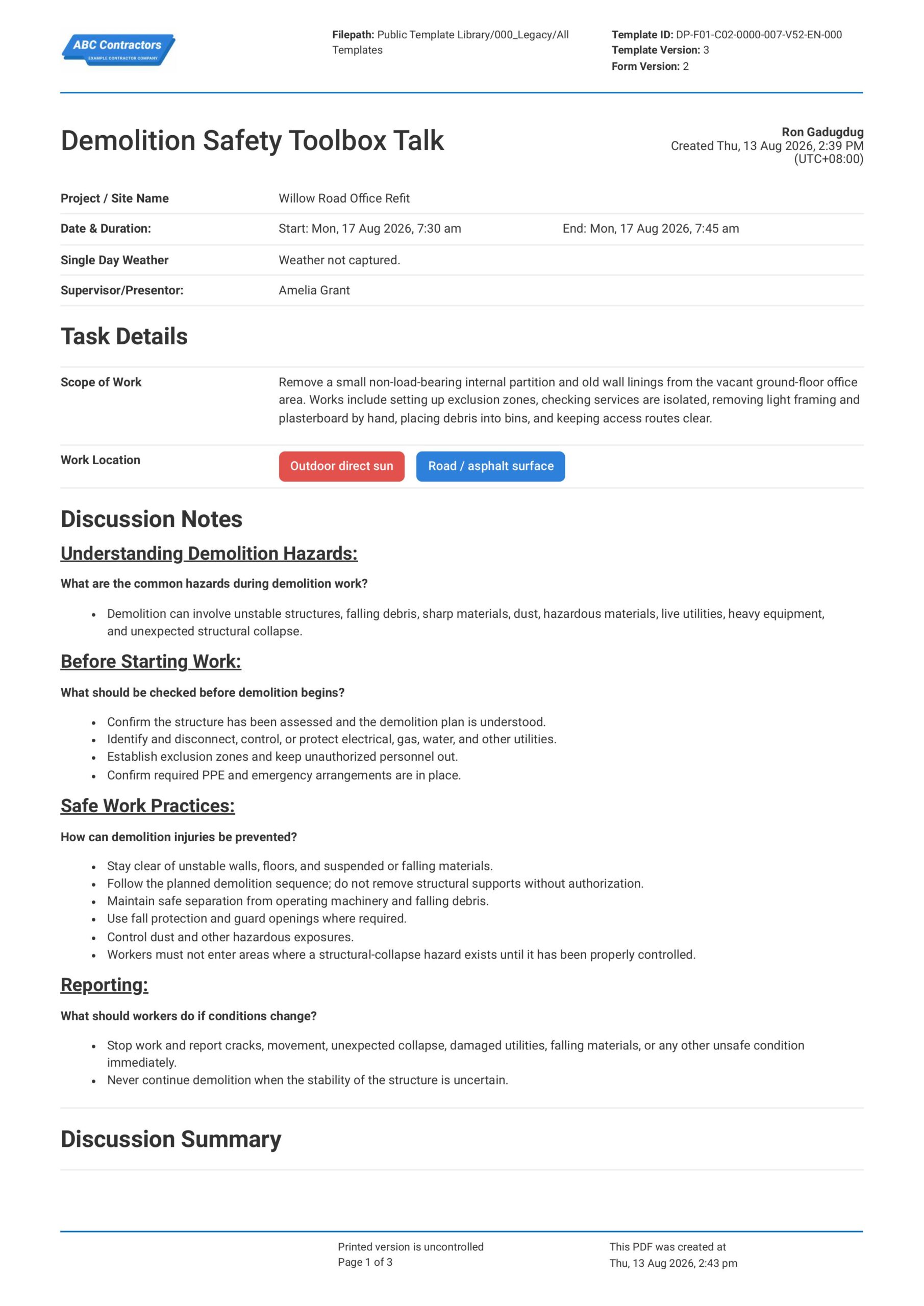
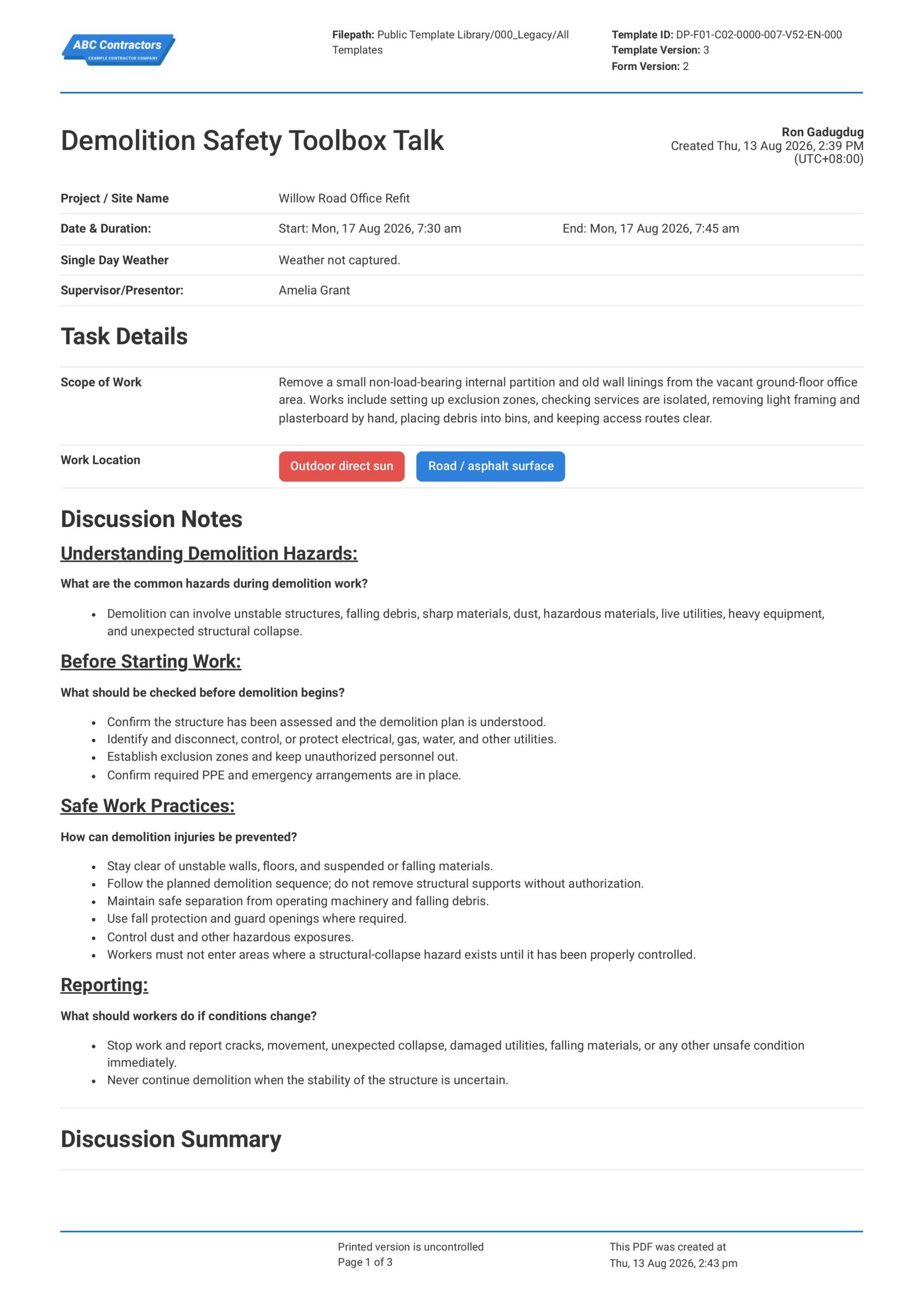
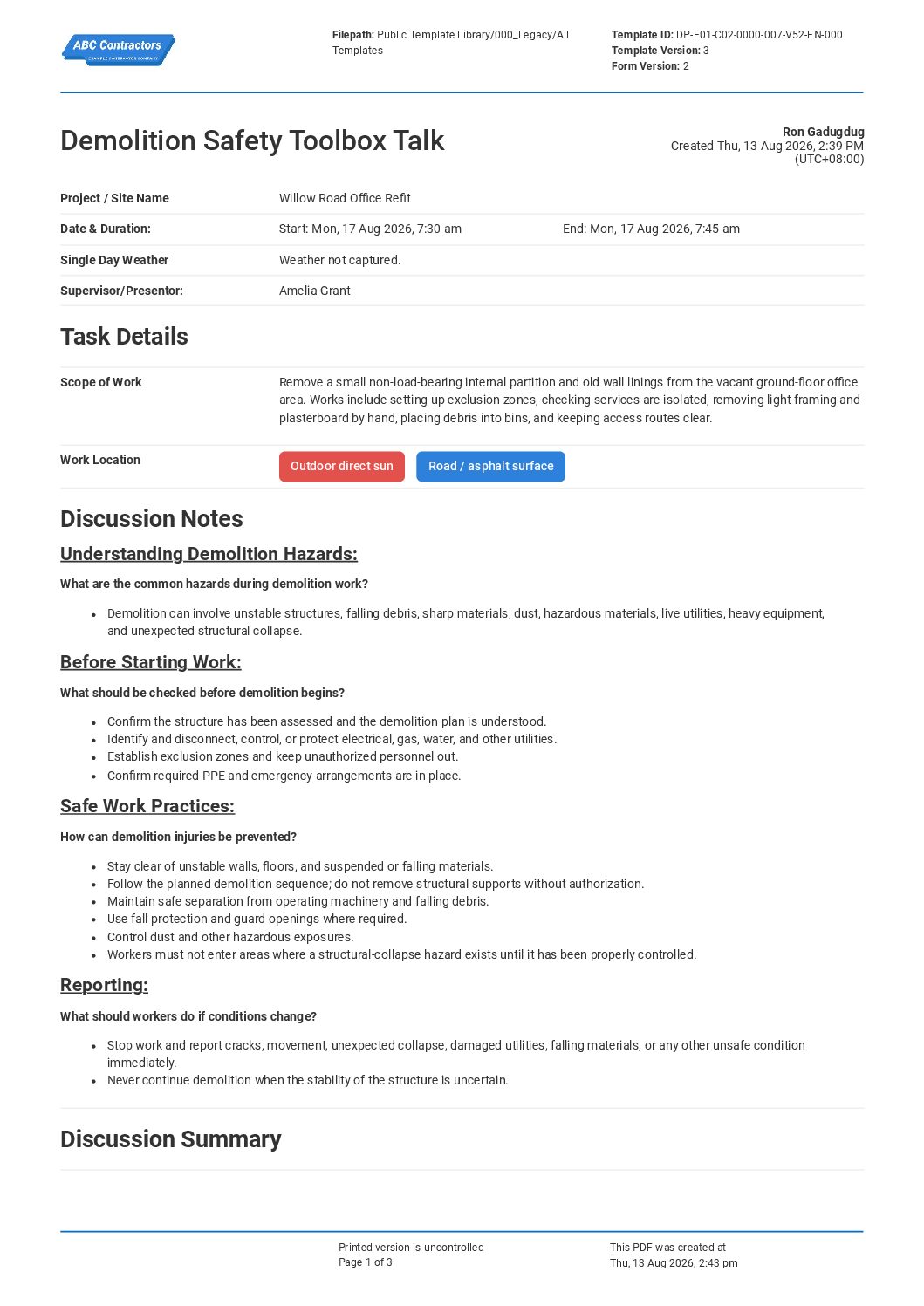
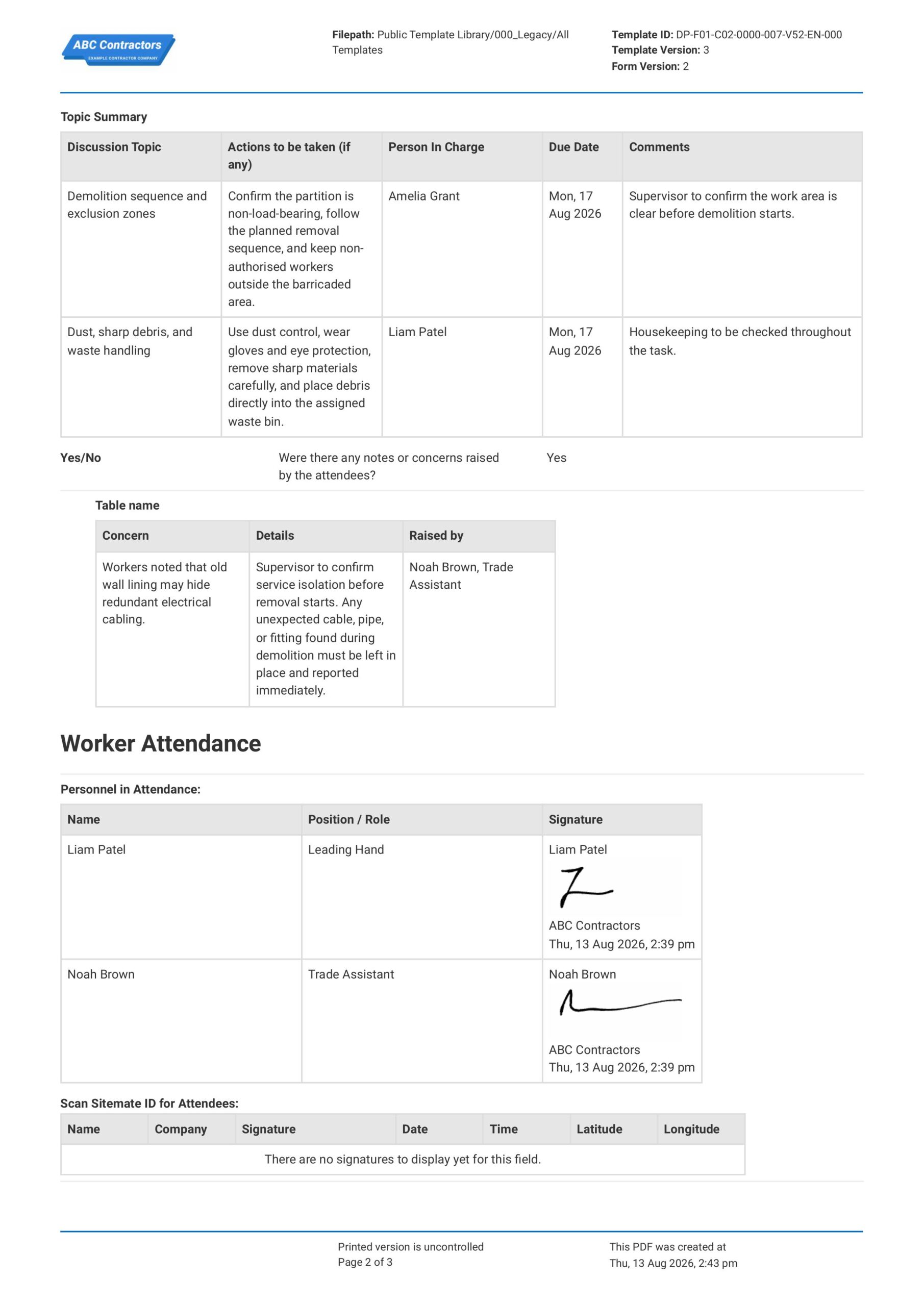
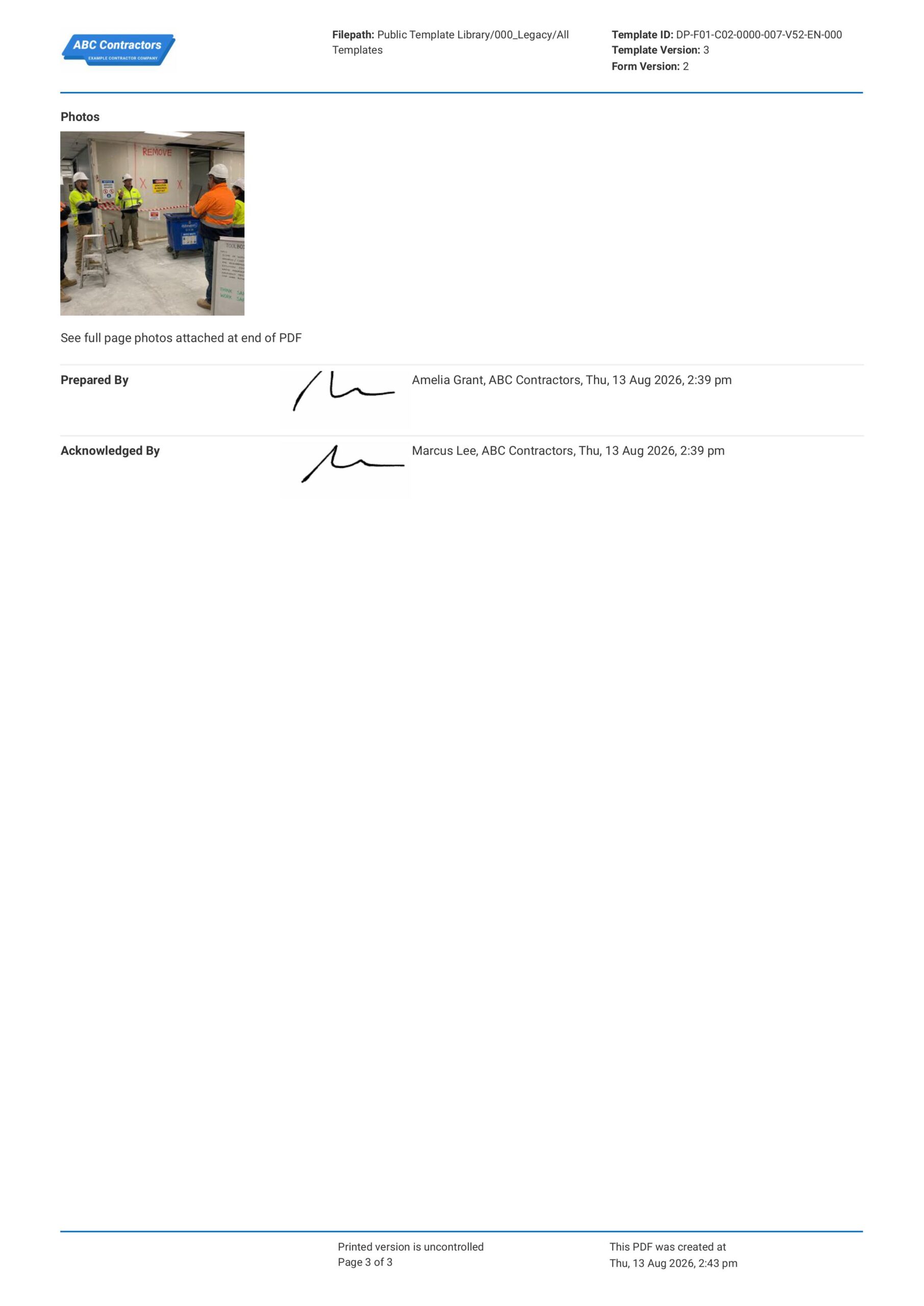
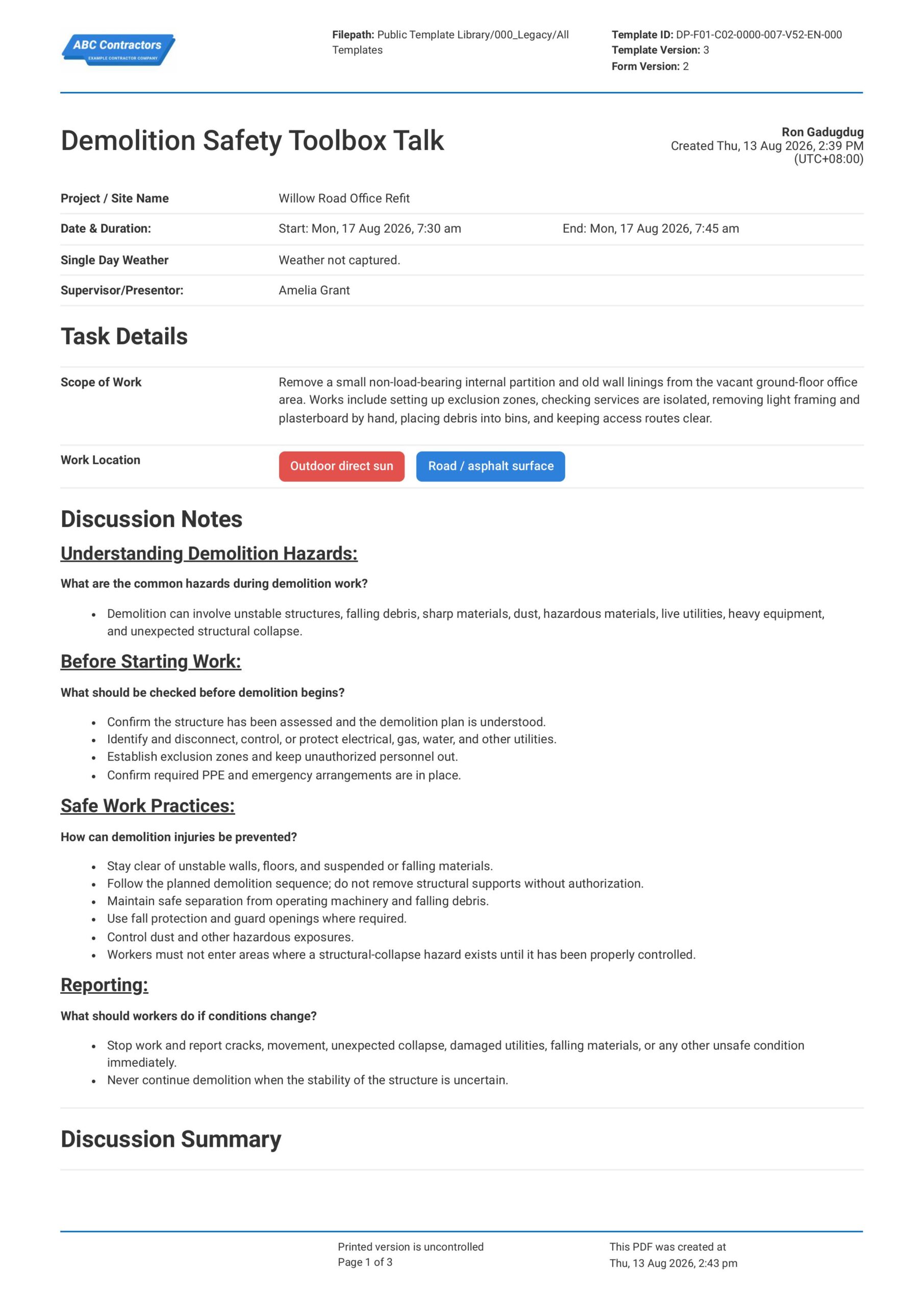
Curious how this Demolition Safety Toolbox Talk works? Check out the example below to see exactly what the form covers, from structural hazard assessments and exclusion zone confirmations through to PPE requirements and worker sign-offs. You can generate your own custom version in minutes, export it in your preferred format, and fill in your site-specific details to have a ready-to-use demolition safety record before the next job starts.
Use this Demolition Safety Toolbox Talk template for free

Generate this template automatically with Storm
You don't have to build the Demolition Safety Toolbox Talk field by field. Let Storm, the AI Data Capture Agent inside Dashpivot, build the template for you in seconds.
Describe what you need
Tell Storm the form you want in plain language and it builds a structured digital template from scratch, with fields, tables, and signatures in place.
Upload what you already use
Drop in your existing PDF, Word, Excel, or even a photo of a paper form. Storm rebuilds it as a smart digital template with the structure intact.
 Storm
Storm
Generate a Demolition Safety Toolbox Talk form template that I can use for my business
Applicable Standards and Policies for Demolition Safety Toolbox Talk
There are generally no explicit formatting requirements for a Demolition Safety Toolbox Talk. However, most construction and workplace safety laws require employers to train workers on demolition hazards, structural stability, falling materials, dust, noise, plant movement, and safe work methods. A Demolition Safety Toolbox Talk is a good document to support compliance with this.
- OSHA 29 CFR 1926 Subpart T covers demolition safety requirements in the USA
- OSHA 29 CFR 1926.850 covers preparatory operations before demolition work in the USA
- UK Construction Design and Management Regulations 2015 require planning and control of demolition risks
- Safe Work Australia Demolition Work Code of Practice 2018 covers demolition hazards and controls
- Local WHS laws commonly require demolition planning, risk controls, and worker training
Staff Members and Parties that use Demolition Safety Toolbox Talk
A Demolition Safety Toolbox Talk is primarily used by project teams that manage demolition, strip-out, dismantling, structural removal, or site clearing activities. Here are examples of other common parties that use a Demolition Safety Toolbox Talk:
- Site supervisors and project managers
- Demolition workers
- Plant operators
- Health and safety teams
- Contractors and subcontractors carrying out demolition work
Business Risks Reduced by Demolition Safety Toolbox Talk
Using a Demolition Safety Toolbox Talk helps reduce the risk of hazards such as structural collapse, falling materials, dust exposure, noise, plant interaction, live services, and unsafe exclusion zones. Ultimately, this can help businesses to:
- Reduce risk of injury, fatality, or demolition-related incidents
- Avoid non-compliance with demolition and workplace safety requirements
- Prevent unsafe work caused by poor planning, live services, or unstable structures
- Lower exposure to legal claims, enforcement action, and incident-related costs
- Reduce project delays caused by incidents, inspections, emergency works, or shutdowns
Business Opportunities Created by Demolition Safety Toolbox Talk
A well-prepared Demolition Safety Toolbox Talk helps businesses improve worker awareness and control over high-risk demolition activities. Here are some ways a well-designed Demolition Safety Toolbox Talk can help businesses:
- Improve worker confidence before demolition work begins
- Strengthen contractor prequalification and tender-offer competitiveness
- Improve coordination between supervisors, demolition crews, plant operators, and subcontractors
- Build trust with clients, regulators, insurers, and project stakeholders
What Hazards are Common During Demolition Work?
Demolition work can expose workers to a wide range of hazards because structures, services, and site conditions can change as materials are removed. These hazards should be discussed before demolition starts so workers understand what to watch for and what controls need to be in place.
- Falling materials from walls, ceilings, roofs, scaffolds, and elevated work areas
- Unstable structures, partial collapse, weak floors, and unsupported building elements
- Dust, silica, asbestos, lead paint, noise, vibration, and other hazardous exposures
- Live or hidden services such as electrical cables, gas lines, water pipes, and drainage systems
- Mobile plant, falling objects, poor access, slips, trips, and restricted work areas
Why are Demolition Safety Toolbox Talks Important?
Demolition Safety Toolbox Talks are important because demolition work can expose workers and nearby people to serious hazards from unstable structures, falling debris, dust, plant movement, and unknown site conditions. This is critically important on construction and refurbishment projects where structural elements, utilities, hazardous materials, and public interfaces may be present.
Essentially, a Demolition Safety Toolbox Talk helps remind workers of the demolition sequence, exclusion zones, service isolation, and required safety controls before work starts. Additionally, it gives supervisors and project management teams clear documentation that demolition risks were discussed, supporting due diligence and compliance with relevant workplace safety requirements.
How to Build a Demolition Safety Toolbox Talk
Creating your own Demolition Safety Toolbox Talk forms doesn’t have to be complicated. In this section, we break down the process step by step.
There are some important pre-requisites you must have in place before starting on your Demolition Safety Toolbox Talk.
- Project or site details are ready.
- Demolition scope and work areas must be listed.
- Structural, falling object, and collapse hazards must be covered.
- Exclusion zones, barriers, and signage needs must be stated.
- PPE, plant, and tool safety requirements must be included.
- Dust, noise, waste, and debris controls must be noted.
- Attendee names and signatures must be recorded.
-
Start with Toolbox Talk and Worksite Information
First, you need to place high-level general information at the beginning of your Demolition Safety Toolbox Talk to help establish context for the discussion. Here are some examples of core elements that you can use:
- Project name and site location
- Date and time of the toolbox talk
- Demolition work activity being discussed
- Work area or structure being demolished
- Name and role of the person leading the talk
-
Identify Demolition Hazards
It is important that potential demolition hazards are identified before work starts so the appropriate safety control measures can be implemented. Common hazards that you should look out for include:
- Unstable structures, walls, floors, or roofs
- Falling debris, tools, or materials
- Dust, noise, vibration, or hazardous materials
- Plant, equipment, and vehicle movement
- Live services such as electricity, gas, water, or communications lines
-
Discuss Demolition Safety Control Measures
After the hazards are identified, you will want to determine the appropriate safety control measures to reduce risks for your workers and nearby site personnel. For example, you will want to cover the following information in your Demolition Safety Toolbox Talk:
- Isolation or disconnection of live services before work starts
- Exclusion zones, barricades, and warning signs
- Safe demolition sequence and work method
- Dust suppression or debris control measures
- PPE requirements for workers performing the demolition work
-
Confirm Equipment, Access, and Work Area Controls
Next, you will want to confirm that equipment, access points, and the demolition work area are set up safely before the task begins. Be sure to document the following information in your toolbox talk:
- Inspection of tools, plant, and demolition equipment before use
- Safe access and egress routes
- Clear communication between workers and equipment operators
- Control of falling materials and waste removal areas
- Housekeeping requirements for debris, sharp materials, and trip hazards
-
Complete Attendance, Questions, and Sign-Off
Complete your toolbox talk with attendance, worker questions, and a sign-off section to confirm that the demolition safety discussion was delivered and understood. Here are some examples of fields you can include:
- Names and signatures of attendees
- Questions or concerns raised by workers
- Actions assigned after the discussion
- Supervisor or facilitator sign-off
- Date and time of completion
Frequently asked questions
How to create your Demolition Safety Toolbox Talk in an App or Software System
A well-designed Demolition Safety Toolbox Talk ensures that workers are well-informed and well-equipped to deal with possible risks at the job site, and that your team can easily document and share outcomes of the talks.
15 minutes
Easy difficulty
-
Start your Toolbox Talk with General Information and Task Details
It is important to begin your Demolition Safety Toolbox Talk with key project, timing, supervisor, and work activity details so the talk can be traced to the correct site and crew. This section should use simple text, date, and location selector fields for fields such as:
- Text field for Project / Site Name
- Date and time selector fields for Date & Duration Start and End
- Automatic weather capture for Single Day Weather
- Text field for Supervisor/Presenter
- Multi-line text field for Scope of Work, with a multiple-choice selector field for Work Location
-
Create a Section for Demolition Safety Discussion Notes
Next, create a section where users can input discussion points they can use on all their demolition safety toolbox talks. Presenters can use these notes to guide the talks, so be sure to add pre-filled text fields for:
- Understanding Demolition Hazards and common hazards during demolition work
- Before Starting Work checks, including structure assessment, demolition plan review, service isolation, exclusion zones, PPE, and emergency arrangements
- Safe Work Practices, including keeping clear of unstable structures, falling debris, operating machinery, and hazardous exposure areas
- Worker restrictions for areas where a structural collapse hazard exists
- Reporting requirements for cracks, movement, unexpected collapse, damaged utilities, falling materials, or other unsafe conditions
-
Create a Table for the Topic Summary
Users will next need to list the main discussion topics that were discussed during the toolbox talk. We highly recommend using a table for this section, with the following formatting for the columns:
- First column for Discussion Topic
- Second column for Actions to be taken
- Third column for Person In Charge
- Fourth column for Due Date
- Fifth column for Comments
-
Create a Section for Notes or Concerns Raised by Attendees
After the topic summary, add fields where users can record whether workers raised any notes or concerns during the toolbox talk. If your software or app allows, we highly recommend using a Yes/No ticker field with conditional logic so the concern table only appears when attendees raise a concern.
- Yes/No field for if there were any notes or concerns raised by the attendees
- Conditional table for attendee concerns when Yes is selected
- First column for Concern
- Second column for Details
- Third column for Name of the attendee who raised the concern
-
Create a Section for Worker Attendance and Photos
Next, create an attendance section so the toolbox talk can record who attended, what role they had on site, and any photo evidence from the talk. We highly recommend using an automatic scan-to-sign-on table so each attendee can confirm their attendance in the same form, but alternatively have a manual sign-on table as well.
- Scan ID Sign-on table for Attendees
- Alternate Manual Sign-on Table for Personnel in Attendance with columns for Name, Position / Role, and Signature
- Company field for each attendee sign-on
- Photo upload field for Photos
-
End your Toolbox Talk with Supervisor Sign-offs
Finally, complete the Demolition Safety Toolbox Talk with sign-off fields for the personnel preparing and acknowledging the talk. If your app or software allows, use automatic e-signature fields and include fields like:
- E-signature field for the team Supervisor or toolbox talk Presenter
- E-signature field for the Approver or Manager
- Automatic date and time stamp fields for each sign-off
About the author

Ron Gadugdug
Content Engineer
 LinkedIn
Education
Cebu Institute of Technology - University - Civil Engineering
Bio
Ron is a Civil Engineer with 6 years of experience in the construction industry, primarily focused on quantity surveying, cost estimation, project management, quality control, contract administration, and property & engineering insurance. At Sitemate, he writes about practical applications of evolving technologies and digital solutions that support construction professionals in improving efficiency, compliance, and project delivery across the built world.
Past Projects
Quantity Surveying & Cost EngineeringPerformed quantity take-offs of several high-rise and horizontal structures using sheets and applications like Revit and Bluebeam Revu, and spearheaded trials with Building Information Modeling (BIM) software.
Project Management & ConsultancyCoordinated with project management teams during the construction of local projects such as a 4-tower hotel & resort, a 22 storey condominium project, and a school dormitory project.
Contract AdministrationAssisted during contract biddings and negotiations with general contractors and sub-contractors, and oversaw progress reporting, billings, and payment.
Property & Engineering InsuranceDedicated non-life claims handler, overseeing property and contractor all-risk insurance claims, risk management, and bonds.
Version History:
Related apps and templates
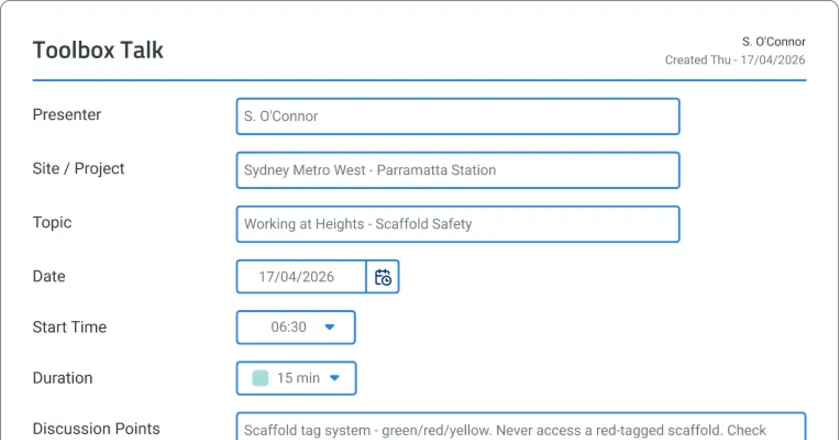
Toolbox Talk App
Toolbox Talk App by Sitemate captures digital attendance, voice-recorded safety discussions, and audit-ready records as the briefing happens. Try
View app
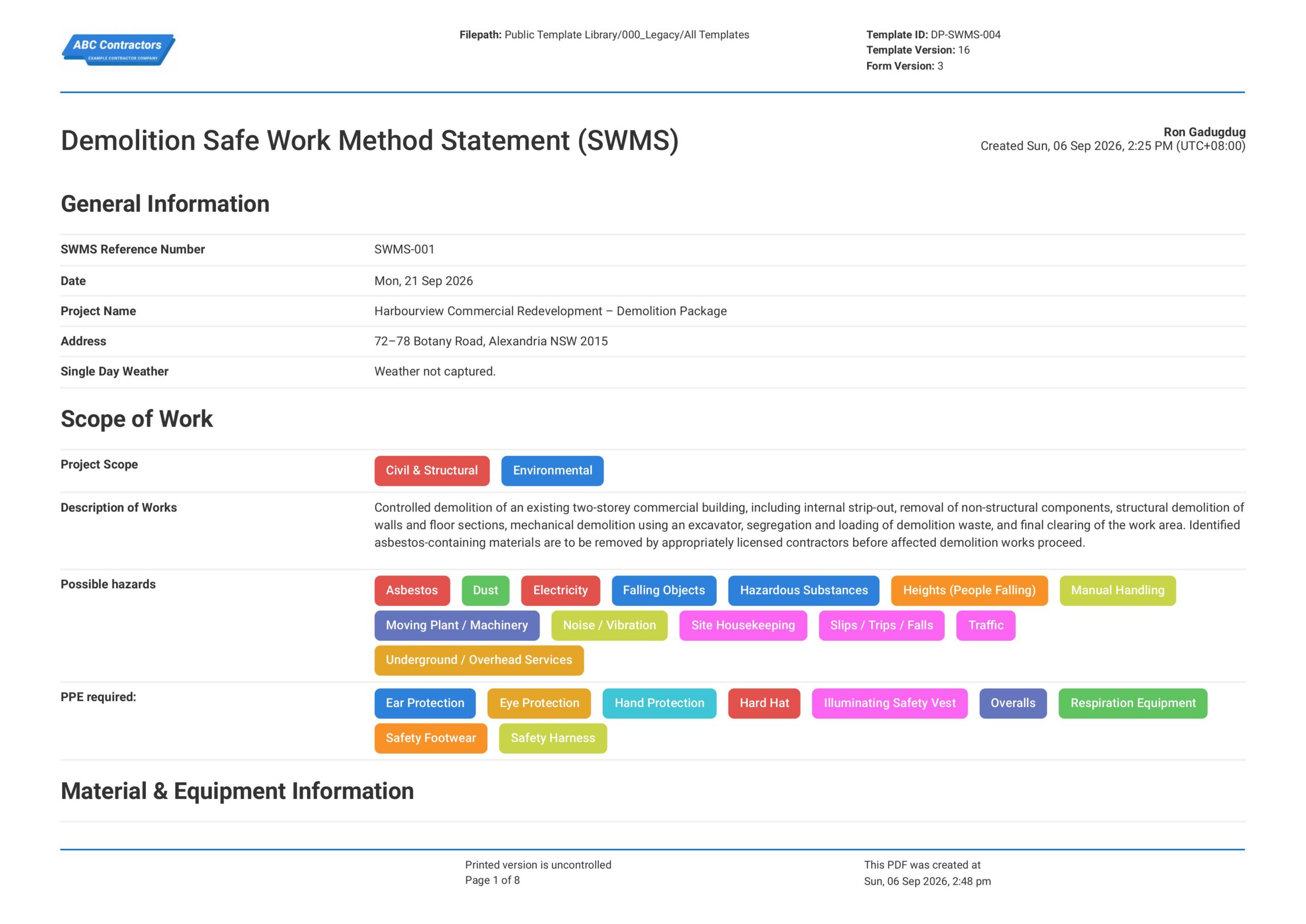
Demolition Safe Work Method Statement (SWMS)
This Demolition Safe Work Method Statement, or Demolition SWMS, is an easy-to-use form that your workers can use to plan and manage demolition risks before dismantling, breaking, or removing structures and materials.
View template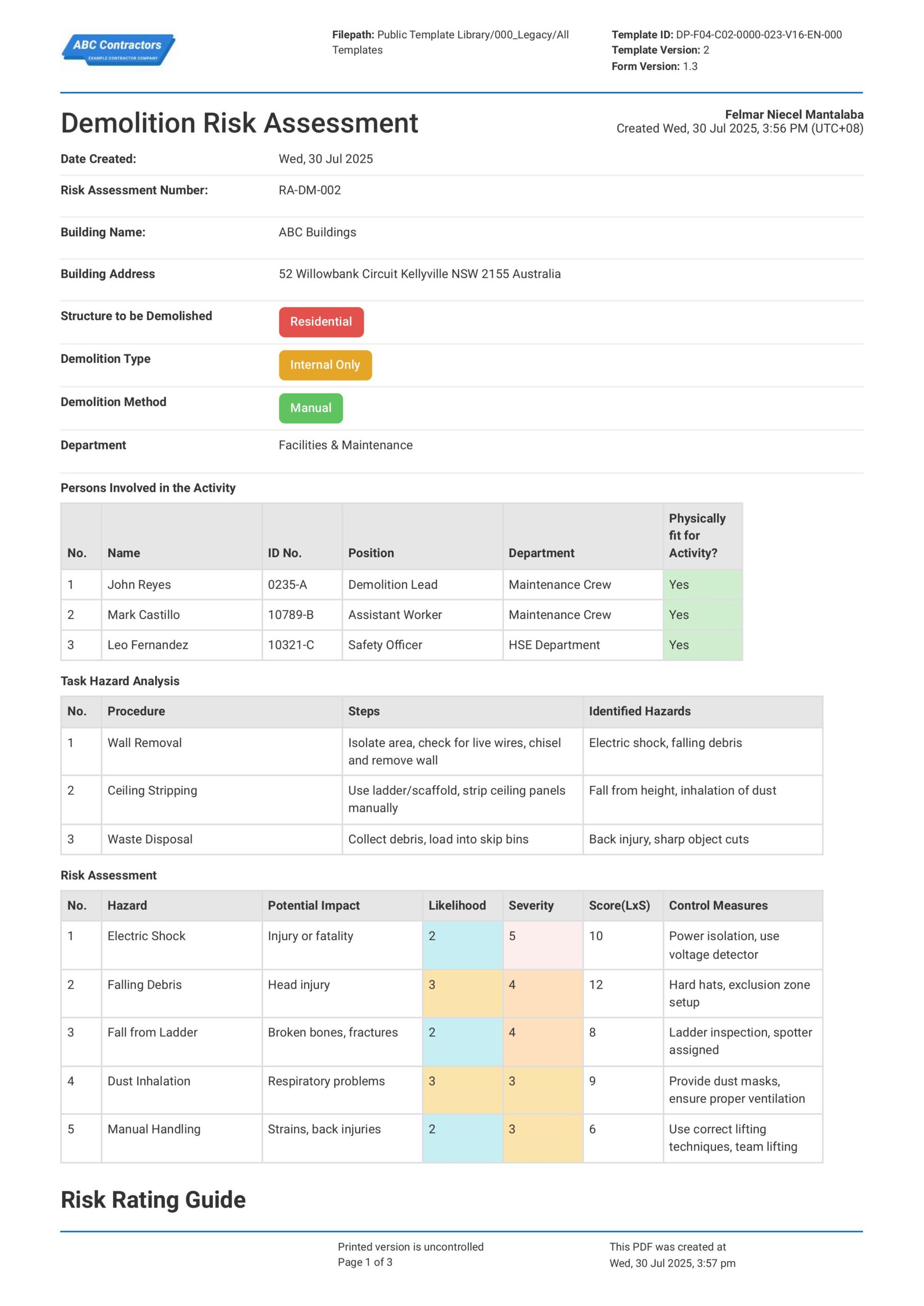
Risk Assessment for Demolition
This downloadable Demolition Risk Assessment is readily available to help you effectively manage safety risks on your demolition projects. It has all the standard features of a demolition risk assessment, ensuring your
View templateThis toolbox talk form was generated with Dashpivot software
- Access, edit and complete your Demolition Safety Toolbox Talk from any device - mobile, tablet or computer.
- Print, download or send your Demolition Safety Toolbox Talk as perfectly formatted PDF documents with your company logo.
- Store your Demolition Safety Toolbox Talk securely online, where they can be searched and found in seconds
- Invite internal and external parties to see, edit and sign off on Demolition Safety Toolbox Talk online.
